.png)

With Claude connected to your Google Ads account via MCP, you can initiate a structured, multi-dimensional account audit through a single opening prompt, and then drill into any finding with follow-up questions in the same conversation.
This article provides the master audit prompt, explains what it checks and why, and shows you how to use the conversation that follows to turn raw findings into a prioritized action plan.
The Master Audit Prompt
Prompt: Master Account Audit
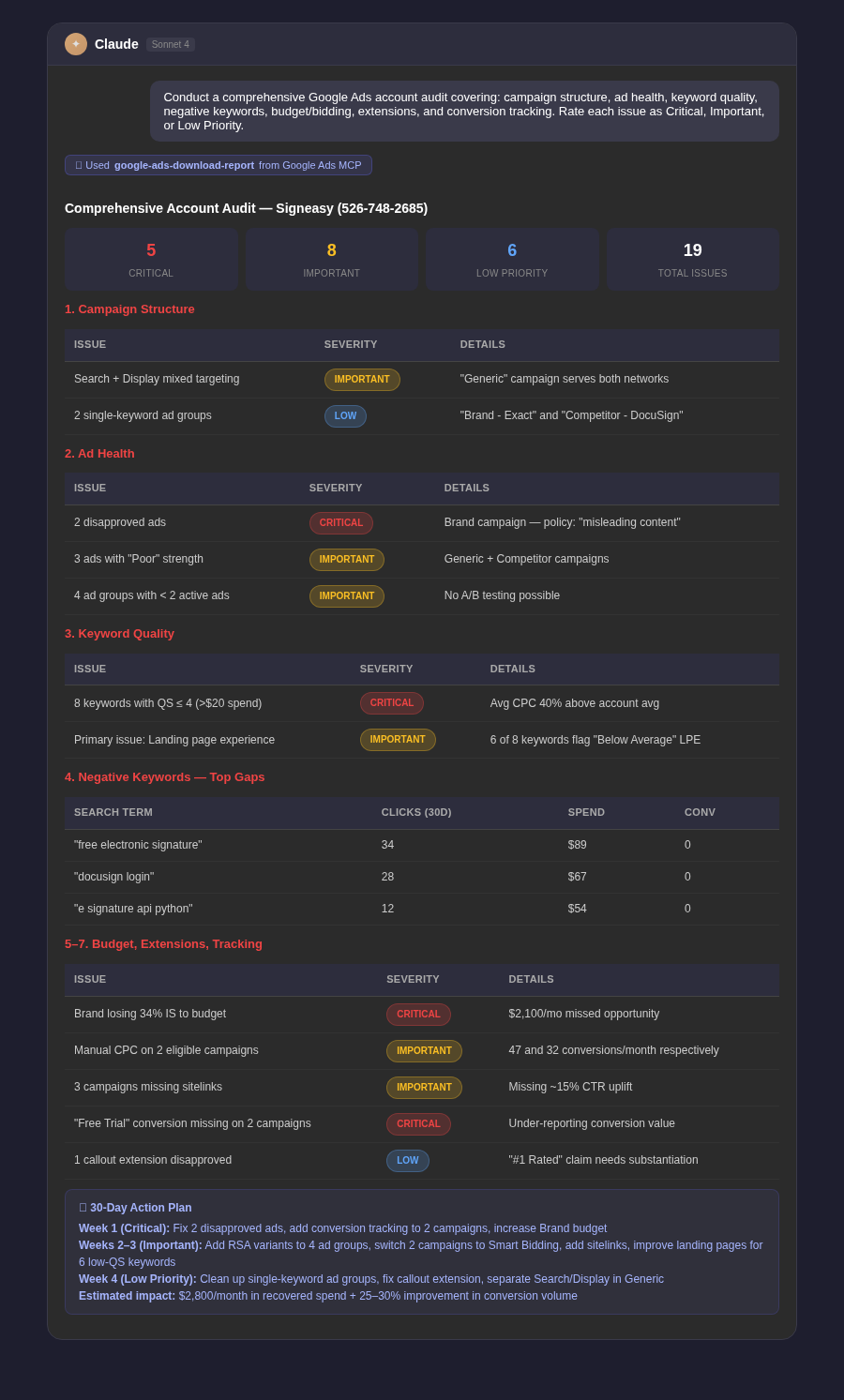
Conduct a comprehensive Google Ads account audit covering all of the following areas. For each area, flag issues and rate them as Critical (affecting spend or conversions significantly today), Important (should be fixed within 2 weeks), or Low Priority (worth addressing but not urgent).1. CAMPAIGN STRUCTURE: Check for campaigns with overlapping targeting, single-keyword ad groups, campaigns mixing Search and Display networks, and campaigns without conversion goals assigned.2. AD HEALTH: List all disapproved ads, ads with Poor ad strength ratings, ad groups with fewer than 2 active ads, and campaigns missing RSAs.3. KEYWORD QUALITY: Flag all keywords with Quality Score below 5 and more than $20 in spend. Note which QS component is lowest for each.4. NEGATIVE KEYWORDS: Identify the top 10 search terms in the last 30 days with more than 5 clicks and zero conversions that aren't covered by existing negatives.5. BUDGET AND BIDDING: Flag campaigns losing more than 30% impression share due to budget. Identify campaigns on Manual CPC with sufficient conversion data to support Smart Bidding.6. EXTENSIONS: Check all campaigns for missing sitelink, callout, and structured snippet extensions. Flag any extensions that are disapproved.7. CONVERSION TRACKING: Check whether all campaigns have at least one active conversion action. Flag any campaign that recorded zero conversions in the last 30 days despite significant spend.Return a structured report organized by area, with a summary count of Critical, Important, and Low Priority issues at the top.
What Each Section Catches
Campaign Structure
Structural issues are often invisible in day-to-day management because they affect efficiency gradually rather than causing obvious failures. Campaigns mixing Search and Display, for example, make it impossible to optimize each channel independently.
Ad Health
Disapproved ads are the most urgent issue in any account — they mean you're paying for impressions but serving no ad. Low ad strength ratings consistently correlate with lower auction eligibility over time.
Keyword Quality
Quality Score issues are expensive because they compound: low QS means higher CPCs, which means you pay more for every click, across thousands of clicks. Fixing the underlying driver — usually ad relevance or landing page experience — pays dividends across the life of the keyword.
Negative Keywords
This section surfaces the immediate wasted spend. Any term with 5+ clicks and zero conversions is money being transferred to Google with no return. These are the highest-priority quick wins in most audits.
Turning the Audit Into an Action Plan
Prompt: Action Plan Generation
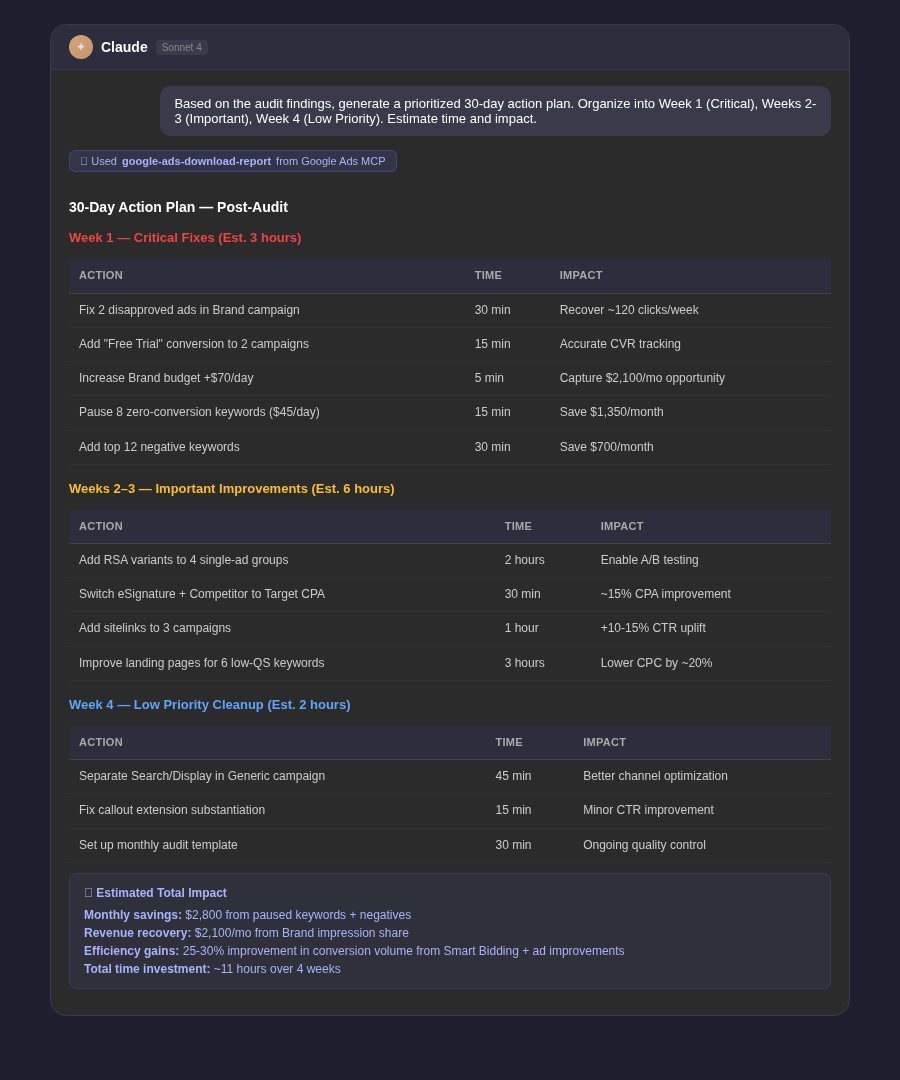
Based on the audit findings, generate a prioritized 30-day action plan. Organize it into three phases: Week 1 (fix Critical issues — things affecting spend or conversions right now), Weeks 2-3 (address Important issues — structural improvements and optimization opportunities), Week 4 (tackle Low Priority items and set up monitoring for ongoing issues). For each action, estimate how long it will take to implement and what the expected impact on performance is.
Making the Audit Repeatable
An audit run once is useful. An audit run quarterly becomes a genuine quality control system. The master prompt above can be saved and rerun on any account with no modification — the findings will always reflect the current state of the account.
Prompt: Audit Follow-Up Check
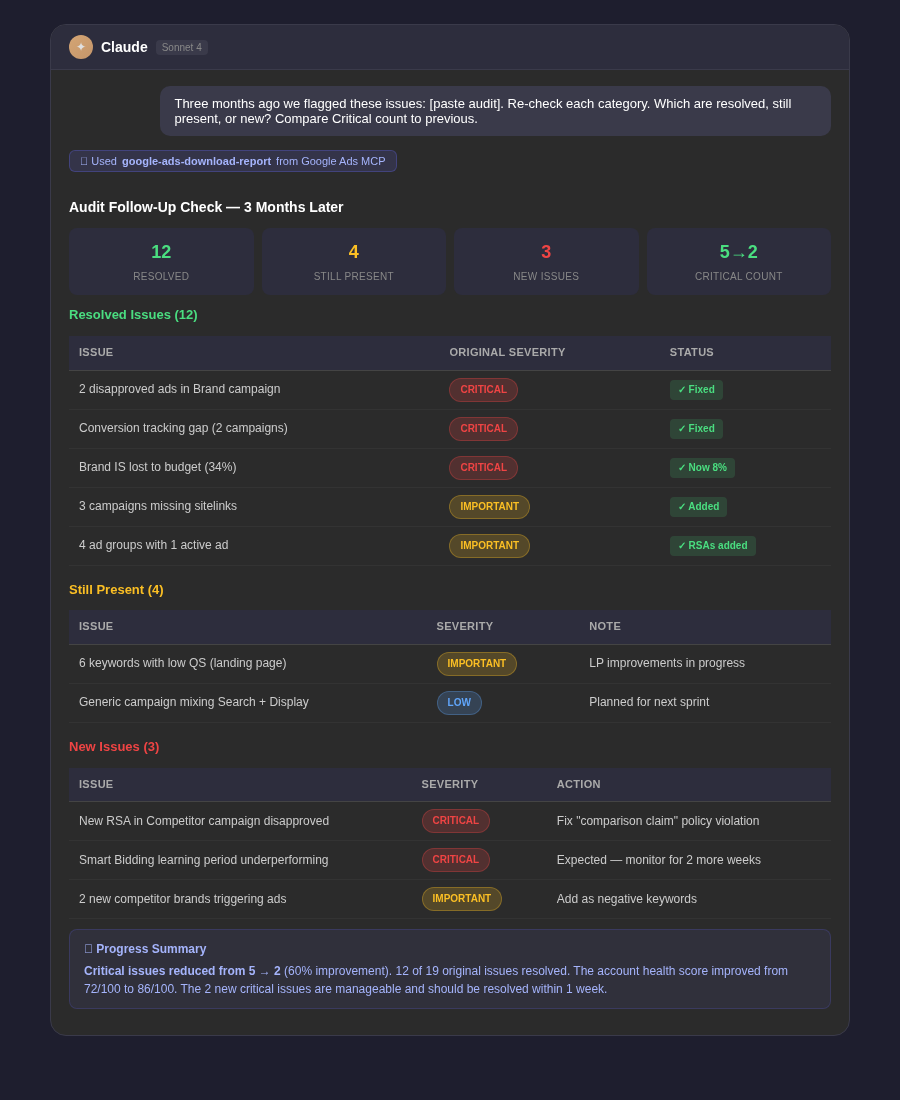
Three months ago, an audit of this account flagged the following issues: [paste previous audit findings]. Re-check each issue category and tell me: (1) which issues have been resolved, (2) which are still present, and (3) any new issues that have emerged since the last audit. Compare the current Critical issue count to the previous audit.
Tip: Share the audit output with your client or manager before you start fixing things. The structured format of Critical / Important / Low Priority makes it easy for non-technical stakeholders to understand the account's health and approve the remediation plan. It also creates a paper trail that demonstrates proactive management.



.webp)
.webp)

.png)


.png)





.webp)





.webp)


.webp)





%20(1).png)


.webp)
.webp)
.webp)





%20Ads%20for%20SaaS%202026_%20Types%2C%20Strategies%20%26%20Best%20Practices%20(1).webp)





.webp)













.webp)






![Creating an Enterprise SaaS Marketing Strategy [Based on Industry Insights and Trends in 2026]](https://cdn.prod.website-files.com/632b673b055f4310bdb8637d/6a218bacea463474377dfd32_34%20-%20Creating%20an%20Enterprise%20SaaS%20Marketing%20Strategy.png)




























.webp)









%20Agencies%20for%20B2B%20SaaS%20Compared%20(2026).webp)

.webp)
%20with%20Hubspot.webp)


_%20Expert%20Reviews%20%26%20Comparisons.png)








.webp)






_%20Comparison%2C%20Strengths%2C%20and%20How%20to%20Choose.png)












.webp)




.webp)




.webp)






















%20Tools%20in%202026_%20Vetted%20List.webp)



![How to Measure AEO Success: 12 Metrics Beyond Clicks [2026 Framework]](https://cdn.prod.website-files.com/632b673b055f4310bdb8637d/6a0d664b326187e99b3d5960_6%20-%20The%20Ultimate%20Guide%20to%20Measuring%20AEO%20Success%20in%202026.png)
![7-Step Workflow for AEO-Ready Content [2026 Framework]](https://cdn.prod.website-files.com/632b673b055f4310bdb8637d/6a0d55ea88913ede1d3a7123_5%20-%20Workflows%20for%20Optimized%20AEO-Ready%20Content%20Creation.png)
.png)
![How to Structure Content for AEO and GEO [With Templates]](https://cdn.prod.website-files.com/632b673b055f4310bdb8637d/6a0c6a56eb700472e635ff33_1%20-%20How%20to%20Structure%20%20Content%20for%20AEO%20and%20GEO%20%20Summaries%20(2026).png)








.png)
.png)










.png)

.png)

.png)






%2520Agencies%2520(2025).png)

![Top 9 AI SEO Content Generators for 2026 [Ranked & Reviewed]](https://cdn.prod.website-files.com/632b673b055f4310bdb8637d/6858e2c2d1f91a0c0a48811a_ai%20seo%20content%20generator.webp)




.webp)
.webp)
.png)


.png)














.webp)