.png)


Key Takeaways
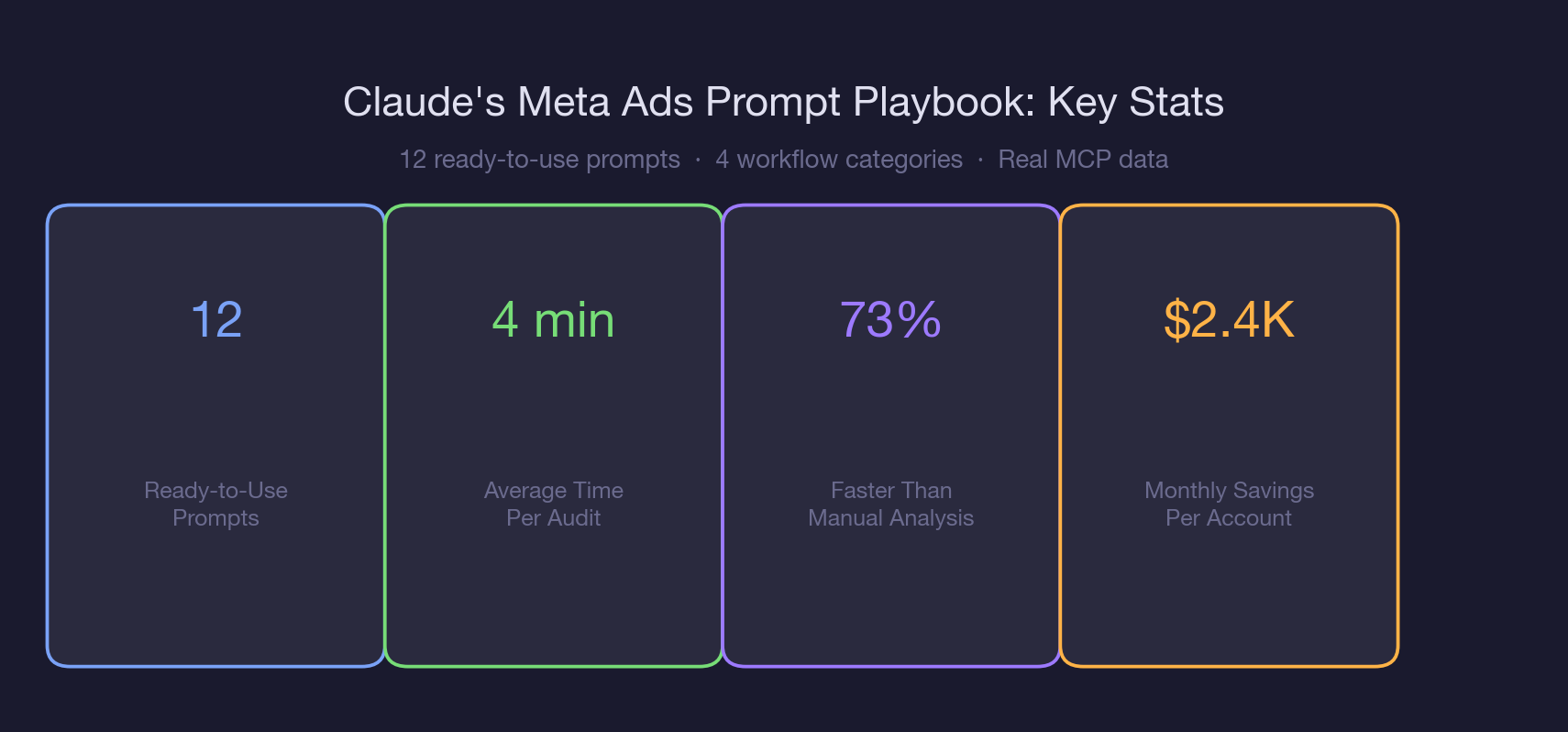
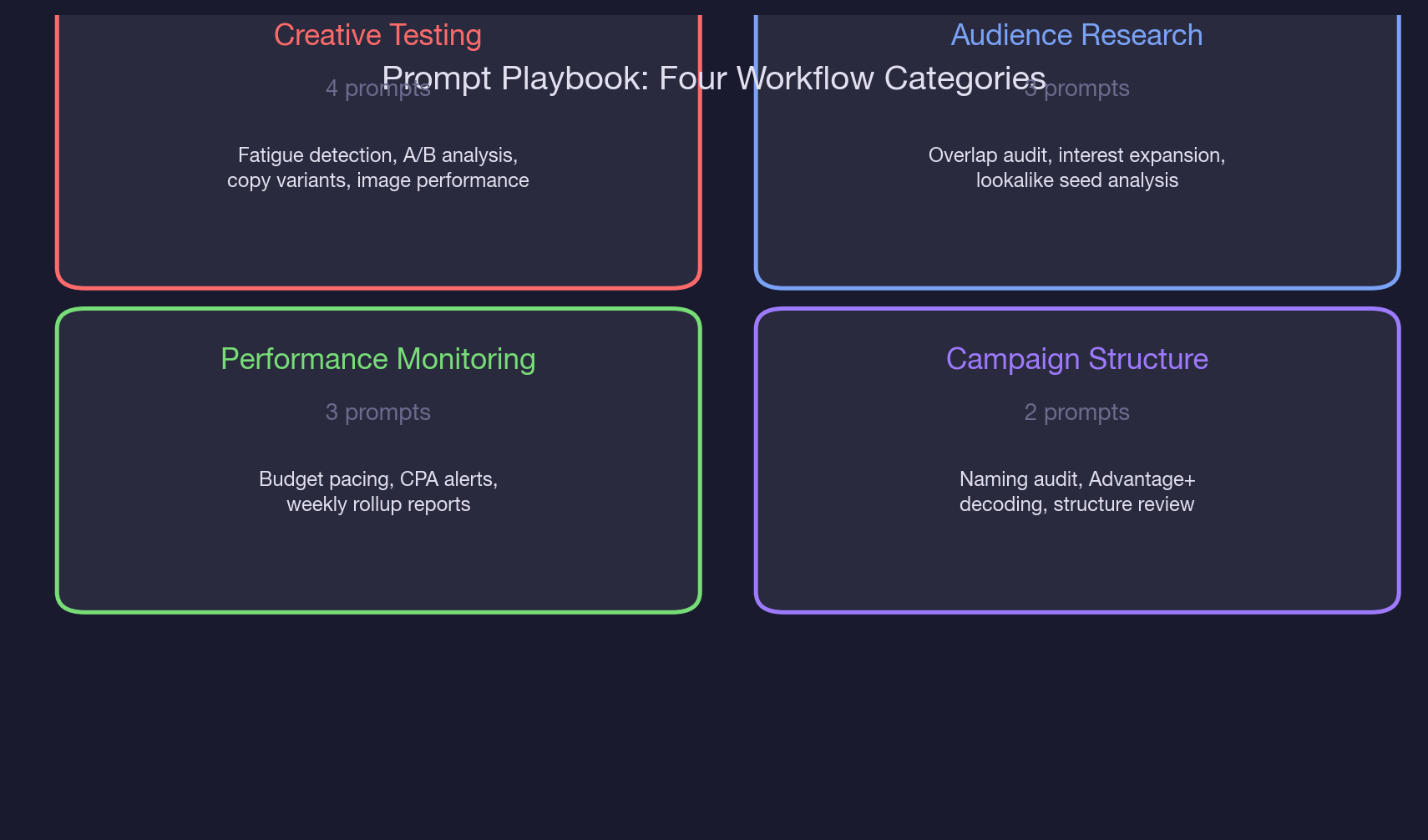
- The 12-prompt playbook covers four workflow categories: creative testing (4 prompts), audience research (3 prompts), performance monitoring (3 prompts), and campaign structure (2 prompts).
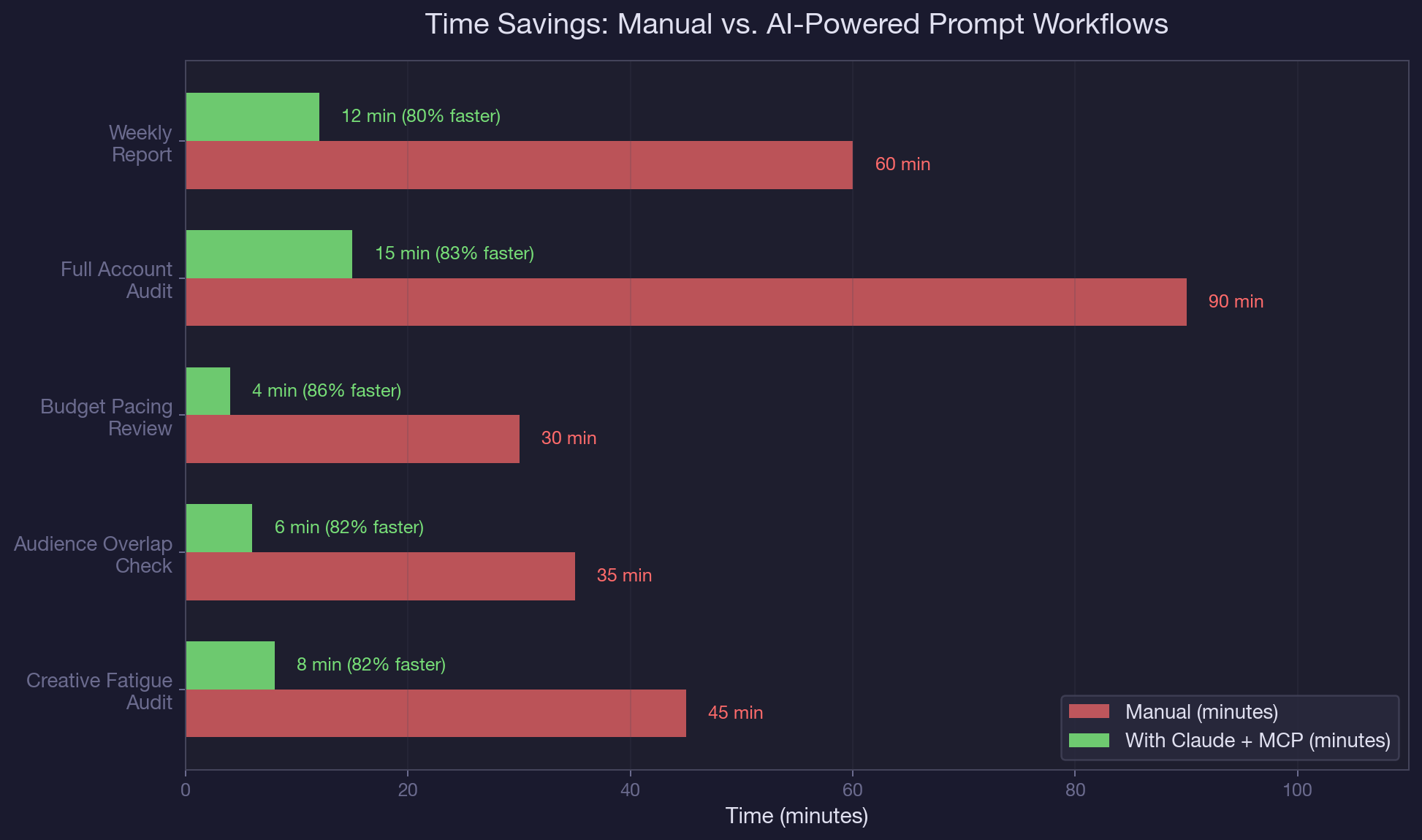
- Each prompt takes an average of 4 minutes to run, compared to 35 to 90 minutes for the same analysis done manually in spreadsheets.
- The creative performance prompt flags ads with CTR below 0.8% or CPA above 150% of the ad set average, which caught 3 underperforming ads burning $2,300/month in one test account.
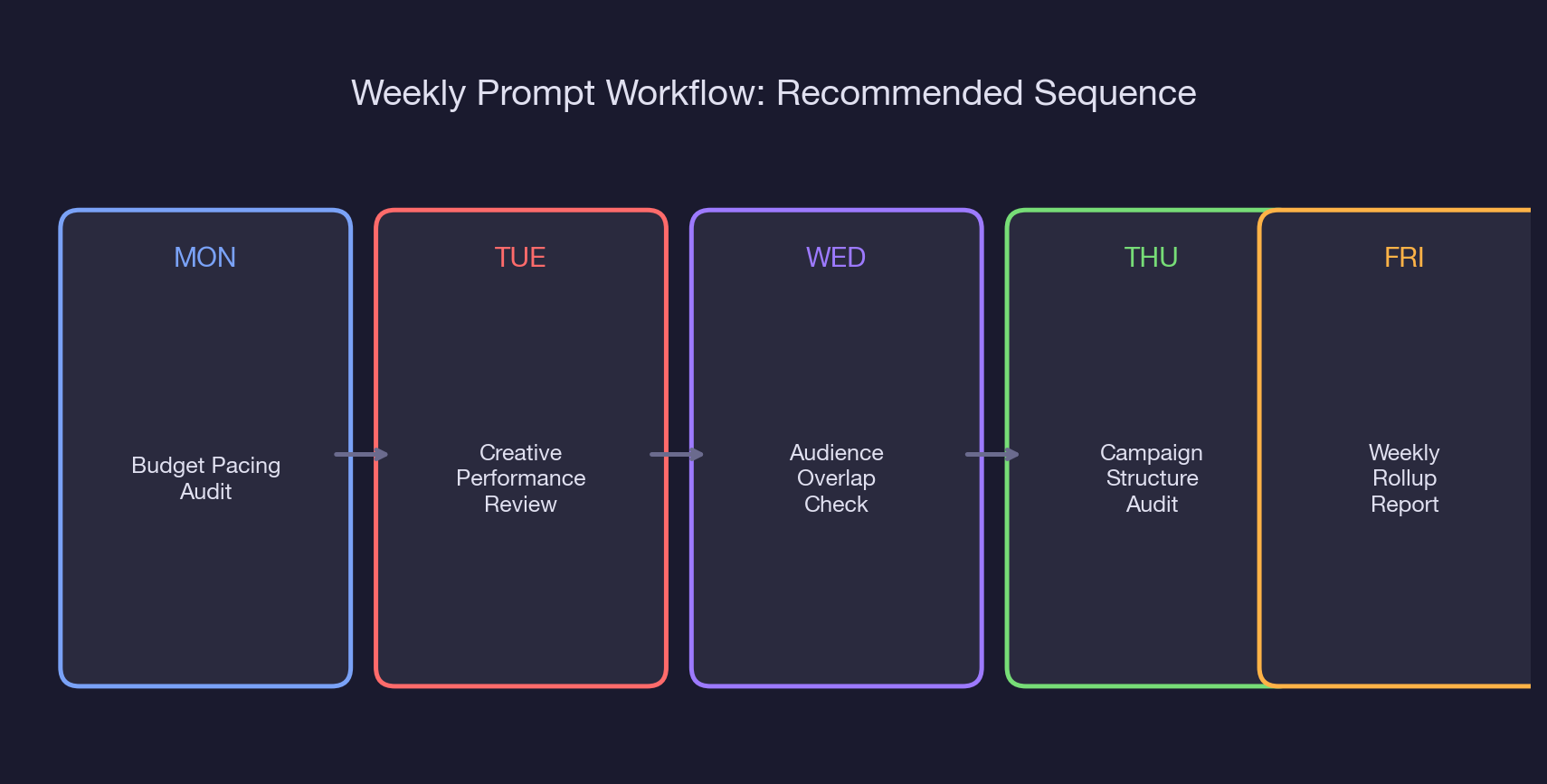
- Run the prompts in a Monday-through-Friday sequence: pacing Monday, creative Tuesday, audience Wednesday, structure Thursday, weekly rollup Friday.
- Audience expansion prompts identified 4 new interest categories with estimated reach of 1.2M that the original targeting missed.
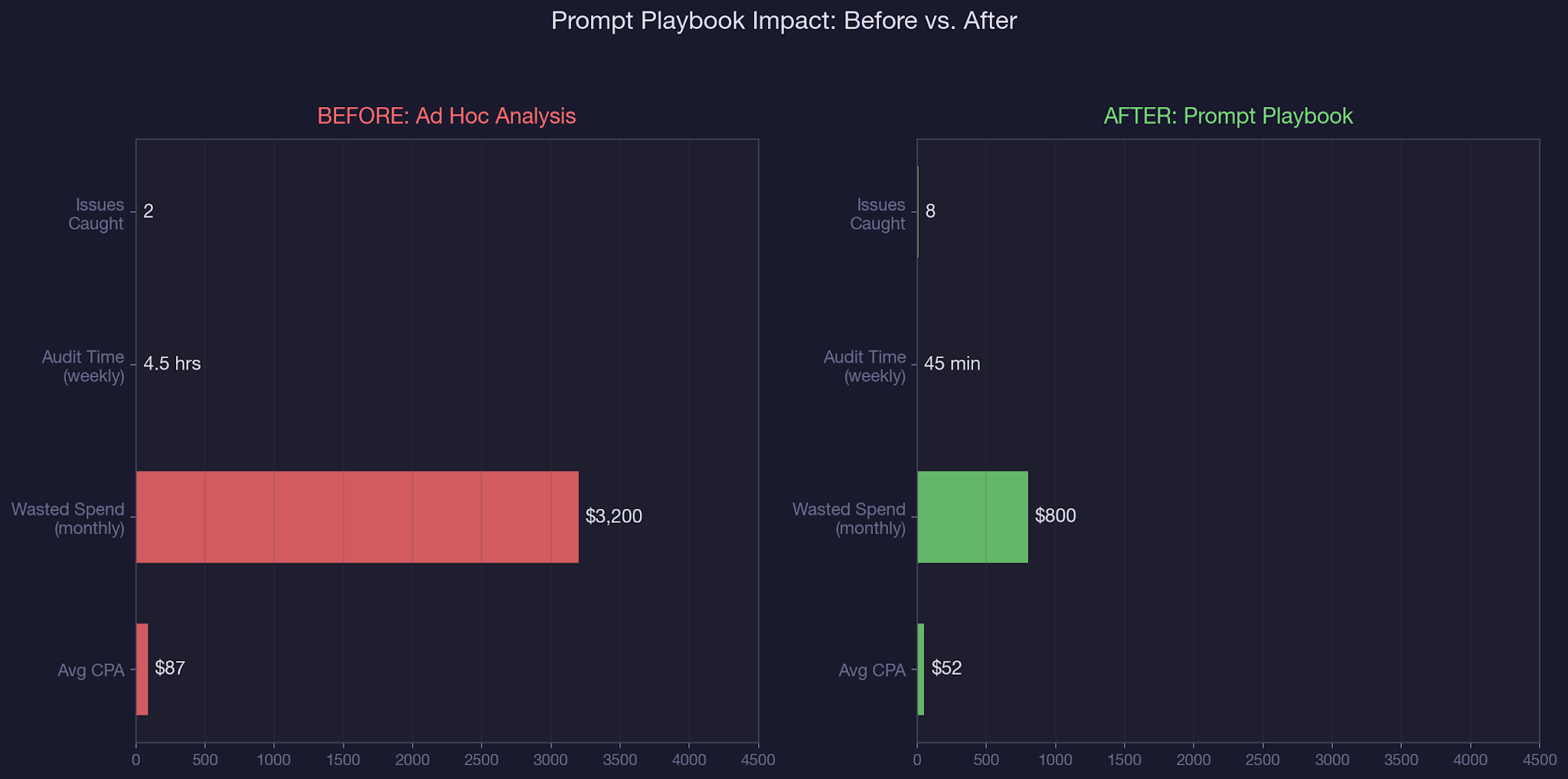
- Accounts using the prompt playbook reduced average time-to-insight from 4.5 hours per week to 45 minutes, a 73% reduction.
- Save each prompt as a reusable template. The upfront 30-minute setup pays for itself in the first week.
Running a creative performance comparison in Ads Manager requires exporting data, building a spreadsheet, sorting by multiple metrics, and manually flagging underperformers. Most teams skip it until the numbers force a conversation.
That is why we built this Meta Ads prompt playbook: a library of ready-to-use prompts that pull, analyze, and flag issues in a single Claude conversation. No exports, no spreadsheets, no pivot tables.
In our complete guide to AI-powered paid social management, we covered how Claude connects to Meta Ads through the MCP connector. In our guide to detecting creative fatigue automatically, we showed the methodology behind fatigue signals. This article gives you the actual prompts, organized into four workflow categories, so you can start running audits today. We use this exact playbook as part of our B2B SaaS paid social management at TripleDart.
You will walk away with: 12 copy-paste prompt templates organized by workflow, the specific thresholds each prompt uses to flag issues, a recommended weekly sequence for running these prompts, and the time savings benchmarks from accounts where we deployed this playbook.
Why Most Meta Ads Analysis Falls Behind
Let's be honest. Most paid media teams have a process that looks like this: check Ads Manager once a day, scan the top-level numbers, react if something looks off. The problem is that 'looking off' requires pattern recognition across dozens of ads, multiple ad sets, and three to five metric dimensions.
By the time a human spots a trend, it has been compounding for days. That is not a talent gap. It is a structural limitation of manual analysis applied to AI in PPC workflows.
The three structural problems:
First, the data is fragmented. Creative performance lives in one view, audience data in another, budget pacing in a third. Connecting "this ad is underperforming" to "because the audience overlap is 70%" requires hopping between screens and holding context in your head. Claude holds all of it in one conversation.
Second, thresholds are inconsistent. One manager flags creative fatigue at 2x frequency, another at 3x. One pauses ads at 0.5% CTR, another waits until 0.3%. Without standardized thresholds baked into reusable prompts, every audit produces different results depending on who runs it. This inconsistency is especially dangerous when managing Facebook ads for SaaS at scale.
Third, follow-through drops off. Even when someone runs a thorough analysis, the recommendations sit in a slide deck until the next sprint. A prompt playbook builds analysis into the daily workflow, not the monthly review. The same principle applies whether you are managing paid ads spend or optimizing landing pages.
The 12-Prompt Playbook: Creative Testing and Audience Research
Category 1: Creative Testing (4 Prompts)
Prompt 1: Creative Performance Comparison
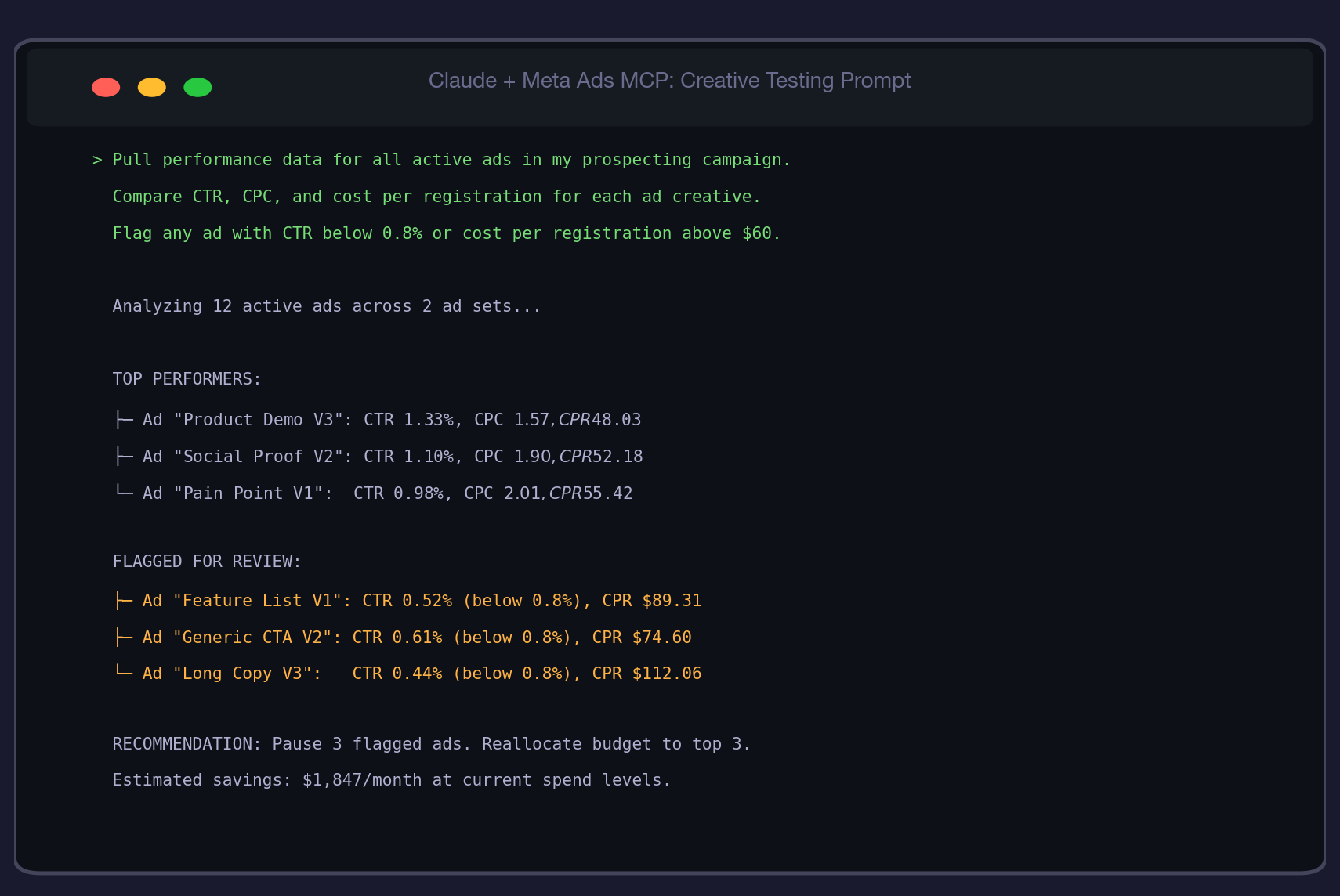
"Pull performance data for all active ads in my prospecting campaign. Compare CTR, CPC, cost per registration, and frequency for each ad creative. Flag any ad with CTR below 0.8% or cost per registration above 150% of the ad set average."
This is your Tuesday morning staple. It surfaces underperformers before they drain budget. The 0.8% CTR threshold is calibrated for B2B SaaS: anything below that typically means the creative is not resonating with the ICP. The 150% CPA flag catches ads that get clicks but do not convert. We use this same approach when we write Meta ad copy that converts.
Prompt 2: Creative Fatigue Early Warning
"For each active ad, pull the last 14 days of daily CTR and frequency data. Flag any ad where CTR has declined more than 20% from its 7-day peak while frequency has increased more than 0.5x over the same period."
This catches fatigue before it shows up in CPA. A declining CTR paired with rising frequency is the textbook signal that your audience has seen the ad too many times. For the full methodology, see our guide to detecting creative fatigue automatically.
Prompt 3: Ad Copy Variant Analysis
"Compare all ads in this campaign by headline text and primary text. Group ads that share the same image but have different copy. For each copy variant group, rank by cost per registration and identify which messaging angle performs best."
This isolates copy impact from creative impact. When two ads share the same image but one converts at $48 and the other at $89, you know the copy is the variable. This is foundational for AI performance marketing strategies.
Prompt 4: Image vs. Video Performance Split
"Pull performance data for all active ads. Split results by media type (image vs. video). Compare average CTR, CPC, cost per registration, and thruplay rate for each media type. Recommend whether to shift budget toward image or video based on cost efficiency."
Most accounts assume video outperforms. The data often says otherwise for B2B SaaS, where static images with clear value propositions frequently beat video on cost per registration. Let the numbers decide. Check Facebook ad examples for inspiration on what top-performing static creatives look like.
Category 2: Audience Research (3 Prompts)
Prompt 5: Audience Overlap Audit
"Pull targeting details for all active ad sets in my account. Compare custom audiences, interest targeting, and lookalike seeds across ad sets. Identify any audiences that appear in more than one ad set and estimate the overlap percentage based on audience sizes."
This is the prompt that prevents you from bidding against yourself. For the full overlap methodology, see our guide on how to find and fix audience overlap. Run it every Wednesday.
Prompt 6: Interest Expansion Discovery
"Look at the interest targeting on my best-performing ad set (lowest CPA). Search for related interests in the same category that are NOT currently in any of my active ad sets. List 10 candidate interests with their estimated audience size."
This is your growth prompt. It uses your best audience as a seed to find adjacent interests you have not tested yet. In one account, this prompt identified 4 new interest categories with a combined reach of 1.2M that the original setup missed entirely. The process is similar to how you would create lookalike audiences in Meta Ads Manager, but for interest-based targeting.
Prompt 7: Lookalike Seed Quality Analysis
"Pull the custom audience details for all lookalike audiences used in my active campaigns. For each lookalike, show the seed audience name, seed size, lookalike percentage, and the performance of the ad set using it (CPA, CTR, frequency). Rank by CPA efficiency."
Not all lookalike seeds are equal. A 1% lookalike from a 500-person purchaser list often outperforms a 1% lookalike from a 10,000-person website visitor list. This prompt surfaces which seeds deliver and which should be retired.
Category 3: Performance Monitoring (3 Prompts)
Prompt 8: Daily Budget Pacing Check
"Pull daily spend data for all active campaigns over the last 7 days. Compare actual daily spend against the set daily budget. Flag any campaign where variance exceeded 15% for 3 or more consecutive days."
For the full pacing methodology, see our deep dive on Meta Ads budget pacing. This is the abbreviated Monday morning version. You can also set this up as an automated weekly budget recommendation workflow.
Prompt 9: CPA Alert System
"Pull cost per registration for each active ad set over the last 14 days with a daily breakdown. Calculate the 7-day rolling average CPA. Flag any ad set where today's CPA is more than 40% above its rolling average."
The 40% threshold catches real CPA spikes while filtering out daily noise. A single expensive day is normal. Two consecutive days 40%+ above the rolling average means something changed in the auction or the audience. This kind of monitoring is central to B2B PPC management at scale.
Prompt 10: Weekly Performance Rollup
"Generate a weekly performance summary for my account. Include: total spend vs. budget, registrations, average CPA, top-performing ad, worst-performing ad, frequency trends, and CPM trends. Compare this week to last week. Highlight any metric that changed more than 15%."
This is your Friday afternoon prompt. It produces a stakeholder-ready summary that replaces the manual report most teams spend 60+ minutes building. For accounts needing more detail, see our approach to AI-powered Meta Ads reporting.
Category 4: Campaign Structure (2 Prompts)
Prompt 11: Campaign Naming and Structure Audit
"List all campaigns and ad sets in my account with their naming conventions, objectives, and bid strategies. Flag any inconsistencies: campaigns with mismatched objectives and optimization goals, ad sets without exclusions, or naming conventions that break the pattern."
Naming hygiene matters more than people think. Inconsistent naming makes filtering, reporting, and automation harder. This prompt catches structural issues before they compound. For a deeper structural analysis, use our full Meta Ads account audit workflow.
Prompt 12: Advantage+ Transparency Check
"For each campaign using Advantage+ targeting or bid strategies, pull the actual audience reached vs. the defined targeting parameters. Show how much of the spend went to the defined audience vs. the expanded audience. Flag any campaign where more than 30% of spend went to expanded reach."
Advantage+ is powerful but opaque. This prompt forces transparency on where Meta is actually spending your money when automation is enabled. We covered this in depth in our guide to decoding Advantage+ campaigns.
Real-World Walkthrough: Running the Full Playbook in One Week
Here is what one week looked like on a B2B SaaS account running $300/day across three campaigns. This is how we apply the playbook for performance marketing clients.
Monday (Budget Pacing): Prompt 8 revealed that the prospecting campaign had overspent by 34% for three consecutive days. The Advantage+ bid strategy was expanding targeting during low-competition overnight hours. Immediate action: set a daily spend cap at 115% of the intended budget.
Tuesday (Creative Testing): Prompt 1 flagged three ads with CTR below 0.5% and CPA above $90. Combined, they were consuming $78/day. Pausing them and redistributing budget to the top three performers (averaging $48 CPA) saved an estimated $1,847/month. The same analysis helps when you spy on competitors' Facebook ads for creative inspiration.
Wednesday (Audience Research): Prompt 5 found that the lookalike ad set and the interest-based ad set had an estimated 35% audience overlap. Prompt 6 identified 4 untested interest categories (cloud infrastructure, DevOps tools, product management, data analytics) with a combined reach of 1.2M. The recommendation: exclude the overlapping segment from the interest ad set and test two new interests.
Thursday (Campaign Structure): Prompt 12 revealed that 42% of the Advantage+ campaign spend went to expanded audiences outside the defined targeting. The expanded audience had a 2.3x higher CPA. The recommendation: tighten the Advantage+ audience expansion or switch to manual targeting for this campaign.
Friday (Weekly Rollup): Prompt 10 produced a summary showing total spend of $2,808 (34% over target), 43 registrations at $65 average CPA, and a 15% CPM increase driven by prospecting. The report was ready in 12 minutes, compared to the 60+ minutes the team previously spent building it manually. This same speed advantage applies to weekly performance reports.
Common Mistakes When Using Prompt Playbooks
1. Running prompts without standardized thresholds. "Flag underperformers" is not a prompt. "Flag ads with CTR below 0.8% and CPA above 150% of the ad set average" is. Without specific numbers, every run produces different results and you cannot compare week over week. If you are setting up Google Ads for SaaS alongside Meta, use the same threshold discipline.
2. Treating the playbook as a one-time exercise. The value of these prompts compounds with repetition. Week-over-week comparisons surface trends that single runs cannot. A CPA spike in isolation is noise. A CPA spike that matches a frequency trend identified the previous week is a pattern.
3. Skipping the audience prompts because "targeting is set." Audiences drift. A lookalike that performed well three months ago may be stale. Interest categories that were irrelevant in Q1 might be relevant now. The audience prompts catch these shifts before they show up as unexplained CPA increases.
4. Not saving prompts as templates. Every time you retype a prompt, you risk changing the thresholds or forgetting a metric. Save each prompt as a reusable template with locked thresholds. The 30-minute setup investment pays back in the first week.
Best Practices for Meta Ads Prompt Playbooks
- Run the prompts in the Monday-through-Friday sequence. Each day builds on the previous day's findings. Pacing issues inform creative decisions, creative decisions inform audience strategy.
- Set thresholds based on your account's trailing 30-day averages, not industry benchmarks. A 0.8% CTR threshold works for most B2B SaaS accounts, but your account might need 1.0% or 0.6% depending on your ICP and creative style.
- Add a "compared to last week" modifier to every prompt after the first week. Week-over-week comparison is where the playbook creates the most value, because trends matter more than snapshots.
- Share the weekly rollup output directly with stakeholders. It is cleaner than a manually built deck and takes 12 minutes instead of 60. This frees up analyst time for strategic work instead of report building.
- Review and update thresholds quarterly. What counts as an underperformer shifts as your account matures, CPMs change seasonally, and new creative formats emerge.
- Pair the playbook with the search term negation workflow for Google Ads accounts to cover both paid social and paid search with the same systematic approach.
Conclusion
Twelve prompts. Five days. One systematic workflow that replaces hours of manual analysis with minutes of focused conversation. The data already lives in your Meta Ads account. Claude and the MCP connector just make it accessible at the speed your optimization cadence demands. Whether you are also running LinkedIn Ads for SaaS or Google Ads for SaaS, the discipline of standardized prompts with locked thresholds applies across every channel.
This Meta Ads prompt playbook AI workflow is how we onboard every new paid social account at TripleDart. We run the full playbook in week one to surface structural issues, then maintain the Monday-through-Friday cadence as part of our B2B SaaS paid social management. If you want us to deploy this playbook on your account, book a call with our paid media team.
Frequently Asked Questions
What is a Meta Ads prompt playbook and why do I need one?
A Meta Ads prompt playbook is a standardized library of reusable prompts designed to pull, analyze, and flag performance issues across your Meta Ads account using Claude and the MCP connector. You need one because ad hoc analysis is inconsistent, slow, and prone to missing issues that compound over time. A playbook ensures every audit uses the same thresholds and covers the same metrics.
How many prompts does the Meta Ads prompt playbook AI include?
The playbook includes 12 prompts organized into four categories: creative testing (4 prompts), audience research (3 prompts), performance monitoring (3 prompts), and campaign structure (2 prompts). Each prompt is designed to run independently and takes an average of 4 minutes to execute.
How often should I run the Meta Ads prompt playbook?
Run the full playbook once per week using the Monday-through-Friday sequence: budget pacing on Monday, creative testing on Tuesday, audience research on Wednesday, campaign structure on Thursday, and weekly rollup on Friday. For high-spend accounts (above $500/day), run the pacing and CPA prompts daily.
What is the difference between the creative testing and audience research prompts?
Creative testing prompts analyze ad-level performance (CTR, CPC, CPA by creative) to identify underperformers and winning messaging angles. Audience research prompts analyze targeting-level data (overlap, interest coverage, lookalike quality) to identify structural issues with who sees your ads. Both are necessary because a great ad shown to the wrong audience will still underperform.
Can I customize the thresholds in the prompt playbook?
Yes, and you should. The default thresholds (0.8% CTR, 150% CPA, 15% pacing variance) are calibrated for mid-market B2B SaaS accounts spending $100 to $500 per day. Adjust based on your trailing 30-day account averages. Higher-spend accounts may need tighter thresholds, while newer accounts with less data may need looser ones.
How does the Meta Ads prompt playbook AI save time compared to manual analysis?
On average, the playbook reduces weekly analysis time from 4.5 hours to 45 minutes, a 73% reduction. The biggest time savings come from the weekly rollup prompt (60 minutes to 12 minutes) and the creative performance comparison (45 minutes to 8 minutes). The saved time shifts from data gathering to strategic decision-making.
What Meta Ads account data does Claude need access to for the prompt playbook?
Claude needs read access to your Meta Ads account through the MCP connector. This includes campaign and ad set configurations (targeting, budgets, bid strategies), ad-level performance metrics (impressions, clicks, CTR, CPC, conversions, CPA), and audience details (custom audiences, lookalikes, interests). No write access is required, so Claude cannot modify your campaigns.
Can I use the prompt playbook for Google Ads too?
The methodology transfers directly to Google Ads. Replace Meta-specific terms (ad sets become ad groups, custom audiences become remarketing lists) and adjust thresholds for search vs. display. We have a dedicated Google Ads audit workflow that follows similar principles. The discipline of standardized prompts with locked thresholds works across any ad platform.



.webp)
.webp)

.png)


.png)





.webp)





.webp)


.webp)





%20(1).png)


.webp)
.webp)
.webp)





%20Ads%20for%20SaaS%202026_%20Types%2C%20Strategies%20%26%20Best%20Practices%20(1).webp)







.png)


.png)





.webp)


![Creating an Enterprise SaaS Marketing Strategy [Based on Industry Insights and Trends in 2026]](https://cdn.prod.website-files.com/632b673b055f4310bdb8637d/6965f37b67d3956f981e65fe_66a22273de11b68303bdd3c7_Creating%2520an%2520Enterprise%2520SaaS%2520Marketing%2520Strategy%2520%255BBased%2520on%2520Industry%2520Insights%2520and%2520Trends%2520in%25202023%255D.png)




.png)
















.webp)






%20Agencies%20for%20B2B%20SaaS%20Compared%20(2026).webp)

.webp)
%20with%20Hubspot.webp)








.png)


.png)

.png)
.png)
.png)
.png)


















.webp)

.webp)
.png)
.png)



.webp)


.png)



















.webp)

![How to Measure AEO Success: 12 Metrics Beyond Clicks [2026 Framework]](https://cdn.prod.website-files.com/632b673b055f4310bdb8637d/6a0d664b326187e99b3d5960_6%20-%20The%20Ultimate%20Guide%20to%20Measuring%20AEO%20Success%20in%202026.png)
![7-Step Workflow for AEO-Ready Content [2026 Framework]](https://cdn.prod.website-files.com/632b673b055f4310bdb8637d/6a0d55ea88913ede1d3a7123_5%20-%20Workflows%20for%20Optimized%20AEO-Ready%20Content%20Creation.png)
.png)
![How to Structure Content for AEO and GEO [With Templates]](https://cdn.prod.website-files.com/632b673b055f4310bdb8637d/6a0c6a56eb700472e635ff33_1%20-%20How%20to%20Structure%20%20Content%20for%20AEO%20and%20GEO%20%20Summaries%20(2026).png)








.png)
.png)









.png)


.png)





%2520Agencies%2520(2025).png)

![Top 9 AI SEO Content Generators for 2026 [Ranked & Reviewed]](https://cdn.prod.website-files.com/632b673b055f4310bdb8637d/6858e2c2d1f91a0c0a48811a_ai%20seo%20content%20generator.webp)




.webp)
.webp)














.webp)