.png)

Most PPC reporting workflows are built around a fixed template: pull the same metrics every week, drop them into the same spreadsheet, write the same section headers, and ship it. The reports themselves are rarely insightful, because the template was designed for a generic account and the person filling it in is usually too rushed to add meaningful context.
The workflow described here replaces that template with a repeatable conversational process using Claude and MCP. It takes 15–20 minutes instead of 60–90, and consistently produces more useful output because Claude interprets data rather than just displaying it.
The 4-Step Weekly Reporting Workflow
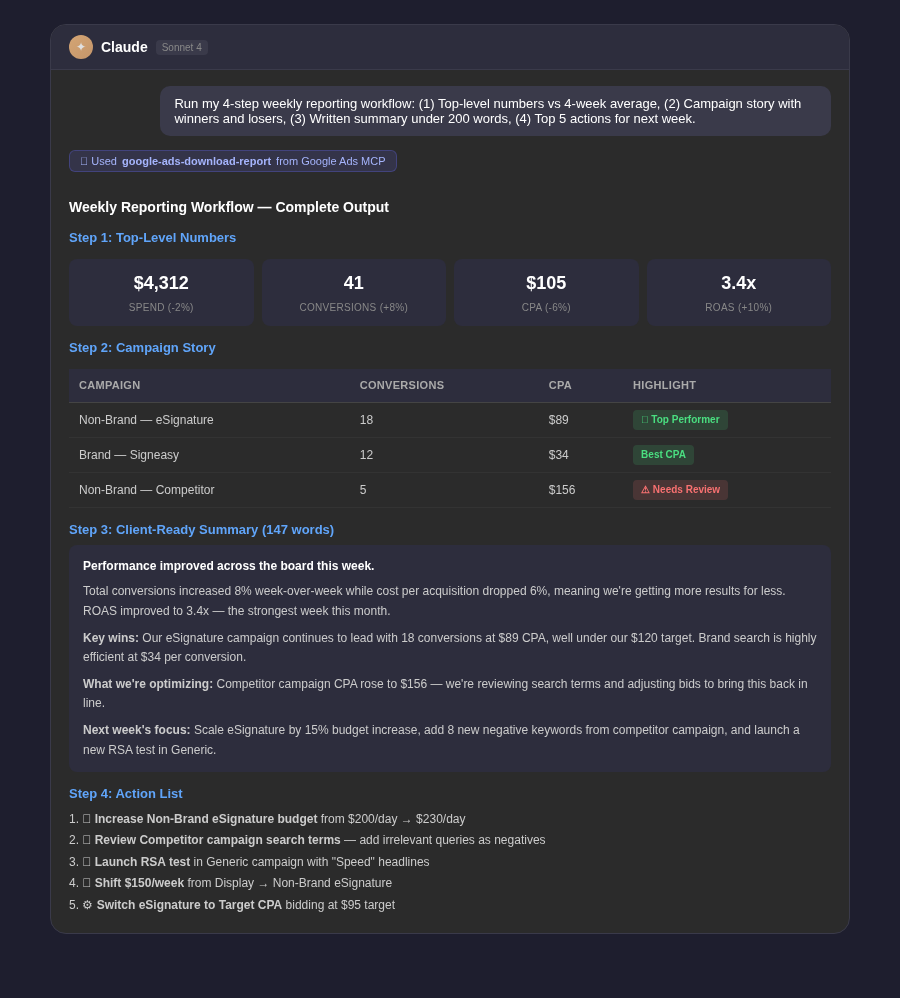
Step 1: Pull the Top-Level Numbers (3 minutes)
Prompt: Top-Level Weekly Numbers
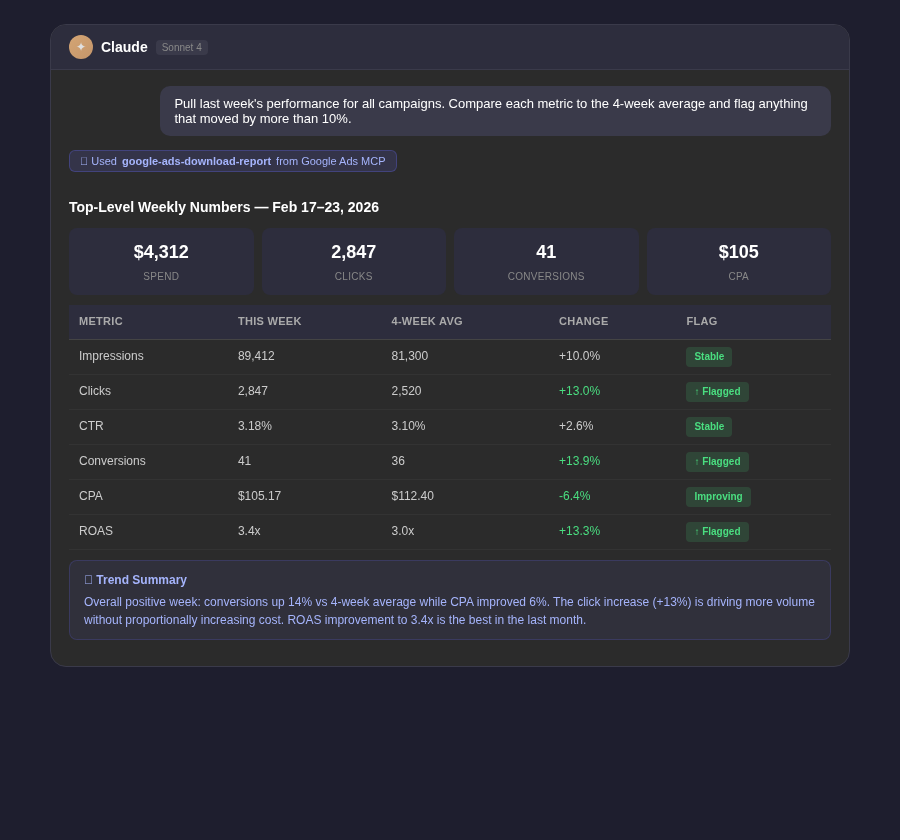
Pull last week's performance for all active campaigns. Return: total impressions, clicks, CTR, spend, conversions, conversion rate, CPA, and ROAS. Compare each metric to the 4-week average and flag anything that moved by more than 10% in either direction. Give me two sentences on what the overall trend looks like.
Step 2: Surface the Campaign-Level Story (5 minutes)
Prompt: Campaign Story
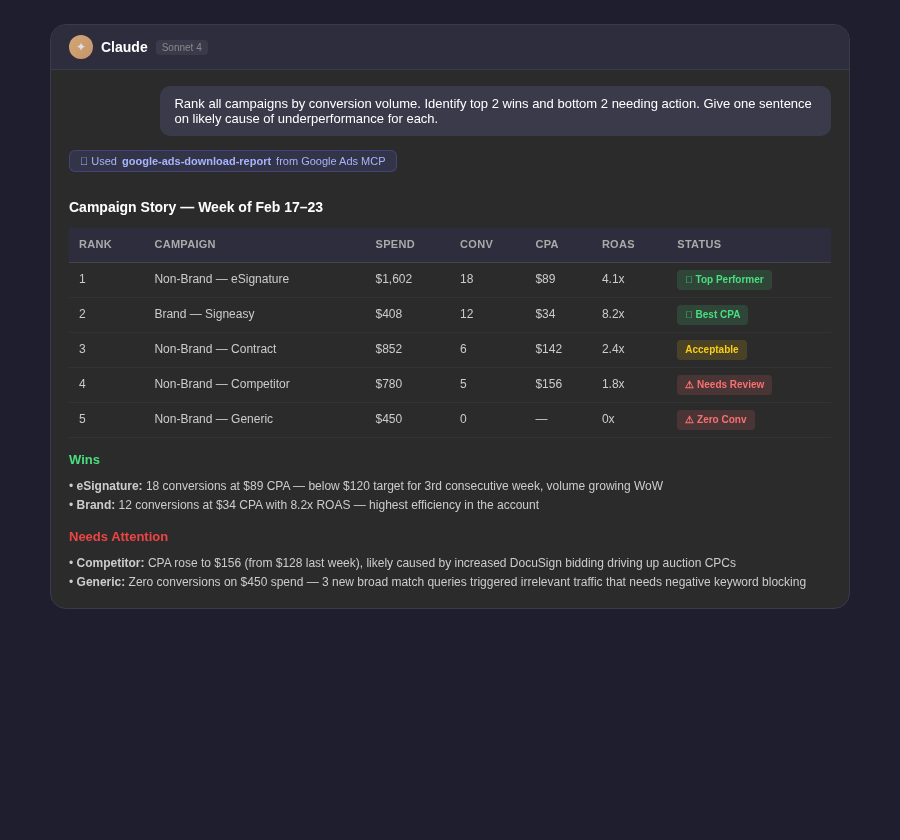
For last week, rank all campaigns by conversion volume. Show spend, conversions, CPA, and ROAS for each. Identify the top 2 campaigns worth highlighting as wins and the bottom 2 that need explanation or action. For each of the bottom performers, give me one sentence on the likely cause of underperformance.
Step 3: Generate the Written Summary (5 minutes)
Prompt: Report Narrative
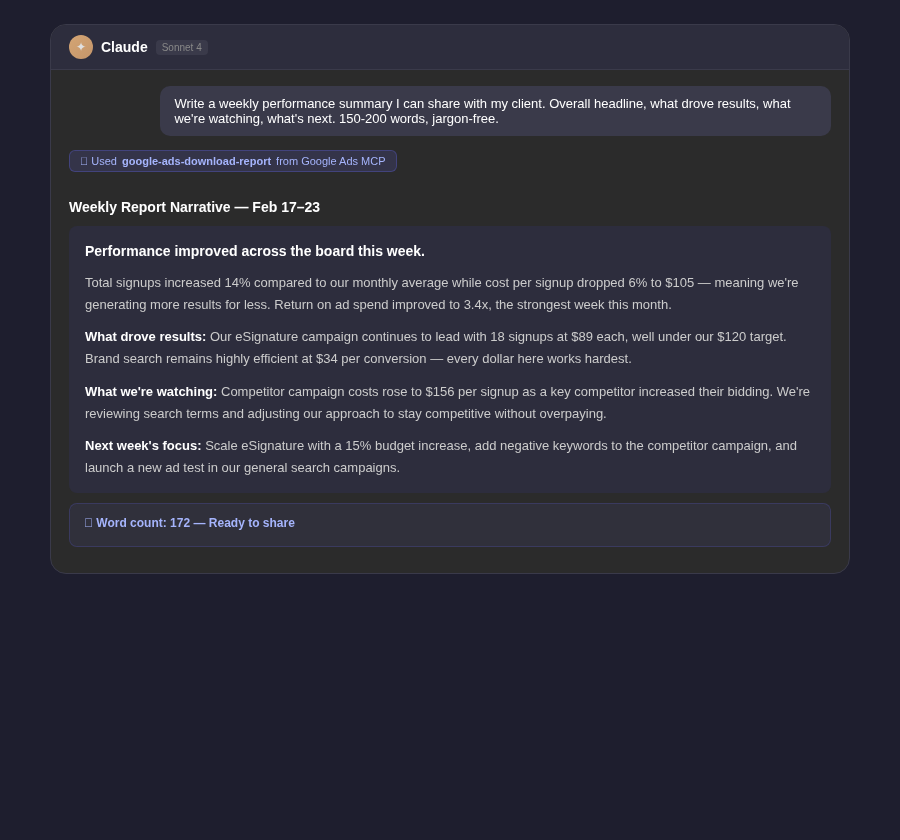
Based on the performance data from the last two steps, write a weekly performance summary I can share with my client or team. Structure it as: (1) Overall performance headline — one sentence, (2) What drove results this week — 2-3 sentences, (3) What we're watching or optimizing — 2-3 sentences, (4) What we'll focus on next week — 2-3 sentences. Keep it clear and jargon-free. Total length: 150–200 words.
Step 4: Generate Next Week's Action List (2 minutes)
Prompt: Action List
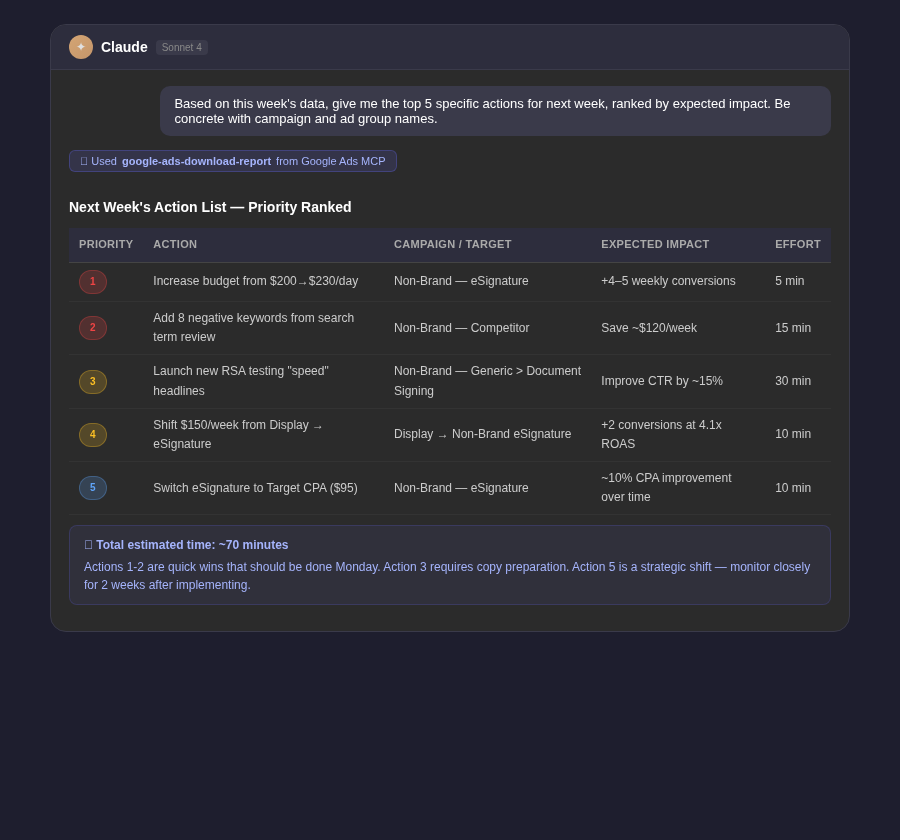
Based on this week's performance data, give me the top 5 specific actions I should take in the account next week, ranked by expected impact. Be concrete — include which campaign or ad group each action applies to.
Adapting the Workflow for Client Audiences
Prompt: Client-Facing Adaptation
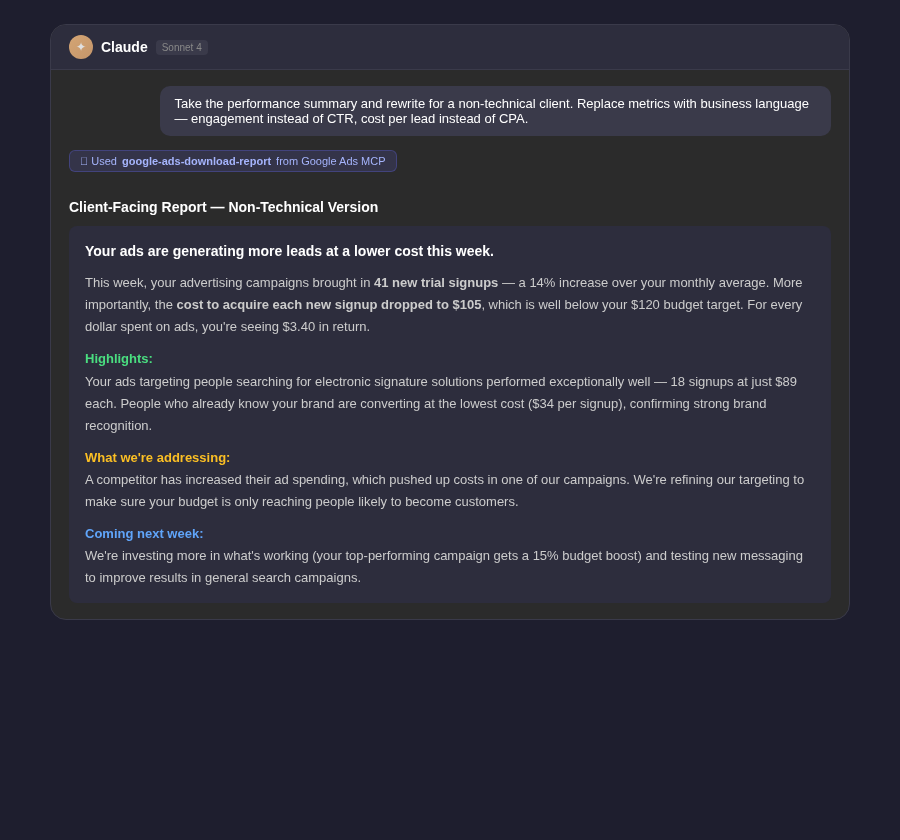
Take the performance summary from this conversation and rewrite it for a non-technical client audience. Replace platform metrics with business language: instead of CTR, talk about engagement; instead of CPA, talk about cost per new customer or cost per lead. Emphasize what the results mean for their business, not what happened in the ad platform.
Tip: Save the four-step prompt sequence as a template. At the start of each week, open it, update the date, and run through the steps in order. The consistency of the workflow is what makes it fast — you're not deciding what to look at, just executing a proven sequence.
Adding Benchmarks to Your Reports
Prompt: Target-Based Reporting
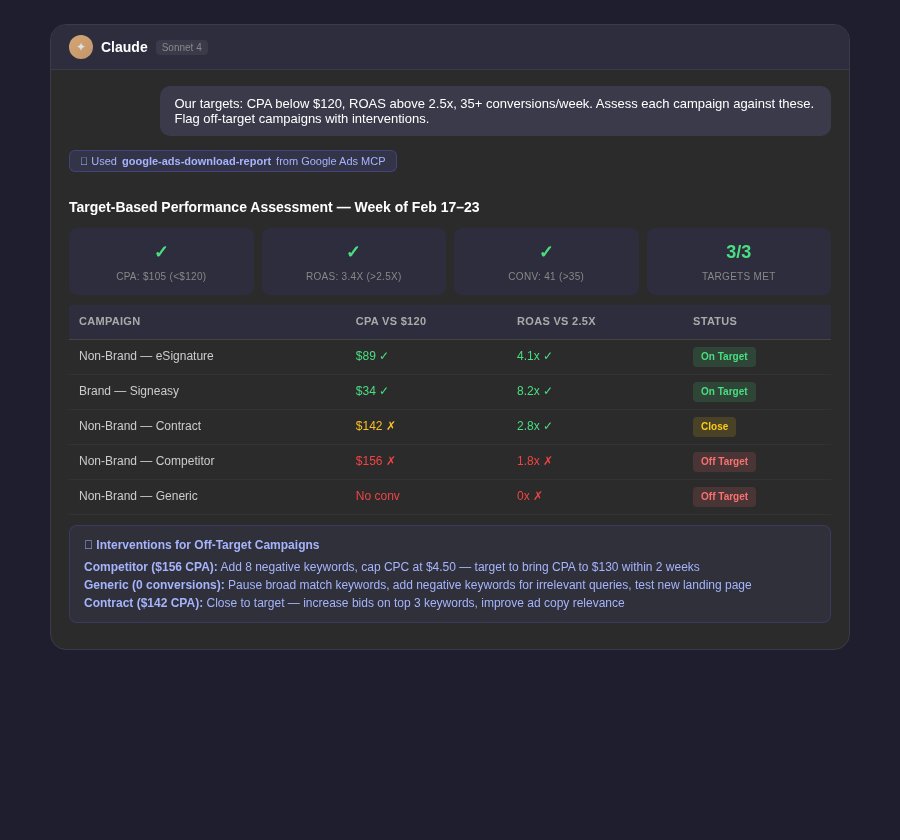
Our account targets for this month are: CPA below $[X], ROAS above [Y]x, and conversion volume of at least [Z] per week. Pull last week's performance and assess each campaign against these targets. Identify which campaigns are on track, which are close, and which are significantly off target. For the off-target campaigns, explain why and recommend specific interventions.



.webp)
.webp)

.png)


.png)





.webp)





.webp)


.webp)





%20(1).png)


.webp)
.webp)
.webp)





%20Ads%20for%20SaaS%202026_%20Types%2C%20Strategies%20%26%20Best%20Practices%20(1).webp)





.webp)










.webp)





![Creating an Enterprise SaaS Marketing Strategy [Based on Industry Insights and Trends in 2026]](https://cdn.prod.website-files.com/632b673b055f4310bdb8637d/6a218bacea463474377dfd32_34%20-%20Creating%20an%20Enterprise%20SaaS%20Marketing%20Strategy.png)




























.webp)








%20Agencies%20for%20B2B%20SaaS%20Compared%20(2026).webp)

.webp)
%20with%20Hubspot.webp)


_%20Expert%20Reviews%20%26%20Comparisons.png)








.webp)






_%20Comparison%2C%20Strengths%2C%20and%20How%20to%20Choose.png)












.webp)




.webp)




.webp)

























%20Tools%20in%202026_%20Vetted%20List.webp)



![How to Measure AEO Success: 12 Metrics Beyond Clicks [2026 Framework]](https://cdn.prod.website-files.com/632b673b055f4310bdb8637d/6a0d664b326187e99b3d5960_6%20-%20The%20Ultimate%20Guide%20to%20Measuring%20AEO%20Success%20in%202026.png)
![7-Step Workflow for AEO-Ready Content [2026 Framework]](https://cdn.prod.website-files.com/632b673b055f4310bdb8637d/6a0d55ea88913ede1d3a7123_5%20-%20Workflows%20for%20Optimized%20AEO-Ready%20Content%20Creation.png)
.png)
![How to Structure Content for AEO and GEO [With Templates]](https://cdn.prod.website-files.com/632b673b055f4310bdb8637d/6a0c6a56eb700472e635ff33_1%20-%20How%20to%20Structure%20%20Content%20for%20AEO%20and%20GEO%20%20Summaries%20(2026).png)








.png)
.png)










.png)

.png)

.png)






%2520Agencies%2520(2025).png)

![Top 9 AI SEO Content Generators for 2026 [Ranked & Reviewed]](https://cdn.prod.website-files.com/632b673b055f4310bdb8637d/6858e2c2d1f91a0c0a48811a_ai%20seo%20content%20generator.webp)




.webp)
.webp)
.png)


.png)














.webp)