.png)


Key Takeaways
- Ahrefs has best-in-class keyword data. The bottleneck is the 60 to 90 minutes of manual synthesis (sorting, clustering, intent labeling, priority scoring) that happens after every data pull.
- Five Ahrefs MCP endpoints power the Skill: keywords_explorer_matching_terms, keywords_explorer_related_terms, site_explorer_organic_keywords, keywords_explorer_volume_by_country, and keywords_explorer_overview. Each returns different data, and the Skill combines all five.
- The output is a four-tab XLSX: full clustered keyword set, quick wins (positions 4 to 15), cluster themes with aggregate metrics, and negative keyword suggestions.
- Competitor domains as seed inputs via site_explorer_organic_keywords often surface the most strategically relevant keyword gaps by showing exactly which terms drive their traffic.
- At agency scale (10 clients, 2 runs per month), the Skill recovers 20 to 30 hours of senior strategist time monthly. That's nearly a full week redirected from spreadsheet work to strategic planning.
Ahrefs gives you volume, keyword difficulty, CPC, SERP features, click metrics, ranking competitors, and semantically related terms. The data quality is excellent. That was never the problem.
The problem is what happens after the export.
You pull 400 keywords into a CSV. Open the spreadsheet.
Start scanning row by row: is this informational or commercial? Top of funnel or bottom? Does this cluster with the terms above it, or does it belong in a separate group? Should it be a blog post target or a product page target? What's the aggregate opportunity for this cluster versus that one?
That process takes 60 to 90 minutes every time. It follows the exact same logic every time. And the output quality depends entirely on how much attention the strategist has left at row 300.
High frequency. Structural predictability. Currently manual. That's the definition of a Skill candidate.
The Five Ahrefs MCP Endpoints and What Each Returns
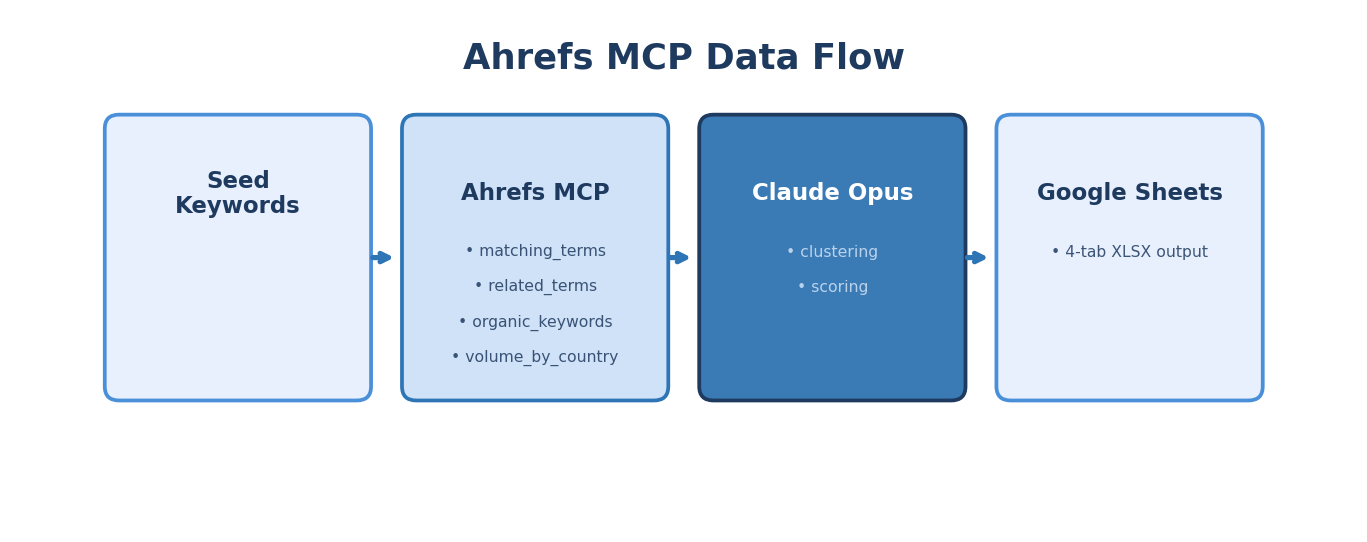
The MCP (Model Context Protocol) connection means Ahrefs data flows directly into the Skill with zero CSV exports, zero API key configuration, and zero manual data handling. This matters for more than convenience. Every manual export introduces risks: column misalignment from locale-specific CSV formatting, encoding errors on international characters, stale data from cached exports. Live MCP data eliminates all three.
Here's what each endpoint contributes to the Skill.
1. keywords_explorer_matching_terms
What it does: Returns keywords that contain your seed term or close variations.
What comes back: Keyword, search volume, keyword difficulty (KD), CPC, clicks, clicks per search, SERP features present, parent topic, updated date.
Why it matters for the Skill: This is your expansion layer. Seed "endpoint detection" and get "endpoint detection and response," "endpoint detection software," "endpoint detection vs antivirus," "managed endpoint detection and response," and hundreds more. The Skill uses these to build the initial keyword universe before clustering.
Concrete example: We input the seed keyword "project management software" for a PM SaaS client. The matching_terms endpoint returned 847 terms. Volume ranged from 90,500 ("project management software") down to 10 ("project management software for architecture firms"). The long-tail terms with industry modifiers became some of the highest-priority targets because they indicated buyer-specific intent with lower competition.
2. keywords_explorer_related_terms
What it does: Returns semantically related keywords that don't necessarily contain the seed term.
What comes back: Same data structure as matching_terms, but the keyword relationship is semantic rather than lexical.
Why it matters for the Skill: This catches the terms your audience searches for that you'd miss with simple keyword matching. Seed "project management software" and related_terms returns "task tracking tools," "team collaboration platform," "work management system," "resource allocation software." These are different phrases for adjacent or overlapping intent.
Concrete example: For the same PM SaaS client, related_terms returned 612 terms. The Skill identified three cluster themes that matching_terms missed entirely: "resource planning" (aggregate volume 14,200), "workload management" (aggregate volume 8,900), and "sprint planning tools" (aggregate volume 6,400). These became net-new content opportunities the client's existing strategy hadn't covered.
3. site_explorer_organic_keywords
What it does: Returns the keywords a specific domain currently ranks for, with position data.
What comes back: Keyword, position, search volume, traffic estimate, traffic percentage, keyword difficulty, URL ranking, SERP features, updated date.
Why it matters for the Skill: Two use cases. First, run it on the client's own domain filtered to positions 4 through 15. These are your quick wins: keywords where you're already ranking but not capturing meaningful click volume. Moving from position 8 to position 3 can triple click-through rate without creating new content.
Second, run it on competitor domains. This is often the most strategically valuable input. You see exactly which keywords drive competitor traffic, filter for the ones you don't rank for, and immediately surface your coverage gaps.
Concrete example: We ran site_explorer_organic_keywords on two competitor domains for the PM SaaS client. Competitor A ranked for 2,340 keywords we didn't. Competitor B ranked for 1,870. After the Skill filtered for commercial and transactional intent, removed branded competitor terms, and deduplicated, we had 312 high-priority gap keywords. Forty-seven of those had KD under 30 with volume above 500. Those became the first quarter's content targets.
4. keywords_explorer_volume_by_country
What it does: Returns search volume breakdown by country for specified keywords.
What comes back: Keyword, country, search volume, CPC by country.
Why it matters for the Skill: B2B SaaS products with international markets need geo-specific volume data. A keyword with 8,000 global volume might have 6,500 of that in the US and only 200 in the UK. If your client's primary market is the UK, global volume is misleading. The Skill uses country-specific volume to adjust priority scores for the client's actual target markets.
Concrete example: For a client targeting DACH markets, volume_by_country revealed that "Projektmanagement Software" had 4,200 monthly searches in Germany alone, higher than the English equivalent in their UK target market. This data shifted their content strategy to prioritize German-language content for their highest-volume opportunity.
5. keywords_explorer_overview
What it does: Returns detailed metrics for a specific keyword or keyword list.
What comes back: Volume, KD, CPC, clicks, global volume, traffic potential, SERP overview (top 10 URLs with their metrics), parent topic, and keyword ideas count.
Why it matters for the Skill: The overview endpoint provides the validation layer. After the Skill clusters and scores keywords from the other four endpoints, it runs overview on the top candidates to pull SERP-level competitive intelligence. The SERP overview data shows exactly which pages rank, their domain ratings, and their backlink profiles. This data informs whether a keyword is realistically targetable given the client's current authority.
Step-by-Step Slate Build
Here's how to build this Skill in Slate, node by node.
NODE 1: Input
Type: Text input
Fields: "Seed Keywords" (comma-separated, 3-5 recommended),
"Client Domain" (for quick wins analysis),
"Competitor Domains" (optional, comma-separated, up to 3)
NODE 2: Ahrefs MCP: keywords_explorer_matching_terms
Trigger: Loop per seed keyword
Parameters: keyword = [current seed], country = [client target market]
Output: Raw matching terms dataset
NODE 3: Ahrefs MCP: keywords_explorer_related_terms
Trigger: Run for top 3 seeds by estimated volume
Parameters: keyword = [top seed], country = [client target market]
Output: Raw related terms dataset
NODE 4: Ahrefs MCP: site_explorer_organic_keywords
Trigger: Run on client domain + each competitor domain
Parameters: target = [domain], country = [market],
positions_from = 4, positions_to = 15 (for client domain quick wins)
positions_from = 1, positions_to = 20 (for competitor domains)
Output: Current ranking data for client; competitor keyword profiles
NODE 5: Ahrefs MCP: keywords_explorer_volume_by_country
Trigger: Run on deduplicated keyword set from nodes 2-4
Parameters: keywords = [batch of up to 100], countries = [target markets]
Output: Geo-specific volume data
NODE 6: Claude Opus node: Clustering, Classification, and Scoring
System prompt: Direction (see below)
User message: Concatenated outputs from all Ahrefs nodes
Output: Structured keyword analysis with clusters, intent, priorities
NODE 7: Ahrefs MCP: keywords_explorer_overview
Trigger: Run on top 20 HIGH priority keywords from Claude output
Parameters: keywords = [top candidates]
Output: SERP-level competitive data for validation
NODE 8: Claude node: Final Validation and Formatting
System prompt: Validate priority scores against SERP data.
Adjust any keywords where SERP competition exceeds client authority.
Format into four-tab output structure.
NODE 9: Google Sheets MCP: Create XLSX
Trigger: Output from final Claude node
Tabs: Full Clustered Set | Quick Wins | Cluster Themes | Negatives
NODE 10: Output
Deliver XLSX link + summary statistics
The Direction Prompt
You are a B2B SaaS SEO strategist for [CLIENT NAME] in [INDUSTRY].
Target buyer persona: [PERSONA]. Target markets: [COUNTRIES].
Exclude: consumer-intent queries, branded competitor terms,
queries with informational-only intent and zero commercial pathway.
// CLASSIFICATION (apply to every keyword):
PRIMARY INTENT: Informational / Commercial / Transactional / Navigational
FUNNEL STAGE: TOFU / MOFU / BOFU
CONTENT TYPE: Product Page / Feature Page / Blog Post / Landing Page / Comparison Page
PRIORITY: HIGH / MEDIUM / LOW
// PRIORITY SCORING LOGIC:
HIGH = Volume > 200 + KD < 40 + Commercial or Transactional intent
HIGH = Any keyword where client ranks positions 4-15 (quick win regardless of KD)
MEDIUM = Volume > 100 + KD < 60 + any intent with clear content pathway
LOW = Volume < 100 OR KD > 60 OR purely informational with no product tie-in
// CLUSTERING:
Group semantically related keywords into clusters.
Name each cluster by its primary theme.
Calculate aggregate metrics per cluster: total volume, avg KD, dominant intent.
Identify the primary target keyword per cluster (highest volume + lowest KD).
// QUICK WINS TAB:
Extract all keywords where client domain ranks positions 4-15.
Sort by traffic potential (volume * estimated CTR improvement from moving to top 3).
Note the currently ranking URL for each.
// NEGATIVES TAB:
Identify keywords that passed initial filters but should be excluded:
consumer intent misclassified as commercial, irrelevant verticals,
geographic mismatches, branded terms for other products.
// OUTPUT FORMAT:
Tab 1: Full Clustered Set: Keyword | Volume | KD | CPC | Intent |
Funnel | Content Type | Priority | Cluster | Ranking URL (if any)
Tab 2: Quick Wins: Keyword | Current Position | Volume | Traffic Potential |
Ranking URL | Recommended Action
Tab 3: Cluster Themes: Cluster Name | Keywords Count | Total Volume |
Avg KD | Dominant Intent | Primary Target Keyword | Content Gap (Y/N)
Tab 4: Negatives: Keyword | Volume | Exclusion Reason
Concrete Walkthrough: Three Seeds for a Project Management SaaS
We ran this Skill for a mid-market project management SaaS targeting US and UK markets. Three seed keywords: "project management software," "team collaboration tools," "resource planning."
What matching_terms returned: 847 terms for seed 1, 523 for seed 2, 289 for seed 3. Total before deduplication: 1,659. After deduplication: 1,124.
What related_terms added: 612 semantically related terms. After deduplication against the matching set: 387 net new terms. Total keyword universe: 1,511.
What organic_keywords revealed: The client ranked for 2,100 total keywords. Filtered to positions 4 through 15: 167 quick win candidates. Two competitor domains added 312 high-priority gap keywords after filtering.
What Claude did with the combined data:
- Clustered 1,823 total keywords into 47 thematic clusters
- Classified 89 keywords as HIGH priority (volume above 200, KD below 40, commercial or transactional intent)
- Identified 167 quick wins with estimated traffic potential of 34,000 additional monthly visits if moved to top 3 positions
- Flagged 142 negatives (consumer app comparisons, enterprise-only terms outside client's market, geographic mismatches)
- Named the top 5 cluster themes: "PM Software Comparisons" (aggregate volume 42,300), "Resource Planning Tools" (aggregate volume 18,700), "Team Collaboration Features" (aggregate volume 15,400), "Agile Project Management" (aggregate volume 12,800), "Remote Team Management" (aggregate volume 9,200)
What volume_by_country clarified: 23 keywords that looked like HIGH priority on global volume dropped to MEDIUM when filtered to the client's US and UK markets. Seven keywords that looked MEDIUM on global volume jumped to HIGH because 80%+ of their volume concentrated in the client's target markets.
The entire process ran in 12 minutes. The equivalent manual process, with the same depth of analysis, takes 90 minutes minimum.
Quick Wins: The Highest-ROI Output
The Quick Wins tab deserves special attention because it produces the fastest results with the least effort.
Every keyword where the client already ranks in positions 4 through 15 represents a page that Google considers relevant. It's already indexed, already earning some clicks, already building topical authority. Moving it from position 8 to position 3 can increase click-through rate from roughly 3% to 11%. That's nearly 4x the traffic from an existing asset.
We run the quick wins analysis at the start of every new SEO engagement. The results feed directly into two parallel workstreams:
- Content optimization: Pages that need better keyword coverage, updated statistics, or expanded sections. The content optimization Skill handles this.
- Internal link building: Pages that need targeted internal links from higher-authority pages. The internal linking Skill identifies the optimal source pages and anchor text.
Quick wins compound. A page that moves from position 8 to position 3 doesn't just earn more clicks. It earns more engagement signals. More engagement signals improve rankings for related keywords on the same page. The virtuous cycle starts with identifying the right targets.
Competitor Domains as Seeds: The Gap Analysis Shortcut
Running site_explorer_organic_keywords on competitor domains is often more valuable than starting with seed keywords.
Here's why. Seed keywords expand outward from what you already know. Competitor organic keywords show you what's working for someone in your market, regardless of whether you'd thought to target those terms.
The Skill processes competitor keyword profiles through the same clustering and classification logic. But it adds one additional layer: gap detection. For each competitor keyword cluster, the Skill checks whether the client has any ranking coverage. Clusters where competitors rank and the client doesn't become immediate content opportunities.
This approach is especially powerful for vertical-specific content strategies. In our cybersecurity SaaS deployments, competitor keyword profiles often blend practitioner-level and executive-level content. The Skill's intent classification separates these automatically, so you know which gaps to fill with engineer-targeted content versus CISO-targeted content.
Chaining to the Content Brief Skill
The keyword research output is designed to feed directly into the content brief Skill.
The chain works like this: the strategist reviews the keyword research XLSX, approves the HIGH priority keyword list (or adjusts priorities based on strategic judgment), and the approved keywords become the input batch for brief generation.
Each keyword passes forward with its volume, difficulty, intent classification, cluster theme, and content type recommendation. The brief Skill doesn't start from zero. It starts with structured context from the research phase.
For teams delivering briefs into Notion, the Notion brief integration adds automatic database property mapping. Every brief lands in the editorial calendar with all metadata populated. No manual data entry between keyword research and editorial planning.
The chained workflow compresses what used to be a multi-day process. Keyword research in 12 minutes. Strategist review in 15 minutes. Batch brief generation for 20 approved keywords in 25 minutes. From seed keywords to 20 writer-ready Notion brief pages in under an hour.
ROI Math for Agency Scale
The time savings compound at agency scale. Here's the math we run:
Per-client savings: Each keyword research run saves 60 to 90 minutes of manual synthesis. Average: 75 minutes saved per run.
Run frequency: Most clients need keyword research twice per month (one strategic run, one quick wins refresh).
Per-client monthly savings: 150 minutes (2.5 hours).
Agency scale (10 clients): 25 hours per month. That's more than three full working days of senior strategist time.
Annual value: 300 hours redirected from spreadsheet classification to strategic SEO planning, content strategy, and client advisory.
The Skill doesn't replace the strategist's judgment. It eliminates the manual labor that sits between raw data and strategic decisions. The strategist still reviews, adjusts, and approves. They just start from a structured analysis instead of a raw CSV.
Handling Large Keyword Sets
For keyword universes exceeding 500 terms, process in segments:
- Split the deduplicated keyword set into batches of 200 terms
- Run each batch through the Claude classification node separately
- Merge results and run a final consolidation pass that reconciles cluster assignments across batches
- Some keywords will cluster differently depending on their batch context. The consolidation pass catches these.
For keyword sets above 1,000 terms, add a pre-filtering step. Use a lightweight Claude node to remove obvious negatives (consumer terms, geographic mismatches, branded competitors) before the full classification pass. This reduces the working set and improves clustering accuracy.
We run Ahrefs-connected keyword research Skills with live MCP data for every client engagement. Book a call to see the four-tab XLSX output and how it chains into brief generation. Try Slate here to build the workflow yourself.
Frequently Asked Questions
Q: Does this replace Ahrefs' built-in keyword grouping?
No. It layers intent classification, funnel staging, B2B-specific filtering, priority scoring, and content type recommendations on top of Ahrefs' volume and difficulty data. The Skill adds the strategic analysis layer that Ahrefs' UI doesn't automate.
Q: Can it handle non-English keyword research?
Yes. Ahrefs supports 170+ countries. Set the country parameter in each MCP node and add target language instructions in the Direction prompt. The clustering logic works across languages.
Q: What's the maximum keyword set size per run?
300 to 400 terms per Claude classification pass. Use the batch processing approach described above for larger sets.
Q: How do I adjust the Direction prompt for different industries?
Add industry-specific exclusion rules (consumer terms for B2B, practitioner terms for executive-targeted content) and adjust the priority scoring weights. A fintech client might weight transactional intent higher. A cybersecurity client might weight practitioner intent for technical content.
Q: How often should keyword research run?
Quarterly minimum for strategic research. Monthly for quick wins refresh. Ad hoc for new product launches or market expansions. We schedule quarterly runs as recurring workflows.
Q: Can the output feed directly into the content brief Skill?
Yes. That's the designed chain. Keyword output becomes brief input. We run this chain for every new client onboarding and every quarterly content planning cycle.
Q: What about keywords with zero search volume?
The Direction prompt includes an instruction to flag emerging terms with zero volume but high commercial relevance for manual review. These are often new product categories or emerging industry terminology that will develop search volume over the next 6 to 12 months.
Q: Can competitor domain analysis work across multiple competitors simultaneously?
Yes. The Skill runs site_explorer_organic_keywords on up to three competitor domains, deduplicates across all of them, and highlights keywords where multiple competitors rank but the client doesn't. Multi-competitor overlap keywords are often the highest-priority targets.



.webp)
.webp)

.png)


.png)





.webp)





.webp)


.webp)





%20(1).png)


.webp)
.webp)
.webp)





%20Ads%20for%20SaaS%202026_%20Types%2C%20Strategies%20%26%20Best%20Practices%20(1).webp)








.png)


.png)





.webp)


![Creating an Enterprise SaaS Marketing Strategy [Based on Industry Insights and Trends in 2026]](https://cdn.prod.website-files.com/632b673b055f4310bdb8637d/6965f37b67d3956f981e65fe_66a22273de11b68303bdd3c7_Creating%2520an%2520Enterprise%2520SaaS%2520Marketing%2520Strategy%2520%255BBased%2520on%2520Industry%2520Insights%2520and%2520Trends%2520in%25202023%255D.png)




.png)
















.webp)







%20Agencies%20for%20B2B%20SaaS%20Compared%20(2026).webp)

.webp)
%20with%20Hubspot.webp)








.png)


.png)

.png)
.png)
.png)
.png)


















.webp)

.webp)
.png)
.png)



.webp)


.png)




















.webp)

![How to Measure AEO Success: 12 Metrics Beyond Clicks [2026 Framework]](https://cdn.prod.website-files.com/632b673b055f4310bdb8637d/6a0d664b326187e99b3d5960_6%20-%20The%20Ultimate%20Guide%20to%20Measuring%20AEO%20Success%20in%202026.png)
![7-Step Workflow for AEO-Ready Content [2026 Framework]](https://cdn.prod.website-files.com/632b673b055f4310bdb8637d/6a0d55ea88913ede1d3a7123_5%20-%20Workflows%20for%20Optimized%20AEO-Ready%20Content%20Creation.png)
.png)

![How to Structure Content for AEO and GEO [With Templates]](https://cdn.prod.website-files.com/632b673b055f4310bdb8637d/6a0c6a56eb700472e635ff33_1%20-%20How%20to%20Structure%20%20Content%20for%20AEO%20and%20GEO%20%20Summaries%20(2026).png)








.png)
.png)









.png)


.png)





%2520Agencies%2520(2025).png)

![Top 9 AI SEO Content Generators for 2026 [Ranked & Reviewed]](https://cdn.prod.website-files.com/632b673b055f4310bdb8637d/6858e2c2d1f91a0c0a48811a_ai%20seo%20content%20generator.webp)




.webp)
.webp)














.webp)