The Prompt That Earned a Permanent Slot in Month Three
The first prompt we wrote that survived a full quarter of use was a duplicate pattern clustering prompt. It took one Screaming Frog export with 847 duplicate H1s and returned a three-line answer: three URL patterns contain 812 of them, fix the template, one release patches them all.
Every prompt in the library below earned its place the same way. It made a task that was already happening 50% faster, or it produced a finding that would not have surfaced from a human spreadsheet pass in any reasonable time.
There are no "impressive-looking prompts you could use" in this list. There are fifteen prompts we run every week across B2B SaaS engagements, each with the client question that triggered it and the output shape that keeps it in rotation.
The broader workflow these plug into is covered in our Claude SEO guide. This piece is the tactical layer: what we ask, why we ask it, and what comes back.
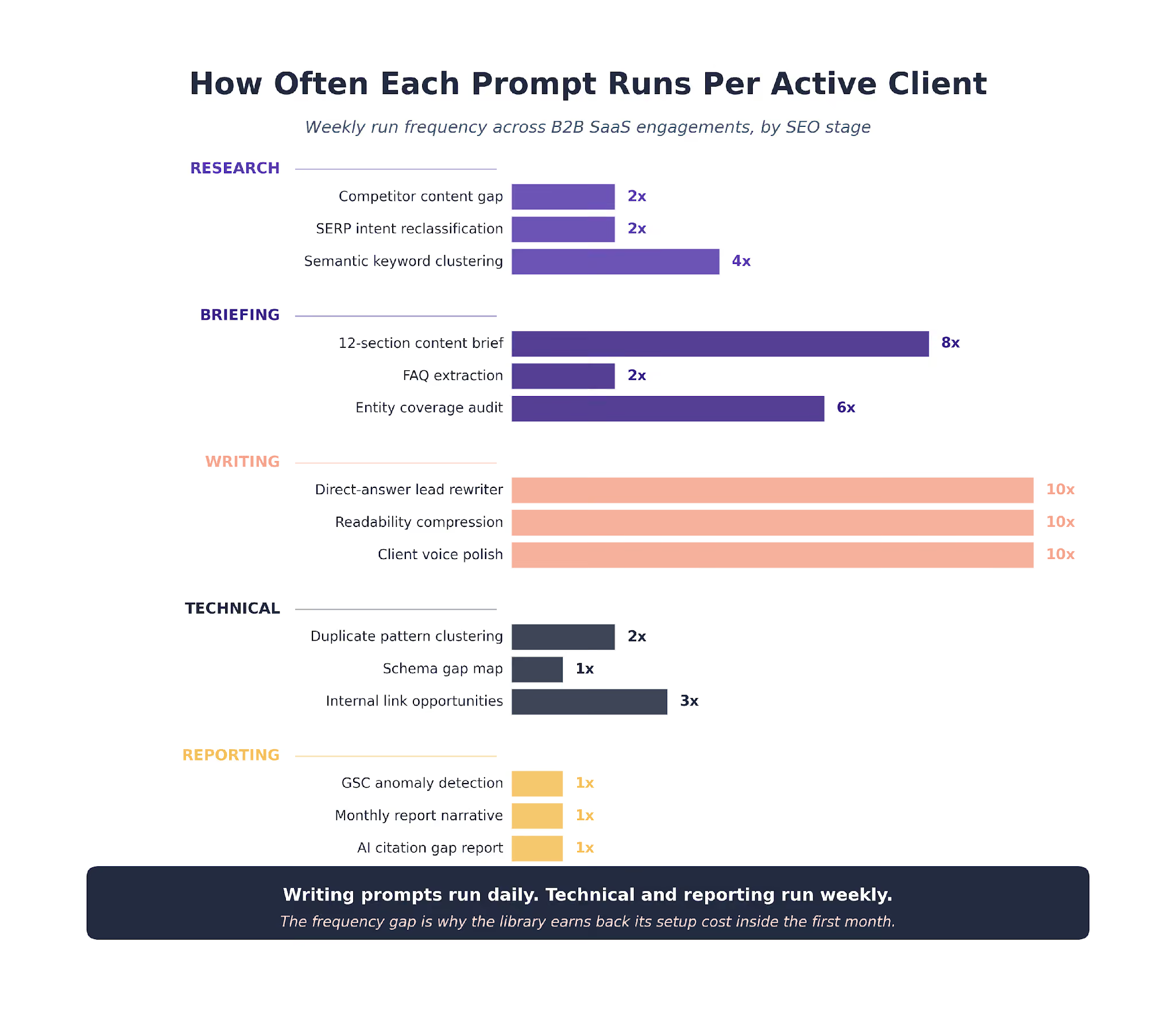
Research Prompts
Research prompts run during the strategy phase. Their job is to synthesize inputs that a human analyst would spend hours filtering through.
The three prompts below each handle a different research task. The first finds what competitors cover that we do not. The second checks whether our target keywords still match SERP intent. The third clusters a keyword list into a usable content plan.
Research prompts produce inputs, not deliverables. The outputs feed the briefing stage or the content calendar. Treat them as pre-processing, not final answers.
Prompt 1. Competitor Content Gap Analysis
Input: our client's URL plus three competitor URLs plus an Ahrefs content gap export.
You are reviewing a content gap export for a B2B SaaS client.
Input 1: the client's current content inventory at /inventory.csv
Input 2: the Ahrefs content gap export at /gap.csv
Input 3: three competitor URLs with top 20 ranking pages
For every keyword the competitors rank for that the client does not:
1. Assign a buying-stage label (awareness | consideration | decision)
2. Flag the three most commercially relevant clusters
3. Score each cluster by: search volume, keyword difficulty,
our authority deficit, and competitor page quality
Output: a table, sorted by commercial relevance, top 20 rows.
The use case: a cybersecurity SaaS client was losing organic traffic on MOFU commercial-investigation queries. No signal on which topics were missing.
The prompt surfaced five clusters that did not exist in their content calendar. The team shipped three of them the following quarter and recovered the lost traffic.
Output shape: a 20-row table engineers and writers can action directly.
Prompt 2. SERP Intent Reclassification
Input: a 2,000-keyword list the client has been targeting for six months.
For each of the keywords below, classify the dominant SERP intent:
informational, navigational, commercial investigation, transactional.
Flag keywords where our current ranking URL's intent does not match
the SERP's current dominant intent. Return a table with columns:
keyword, current ranking URL, current URL intent,
SERP dominant intent, mismatch severity (1 to 5), recommended fix.
The use case: a sales enablement SaaS had optimized landing pages for informational queries that had drifted to commercial intent over 12 months.
The reclassification surfaced 180 keywords where the ranking URL no longer matched SERP intent. Six recovery actions shipped inside the quarter.
Output shape: a ranked fix list. Mismatch severity dictates priority.
Prompt 3. Semantic Keyword Clustering
Input: an Ahrefs export of 5,000-plus keywords.
Cluster these keywords by user intent and semantic similarity, not
just lexical overlap. For each cluster return:
- cluster name (a 2-3 word topic)
- representative keyword (highest volume in cluster)
- buying stage (TOFU | MOFU | BOFU)
- page type to target (guide | comparison | alternative | tool | hub)
- cluster size (count of keywords)
Flag clusters where buying stage is mixed (split cluster recommended).
The use case: every client engagement starts with a keyword cluster refresh. The deeper walkthrough sits in our keyword research workflow.
Output shape: clusters ready to feed a content calendar.
Briefing Prompts
Briefing prompts run after strategy, before writing. Their job is to turn a topic into a structured brief a writer can hand to Claude for drafting.
These are the highest-weight prompts in the library by time saved per run. A brief that used to take 60 to 90 minutes now takes 10 to 15 plus a writer review pass. That compression is what made the content engine economics work.
Briefing also carries the most variance in quality. A mediocre brief produces a mediocre draft regardless of which drafting prompt runs next. Get these right and the downstream prompts need less from you.
Prompt 4. 12-Section Content Brief Generator
Input: a target keyword, the top 10 ranking URLs, and the client's CLAUDE.md.
Generate a 12-section content brief for the target keyword below.
Target: [keyword]
Top 10 ranking URLs: [URL list]
Client context: [CLAUDE.md reference]
Sections required:
1. Reader persona
2. Search intent classification
3. Angle wedge (the one claim only this piece makes)
4. Three competitor URLs: wins + gaps + what we can beat
5. SERP structure classification (listicle, how-to, comparison, guide)
6. Primary + 8 to 12 secondary keywords, frequency-weighted
7. Entities to reference (products, people, frameworks, data sources)
8. Word count target + format bias
9. The one anchor claim this article must carry
10. Internal links to place + purpose
11. External sources to cite + anchor stats
12. FAQs the piece must answer
Output each section under its own heading.
The use case: content brief generation used to run 60 to 90 minutes per article. It now runs 10 to 15 minutes with this prompt plus a writer review pass. The full brief pipeline is covered in our content writing workflow.
Output shape: a brief a writer can hand to Claude for drafting.
Prompt 5. FAQ Extraction From Customer Interviews
Input: transcripts of three or four sales or customer success calls.
Read these customer interview transcripts. Extract every question
a buyer asked that the SEO team should treat as a potential content
topic. For each question return:
- the question as the buyer asked it
- the buying-stage signal (TOFU, MOFU, BOFU)
- whether the question is a direct query-match to an SEO opportunity
- the best page type to serve the answer (FAQ answer, blog, comparison)
The use case: the most valuable FAQ keywords on any B2B SaaS site come from real buyer questions, not from keyword research tools. This prompt runs monthly against fresh call transcripts.
Output shape: a rolling list of FAQ content opportunities.
Prompt 6. Entity Coverage Audit
Input: a draft article and the entity list from its brief section 7.
Compare this draft against the entity list below. For each entity:
- confirm it appears at least once in the draft
- flag entities that appear fewer than two times
- flag entities named in the brief but missing from the draft
- flag entities added by the draft that are not in the brief
Return a two-column audit: expected entities vs present entities.
The use case: entity coverage is one of the common reasons a draft that passes editorial review still underperforms in AI citations. This prompt catches the gap before publish.
Output shape: a coverage audit with explicit gaps to fix.
Writing Prompts
Writing prompts run during drafting. Their job is to turn a brief into a first draft that carries the client brand voice.
We run writing as a chain of prompts, not one giant draft call. The three below are the highest-weight single prompts in that chain. Any one of them used in isolation still improves a draft. All three in sequence produce a draft that needs about 50% less editor rework.
The broader chain and the editor pass that follows are walked through in the content workflow linked above.
The Ahrefs AI content study of 600,000 pages backs the same pattern: AI-assisted content ranks when it is layered, and stops ranking when the expert layer is skipped.
Prompt 7. Direct-Answer Lead Rewriter
Input: a draft article.
For every H2 in this draft, rewrite the first sentence as a
30-to-60-word direct answer to the H2's implicit question.
Rules:
- Plain prose, no throat-clearing
- No "In this section we will..." openers
- No scene-setting
- Lead with the concrete claim, not the setup
- Keep the rest of the H2 unchanged
Return the revised draft only.
The use case: direct-answer leads carry AI citability. This prompt is the highest-weight readability pass in our chain.
Output shape: the same article, every H2 opener rewritten.
Prompt 8. Readability Compression Pass
Input: a draft article.
Apply these rules to this draft, returning the revised version only:
- Split every sentence over 28 words into two sentences or a list
- Break every paragraph over three rendered lines
- Replace every em dash with a comma or period
- Flag sentences that use banned phrases (list below)
Banned: "in today's landscape", "what matters is", "not X, it's Y",
"move the needle", "leverage" as a verb, "actually", "compound",
"significantly", "fundamentally".
The use case: this pass alone removes about 15% of the surface-AI voice from any first draft. Every article runs through it before the editor pass.
Output shape: a cleaner draft ready for editorial review.
Prompt 9. Client Voice Polish
Input: a draft article and the client's CLAUDE.md voice rules.
Read this draft against the voice rules in the attached CLAUDE.md.
For every paragraph, rewrite to match:
- sentence length variance
- approved vocabulary (from CLAUDE.md)
- avoided phrases (from CLAUDE.md)
- first-person plural for the brand
- second-person for the reader
Return the revised draft, tracking changes with inline comments
on sentences that were rewritten for voice.
The use case: brand voice drift shows up within three articles without this pass. The polish prompt keeps five writers on one client account producing drafts that sound like one writer.
Output shape: a draft aligned to the client voice layer.
Technical Prompts
Technical prompts run during site audits. They turn crawl data into findings engineering can ship.
The pattern across all three below is the same. Claude reads a structured export from Screaming Frog, finds a category of issue, and groups the findings at the template level rather than the page level.
That grouping is the whole point. A crawler says "847 duplicate H1s." Claude says "812 of those are one template pattern." Engineering ships the template fix, and 812 pages resolve in a single release. That ratio shows up on every technical audit we run.
Prompt 10. Duplicate Pattern Clustering
Input: a Screaming Frog H1 duplicate export.
Cluster these duplicate H1 findings by URL pattern, not by H1 text.
For each cluster return:
- the URL pattern (e.g., /integrations/{partner})
- count of pages in the cluster
- the shared H1 template
- recommended template-level fix
- engineering effort estimate (1 release | 2 releases | multi-sprint)
Sort by count descending. Flag any cluster over 100 pages as HIGH severity.
The use case: this is the prompt that turned an "847 duplicate H1s" audit finding into "812 pages fixable in one release." The full audit pipeline sits in our technical audit guide.
Output shape: a pattern-level fix list engineering can action directly.
Prompt 11. Schema Gap Map
Input: a structured data export from the crawl.
Build a coverage matrix from this structured data export.
Rows: page templates (/blog/, /product/, /integrations/, etc.)
Columns: schema types present (Organization, Article, Product, FAQPage, etc.)
Cell values: coverage percentage for each template/type pair.
Highlight cells with under 50% coverage.
Return the matrix plus a prioritized recommendation list for
which templates should ship which missing schema type first,
sorted by monthly impressions at risk.
The use case: schema audits that used to take a day now take under an hour. The generation pipeline is covered in our schema markup workflow.
Output shape: a matrix plus a prioritized implementation list.
Prompt 12. Internal Link Opportunity Finder
Input: a content inventory and a set of target URLs that need authority signals.
Read the content inventory. For each target URL, find three to five
existing pages in the inventory that:
- cover topically adjacent content
- have above-median authority (by backlinks or traffic)
- do not currently link to the target URL
- contain a sentence where a link to the target would be contextually natural
Return a table: source URL, target URL, suggested anchor text,
paragraph where the link fits, existing surrounding text.
The use case: surfaces 200 to 500 missing internal links on a typical 2,000-page B2B SaaS archive. The full architecture sits in our internal linking playbook.
Output shape: a queue of contextual link suggestions ready for insertion.
Reporting Prompts
Reporting prompts run monthly. Their job is to turn GSC and GA4 exports into a narrative a client can read.
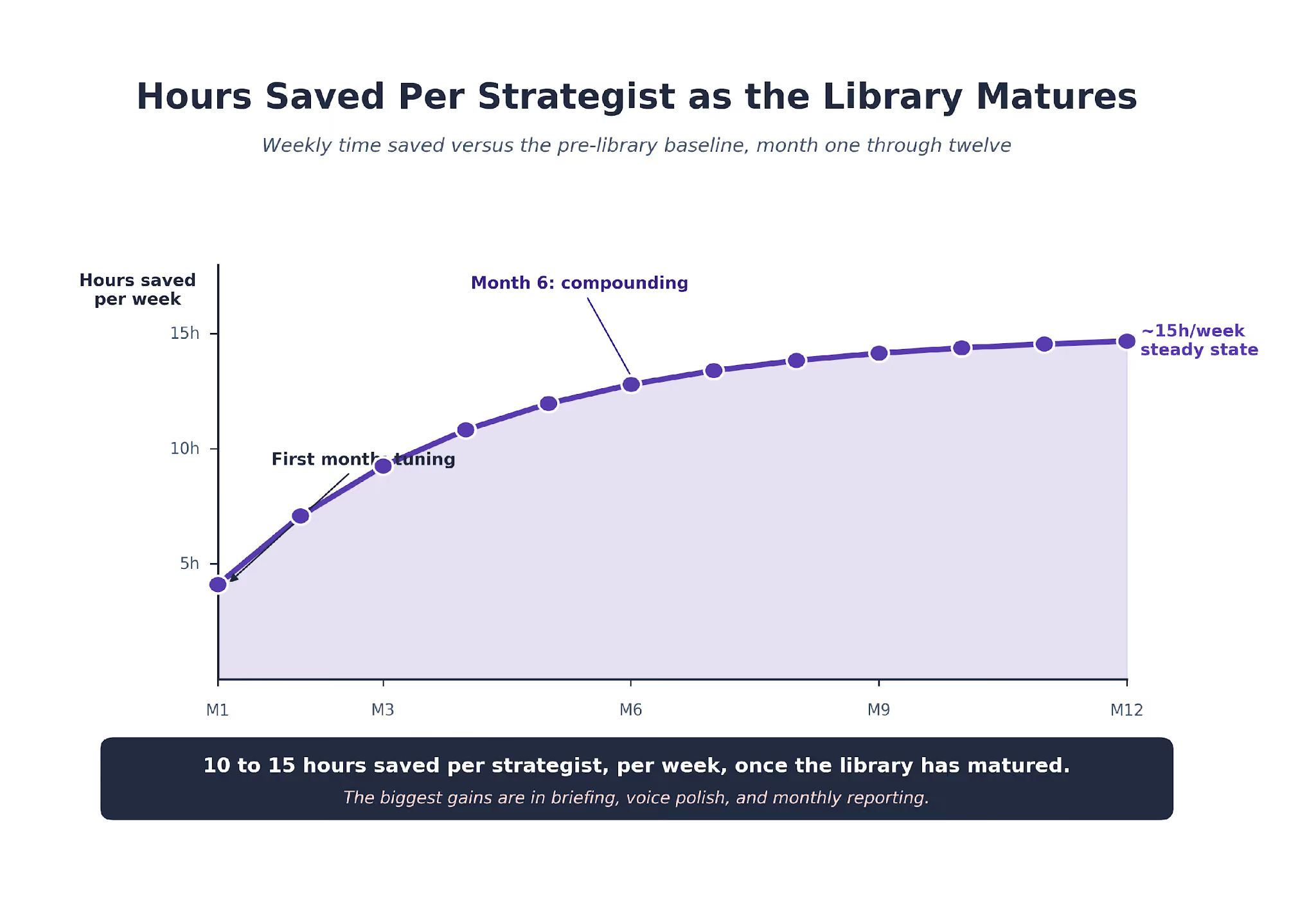
These are the prompts that closed the biggest calendar gap in our operations. Monthly reports used to eat a full analyst day. They now take 30 minutes plus a review pass, with the reviewer's attention on the interpretation, not the data pulls.
The HubSpot research on AI-assisted content holds up for reports too. The first draft runs fast. The expert layer is what makes the output shippable.
Prompt 13. GSC Anomaly Detection
Input: 90 days of GSC query-level performance.
Read this GSC export. Find every anomaly that deserves client attention:
- queries with 50%+ impression drop week over week
- queries with rising impressions but flat clicks (CTR optimization opportunity)
- queries moving from position 4 to 10 to 10 to 20 over the period
- new queries entering the top 20 for the first time
- queries losing position after competitor URL changes
For each anomaly, return: query, baseline metric, current metric,
suspected cause, recommended next step.
The use case: every monthly report opens with the three anomalies this prompt surfaces. It finds things a human analyst misses when filtering 2,000 rows by hand.
Output shape: a ranked anomaly list that becomes the report's opening section.
Prompt 14. Monthly Report Narrative
Input: GSC anomaly output, GA4 performance, and the client's known business context.
Write the client-facing narrative sections of this month's SEO report.
Tone: confident, specific, never defensive on misses.
Include: top three wins, top three misses, two recommendations for
next month, one emerging opportunity that was not previously tracked.
Each section gets one specific number, a named client-relevant URL,
and a one-sentence next step.
The use case: monthly report drafts that used to run six hours now run 30 minutes plus review. The full reporting workflow is covered in our reporting guide.
Output shape: a narrative report an analyst reviews and an account lead presents.
Prompt 15. AI Citation Gap Report
Input: Slate's AI citation data and the client's tracked URL list.
Compare the AI citation data against the client's ranking URL list.
For each tracked topic, surface:
- AI engines where the client is cited
- AI engines where the client should be cited but is not
- competitor domains capturing citations on topics the client ranks for
- query patterns where AI cites but Google does not rank
Return three prioritized opportunities:
a topic where AI visibility is earnable, a topic where citation share
is being lost, and a structural content change that would unlock both.
The use case: AI citations are now a standard line in the monthly report. This prompt turns citation data into three specific actions per month.
Output shape: a three-line opportunity list that feeds the next content sprint.
What We Retired From the Library
For every prompt that stays, two or three have been retired. Naming the retired ones is useful because the failure patterns are instructive.
One early prompt tried to generate content briefs and first drafts in a single pass. It produced drafts that looked complete but failed editor review at the angle-wedge level.
Splitting it into briefing and drafting as separate stages was the unlock. A brief produced by a dedicated prompt turned out to be the ceiling that draft quality could reach. Briefing now owns the quality decision; drafting owns the word output.
Another retired prompt tried to auto-generate meta titles and descriptions at scale. It shipped technically valid output and failed on voice.
Meta titles and descriptions carry the brand voice more heavily per character than any other content surface. We run meta work through writers now, with the voice polish prompt as the last pass.
A third retired prompt asked Claude to write competitor battlecards from SERP and public content. The output was well-structured and consistently wrong on product positioning.
Only a human reading the competitor's sales deck would have caught the gap. Competitor research stays with a strategist; Claude helps structure the output, not the opinion.
The pattern across retired prompts is consistent. They tried to compress two stages into one. The successful prompts stay narrow. One input, one output, one decision the user makes with the output.
The One Rule That Makes Prompts Repeatable
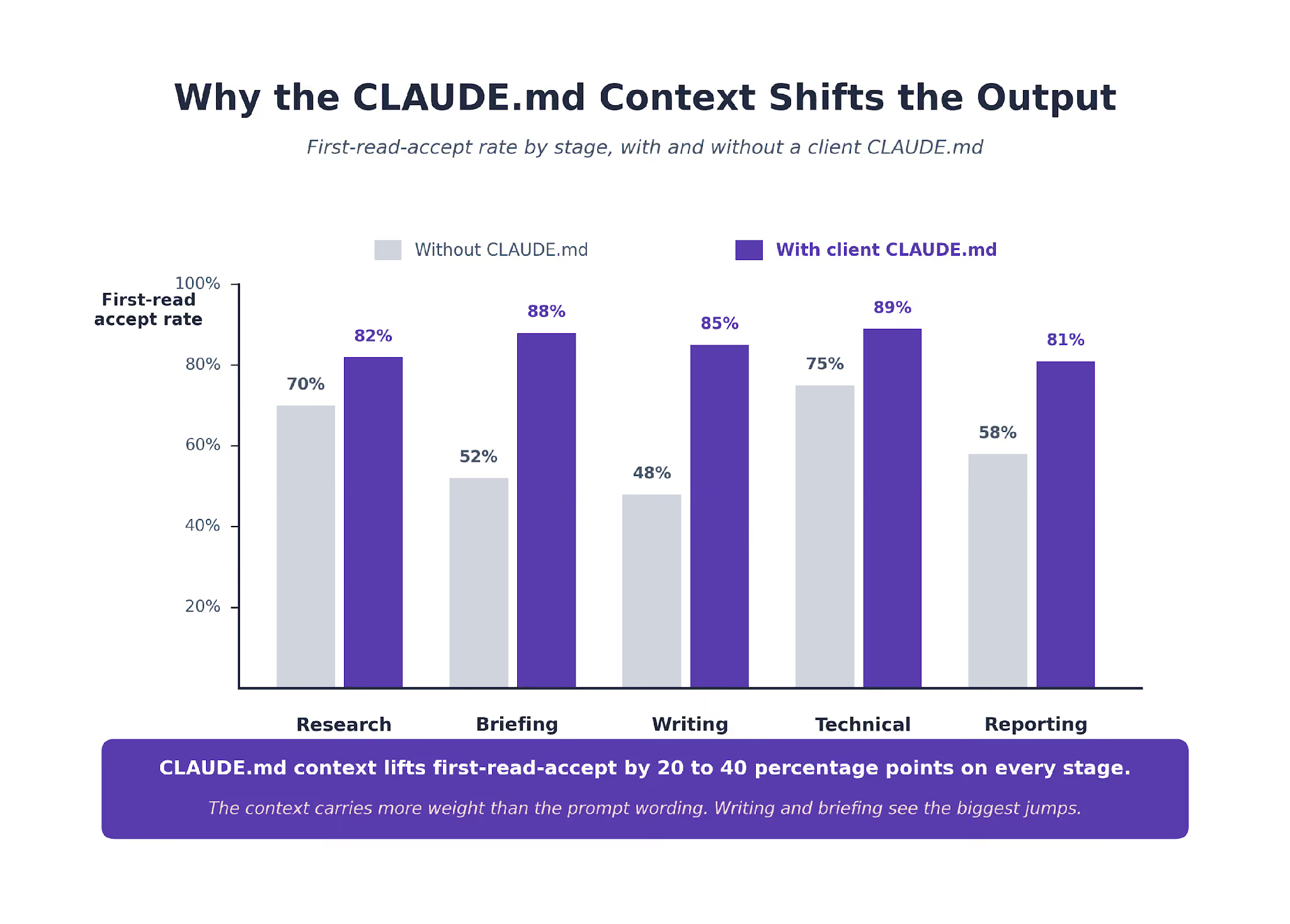
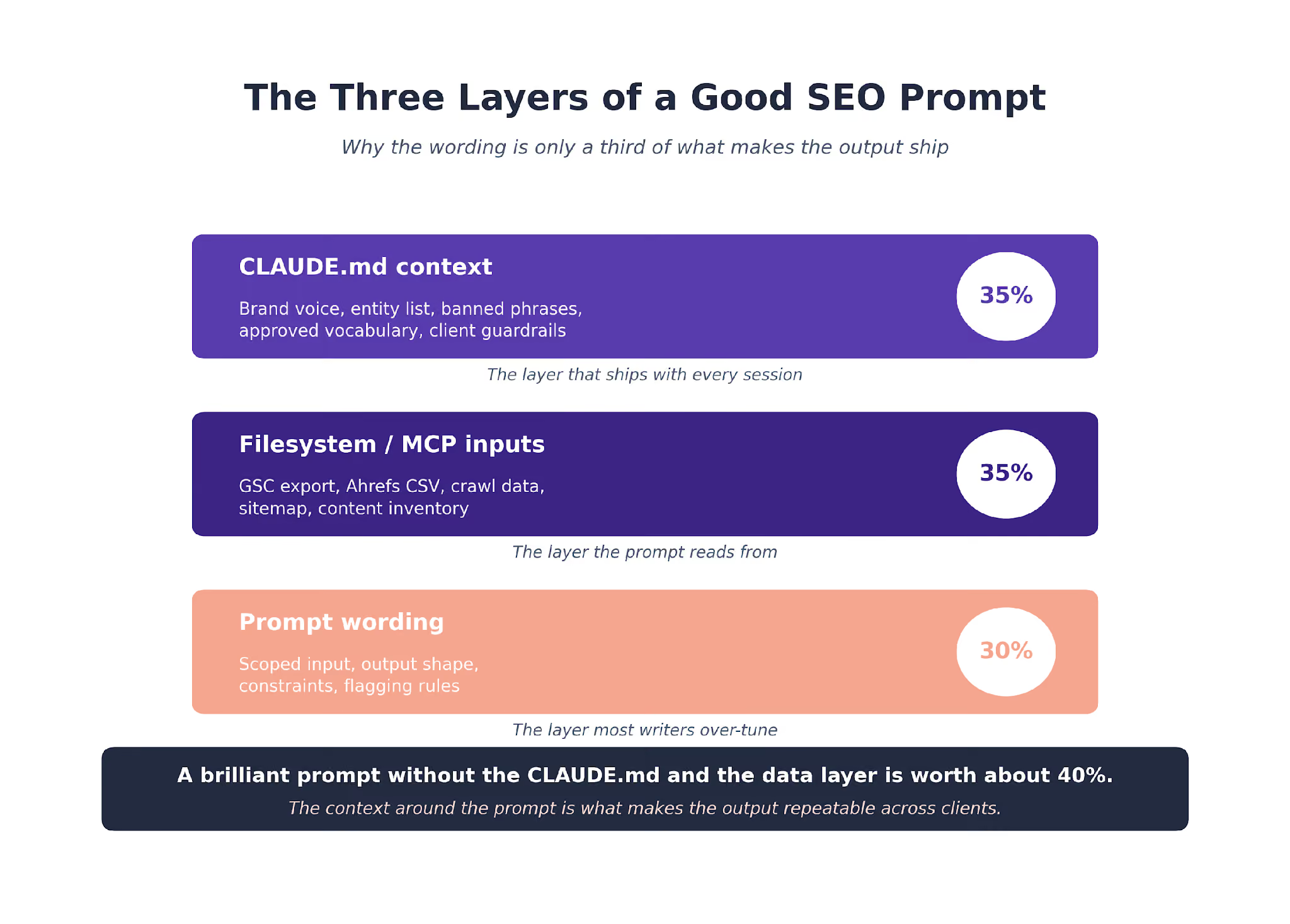
A good prompt without a good CLAUDE.md is worth about 40% of what a good prompt with a CLAUDE.md is worth.
The CLAUDE.md is where brand voice, banned phrases, approved vocabulary, and client context live. Claude reads it automatically every session. The prompt itself stays narrow because the context is already loaded.
We run the three-layer CLAUDE.md discipline across every client engagement. Agency layer, client layer, task layer. The task layer is where these 15 prompts sit as templates.
The broader framing of how prompt discipline connects to strategy sits in our AI SEO playbook and our SaaS SEO strategy guide.
What Our Prompt Library Data Shows
Across the B2B SaaS content and technical programs we run, prompts paired with a client CLAUDE.md produce first-read-accept rates about 30 percentage points higher than the same prompts without one. The context carries more weight than the wording. That has held steady across every client engagement we have measured.
The Search Engine Land breakdown of Claude Code as an SEO command center makes the same point from the data-analyst framing.
The prompt is one part of a three-part stack. The CLAUDE.md carries the voice and context. The filesystem MCP carries the data. The prompt is just the trigger.
How Prompts Get Added to the Library
A new prompt has to earn its slot the same way the original fifteen did. We run it on three different clients for at least a month before it joins the permanent library.
The evaluation looks at four things. Whether the prompt solved the problem it was meant to solve. Whether the output shape was consistent across clients.
Whether the time savings held once we moved past the honeymoon phase. And whether the prompt still worked after Claude model updates.
About one new prompt per quarter makes the cut. The ones that fail usually fail because they were too ambitious in scope, asked Claude to make a decision that should stay human, or produced output that looked polished but collapsed when pressure-tested.
The failure rate is useful data. It tells us where we are pushing the boundary of what Claude handles well and where we are trying to compress two stages into one that should stay separate. Every retired prompt informed at least one of the fifteen that stayed.
The meta-lesson: a prompt library is a living system, not a static document.
The prompts above reflect what worked in production this quarter. Next quarter's library will have one or two new prompts, one or two retired, and the same discipline around narrow scope and output shape across the whole set.
The Prompts We Do Not Publish
Some prompts stay internal. The ones tied to specific client business logic (pricing models, ICP conversion math, sales playbooks) do not generalize, and sharing them would compromise client confidentiality.
We share the structural pattern behind those prompts, not the prompts themselves. The pattern is: load client-specific context into the CLAUDE.md, write a narrow prompt that operates against that context, validate the output against the client's known business rules.
That pattern works across any vertical. The fifteen prompts above sit at the general-enough layer to publish without leaking client-specific logic.
Putting the Library Into Practice
The fifteen prompts above cover roughly 70% of the recurring tactical SEO work we run at TripleDart. The remaining 30% is bespoke enough that each client gets one or two prompts unique to their product, their vertical, or their audit scope.
The agency-level AI SEO agent we run packages several of these prompts into an autonomous workflow for clients that prefer the managed version.
The starter templates library we publish includes free versions of the brief, keyword research, and strategy templates referenced above.
Copy the fifteen below into a task-layer CLAUDE.md. Layer a client CLAUDE.md on top with their voice, entities, and approved vocabulary.
Run the prompts one at a time against a project with the right exports in the filesystem. The time savings stack up the third time you run each one.
The agency-wide version of this stack runs across 250+ B2B SaaS engagements. The pattern has carried across WeWork, Atlas, Payoneer, and SignEasy. Talk to our team to see how we would set it up for yours.
Frequently Asked Questions
How do you decide which prompts belong in the permanent library? Three filters. The prompt solves a problem we hit at least weekly. The output feeds a deliverable we ship. Someone on the team has run it enough times to tune the edge cases. Prompts that fail any of the three get retired.
Do these prompts work with Claude Sonnet or do you need Claude Opus? Most of them work with Sonnet. The writing and voice polish prompts benefit from Opus because instruction-following precision carries more weight on long-form output. The research, briefing, and technical prompts run fine on Sonnet.
How do you stop Claude from hallucinating inside these prompts? The CLAUDE.md rules enforce sourced claims. The prompt templates explicitly require every output field to trace back to input data. Every deliverable gets a human review pass before shipping. Hallucination still happens. The layered guard catches it.
Should we use Claude Projects or Claude Code to run these? Both. Claude Projects for individual practitioners where the CLAUDE.md lives in the project UI. Claude Code for team workflows where the CLAUDE.md stack and the prompt templates live on the filesystem and get versioned.
How much do these prompts save per week for a working SEO team? About 10 to 15 hours per strategist on the team, once the library is tuned. The savings concentrate in briefing, readability, and reporting. Technical and research prompts add another layer when the team owns enterprise sites.
Can we use these prompts for our agency client work? Yes, the patterns generalize. Each prompt needs a client-specific CLAUDE.md to produce output that matches the client's brand voice. Without the CLAUDE.md layer, the prompts produce generic B2B output.
Do these prompts change as Claude models update? Slightly. Claude Opus 4.7 handled the writing prompts with noticeably less voice drift than earlier versions. The research and technical prompts have held steady across model updates. The Anthropic Claude overview tracks the tier differences.
Where do new prompts come from? Client questions we could not answer in a reasonable time with the existing library. Every time we hit that wall, we draft a new prompt. About one new prompt per quarter joins the permanent library after two quarters of usage.