You pulled 400 keywords from Ahrefs for your cybersecurity client yesterday. Two hours later, you had a spreadsheet with intent labels, funnel stages, and priority scores. Today you need to do the same thing for your fintech client. And your HR SaaS client. And the logistics platform that onboarded last week.
The data pull takes five minutes. The synthesis takes 90. And the synthesis looks identical every single time.
That repetition is why keyword research is one of the strongest Skill candidates in B2B SaaS marketing. The judgment (which seeds to target, which clusters to prioritize, which competitors to analyze) stays human. The structured synthesis becomes automated.
The Synthesis Problem, Explained with a Real Example
Every SEO team has access to Ahrefs. Volume, CPC, difficulty, SERP features, ranking competitors, related terms: the data is all there. Keyword research tools are not the constraint.
The constraint is what happens after you pull the data.
Let us walk through a real example. You are doing keyword research for a cybersecurity SaaS client that sells endpoint detection and response (EDR) software to enterprise buyers. You enter "endpoint security" as a seed keyword in Ahrefs Keywords Explorer.
Ahrefs returns 2,847 matching and related terms. Now what?
Manual process (90 minutes):
- Export to CSV. Open in Google Sheets.
- Scan through 2,847 rows. Start labeling intent: "endpoint security software" is Commercial, "what is endpoint security" is Informational, "endpoint security vs antivirus" is Commercial Investigation.
- Realize 40% of the terms are consumer antivirus queries. Start deleting rows: "best free antivirus," "norton endpoint security home," "endpoint protection for mac personal use."
- Label funnel stages. "Endpoint security" is TOFU. "EDR software comparison" is MOFU. "CrowdStrike vs SentinelOne pricing" is BOFU.
- Score priority. High volume + low difficulty + commercial intent = HIGH. But wait, "endpoint security" has a KD of 87. Is it still HIGH priority? You need to weigh multiple signals.
- Identify quick wins. Cross-reference the client's existing rankings (positions 4 to 15) with commercial-intent terms. This requires a second Ahrefs pull.
- Group into clusters. "Endpoint security," "endpoint protection," and "endpoint detection and response" are the same cluster. "SIEM vs EDR" is a different one.
- Format everything. Create separate tabs. Add conditional formatting. Clean up.
That is 90 minutes of work that looks structurally identical for every client, every quarter.
Skill process (under 10 minutes):
Input: three seed keywords ("endpoint security," "EDR software," "endpoint detection and response") plus the client domain. The Skill pulls matching terms, related terms, and existing rankings via Ahrefs MCP. Claude receives all data, applies the Direction prompt, and outputs the four-tab XLSX. You review the output. Done.
For the foundational concepts behind Claude Skills and the DBS framework, start with our complete guide.
What the Four-Tab XLSX Output Actually Looks Like
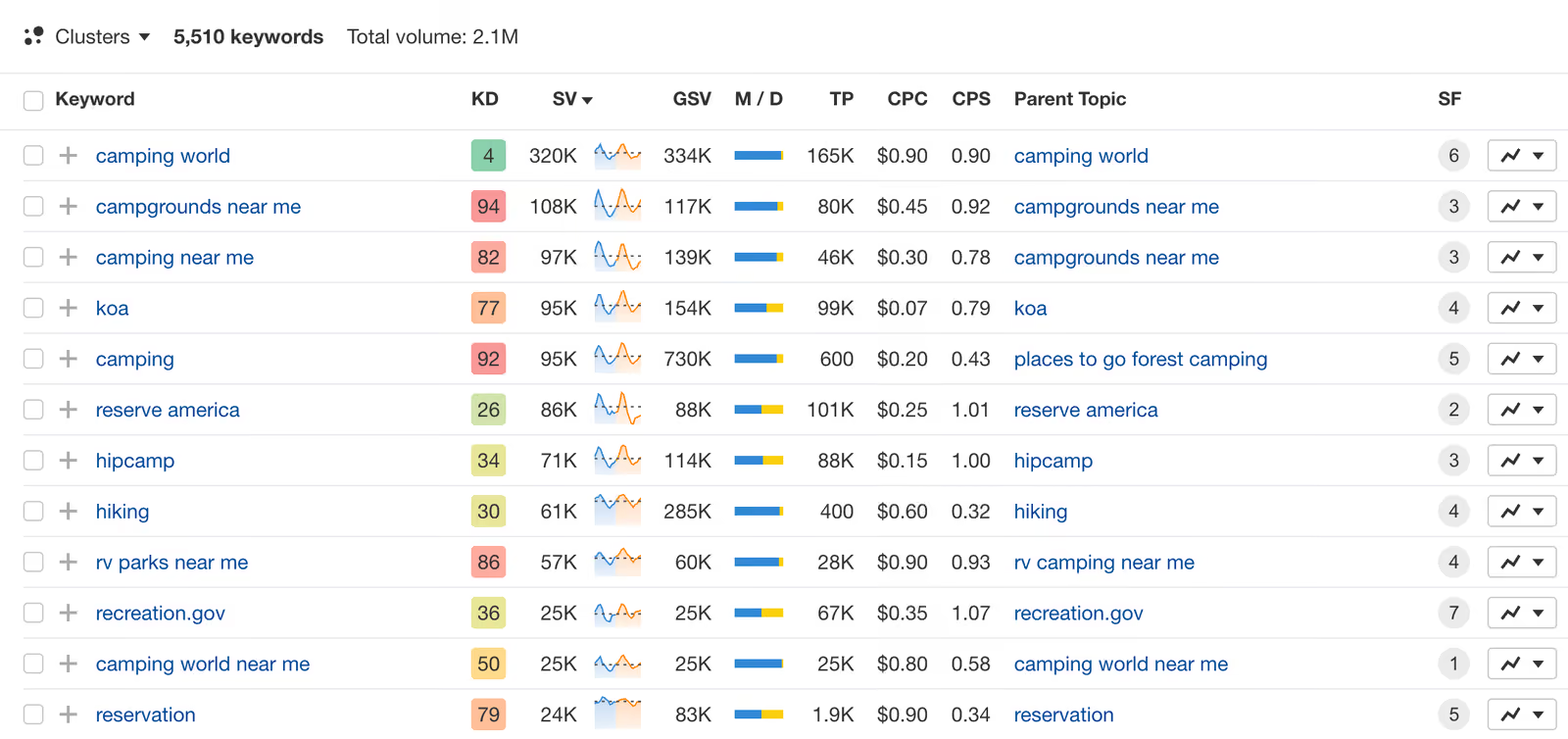
Tab 1: Full Clustered Keyword Set
Here is a sample of what the output table contains (excerpt from an actual cybersecurity client run):
Every row gets classified across five dimensions. The Priority column is where the real value lives: it weighs volume, difficulty, intent, and funnel stage simultaneously rather than sorting by any single signal.
Tab 2: Quick Wins
Terms the client domain already ranks for in positions 4 to 15 with commercial or transactional intent. These are the highest-ROI optimization targets.
Tab 3: Cluster Themes
Three to five recommended content clusters with aggregate volume.
Tab 4: Negative Suggestions
Terms to explicitly exclude from content targeting.
The Direction Prompt: Full Structure
The Direction prompt is what transforms raw Ahrefs data into strategically useful output. Here is the actual structure we use (with client-specific fields templated):
ROLE: You are a senior B2B SaaS SEO strategist performing keyword
research for [CLIENT NAME], a [INDUSTRY] company selling
[PRODUCT DESCRIPTION] to [BUYER PERSONA] at [COMPANY SIZE] companies.
CONTEXT:
- Exclude all consumer-intent queries. This is B2B only.
- Exclude branded terms for: [COMPETITOR BRAND LIST]
- The client's current domain authority is [DA]. Factor this
into difficulty assessments.
- Target market: [GEOGRAPHY]
TASK: Analyze and classify the keyword data provided below.
FOR EACH KEYWORD, CLASSIFY:
1. PRIMARY INTENT
- Informational: seeking to learn or understand
- Commercial Investigation: comparing options, reading reviews
- Transactional: ready to buy, sign up, or request demo
- Navigational: looking for a specific brand or page
2. FUNNEL STAGE
- TOFU: awareness stage, educational queries
- MOFU: consideration stage, comparison and evaluation queries
- BOFU: decision stage, pricing/demo/trial queries
3. CONTENT TYPE POTENTIAL
- Product Page: commercial terms best served by product/solution pages
- Blog Content: informational or educational terms best served
by blog posts or guides
4. PRIORITY SCORE
HIGH: volume > 500 AND KD < 50 AND (Commercial or Transactional
intent) AND client DA can realistically compete
MEDIUM: meets 2 of the 3 criteria above, OR high volume
informational terms essential for topical authority
LOW: consumer intent, very high KD relative to client DA,
or navigational terms owned by competitors
5. CLUSTER ASSIGNMENT
Group related terms into thematic clusters. Each cluster
should map to a content hub or pillar page strategy.
6. NOTES
Flag: ambiguous intent, mixed signals, seasonal patterns,
SERP features present (featured snippet opportunity, PAA),
or terms that need human review before classification.
ADDITIONAL OUTPUTS:
QUICK WINS: Identify all terms where the client domain ranks
positions 4-15 with Commercial or Transactional intent.
Calculate estimated click gain using CTR curve:
Pos 4: ~8% CTR, Pos 7: ~3.5% CTR, Pos 11-15: ~1% CTR.
If moving to Pos 3 (~10% CTR), click gain = (new CTR - current CTR)
x monthly volume.
CLUSTER THEMES: Recommend 3-5 content cluster topics.
For each: total aggregate volume, average KD, keyword count,
and recommended content approach (pillar + supporting articles).
NEGATIVE SUGGESTIONS: Terms that appear in the dataset but should
be excluded from content targeting. Provide reason for each.
OUTPUT FORMAT: Structured table with columns:
Keyword | Volume | CPC | KD | Intent | Funnel | Content Type |
Priority | Cluster | Notes
Separate tabs for: Full Set, Quick Wins, Cluster Themes, Negatives.
Two details in this prompt matter more than the rest.
First, "Exclude all consumer-intent queries. This is B2B only." Without this line, every keyword dataset gets polluted with individual-user queries. For "endpoint security," that means dozens of home antivirus terms your enterprise client would never target. For B2B keyword research, this filter is essential.
Second, the Priority score definition forces Claude to weigh multiple signals simultaneously. A high-volume, high-difficulty informational term might score MEDIUM even though volume alone would suggest HIGH. That multi-signal scoring is what makes the output strategically useful rather than another sorted list.
Step-by-Step Slate Build
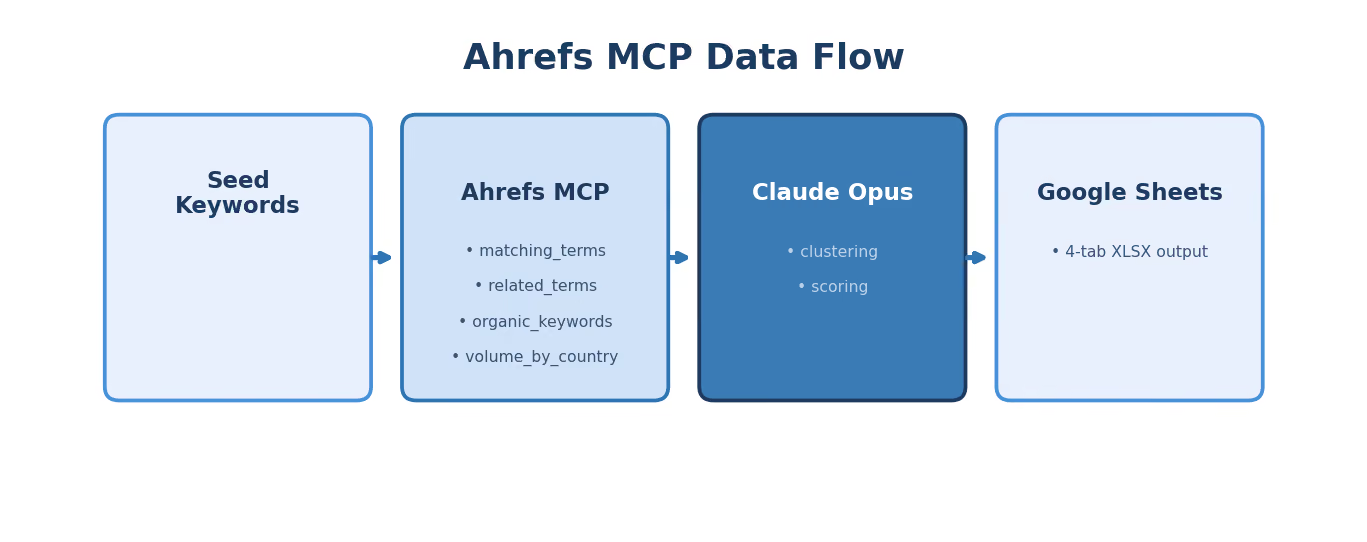
Here is how to build this Skill in Slate, node by node.
Node 1: Input
Create a new workflow. Add an Input node with two fields:
- Seed Keywords (multi-line text): the operator enters 3 to 5 seed terms, one per line
- Client Domain (text): the client's root domain for existing ranking analysis
Node 2: Ahrefs MCP, Matching Terms
Connect the Ahrefs MCP node. Use the keywords_explorer_matching_terms endpoint. Configure it to loop per seed keyword using iteration mode. This pulls all keyword variations that contain or closely match each seed.
For our "endpoint security" example, this single call returns 800+ matching terms with volume, CPC, difficulty, and SERP data.
Node 3: Ahrefs MCP, Related Terms
Add a second Ahrefs MCP node using keywords_explorer_related_terms for the top 3 seeds by volume. Related terms surface keywords that are semantically connected but do not contain the exact seed phrase. "Zero trust architecture" might surface as a related term for "endpoint security," which a matching-terms-only approach would miss.
Node 4: Ahrefs MCP, Existing Rankings
Add a third Ahrefs MCP node using site_explorer_organic_keywords for the client domain, filtered to positions 4 to 15. This is the data that powers the Quick Wins tab.
Why positions 4 to 15? Terms ranking 1 to 3 are already performing. Terms ranking below 15 need more than on-page optimization (they need new content or significant authority building). The 4 to 15 range is the sweet spot where targeted improvements to existing pages can move rankings into the top 3 without creating new content.
Node 5: Claude Analysis Node
Add a Claude node. Paste the full Direction prompt into the system message field. In the user message, concatenate the outputs from Nodes 2, 3, and 4.
For large keyword sets (500+ terms), use batch processing mode: a Python node splits the data into 200-term segments, each segment processes through a separate Claude call, and a merge step combines results. This prevents context window overload on large Ahrefs pulls.
Node 6: Google Sheets MCP
Connect the Google Sheets MCP node. Configure it to:
- Create a new spreadsheet named "[Client Name] Keyword Research [Date]"
- Write Tab 1: Full Clustered Set
- Write Tab 2: Quick Wins
- Write Tab 3: Cluster Themes
- Write Tab 4: Negative Suggestions
Node 7: Test and Validate
Run the Skill against three different seed sets. Validate:
- Are intent classifications accurate? Spot-check 20 random terms.
- Are consumer terms properly excluded?
- Do quick wins match what you see in Ahrefs manually?
- Are cluster groupings logical?
If accuracy drops below 90% on any dimension, refine the Direction prompt and retest.
The Quick Wins Math: Why This Tab Has the Highest ROI
The Quick Wins tab shows keywords your domain already ranks for in positions 4 to 15 with commercial intent. Here is why the math makes this the single highest-ROI output from any Skill we run.
Moving a page from position 11 to position 4 for a 1,000-volume commercial keyword:
- Position 11 CTR: approximately 1.0% = 10 clicks/month
- Position 4 CTR: approximately 8.0% = 80 clicks/month
- Click gain: +70 clicks/month of high-intent traffic
Now multiply across 15 quick-win terms with an average volume of 600:
- Average click gain per term: ~40 clicks/month
- Total: 600 additional high-intent clicks per month
- At a 3% conversion rate with $150 average deal value... that is pipeline worth calculating.
And the work to capture those gains? On-page optimization of existing content. No new pages needed. No new backlinks required (in most cases). Just targeted improvements: better title tags, expanded content sections, added schema markup, and internal links from high-authority pages.
We run quick wins analysis at the start of every new client engagement. It is the low-hanging fruit keyword strategy that produces results fastest.
Quick wins also feed directly into our SEO Re-Optimization Skill (currently at v16), a separate workflow that takes an underperforming URL and produces a full re-optimization playbook. The keyword research Skill identifies the targets. The re-optimization Skill executes the improvements.
Vertical-Specific Configuration Examples
The Direction prompt variant is where vertical intelligence lives. Here is what changes for different verticals.
Fintech Configuration
ADDITIONAL EXCLUSIONS:
- Consumer banking queries (personal savings, checking account)
- Retail investment queries (how to buy stocks, best ETF)
- Cryptocurrency speculation queries (bitcoin price prediction)
ADDITIONAL CLASSIFICATION:
- Audience Type: Consumer / SMB / Enterprise / Regulated Institution
- Compliance Flag: terms requiring regulatory context (PCI DSS,
SOX, AML/KYC) get flagged for compliance review
PRIORITY ADJUSTMENT:
- Terms targeting regulated institutions get +1 priority boost
(these are higher-value accounts with longer sales cycles)
For teams doing fintech SEO, the audience type classification is the difference between targeting a retail banking audience (wrong) and targeting the compliance officers at commercial banks (right).
Cybersecurity Configuration
ADDITIONAL EXCLUSIONS:
- Consumer antivirus queries (home use, personal, free antivirus)
- Hacking tutorial queries (how to hack, pentesting for beginners)
- Certification-seeking queries (CISSP exam, CompTIA Security+)
ADDITIONAL CLASSIFICATION:
- Persona: CISO / Security Engineer / IT Manager / GRC Analyst
- Threat Category: map to MITRE ATT&CK framework where applicable
PRIORITY ADJUSTMENT:
- CISO-persona terms get +1 priority boost (decision-maker)
- Terms with featured snippet opportunity get flagged for
content optimization priority
For cybersecurity SaaS SEO, the persona segmentation prevents the common mistake of writing content that speaks to security engineers when the buying decision sits with the CISO. Different persona, different content angle, different keyword priority.
HR SaaS Configuration
ADDITIONAL EXCLUSIONS:
- Job seeker queries (job openings, resume templates, interview tips)
- Personal HR queries (how to file for unemployment, wrongful termination)
ADDITIONAL CLASSIFICATION:
- Company Size Relevance: SMB (< 200 employees) / Mid-Market
(200-2000) / Enterprise (2000+)
- HR Function: Recruiting / Payroll / Benefits / Compliance / L&D
PRIORITY ADJUSTMENT:
- Terms matching client's core HR function get +1 priority
- Enterprise-relevant terms get +1 for enterprise-focused clients
The vertical configuration is not optional decoration. Without cybersecurity-specific exclusions, a keyword pull for "endpoint security" returns dozens of consumer antivirus terms. Without fintech exclusions, "payment processing" mixes B2B payment infrastructure with consumer payment app queries. Every vertical has its own noise signature.
Chaining to the Content Brief Skill
The keyword research output is designed to feed directly into the content brief Skill. The chain works like this:
- Keyword research Skill outputs the four-tab XLSX.
- The strategist reviews Tab 1 (full clustered set) and approves a set of HIGH priority keywords.
- Those approved keywords flow into the content brief Skill as batch input.
- The brief Skill processes each keyword through its 25-node pipeline (SERP scraping, competitor analysis, persona research, Claude Sonnet 4 synthesis).
- Output: one writer-ready brief per keyword, delivered to Notion or Google Docs.
We chain these two Skills for every new client onboarding. Keyword research runs first. The strategist spends 30 minutes reviewing and approving keywords. Then batch brief generation produces 20 briefs in 25 minutes.
From seed keywords to a full content calendar of writer-ready briefs: under an hour of human time.
The chain extends further downstream. Briefs feed into draft generation. Drafts feed into fact-checking. Fact-checked content feeds into humanization, then internal linking, then external linking, then publication. The keyword research Skill is the first link in a chain that automates the entire content lifecycle.
Common Mistakes When Building This Skill
Not testing B2B exclusion logic.
Run the Skill against a seed keyword you know has heavy consumer overlap (like "endpoint security" or "project management"). If consumer terms appear in Tab 1 with anything other than LOW priority, your Direction prompt needs tighter exclusion rules.
Sorting by volume instead of priority.
Volume is one signal. The Skill's priority score weighs volume, difficulty, intent, and the client's competitive position simultaneously. A 2,000-volume informational term with KD 78 is often less valuable than a 400-volume commercial term with KD 32. Train your team to sort by Priority, not Volume.
Skipping the quick wins tab.
Teams focused on new content production often overlook the quick wins tab entirely. That is a mistake. Improving existing rankings from positions 4 to 15 is almost always higher ROI than creating new content for the same terms. Start with quick wins, then move to new content strategy.
Using generic Direction prompts across verticals.
A Direction prompt that works for HR SaaS will produce noisy output for cybersecurity. The 30 minutes you spend writing a vertical-specific Direction variant saves hours of manual cleanup downstream.
TripleDart's keyword research Skill connects Ahrefs MCP to Claude for automatic intent classification, funnel staging, priority scoring, and quick wins identification. We run it at the start of every client engagement and quarterly thereafter, feeding the output directly into our 25-node content brief pipeline. If your team spends hours every week on the same keyword synthesis work, we can show you what the automated version produces and how to configure it for your verticals.
Book a meeting with TripleDart
Try Slate here: slatehq.com
Frequently Asked Questions
Does this Skill replace Ahrefs' own keyword clustering feature?
No. It adds a strategy layer on top of Ahrefs data: B2B-specific intent classification, funnel staging, multi-signal priority scoring, quick wins identification, and negative term flagging. Ahrefs provides the raw data. The Skill provides the analysis that turns data into a content plan.
Can the Skill handle non-English keyword research?
Yes. Ahrefs supports 170+ countries. Specify the target country in the MCP node configuration and the target language in the Direction prompt. The classification logic works across languages, though you may need to adjust vertical exclusion terms for the target language.
What is the maximum keyword set size per run?
Up to 300 to 400 terms per Claude pass. For larger sets, the batch processing mode splits data into 200-term segments, processes each separately, and merges results. A 1,000-term dataset takes about 15 minutes with batching.
Should I use competitor domains as seed inputs?
Yes, and it is often the most efficient strategy. Feed a competitor's domain into site_explorer_organic_keywords and run their ranking terms through the Skill. Instant gap identification: terms they rank for that you do not.
How do I prioritize quick wins vs. new content?
Quick wins first, almost always. Improving existing rankings from positions 4 to 15 has faster time-to-impact and lower effort than creating new content for the same terms. New content from topic clusters fills gaps that quick wins cannot address.
How often should keyword research refresh?
Quarterly minimum. Plus ad hoc runs when launching new product areas, entering new verticals, or when significant SERP changes suggest the competitive landscape has shifted. Each refresh takes under 10 minutes per seed set, so the cost of running more frequently is negligible.
Can this output feed into paid search campaigns too?
Yes. The intent classification and priority scoring are directly useful for Google Ads keyword planning. Commercial and transactional terms with HIGH priority are natural candidates for paid search, especially when organic ranking will take months to build. The funnel stage labels also help with ad group organization and bid strategy.
How does the Skill handle keywords with ambiguous intent?
The Direction prompt instructs Claude to flag ambiguous terms in the Notes column for human review rather than force-classifying them. Forcing a classification on genuinely ambiguous terms leads to misallocated content resources. The strategist makes the final call.