Claude + Meta Ads MCP: The Complete Guide to AI-Powered Paid Social Management

Key Takeaways
- MCP gives Claude live access to your Meta Ads account, pulling real-time campaign data, creative performance, and audience insights directly, without manual exports or copy-pasting.
- Setup takes under 10 minutes with no code required. The Zapier route connects your Meta Ads account to Claude in five steps, and the integration persists across all future conversations.
- Meta Ads benefits from AI reasoning more than Google Ads does, because it's a multivariate optimization problem across creative, audience, placement, and timing, exactly where Claude adds the most value.
- Creative fatigue and audience overlap are the highest-ROI use cases. Claude can flag declining CTR against rising frequency and identify ad sets bidding against each other, catching issues most teams miss until budget is already wasted.
- Claude is an analyst, not an autonomous operator. All write operations require explicit human confirmation, and strategic decisions around brand, creative direction, and signal-loss interpretation still require human judgment.
If you run Meta Ads, you already know the drill. Living inside Ads Manager, bouncing between campaign dashboards, creative reports, and audience insights tabs, all before you can form a single actionable takeaway.
Now layer on the signal loss from iOS 14.5+, the move toward Advantage+ automation, and the constant pressure to test new creatives. You have a platform generating massive amounts of data but making it painfully slow to act on.
That changes with the Meta Ads Model Context Protocol (MCP) integration for Claude.
MCP is an open protocol developed by Anthropic that creates a standardized, secure bridge between Claude and external services like Meta Ads. Instead of passively answering questions from its training data, Claude can now reach directly into your live ad account, retrieve real-time metrics, and return analysis in plain English, all inside a single conversation.
This guide covers exactly how Claude and Meta Ads MCP work together, how to set it up (two routes, both under 10 minutes), the use cases that matter most for B2B SaaS advertisers, and the prompts that are driving the best results.
What Is MCP and Why Does It Matter for Meta Ads?
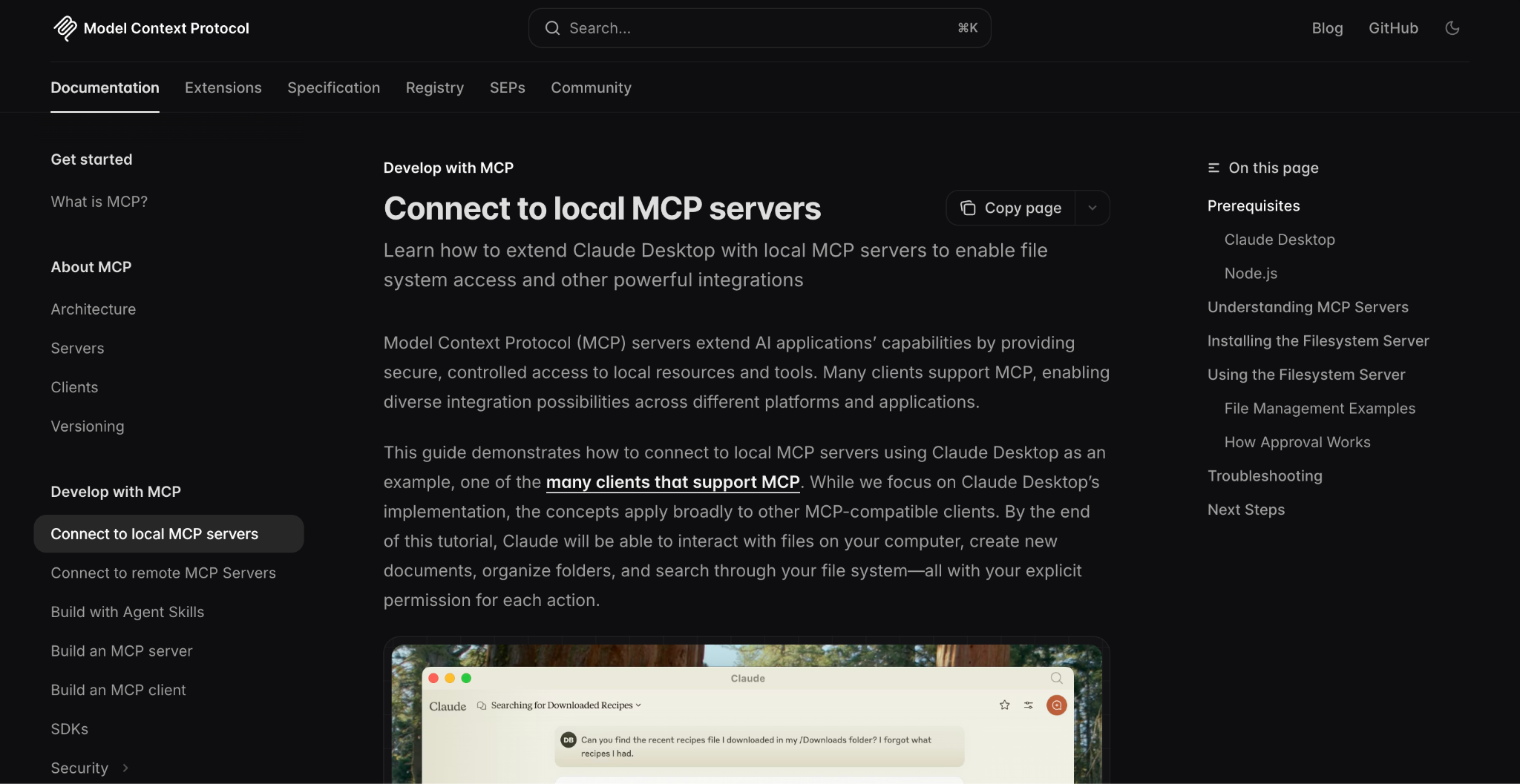
Think of Model Context Protocol (MCP) as a universal adapter. It's Anthropic's open standard for connecting AI assistants to external data sources and tools. letting Claude "plug into" platforms like Meta Ads without requiring custom API integrations for every request.
Before MCP, AI tools had two hard limits when applied to paid social:
- They could only work with data you manually copied and pasted into the chat window.
- Their knowledge was frozen at their training cutoff date, useless for understanding yesterday's ad performance.
With MCP, Claude bypasses both limitations. It connects directly to your Meta Ads account via the Meta Marketing API, pulls real-time performance data, and immediately analyzes it.
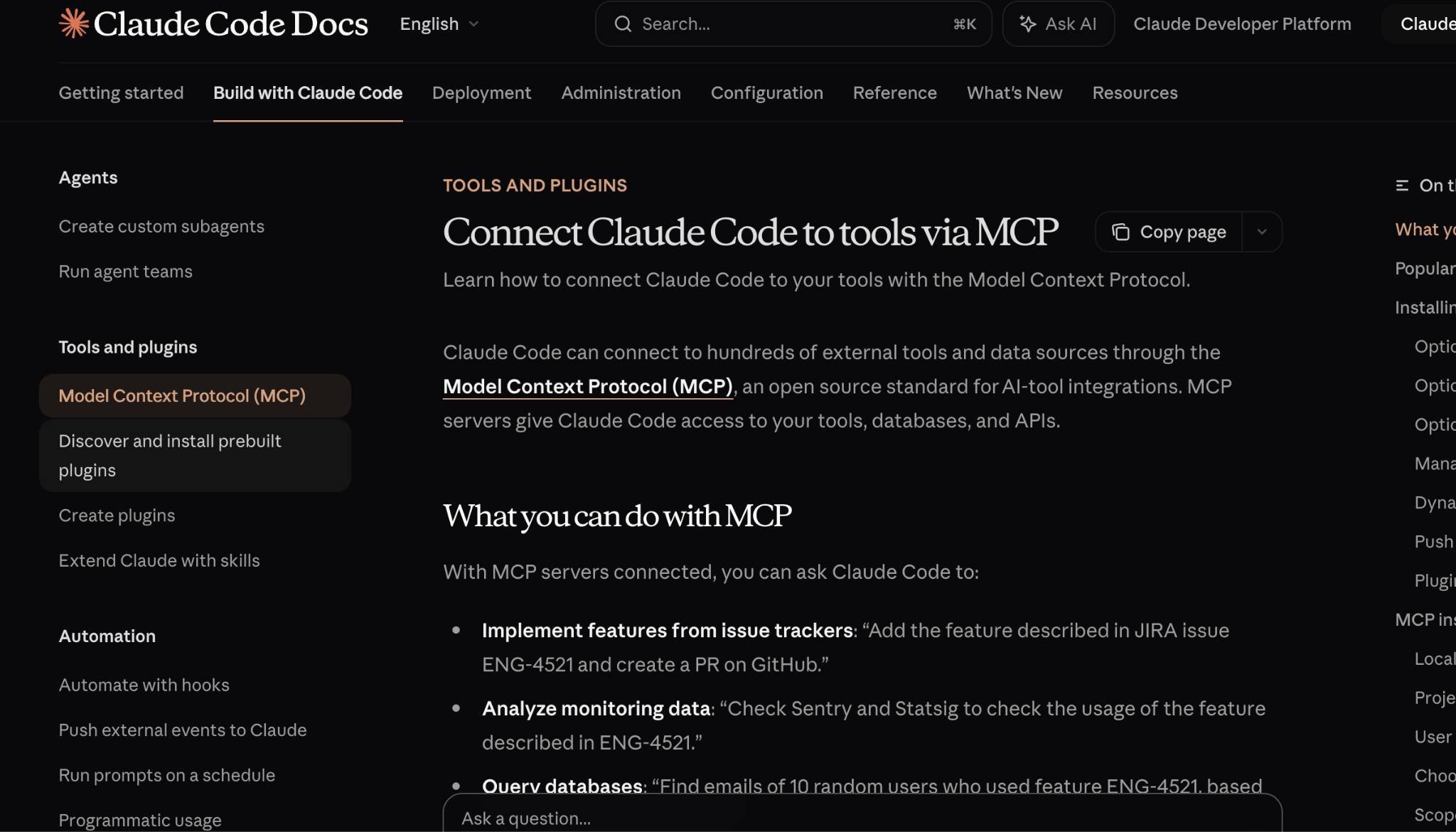
And here's what makes this interesting for paid social.
Meta Ads benefits from this even more than Google Ads does.
Why?
Because Meta is a creative-heavy, audience-heavy platform where the variables that drive performance (ad fatigue, audience overlap, frequency caps, attribution windows) are harder to monitor manually.
Google Ads is largely keyword-driven. Meta Ads is a multivariate optimization problem across creative, audience, placement, and timing, and that is exactly where AI reasoning adds the most value.
The practical result: Claude becomes a paid social strategist with read (and optional write) access to your actual account, not a generic advisor recycling hypothetical best practices.
How to Set It Up: Step-by-Step
There are two ways to connect Claude to your Meta Ads account. Choose the one that matches your comfort level. Most marketers start with Route A. It takes about five minutes and requires zero technical knowledge.
Route A: No-Code Setup via Zapier (Recommended for Marketers)
What you'll need: A Claude account (Pro or above), a Meta Ads account with admin access, and a free Zapier account.
Step 1: Open Claude's Integrations Settings
Go to claude.ai, click your name in the bottom-left corner, and select Settings. Navigate to the Connectors tab. This is where all your MCP connections will live.
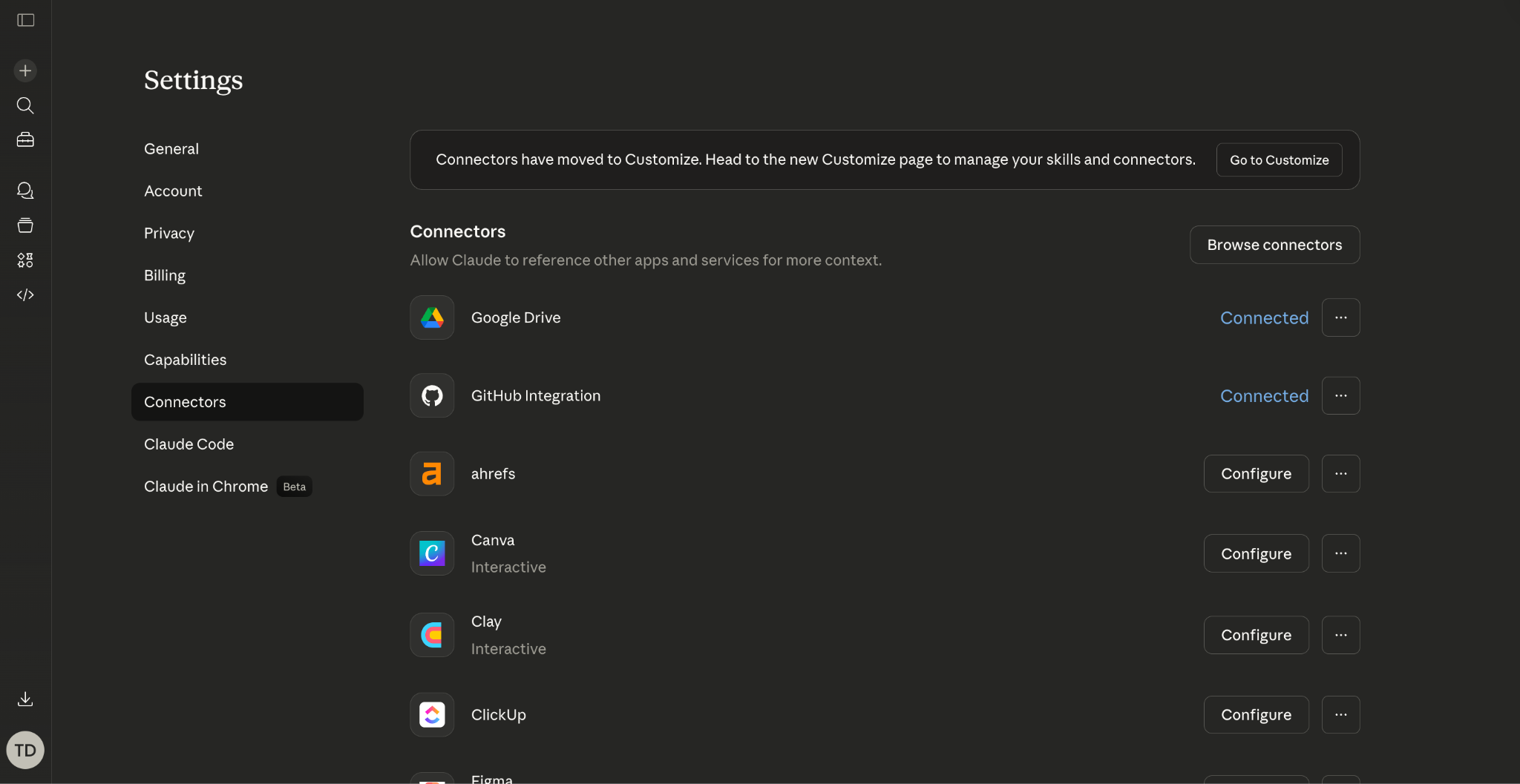
Claude Settings > Connectors page. Click 'Browse connectors' to see pre-built integrations.
Step 2: Find the Zapier MCP Connector
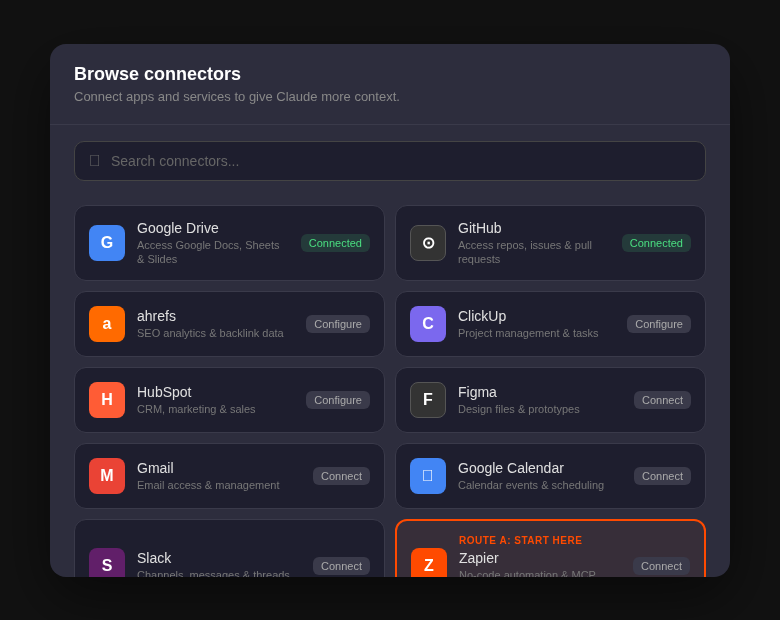
Click "Add Integration" or "Browse connectors," then look for the link to pre-built connectors. This takes you to Anthropic's directory of ready-made MCP integrations. Scroll down and select Zapier, which will redirect you to mcp.zapier.com.
Step 3: Create a New MCP Server in Zapier
Inside Zapier's MCP dashboard, click "New MCP Server." Give it a name like "Meta Ads - My Account." Then click "Add Tools" and search for Facebook Ads (Meta Ads). Zapier will walk you through connecting your Facebook account and selecting which Meta Ads account Claude should access.
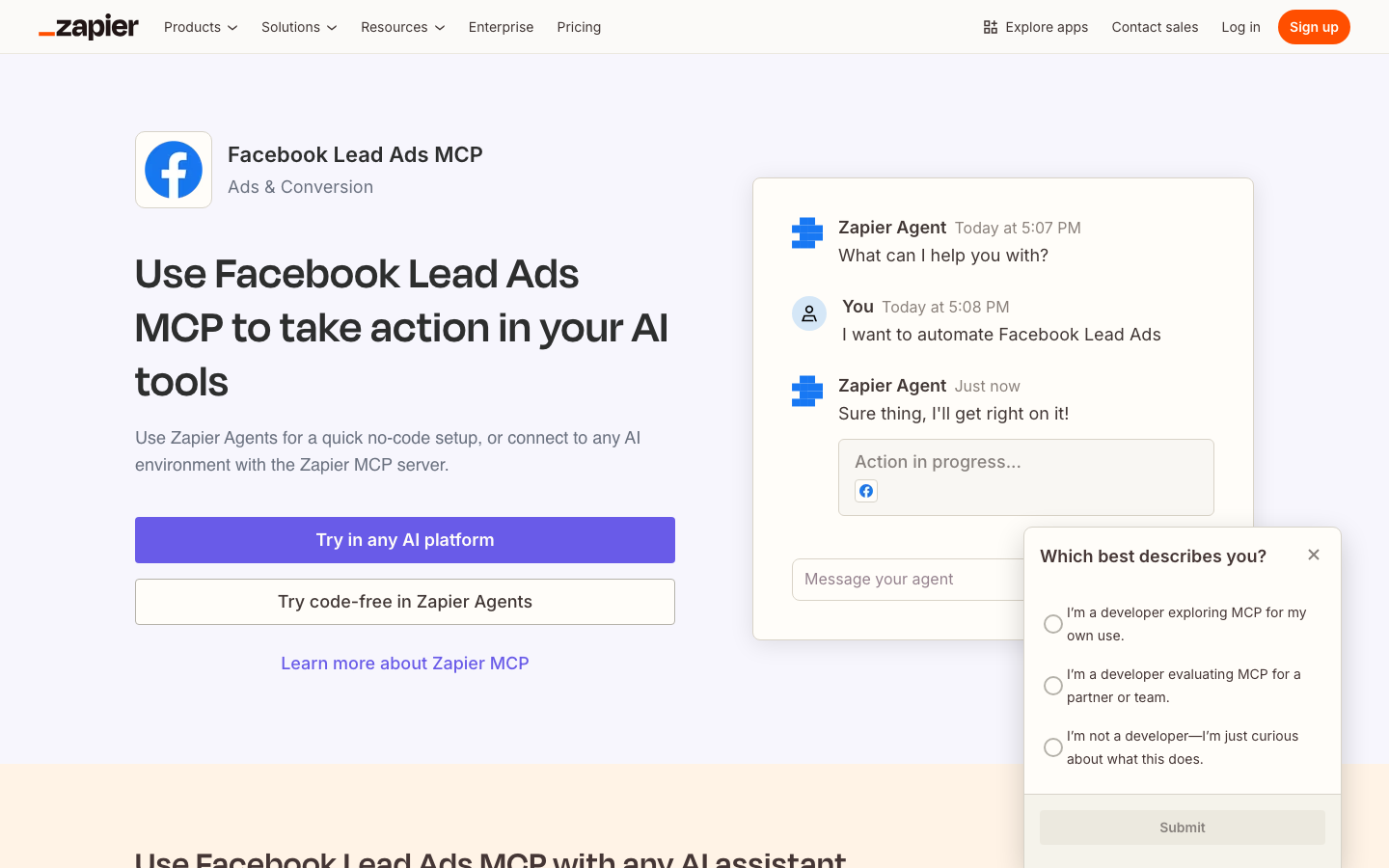
Zapier's Facebook Lead Ads MCP page showing the 'Try in any AI platform' setup option.
Step 4: Copy Your Integration URL
Once your Meta Ads account is connected, navigate to the "Configure" tab inside Zapier. You'll see a unique integration URL. Copy it. This is the bridge Claude will use to talk to your account.
Step 5: Paste the URL into Claude
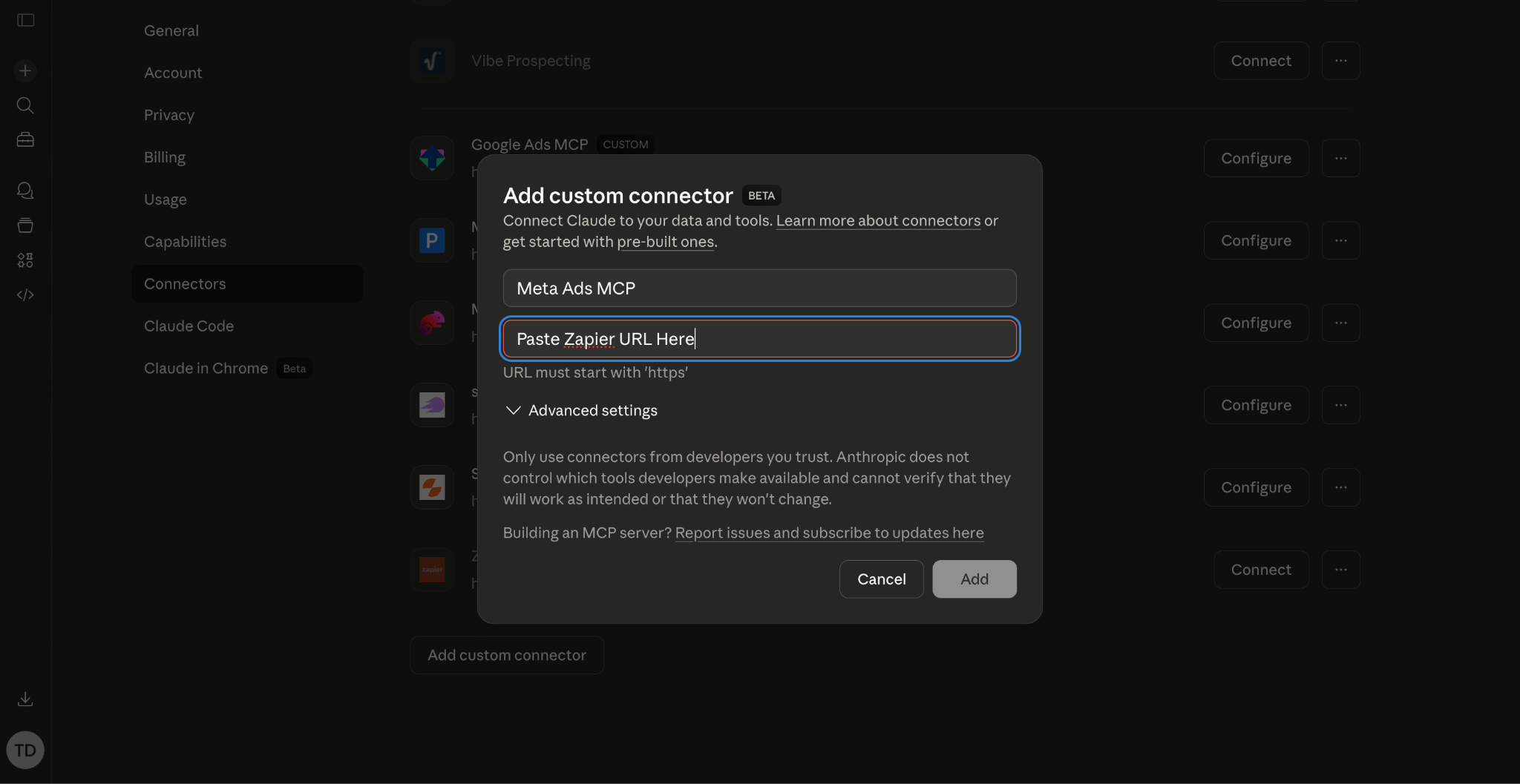
Go back to claude.ai/settings/connectors and click "Add custom connector." Paste in the URL you copied from Zapier and save. You should see the Meta Ads integration appear as active in your list.
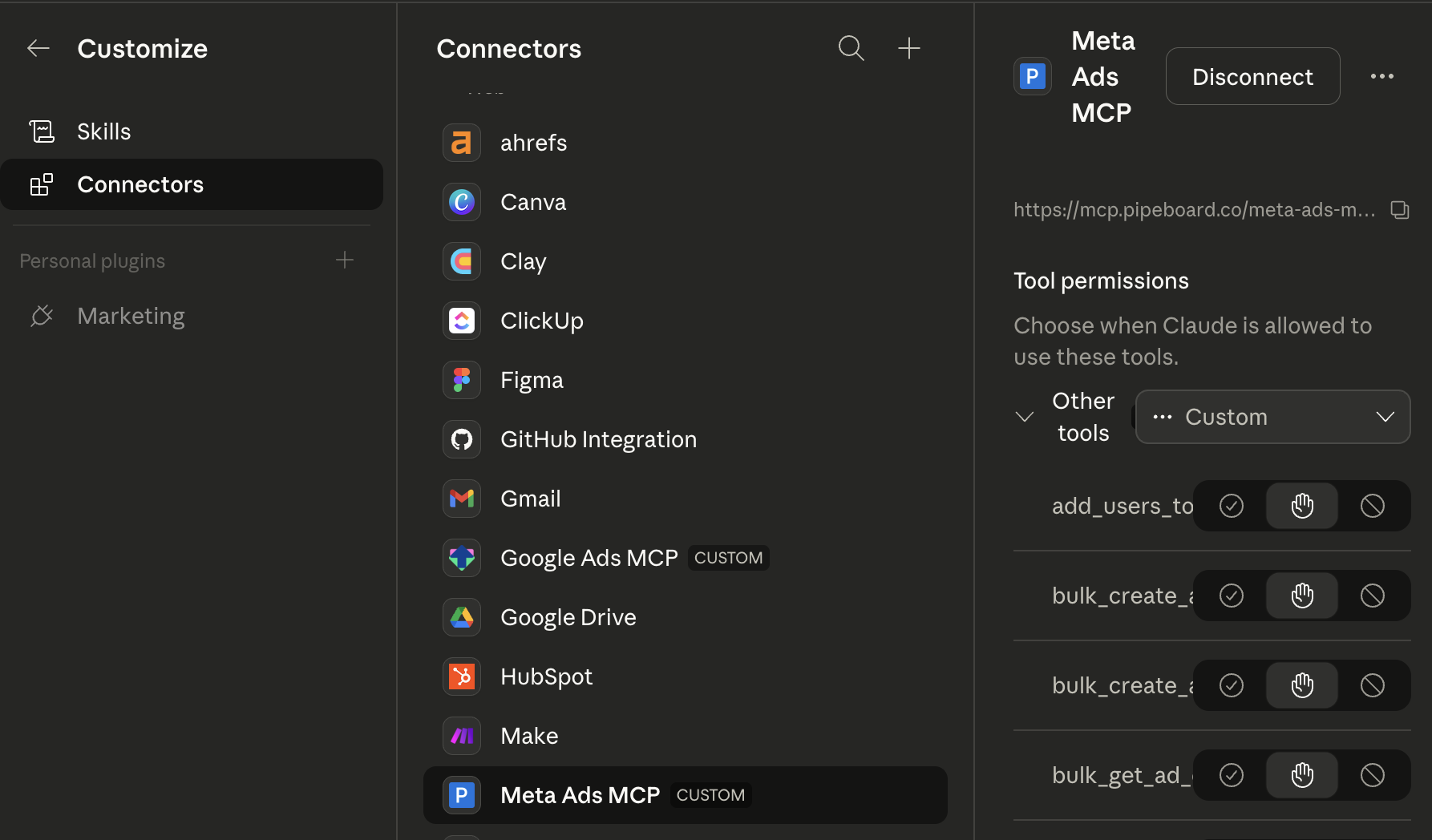
Claude Connectors page showing Meta Ads MCP configured as a custom connector with the integration URL visible.
Step 6: Start a New Chat and Test It
Open any new conversation in Claude. Make sure the integration is toggled on in the tools panel. Then try:
"Pull the last 7 days of campaign performance from my Meta Ads account and give me a summary."
If it returns real data, you're live.
Here's what real output looks like when Claude pulls data from an active Meta Ads account:
That's not a hypothetical example. That's real data pulled live from a TripleDart-managed Meta Ads account through the MCP connection. The remarketing campaign is delivering the highest CTR (1.77%) at the lowest CPC ($1.24), while the awareness campaign drives 310,646 unique users at just $3.10 CPM. The prospecting conversion campaign generated 30 registrations at $77.08 per registration.
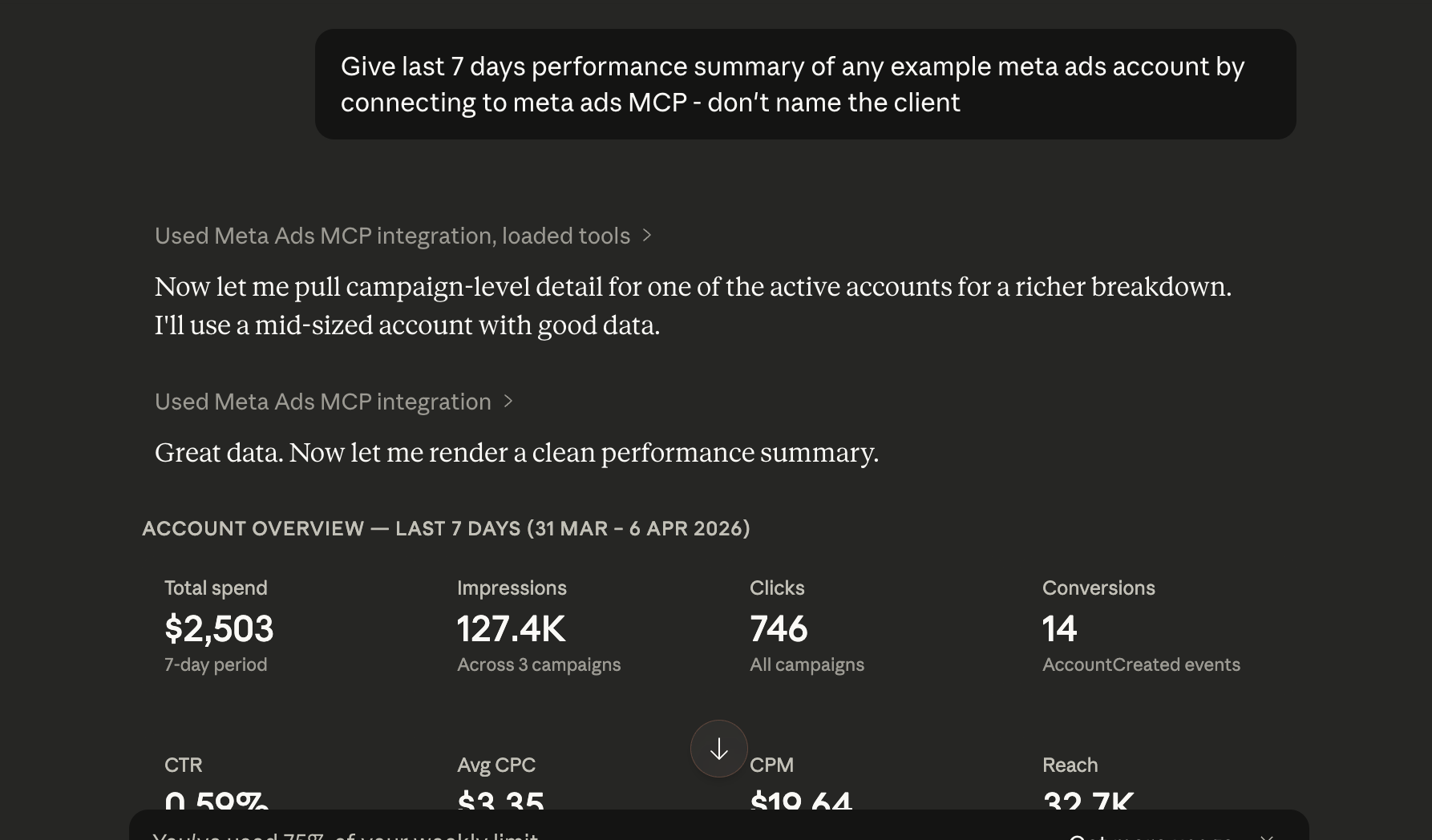
Claude returning real campaign performance data from a connected Meta Ads account.
Tip: You only need to do this setup once. The integration stays connected across all future Claude conversations.
Alternative no-code connectors: If you prefer a different connector, Adzviser, Windsor.ai, and Flyweel also offer Meta Ads MCP integrations with similar no-code setup flows. Adzviser starts at $34.99/month, Windsor.ai at $19/month, and Flyweel offers a free tier. The setup process is nearly identical: connect your Meta Ads account, get a URL, paste it into Claude's connectors.
Route B: Developer Setup via Direct MCP Server
This route is for teams that want deeper control, the ability to run custom Meta Marketing API queries, or prefer not to route data through a third party like Zapier. It requires someone comfortable with a terminal, but the steps are still manageable.
Step 1: Choose Your MCP Server
Several open-source options are available on GitHub, including pipeboard-co/meta-ads-mcp (745+ stars) and brijr/meta-mcp. Alternatively, managed platforms like Composio host the server for you and handle the technical plumbing.
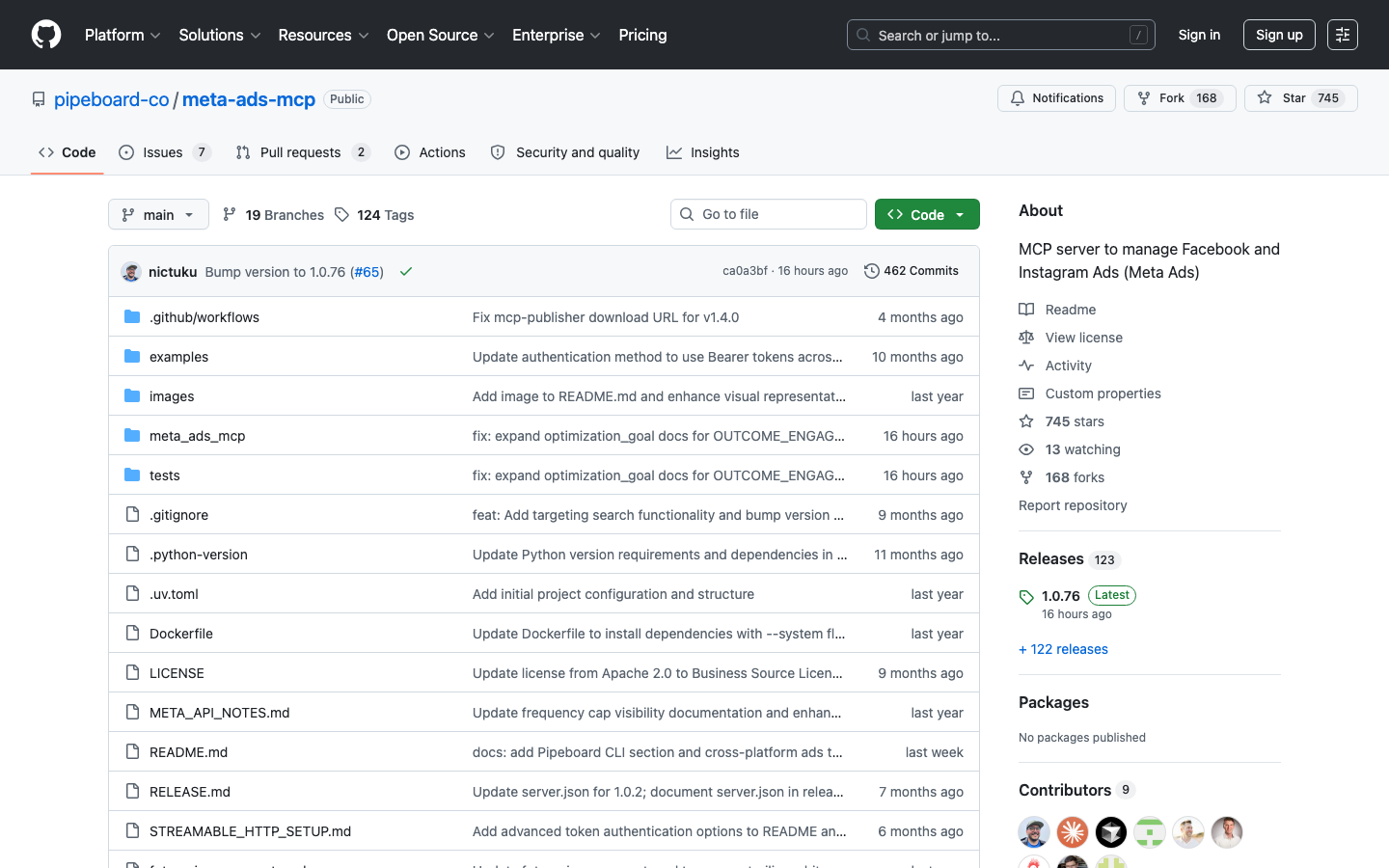
The open-source meta-ads-mcp repository on GitHub: 29 tools covering campaign reads, ad creation, and insights.
Step 2: Get Meta Ads API Access
Create a Meta Developer App at developers.facebook.com. You will need:
- A Meta Business account with admin access to your ad accounts
- An app with the Marketing API product enabled
- A system user access token with ads_read and ads_management permissions
Step 3: Configure and Run the Server
Clone the MCP server repository, add your API credentials to the configuration file, and run the server locally (or deploy it to a cloud host like Railway or Render). The server will expose an endpoint that Claude connects to.
git clone https://github.com/pipeboard-co/meta-ads-mcp.git
cd meta-ads-mcp
cp .env.example .env
# Add your META_ACCESS_TOKEN to .env
npm install && npm start
Step 4: Connect to Claude Desktop
In the Claude Desktop app, open the configuration file (claude_desktop_config.json) and add the MCP server entry with your server's URL. Save the file and restart Claude Desktop.
{
"mcpServers": {
"meta-ads": {
"command": "node",
"args": ["path/to/meta-ads-mcp/index.js"],
"env": { "META_ACCESS_TOKEN": "your_token_here" }
}
}
}
Step 5: Verify the Connection
Start a new conversation in Claude Desktop. You'll see Meta Ads tools listed in the available tools panel. Run a quick test: ask Claude to list all campaigns in your account to confirm data is flowing.
Tip: Agencies managing multiple client accounts will find the developer route worth the extra setup. It allows Claude to query across Manager (MCC) accounts and gives full access to the Meta Marketing API, including custom queries and write operations.
Core Use Cases
1. Real-Time Campaign Performance Analysis
The most immediate use case is replacing your morning Ads Manager ritual.
Instead of opening Meta Ads Manager, navigating to campaign reports, and interpreting charts, you simply ask Claude what happened. Claude queries your account, aggregates the data, and returns a plain-English narrative with the key takeaways.
For accounts running dozens of campaigns across prospecting, retargeting, and awareness layers, this saves meaningful time every single day.
2. Creative Fatigue Detection and Rotation Signals
Creative fatigue is the silent budget killer on Meta. An ad that crushed it in week one quietly bleeds money by week three as frequency climbs and CTR declines.
Claude can pull ad-level insights with time breakdowns, identify ads where CTR has declined week-over-week while frequency has increased, and flag the specific creatives that need rotation.
This is one of the highest-ROI workflows because most teams catch fatigue too late.
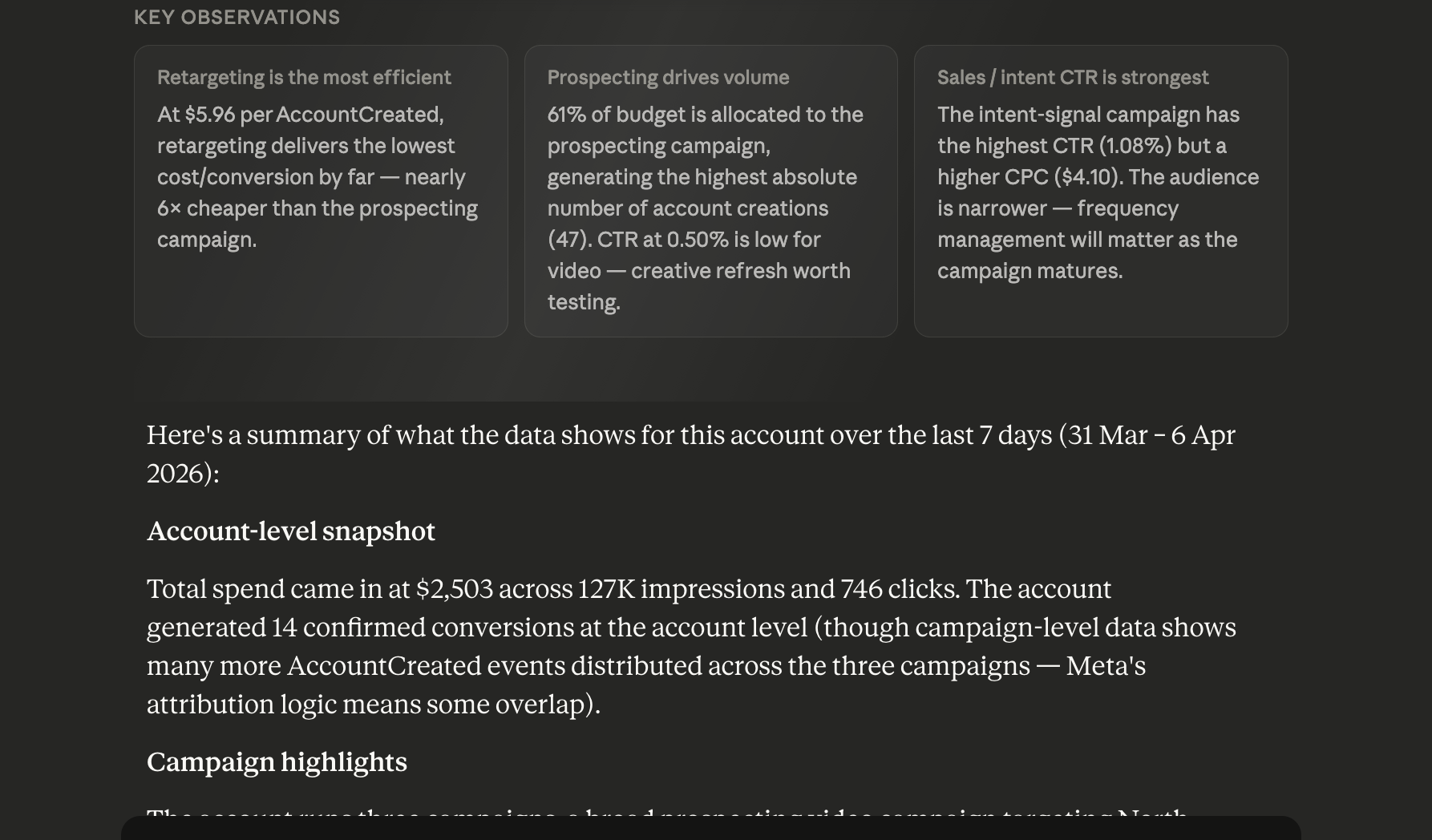
Claude flagging creative fatigue: declining CTR paired with rising frequency, with rotation recommendations.
3. Audience Overlap Analysis
Running multiple ad sets targeting similar audiences? You're probably bidding against yourself without knowing it. Claude can pull ad set targeting details and identify where audiences overlap across your campaign structure.
In a real account analysis, Claude identified that two prospecting ad sets (one targeting five 1% lookalike audiences, the other targeting interests like "Software as a service" combined with executive job titles like CMO and VP of Marketing) had no cross-exclusion.
Users matching both criteria were in both audiences, driving up auction costs. Claude recommended adding the lookalike audiences as exclusions in the interest-based ad set.
That analysis took 15 seconds versus 20 minutes of clicking through each ad set's targeting panel in Ads Manager.
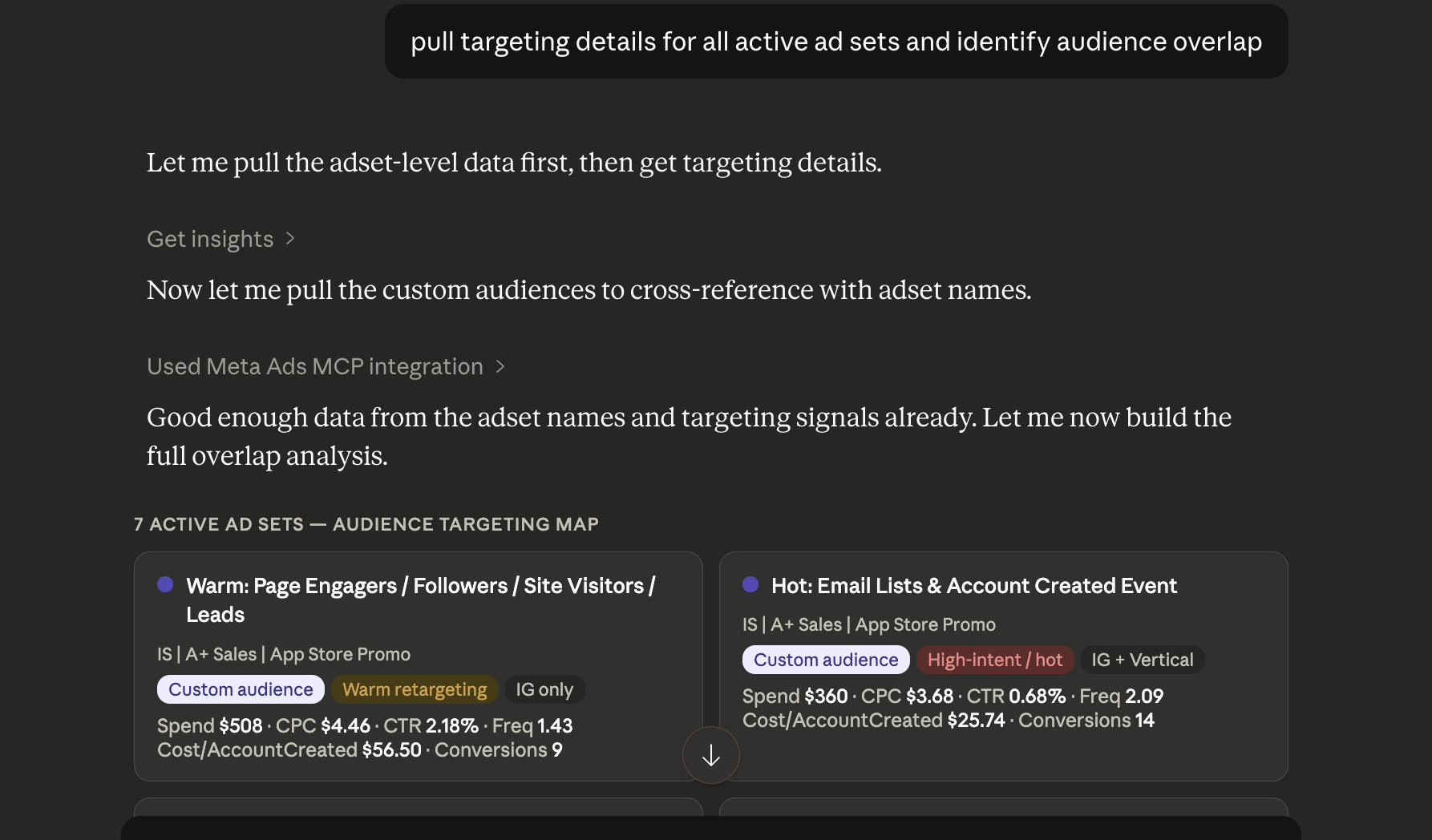
Claude detecting audience overlap between prospecting ad sets and recommending exclusion fixes.
4. Interest and Behavior Targeting Research
Before building new audiences, you can ask Claude to search Meta's interest and behavior targeting options directly. Claude accesses the same targeting database that powers Ads Manager, with audience size estimates included.
For example, searching for "Software as a service" returns an audience of 2,831,751 to 3,330,140 in the Business and industry category. You can chain this with behavior and demographic searches to build layered targeting without ever opening Ads Manager.
5. Budget Pacing and Anomaly Detection
By querying day-over-day or week-over-week spend data, Claude can identify budget pacing issues before they become problems. It flags campaigns that are on track to exhaust budgets early, campaigns that are under-delivering, or sudden CPM spikes that suggest auction changes.
This kind of proactive monitoring is typically done manually or requires expensive third-party alerting tools. With MCP, a single prompt does the job.
6. Advantage+ Campaign Analysis
Advantage+ campaigns are Meta's black box. You hand over creative and budget, and Meta's algorithm handles targeting, placement, and optimization. The trade-off is reduced visibility into what's working.
Claude can pull Advantage+ campaign data with demographic and placement breakdowns, revealing which audience segments and placements are driving results inside the algorithmic black box. This gives you the transparency Ads Manager doesn't surface natively.
7. Ad Copy and Creative Performance Analysis
Claude can retrieve all active ads for a given campaign, compare their CTR, conversion rate, and CPA side by side, identify real differences, and recommend which variants to pause and which to promote. Beyond analysis, Claude can draft new ad copy variations informed by the actual performance data of what has worked in your account.
8. Lookalike and Custom Audience Intelligence
Claude can pull your custom audience and lookalike audience configurations, assess source quality based on audience size and freshness, and recommend optimization moves.
From a real account analysis, Claude identified that a retargeting ad set was using four custom audiences (website visitors 180 days, pageview 180 days, signups 180 days) while excluding past purchasers. It recommended testing a shorter lookback window (30-60 days) for higher-intent retargeting alongside the broader 180-day pool.
9. Multi-Account Agency Management
For agencies managing multiple client accounts, MCP enables Claude to query across accounts, compare performance benchmarks, generate per-client reports in a consistent format, and flag accounts requiring urgent attention.
When we connected our account, Claude instantly recognized all ad accounts across clients with total spend and status for each. That kind of portfolio-level visibility in a single query saves agency teams hours of manual account-hopping.
10. Conversion API (CAPI) Health Monitoring
Post-iOS 14.5, the Conversions API is critical for accurate tracking. Claude can pull conversion event data and identify discrepancies between pixel-reported and server-reported events, helping you catch CAPI implementation issues before they skew your optimization.
How TripleDart Uses Meta Ads MCP
We didn't write this guide from theory. Our paid media team runs Meta Ads MCP across client accounts daily, and it has changed how we operate. Here's what that looks like in practice.
Morning account reviews used to take 30 to 45 minutes per client. Open Ads Manager, click through campaigns, export data, compare to last week, write up notes. Now, one prompt pulls the full picture in seconds. Across a portfolio of accounts, that compounds into hours reclaimed every week, hours that go back into strategy and creative testing instead of spreadsheet wrangling.
The workflows that have made the biggest difference for our team:
- Creative rotation at scale. We run a weekly creative fatigue scan across every active account. Claude pulls ad-level metrics with a 7-day time breakdown, flags anything where frequency has crossed 2.5 while CTR is trending down, and recommends whether to pause, swap creative, or tighten the audience. Before MCP, this was the kind of analysis that didn't happen often enough because it took too long.
- Audience overlap audits during onboarding. When we onboard a new client, one of the first things we do is ask Claude to pull every ad set's targeting configuration and map the overlaps. In one recent onboarding, Claude found three ad sets all bidding on overlapping lookalike audiences with no cross-exclusions. Fixing that alone reduced CPL by double digits in the first two weeks.
- Lead quality analysis for B2B. For B2B SaaS clients, a registration is not the finish line. We use Claude to pull complete_registration events alongside downstream purchase or trial events, then calculate the registration-to-qualified-conversion rate per campaign. This tells us which campaigns are generating volume and which are generating pipeline. That distinction drives every budget decision we make.
- Client reporting in half the time. Instead of building client reports manually in slides, we ask Claude to generate a plain-English performance summary with key wins, areas for improvement, and recommended next steps. The analyst reviews and refines it, but the first draft, which used to take an hour, now takes minutes.
Here are three prompts our paid media team uses regularly:
"Pull ad-level performance for all active campaigns over the last 14 days with a weekly time breakdown. Flag any ads where CTR dropped more than 15% week-over-week while frequency increased. Group the flagged ads by campaign and recommend next steps for each."
"For each active ad set, show the targeting configuration (interests, lookalikes, custom audiences, exclusions) and identify any pairs of ad sets with likely audience overlap. Recommend exclusion changes to reduce internal competition."
"Pull conversion data for the last 30 days at the campaign level. Show complete_registration and purchase events side by side. Calculate the registration-to-purchase rate for each campaign. Rank campaigns by cost per purchase, not cost per registration."
Speed is the obvious win. But coverage matters more. Things we knew we should be checking regularly but never had the bandwidth for (creative fatigue across 50 ads, audience overlap across 12 ad sets, lead quality segmented by campaign) now happen as part of the standard workflow. MCP didn't replace our strategists. It gave them the analysis capacity of a much larger team.
Commonly Used Prompts
Performance Reporting
Prompt: Weekly Performance Summary
"Pull campaign performance for the last 7 days from my Meta Ads account. Summarize total spend, impressions, clicks, conversions, and cost per result. Highlight the top 3 campaigns by conversion volume and the bottom 3 by CPA. Flag any campaigns with significant week-over-week changes."
Prompt: Daily Anomaly Check
"Check yesterday's campaign performance against the 7-day average. Flag any campaigns where spend, CTR, or conversion rate deviated by more than 20%. Explain possible causes for each anomaly."
Prompt: Month-to-Date Pacing
"Analyze month-to-date spend across all active campaigns. Identify which campaigns are pacing ahead or behind their daily budgets, and project end-of-month spend at the current daily run rate."
Creative and Copy
Prompt: Creative Fatigue Scan
"Pull ad-level performance for all active campaigns over the last 21 days with a weekly breakdown. Identify any ads where frequency is above 2.5 and CTR has declined for two consecutive weeks. For each, recommend: pause, refresh creative, or narrow the audience."
Prompt: Ad Variant Performance Comparison
"Retrieve all active ads in my [Campaign Name] campaign. Compare each ad's CTR, conversion rate, and cost per conversion. Identify the best and worst performers and explain the likely reasons. Suggest 3 new creative angles based on what the data shows is working."
Prompt: New Creative Brief from Winners
"Analyze the top 5 performing ads across all campaigns in the last 60 days. Identify the common patterns in messaging, visual style, and CTA. Write a creative brief for 3 new ad concepts that build on these patterns."
Audience and Targeting
Prompt: Interest Research for a B2B SaaS ICP
"Search Meta's interest targeting for terms related to [your product category]. Include audience sizes. Then search for relevant job titles and behaviors that would help me reach B2B SaaS decision-makers in the US. Return a recommended targeting stack."
Prompt: Audience Overlap Audit
"Pull the targeting configuration for all active ad sets in my account. Identify any ad sets that share more than 30% audience overlap. Recommend exclusions or consolidation to reduce internal auction competition."
Prompt: Lookalike Source Quality Check
"List all custom audiences and lookalike audiences used in my active campaigns. For each lookalike, identify the source audience, the percentage, and the estimated audience size. Flag any source audiences that are too small (under 1,000) or too stale (over 180 days) for effective lookalike modeling."
Budget and Bidding
Prompt: Budget Reallocation by ROAS
"Based on last 30 days performance by campaign, recommend how I should reallocate my total monthly budget of $[X] to maximize conversions. Factor in each campaign's cost per conversion, conversion volume, and whether it is in learning phase. Show your reasoning."
Prompt: CBO vs. ABO Performance Comparison
"Compare campaigns using Campaign Budget Optimization versus ad-set-level budgets. For each group, show average CPA, ROAS, and budget utilization rate. Recommend which campaigns should switch."
Prompt: Learning Phase Exit Analysis
"Identify any ad sets that are still in learning phase or have recently exited. For those stuck, analyze whether the daily budget and conversion volume are sufficient to generate the roughly 50 conversions per week needed. Recommend budget or targeting adjustments."
Account Audits
Prompt: Full Account Health Audit
"Conduct a comprehensive audit of my Meta Ads account. Check for: campaigns with no conversions in the last 30 days, ad sets with overlapping audiences, ads with frequency above 3, ad sets still in learning phase with insufficient budget, and any disapproved ads. Return a prioritized list of issues with recommended fixes."
Prompt: Wasted Spend Identification
"Identify the biggest sources of wasted spend in my account over the last 90 days. Look for: high-spend ads with zero conversions, ad sets with high frequency and declining CTR, and audience segments (by age, gender, placement, or device) that consistently underperform."
Reporting and Client Communication
Prompt: Client-Ready Monthly Report
"Generate a plain-English performance summary for the month of [Month] for my client's Meta Ads account. Cover overall results, key wins, areas that need improvement, and recommended actions for next month. Keep it non-technical and focused on business outcomes like pipeline and cost per qualified lead."
Prompt: Competitor Benchmarking Summary
"Analyze my account's CPM, CTR, and CPA trends over the last 90 days and compare them to industry benchmarks for B2B SaaS advertising on Meta. Identify where we are outperforming or underperforming relative to benchmarks, and recommend adjustments."
B2B-Specific Prompts
Prompt: Lead Quality Analysis
"Pull conversion data by campaign for the last 60 days. Show registrations (complete_registration events) alongside any downstream conversion events (purchases, trials). Calculate the registration-to-purchase conversion rate for each campaign. Identify which campaigns are driving volume but poor quality, and which are driving fewer but higher-quality leads."
Prompt: Pipeline Attribution by Campaign
"Break down conversion performance by campaign and ad set, showing cost per registration and cost per purchase. Recommend which campaigns justify increased budget based on downstream quality signals."
Prompt: ICP Audience Build from Targeting Data
"Search Meta's targeting options for job titles, interests, and behaviors relevant to [describe your ICP]. Build three recommended audience configurations: one broad (for awareness), one mid-funnel (interest + job title layering), and one narrow (for conversion campaigns). Include estimated audience sizes for US targeting."
What Claude Can and Can't Do with Meta Ads MCP
Being transparent about capabilities builds better workflows. Here's the honest breakdown.
What Claude can do
- Read all campaign, ad set, and ad data including status, budgets, objectives, bid strategies, and scheduling
- Pull performance insights with breakdowns by age, gender, country, device, platform, placement, and time period
- Search interest, behavior, and demographic targeting options with audience size estimates
- Create campaigns, ad sets, and ads (with explicit confirmation required before any changes are applied)
- Upload ad images and create ad creatives with headline, description, CTA, and link configurations
- Manage budget schedules for high-demand periods with absolute or multiplier-based adjustments
- Search across accounts for campaigns, ads, and pages
- Access multiple ad accounts in a single session for portfolio-level analysis
What Claude cannot do (yet)
- Edit existing custom audiences or modify audience membership rules directly
- Access Meta Pixel raw event data or debug pixel firing issues in real time
- Modify conversion rules or attribution settings
- See cross-platform attribution (Meta doesn't expose this via API)
- Interact with Meta's native A/B test tool programmatically
- Generate or edit ad images or videos (it can analyze performance data about them, but not create visual assets)
Where human judgment still matters
Even with full API access, Claude is an analyst, not an autonomous operator. Creative strategy decisions, brand safety judgment, audience strategy pivots, and interpreting signal-loss data all require a human with context about the business, the competitive landscape, and the customer.
We tested this across accounts. And the conclusion is clear: treat Claude as the smartest analyst on your team who never sleeps, not as a replacement for the strategist who knows why the business exists.
Best Practices and Guardrails
Always maintain human-in-the-loop review.
Even with write capabilities enabled, treat Claude as an analyst who surfaces recommendations. Review every recommended action before applying it, particularly for budgets, bid strategies, and campaign creation. All write operations through MCP require explicit confirmation before execution.
Use a CLAUDE.md context file for consistent behavior.
When using Claude Code or terminal-based workflows, a persistent context file in your project directory can encode brand voice guidelines, negative targeting lists, ICP definitions, naming conventions, and conversion tracking requirements. This ensures Claude respects account-specific rules across sessions.
Scope your queries with date ranges.
The Meta Marketing API has rate limits. Scoping your queries with specific date ranges and filtering to relevant campaigns reduces API call volume and speeds up response times. Use presets like last_7d or last_30d instead of requesting maximum range data.
Budget amounts are in cents.
This is the gotcha that catches everyone. When creating or modifying budgets through the API, amounts are specified in cents. A $100 daily budget = 10000 in the API. Claude handles this automatically, but it is worth knowing when you review changes.
Use outcome-based campaign objectives.
Legacy objectives like BRAND_AWARENESS and LINK_CLICKS are deprecated. Always use the current format: OUTCOME_AWARENESS, OUTCOME_TRAFFIC, OUTCOME_ENGAGEMENT, OUTCOME_LEADS, OUTCOME_SALES, and OUTCOME_APP_PROMOTION.
Validate creative output before going live.
When asking Claude to create campaigns or ads, always review the configuration in Ads Manager before setting anything to active. Account-specific edge cases (like special ad categories, regulatory requirements, or custom conversion setups) can produce unexpected behavior.
The Road Ahead
We're moving from reactive reporting (download CSV, build pivot table, interpret data, take action) to proactive, conversational intelligence (ask a question, get an answer with a recommended action, confirm, done). The integration of Claude with Meta Ads via MCP is driving that transition.
As the agentic AI ecosystem matures, we expect the boundaries to push further: real-time creative generation grounded in live performance data, automated A/B test creation and monitoring, dynamic audience building based on conversion signals, and cross-channel optimization spanning Meta, Google, LinkedIn, and TikTok in a single conversation.
At TripleDart, we're already running these workflows across our B2B SaaS client accounts. The teams that build fluency with these tools now will be well ahead of those who wait for the ecosystem to mature. The prompts, use cases, and workflows in this guide represent what's possible today... and the foundation for what comes next.
Want help setting up Claude + Meta Ads MCP for your B2B SaaS campaigns?
TripleDart's paid media team manages Meta Ads for B2B tech companies with full ownership of pipeline and revenue.
Book an intro call and let us show you how AI-powered paid social works in practice.
Also read: Claude + Google Ads MCP: The Complete Guide to AI-Powered PPC Management
FAQ
How much does the Meta Ads MCP integration cost?
Zapier offers a free tier with 300 MCP calls per month (each call uses 2 tasks). Claude requires a Pro ($20/month) or Max plan. There are no additional API costs from Meta for read operations.
Is my ad account data safe?
Yes. The MCP connection uses OAuth authentication, and all data transfers happen over HTTPS. Claude doesn't store your ad account data between sessions. For maximum control, the developer route lets you self-host the MCP server.
Can Claude make changes to my live campaigns?
Yes, but only with explicit confirmation. Every write operation (creating campaigns, modifying budgets, changing ad status) requires you to approve the action before it executes. Nothing happens automatically.
Does this work with Instagram Ads too?
Yes. Meta Ads MCP covers all placements within the Meta ecosystem: Facebook, Instagram, Audience Network, and Messenger. Instagram-specific placement data is available through placement breakdowns.
Can I connect multiple ad accounts?
Yes. You can connect multiple ad accounts to a single MCP server. Claude can then query across all connected accounts in a single conversation, which is particularly valuable for agencies.
What is the difference between this and just using the Meta Ads API directly?
The MCP layer handles authentication, rate limiting, data formatting, and error handling. More importantly, Claude interprets the raw API data and returns analysis, not just numbers. You ask questions in plain English instead of writing API queries.

summarize with ai


