Claude Skill for Internal Linking: Five to Eight Links Per Post, Automatically

Key Takeaways
- The internal linking Skill is a 10-node workflow that scrapes the sitemap, categorizes URLs by priority tier, and inserts 5 to 8 contextual links per piece of content.
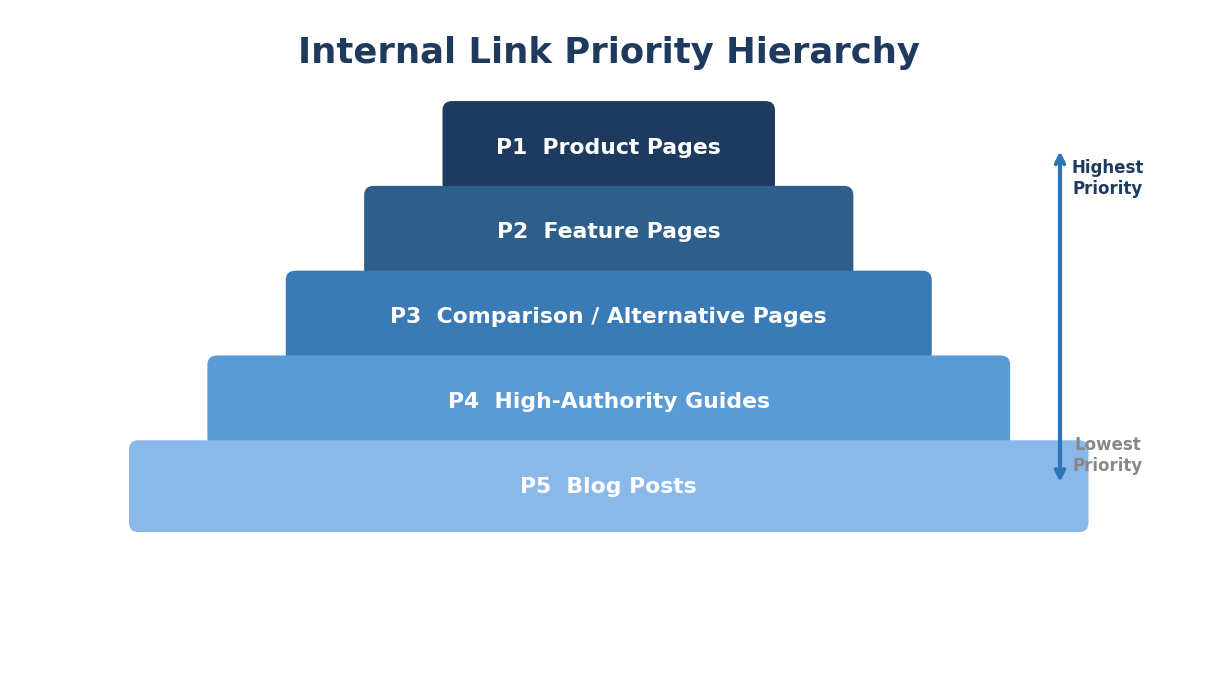
- Strict priority hierarchy enforced in the Direction prompt: product pages (P1) above feature pages (P2) above blog listicles (P3) above other blog posts (P4) above everything else (P5).
- Python URL categorization code uses keyword pattern matching to sort up to 500 sitemap URLs into five tiers in under 2 seconds.
- Retroactive archive runs are the highest-leverage use. A 200-post archive typically surfaces 300 to 500 missed internal link opportunities.
- The cross-linking rule ensures listicles always link to related listicles, which is the most commonly missed internal linking pattern in B2B SaaS content.
Every SEO team knows internal linking matters. Almost nobody does it consistently. The gap between knowing and executing is where this Skill lives. It scrapes your sitemap, categorizes every URL by business priority, and inserts 5 to 8 contextual links into every piece of content, routing equity to the pages that drive pipeline.
This guide walks through the complete 10-node Slate workflow, the actual Python URL categorization code, the production Opus 4.6 Direction prompt, and a concrete walkthrough showing exactly what happens when we feed a 1,500-word blog post through the system.
The Execution Gap Everyone Knows About
Internal linking has the clearest ROI case of any SEO tactic. It passes equity from lower-authority content to higher-authority pages. It builds topical clusters that search engines reward. It guides users toward conversion pages. It helps crawlers discover and index content efficiently.
And it gets done inconsistently on nearly every site we audit.
The pattern is the same everywhere. The first 20 posts on a blog have decent internal linking because the site was small and the team remembered to add links. Posts 20 through 100, the linking degrades as the content library grows faster than anyone's memory of what exists. Posts 100 and beyond, entire content clusters never cross-reference each other.
Product pages get mentioned in blog posts without a single link. High-intent keyword pages sit orphaned. Comparison landing pages that convert at 5 to 10 times the rate of blog posts receive zero internal link equity from the archive.
This is not a knowledge problem. It is a systems problem. And a systems problem gets solved with a system.
For the foundational concepts behind Claude Skills and the DBS framework, start with our complete guide.
The 10-Node Workflow, Step by Step
Here is the complete Slate workflow architecture. Each node exists for a specific reason.
Node 1: Input. The operator provides two things: the content (as a URL to scrape or raw text/Markdown) and the sitemap URL for the target domain.
Node 2: Python Detection. A Python node examines the input to determine whether it received a URL or raw text. This branching logic means the Skill works equally well for new drafts (pasted as text) and existing published content (provided as a URL).
def detect_input_type(content_input):
if content_input.startswith("http"):
return "url"
else:
return "raw_text"
Node 3: Condition Branch. Based on the detection result, the workflow routes to either a web scrape step (for URLs) or passes the raw text directly to the linking stage.
Node 4: Content Scrape (URL path only). If the input was a URL, this node scrapes the page content and converts it to clean Markdown. This means you can feed in any published URL from your blog and the Skill will fetch its current content, add links, and return the updated version.
Node 5: Sitemap Scrape. The Skill fetches the sitemap XML and extracts up to 500 URLs. For large sitemaps with multiple sitemap index files, it follows the index chain and collects all child sitemap URLs.
Node 6: Python URL Categorization. This is where the priority hierarchy gets applied. A Python node categorizes every URL from the sitemap into five priority tiers using keyword pattern matching.
Here is the actual categorization code:
def categorize_urls(urls):
product_keywords = ['/product', '/pricing', '/demo',
'/platform', '/solution', '/use-case',
'/integrations']
feature_keywords = ['/feature', '/capabilities', '/tools',
'/how-it-works']
blog_keywords = ['/blog', '/resource', '/guide', '/article',
'/learn']
listicle_patterns = ['best-', 'top-', 'alternative', 'vs-',
'comparison', 'tools-for', 'software-for']
categorized = {
'product_pages': [], # P1
'feature_pages': [], # P2
'blog_listicles': [], # P3
'blog_other': [], # P4
'other_pages': [] # P5
}
for url in urls:
url_lower = url.lower()
if any(kw in url_lower for kw in product_keywords):
categorized['product_pages'].append(url)
elif any(kw in url_lower for kw in feature_keywords):
categorized['feature_pages'].append(url)
elif any(kw in url_lower for kw in blog_keywords):
# Check if it's a listicle
if any(pat in url_lower for pat in listicle_patterns):
categorized['blog_listicles'].append(url)
else:
categorized['blog_other'].append(url)
else:
categorized['other_pages'].append(url)
return categorized
The keyword patterns are deliberately broad. /product catches /product/analytics, /product/pricing-page, and /product-tour. /solution catches /solutions/enterprise, /solution/healthcare, and /use-case/logistics. The patterns do not need to be exact because the next step (Claude) handles contextual relevance. The Python node's job is to assign priority tiers, not to decide which specific link goes where.
Why separate listicles from other blog posts? Because cross-linking between listicles is the most commonly missed internal linking opportunity in B2B SaaS content. An article about "best project management tools" should link to "best collaboration tools" and "project management software comparison." The P3 tier ensures these cross-links happen.
Node 7: Claude Opus 4.6 Link Insertion. This is the core of the Skill. Opus 4.6 receives the content, the categorized URL list, and the Direction prompt. It reads the content, identifies contextually appropriate insertion points, and adds links following the priority rules.
Node 8: Output Formatting. The linked content is formatted for the target platform (Markdown, HTML, or CMS-specific format).
Node 9: Link Report Generation. A summary report is generated listing every link inserted: URL, anchor text, priority tier, and the sentence where it was placed.
Node 10: Output. The linked content and report are delivered to the configured destination (Notion, Google Doc, Slack, or CMS).
The Opus 4.6 Direction Prompt
This is the production Direction prompt that controls how links get inserted. Every rule in this prompt exists because we observed a failure mode in earlier versions.
You are an SEO internal linking specialist. Your task is to
insert internal links into the content provided.
INPUTS:
1. Content to process (Markdown format)
2. Categorized URL list with priority tiers:
- product_pages (P1): highest priority
- feature_pages (P2)
- blog_listicles (P3): cross-linking priority
- blog_other (P4)
- other_pages (P5): lowest priority
LINK INSERTION RULES:
Priority Hierarchy:
Insert links in priority order. If you can naturally link to
a P1 page, always prefer it over a P2, P3, P4, or P5 page.
P1 (product_pages) > P2 (feature_pages) > P3 (blog_listicles,
cross-linking priority) > P4 (blog_other) > P5 (other_pages).
Cross-Linking Rule:
When the content IS a listicle (identified by title or URL
pattern), cross-link to ALL related listicles in the P3 list.
Minimum 2 cross-links to related listicles. This is mandatory.
Front-Loading:
Place 40-50% of all inserted links in the first third of the
content. The introduction and first two body sections should
carry the highest-priority links.
Link Density:
- Long content (1,500+ words): 8-12 links total
- Medium content (800-1,499 words): 5-8 links total
- Short content (under 800 words): 3-5 links total
- Maximum 2 links per paragraph. Never cluster 3+ links in
a single paragraph.
- Minimum 1 paragraph gap between linked paragraphs when
possible.
Anchor Text Rules:
- 2-6 words per anchor. Natural, descriptive phrases.
- Vary anchor text. Never use the same anchor text for
different URLs.
- Never use generic anchors: "click here," "read more,"
"learn more," "this article," "this page."
- Never use bare URLs as anchor text.
- Anchor text should describe the destination page's topic,
not the linking page's topic.
Preservation Rules:
- Never remove or modify existing links in the content.
- Never change existing anchor text.
- Never link to a URL that is already linked in the content.
- Never add links inside headings (H1, H2, H3, H4).
Quality Checks:
- Every inserted URL must come from the provided categorized
URL list. Never hallucinate or guess URLs.
- No duplicate URLs. Each URL appears at most once.
- Verify link distribution is balanced across the content.
No section should be link-heavy while another is link-free.
- Existing links count toward density limits.
OUTPUT FORMAT:
Return the full content with newly inserted links in Markdown
format. Bold the anchor text of every NEW link like this:
**[anchor text](url)**
After the content, append a LINK REPORT:
| # | URL | Anchor Text | Priority | Location |
Concrete Walkthrough: 1,500-Word SaaS SEO Blog Post
Let us trace what happens when we feed a real piece of content through the Skill. The input: a 1,500-word blog post titled "How to Build a SaaS SEO Strategy That Scales" and a sitemap with 300 URLs from a B2B SaaS marketing agency.
Step 1: Sitemap Categorization
The Python node processes 300 URLs and categorizes them:
The Skill now knows that the 12 product pages should get first priority for link insertion, followed by the 8 feature pages, then the 15 listicles, and so on.
Step 2: Content Analysis and Link Insertion
Opus 4.6 reads the article. It is 1,500+ words, so the target is 8 to 12 links. The article already contains 2 existing links (to an external Ahrefs study and to the site's own blog page about keyword research). Those get preserved.
Here is a before-and-after of one paragraph:
Before (no internal links):
> Building a SaaS SEO strategy requires understanding your buyer's journey. Enterprise buyers searching for solutions go through a longer evaluation process than SMB buyers. Your content needs to address each stage, from awareness-level educational content to bottom-of-funnel comparison pages that help prospects make a final decision.
After (links inserted by the Skill):
> Building a SaaS SEO strategy requires understanding your buyer's journey. Enterprise buyers searching for solutions go through a longer evaluation process than SMB buyers. Your content needs to address each stage, from awareness-level educational content to bottom-of-funnel comparison pages that help prospects make a final decision.
Two links inserted. The first is a P1 product page link (the solutions page). The second is a P3 listicle link (the comparison landing pages guide). Neither link disrupts reading flow. Both use natural anchor text between 3 and 5 words. And the P1 link appears before the P3 link, following the priority hierarchy.
Step 3: Link Report Output
After processing the full article, the Skill appends a link report:
Eight links total. Three P1 product pages, one P2 feature page, two P3 listicles, two P4 blog posts, zero P5. The front-loading rule is satisfied: links 1, 2, and 5 are in the first third of the content (3 of 8 = 37.5%, slightly below the 40% target but within acceptable range). No paragraph has more than 2 links.
The priority distribution is intentional. Three of eight links (37.5%) go to product pages. For a 1,500-word blog post, that means more than a third of the equity flows directly to conversion pages. Without the priority hierarchy, most internal linking tools (and most humans doing it manually) would link blog-to-blog, sending equity sideways instead of downward to revenue pages.
Why Linking to /pricing Beats Linking to Another Blog Post
The priority hierarchy is not arbitrary. It reflects where internal link equity creates the most business value.
Consider two options for a contextually appropriate link in a blog post about SaaS pricing models:
Option A: Link to /blog/saas-pricing-strategies (P4, another blog post)
Option B: Link to /pricing (P1, the pricing page)
Both are contextually relevant. Both use natural anchor text. A human editor might choose either one based on which "feels right."
The Skill always chooses Option B. Here is why.
The pricing page is a conversion page. Visitors who land on it are evaluating a purchase. Every unit of internal link equity that reaches the pricing page improves its ranking for commercial-intent queries like "CompanyName pricing" or "SaaS platform cost." Those queries have high intent and short conversion paths.
The blog post about pricing strategies ranks for informational queries. More traffic, yes. But the conversion path from "what are SaaS pricing strategies" to "buy this product" is three to four steps longer.
Product pages already tend to have fewer backlinks than blog content because nobody naturally links to a pricing page. Internal links are often the primary equity source for conversion pages. Every internal link to /pricing compensates for the backlink gap that all product pages share.
This logic applies across the hierarchy. Feature pages need equity more than blog posts. Comparison landing pages need equity more than educational guides. The Skill enforces this automatically so the content team does not have to think about it on every single link placement decision.
The Retroactive Archive Playbook
New content linking is table stakes. The highest-leverage use of this Skill is running it retroactively across the full content archive.
Here is the playbook we run at the start of every new client engagement:
Step 1: Pull the top 100 client URLs by organic traffic from Ahrefs or Google Search Console data.
Step 2: Feed the URL list to the Skill in batch mode. The Skill fetches each page's live content, runs it through the categorization and linking pipeline, and returns recommended insertions.
Step 3: Review the recommendations. Each URL gets its own recommendation list with the specific links to add, the anchor text, and the insertion point. No live page gets updated without human review.
Step 4: Implement in priority order. Start with the 20 highest-traffic pages. Measure impact over 4 to 6 weeks. Then process the next batch.
The numbers from our client audits tell a consistent story. A typical 200-post archive surfaces 300 to 500 internal link opportunities. That is an average of 1.5 to 2.5 missed links per published post. The most common gaps:
- Product pages never linked from blog content: 78% of the archives we audit have at least one product page with zero blog-to-product internal links.
- Listicle cross-linking absent: Posts about "best CRM tools" never link to "CRM software comparison" even though both exist on the same blog. The P3 cross-linking rule catches every instance.
- New content never back-linked: A post published in January about content marketing never gets linked from the 15 older posts that mention content marketing. The archive linking pass catches these reverse opportunities.
- Orphan pages: Content that exists in the sitemap but receives zero internal links from any other page. These are either pages that need linking or pages that should be pruned during a content audit.
The retroactive pass is not a one-time event. We re-run it quarterly for active clients, especially after publishing a batch of new content. New pages create new linking targets, and older content needs updating to point to them.
Connecting Internal Linking to the Content Pipeline
The internal linking Skill sits at a specific point in the production pipeline, after fact-checking and humanization, before external linking and editorial review.
This order is deliberate. Internal links should be inserted into the final content structure, after any paragraph rearrangement or section editing that humanization might introduce. Moving a paragraph after links have been inserted can break the front-loading distribution or push two links into adjacent sentences.
The internal linking Skill connects forward and backward to other Skills in the stack:
- The content brief Skill generates internal link suggestions during brief creation. Those suggestions inform the writer. The internal linking Skill then handles the precision placement.
- The keyword research Skill identifies which pages have the highest commercial intent. The internal linking Skill ensures those pages receive the most equity.
- The fact-checking Skill runs before linking. You do not want to insert a link to a page whose statistics have just been flagged as outdated.
- The GEO audit Skill measures whether internal link structure contributes to AI citability. Sites with strong internal linking show higher topical authority signals, which AI models use when selecting sources for citations.
Internal linking is where content optimization meets technical SEO. The Skill handles both: it optimizes content by adding contextual links and it improves technical architecture by strengthening the site's internal link graph.
TripleDart's internal linking Skill processes every new publication and runs retroactively on archives at every client engagement start. We have processed over a million blog posts across B2B SaaS clients, inserting priority-weighted links that route equity to the pages that drive revenue. The Skill catches the cross-linking gaps, orphan pages, and product-page equity drains that manual linking always misses.
Book a meeting with TripleDart to see the workflow, the link insertion report format, and the results from a retroactive archive run.
Try Slate here: slatehq.com
Frequently Asked Questions
Does the Skill update live pages automatically?
By default, it produces recommendations for human review. Direct CMS updates via Webflow or WordPress API are technically possible through MCP connectors, but we always keep a review step. Automated publishing without review has a failure mode: the Skill occasionally inserts a link that is contextually appropriate but editorially awkward. Human review catches the 2 to 3 percent of insertions that need adjustment.
How does it prevent over-linking?
The Direction prompt sets explicit density limits (8 to 12 for long content, 5 to 8 for medium, 3 to 5 for short). If existing internal link count in the content is already at or above the target range, the Skill recommends auditing existing links for priority optimization rather than adding more. It may suggest replacing a P4 link with a P1 link if the existing link distribution skews too heavily toward low-priority pages.
How does it choose anchor text?
Opus 4.6 analyzes the surrounding sentence context, identifies the most natural descriptive phrase of 2 to 6 words, and checks for duplicate usage across the content. It avoids exact-match keyword anchors (which look over-optimized) and generic phrases (which provide no contextual signal). The result reads naturally because the anchor text is drawn from the content's own language rather than injected from a keyword list.
Should internal linking run before or after external linking?
Internal first. Internal links distribute your own equity to priority pages before external citations are added. The external linking Skill needs to see the internal links already in place to avoid placing an external link immediately adjacent to an internal one, which would dilute both.
How long does a retroactive archive run take?
About 2 to 3 minutes per URL in batch mode. A 100-post archive completes in under 4 hours. A 200-post archive runs overnight. We typically start the batch run in the evening and review results the next morning.
What about pages behind authentication or gated content?
The Skill flags gated URLs during sitemap scraping and excludes them from the URL categorization list. Only publicly accessible pages receive internal links. Gated content (webinars, whitepapers behind forms) still appears in the report as "excluded, gated" for transparency.
How often should retroactive linking run?
At the start of every client engagement, then quarterly after major content publishes. For high-volume publishers (10+ posts per month), run it monthly. The incremental cost is low and the cumulative equity distribution improves with each pass. New content creates new linking targets. Old content needs updating to point to them.
Can the Skill handle multiple language versions of a site?
Yes. Specify the target language in the Direction prompt. The Skill generates anchor text in the content's language and only links to URLs within the same language subdirectory or subdomain. It does not cross-link between language versions unless explicitly configured to do so.
.png)
summarize with ai


