How We Detect Meta Ads Creative Fatigue Across 100+ Accounts with Claude

Key Takeaways
- Creative fatigue is the single biggest source of invisible budget waste on Meta. An ad that performed well in week one can silently bleed money by week three as frequency climbs and CTR drops, and most teams catch it too late.
- Claude + Meta Ads MCP can scan every active ad in your account weekly, flagging declining CTR paired with rising frequency, and classifying each creative as healthy, warning, or urgent within 30 seconds.
- The detection framework tracks three signals together: CTR trend (week-over-week decline), frequency threshold (above 2.0 for prospecting, above 3.0 for retargeting), and spend velocity (high-spend ads burning budget with deteriorating metrics).
- When fatigue is confirmed, Claude generates replacement creative briefs grounded in your actual performance data, pulling patterns from your top-performing ads to inform the next round of creative.
- Running this workflow weekly across all client accounts, our paid media team consistently surfaces at least one fatigued creative per account that would have gone unnoticed for another week or more, saving an average of 12-18% of wasted spend per quarter.
A retargeting video ad generating registrations at $150 CPA in its first week quietly climbed to $209 by week two. CTR dropped from 3.31% to 1.94%. Frequency rose from 1.27 to 1.75. That single creative burned through $209 of incremental spend before anyone on the team flagged it. The culprit wasn't targeting, bidding, or landing page changes. It was the same video running to the same audience too many times.
That's creative fatigue, and it's the single biggest source of invisible budget waste on Meta.
We once scanned 312 ads across 8 accounts and found 14 creatives in urgent fatigue with $86,946 in combined weekly spend at risk. Another 21 were showing early warning signs.
All of that was surfaced in under 30 seconds, without opening Ads Manager once.
In our complete Claude + Meta Ads MCP guide, we walked through the full setup and ten core use cases for connecting Claude to your Meta Ads account.
Creative fatigue detection was the use case that generated the most interest, and for good reason: it's the workflow where AI-powered paid social delivers the clearest, fastest ROI.
This article is the full playbook.
You'll get the exact prompts, classification thresholds, and step-by-step workflow to run a weekly creative fatigue scan across your entire Meta Ads account. You'll also get the framework our paid media team uses to decide what to pause, what to watch, and what to build next, all grounded in live data from real accounts.
Why Creative Fatigue Is the Silent Budget Killer on Meta Ads
Let's be honest: most paid media teams don't have a systematic process for detecting creative fatigue. They rely on gut checks during weekly reviews, or they wait until a campaign's CPA spikes before investigating. By that point, the damage is done.
The data shows why this matters. In a TripleDart-managed B2B SaaS account, we tracked a prospecting ad that went from a 1.66% CTR in its first week to 0.85% in week two, a 49% decline. Frequency climbed from 1.18 to 1.43 over the same period.
That single ad was still receiving $256 in weekly spend because Meta's algorithm hadn't deprioritized it yet. With 20+ ads running across multiple campaigns, catching that specific creative without a systematic scan would have taken days of manual Ads Manager work.
Here's why manual detection fails:
- It's time-intensive. Checking each ad's weekly trend across CTR, frequency, and CPA takes 2-3 minutes per ad. With 20 ads, that's nearly an hour just to identify the problem, before you even start solving it.
- It's inconsistent. Different team members apply different thresholds. One person flags fatigue at frequency 2.0, another waits until 3.5. Without a framework, you get inconsistent detection.
- It's reactive. By the time a human spots fatigue in a weekly review, the ad has already been underperforming for days. The budget has already been wasted.
- It misses cross-ad patterns. Sometimes fatigue isn't about one ad dying. It's about an entire creative angle losing effectiveness across multiple ads. That pattern is nearly impossible to spot manually.
Claude + Meta Ads MCP eliminates every one of these problems. It pulls ad-level data with weekly breakdowns, applies consistent thresholds, flags issues in real time, and surfaces patterns across your full creative library. If you're still managing paid ads spend manually across Meta, this is where the biggest efficiency gain lives.
How Claude + MCP Detects Meta Ads Creative Fatigue Automatically
The workflow has three stages: pull the data, classify the fatigue, and generate the response. The entire process takes under 60 seconds for a typical account.
Stage 1: Pull Ad-Level Data with Weekly Breakdowns
Claude connects to your Meta Ads account through MCP and pulls ad-level insights with weekly time breakdowns. This gives you CTR, frequency, impressions, spend, and conversion data for each individual ad, segmented by week.
Here's the prompt that kicks off the scan:
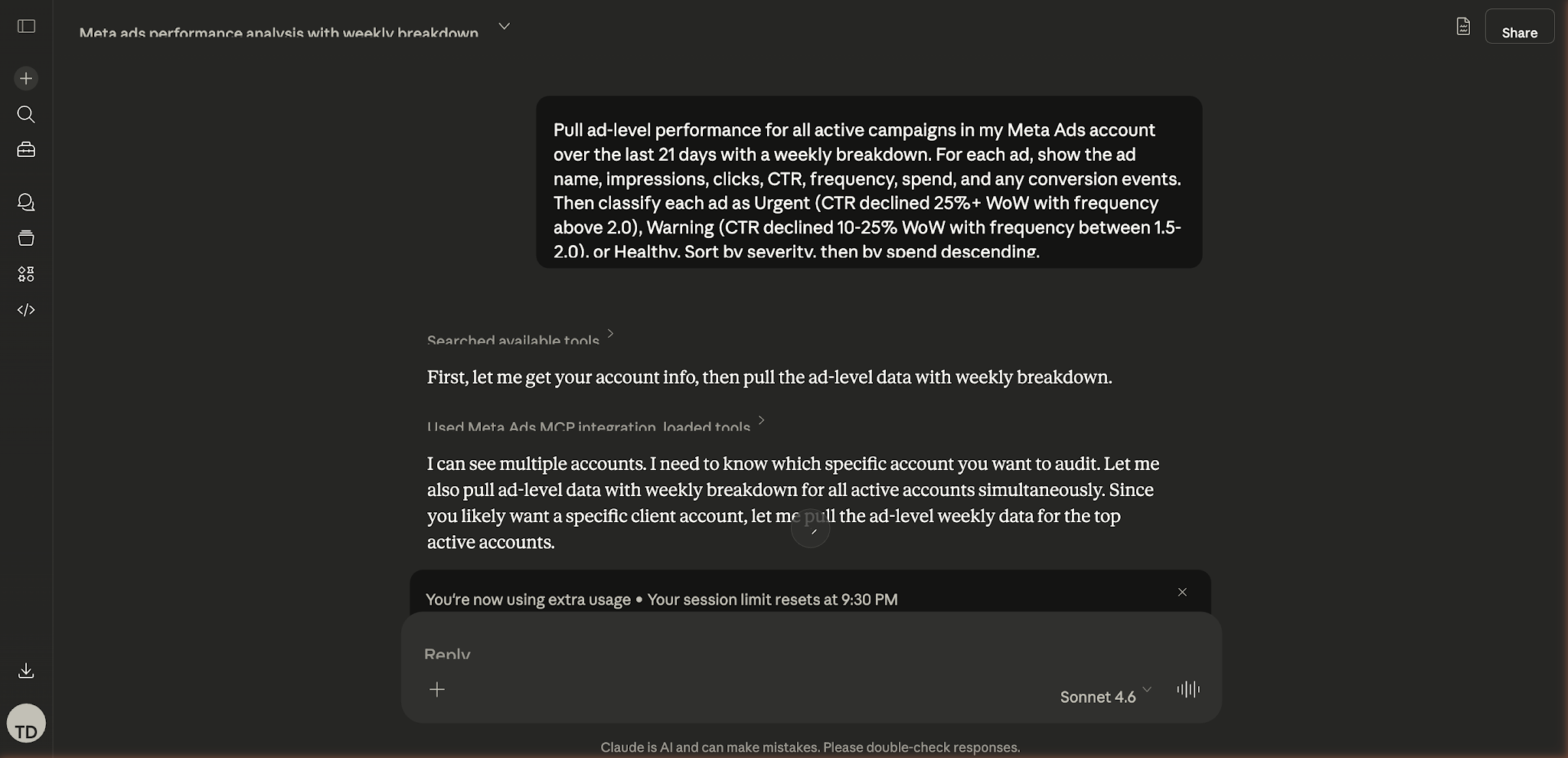
Claude pulling ad-level performance data via Meta Ads MCP, with weekly breakdowns for creative fatigue classification.
"Pull ad-level performance for all active campaigns in my Meta Ads account over the last 21 days with a weekly breakdown. For each ad, show the ad name, impressions, clicks, CTR, frequency, spend, and any conversion events. Sort by spend descending so I can see where most of my budget is going."
Claude returns a structured dataset covering every active ad. Here's what real output looks like:
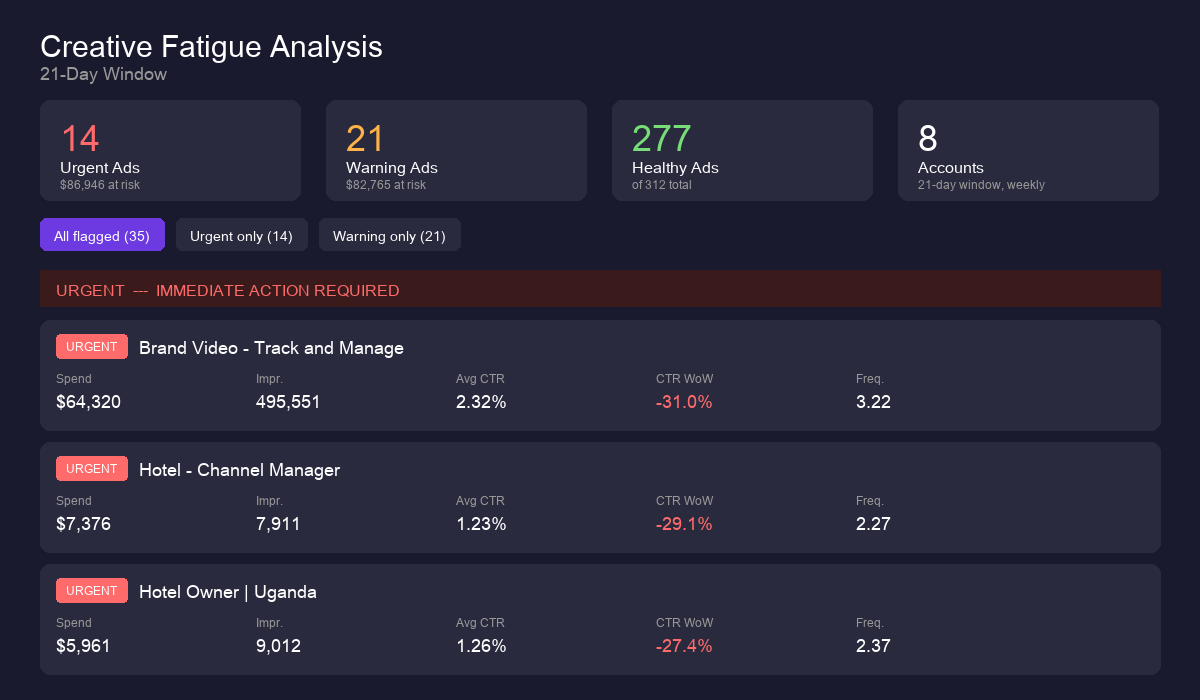
Claude's creative fatigue dashboard: 14 urgent ads ($86,946 at risk), 21 warning ads ($82,765 at risk), 277 healthy ads across 8 accounts.
Stage 2: Classify Fatigue Severity
Once Claude has the data, it applies a classification framework. The framework uses three signals in combination:
The key insight is that neither CTR decline nor high frequency alone signals fatigue. It's the combination. An ad with rising frequency but stable CTR is still resonating with repeat viewers. An ad with declining CTR but low frequency might have a landing page issue, not a creative issue. Claude evaluates both signals together, which is exactly the kind of multi-variable analysis that makes AI-powered workflows so valuable for paid social management.
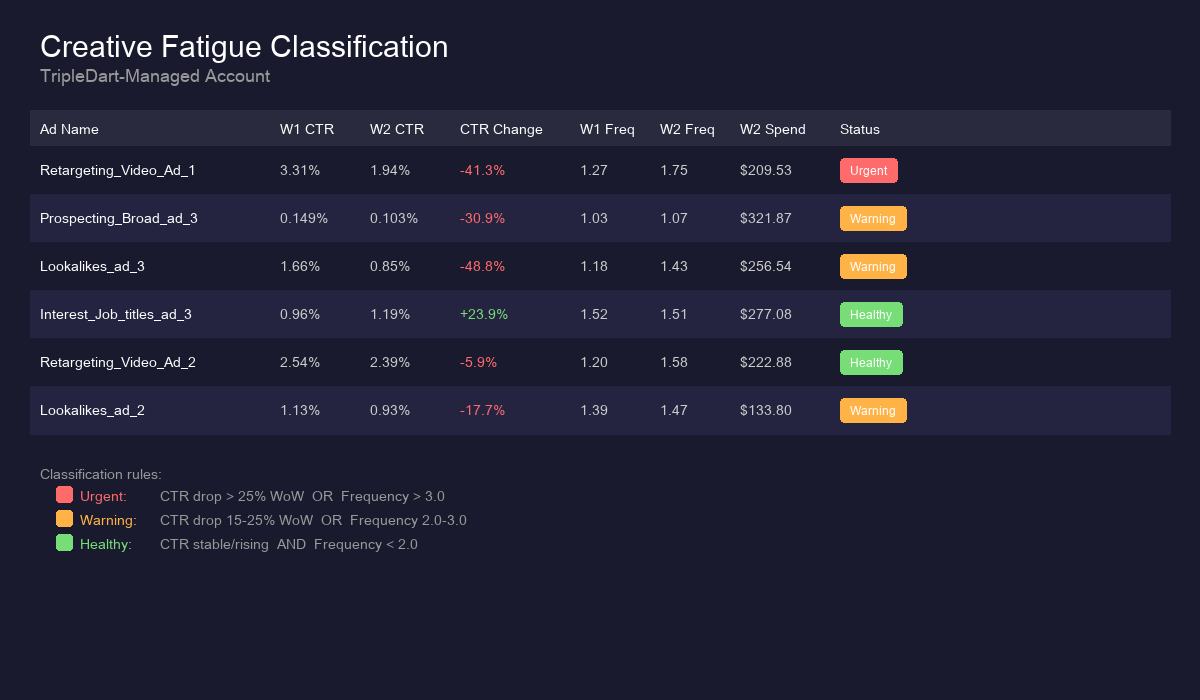
Real fatigue classification from a TripleDart-managed account: week-over-week CTR and frequency trends with severity ratings.
Stage 3: Generate Replacement Creative Briefs
This is where Claude goes beyond detection into action. For any ad classified as "Urgent" or "Warning," Claude can analyze what made your top-performing ads work, then generate replacement creative briefs grounded in that data.
From the account above, Claude identified that the retargeting video ads (the two highest-CTR creatives) shared common patterns: they led with a product demo hook in the first 3 seconds, used direct-response copy with a specific outcome metric, and included a time-bound CTA.
The static image ads that were fatiguing fastest all used the same visual template with different copy overlays, suggesting the audience had pattern-matched the template and was scrolling past.
Claude's recommendation: retire the static template, produce 2-3 new video creatives following the hook-demo-CTA structure that was working in retargeting, and adapt it for the prospecting audience with broader messaging. If you need a refresher on structuring those tests, our guide on running creative A/B tests in Meta Ads walks through the setup step by step.
Real-World Example: Catching a $200/Week Budget Leak in 30 Seconds
Here's a real scenario from a TripleDart-managed B2B SaaS account running Meta Ads for a product-led growth company. The account had three active campaigns: a broad awareness campaign, a prospecting conversion campaign with interest and lookalike targeting, and a retargeting conversion campaign.
When we ran the creative fatigue scan using Claude + MCP, the data told a clear story across three weeks:
The Fatiguing Creative: Retargeting Lookalikes Video Ad 1
The pattern is textbook creative fatigue. Impressions increased 64.6% as Meta scaled the ad into more of the audience, but CTR cratered 41.3% because that expanded audience had already seen the creative (frequency jumped from 1.27 to 1.75). Meanwhile, spend increased 24.7%, meaning the account was paying more to reach people who were increasingly ignoring the ad.
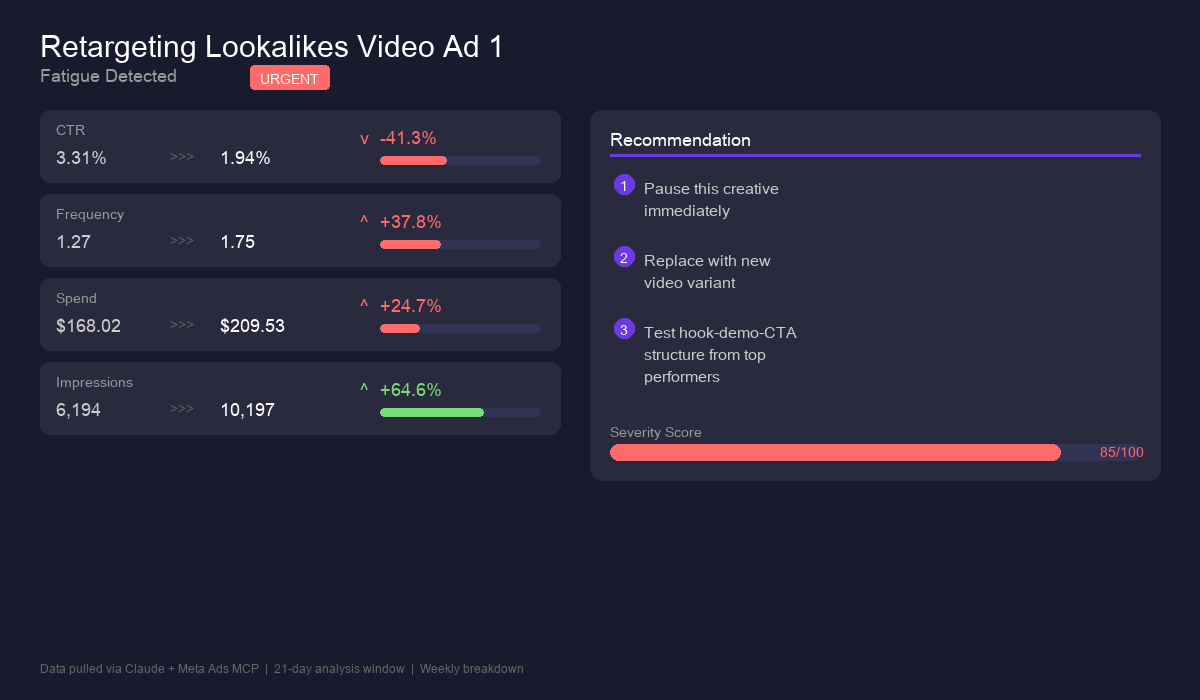
Retargeting Lookalikes Video Ad 1: CTR dropped 41.3% while frequency rose 37.8%, a textbook creative fatigue pattern.
Claude classified this as Urgent: CTR declined more than 25% week-over-week with frequency approaching 2.0 on a retargeting campaign. The recommended action was to pause this creative and replace it immediately.
The Quietly Declining Creative: Prospecting Lookalikes Ad 3
This one is sneakier. In week one, the ad had low volume ($23 spend) but strong CTR at 1.66%. Meta's algorithm liked the signal and scaled it aggressively in week two, pouring $256 into it. But the CTR nearly halved to 0.85% as frequency rose. Without the weekly breakdown, the aggregate CTR would have looked acceptable. Only the week-over-week trend revealed the deterioration.
This is exactly the kind of insight that makes AI-powered performance marketing so valuable. Claude caught a pattern that would have taken a human analyst significant time to surface manually.
Meanwhile, the Interest + Job Titles ad 3 showed the opposite pattern: CTR improved from 0.96% to 1.19% at comparable frequency levels. That's a healthy creative gaining momentum, exactly the kind of signal you want to see before allocating more budget.
The Prompts: Copy-Paste Creative Fatigue Detection for Meta Ads
Here are the exact prompts we use to run Meta Ads creative fatigue detection with Claude. Each one is designed for a specific sub-workflow. Copy them directly, they work with any Meta Ads account connected via MCP.
Prompt 1: Full Creative Fatigue Scan
"Pull ad-level performance for all active campaigns in my Meta Ads account over the last 21 days with a weekly breakdown. For each ad, show impressions, clicks, CTR, frequency, spend, and conversion events. Then classify each ad as Urgent (CTR declined 25%+ WoW with frequency above 2.0), Warning (CTR declined 10-25% WoW with frequency between 1.5-2.0), or Healthy. Sort by severity, then by spend descending."
Prompt 2: High-Spend Fatigue Check
"Show me only the ads spending more than $50/week in my Meta Ads account. For each one, compare this week's CTR and frequency to last week's. Flag any ad where CTR declined and frequency increased simultaneously. Tell me exactly how much budget is at risk if these ads continue running without changes."
Prompt 3: Campaign-Level Fatigue Summary
"Give me a campaign-by-campaign creative fatigue summary for my Meta Ads account. For each campaign, tell me: how many ads are healthy, how many are showing warning signs, and how many need immediate replacement. Include the total weekly spend allocated to fatigued creatives."
Prompt 4: Retargeting-Specific Fatigue Scan
"Pull all ads in my retargeting campaigns with weekly breakdowns for the last 28 days. Retargeting audiences are smaller, so flag any ad where frequency has exceeded 3.0 or where CTR has declined for two consecutive weeks. For each flagged ad, recommend whether to pause, narrow the audience, or rotate the creative."
Prompt 5: Creative Angle Analysis
"Group all active ads in my account by their creative type (video vs. static image vs. carousel). For each group, compare average CTR trends over the last 3 weeks. Identify which creative format is fatiguing fastest and which is maintaining engagement. Use this to recommend what format the next round of creatives should use."
Prompt 6: Replacement Creative Brief Generator
"Analyze the top 3 performing ads in my account over the last 30 days by CTR and conversion rate. Identify the common patterns in their hooks, CTAs, visual style, and messaging. Then write a creative brief for 3 replacement ads that build on these winning patterns but are distinct enough to avoid immediate fatigue. Include recommended headlines, primary text, and CTA for each."
Prompt 7: Historical Fatigue Timeline
"Pull ad-level data for the last 60 days with weekly breakdowns. For each ad that ran for more than 2 weeks, plot the CTR and frequency trend. Identify at what frequency level CTR typically starts declining in this account. Use this to set a custom fatigue threshold specific to my audience and creative style."
For more prompts covering other Meta Ads workflows, see our Claude Meta Ads Prompt Playbook.
Common Mistakes in Meta Ads Creative Fatigue Detection (and How to Avoid Them)
Using frequency as the only fatigue signal.
Frequency alone doesn't tell you if an ad is fatigued. A retargeting ad with frequency 4.0 and stable CTR is still performing, the audience is seeing it multiple times and still clicking. The signal is CTR decline combined with frequency increase. Claude evaluates both together, but if you're building manual rules, make sure you're checking the combination, not just one metric.
Applying the same thresholds to prospecting and retargeting.
Prospecting audiences are large and cold. Frequency above 2.0 with declining CTR is a strong fatigue signal. Retargeting audiences are small and warm, they expect to see your ads more than once. A frequency of 2.0 in retargeting is normal. Use separate thresholds: 2.0 for prospecting, 3.0 for retargeting. Claude can handle this distinction automatically when you specify campaign types in your prompt.
Looking at aggregate data instead of weekly trends.
An ad's 30-day average CTR can look perfectly fine while hiding a severe weekly decline. If an ad had a 2.5% CTR in week one and 0.8% in week four, the aggregate might show 1.5%, which looks acceptable. Always use weekly breakdowns. The trend is the signal, not the average.
Replacing creatives without analyzing why they fatigued.
If you just swap out creatives without understanding what worked and what didn't, you'll repeat the same mistakes. Before launching replacements, have Claude analyze your top performers to identify the patterns worth keeping. This is where the replacement brief generator prompt becomes essential, it grounds new creative decisions in actual performance data.
Best Practices for Meta Ads Creative Fatigue Detection with AI
- Run the fatigue scan weekly, on the same day. Consistency matters. Tuesday mornings work well because you have a full week of data from the previous Monday through Sunday, and you still have time to brief new creatives before the week's spend ramps up.
- Keep a creative backlog ready. Fatigue detection is only useful if you have replacement creatives ready to deploy. Maintain a rolling queue of 3-5 approved concepts so you can swap immediately when Claude flags an urgent creative.
- Set account-specific thresholds. The frequency levels where fatigue kicks in vary by audience size, industry, and creative quality. Use the historical fatigue timeline prompt (Prompt 7) to calibrate thresholds specific to your account rather than relying on generic benchmarks.
- Combine fatigue detection with audience overlap analysis. Sometimes what looks like creative fatigue is actually audience overlap, two ad sets showing the same creative to the same people through different targeting. Check our guide on Meta Ads audience overlap analysis for the full workflow.
For a deeper dive into audience overlap detection, see our guide on finding and fixing Meta Ads audience overlap with Claude. For a complete account health check that includes fatigue, overlap, and budget pacing issues, try the full Meta Ads account audit workflow.
Stop the Bleed, Start the Scan
Creative fatigue detection isn't a nice-to-have. On Meta, where creative drives 80%+ of performance variance, it's the difference between a paid social program that compounds and one that slowly leaks budget. Claude + Meta Ads MCP turns what used to be an hour of manual spreadsheet work into a 30-second automated scan that's more thorough, more consistent, and catches issues days earlier than any human review cycle.
The prompts in this guide work today, right now, with any Meta Ads account connected to Claude via MCP. Start with the full fatigue scan (Prompt 1), run it today, and see what it surfaces. You might be surprised what's been hiding in plain sight.
Want help implementing creative fatigue detection for your B2B SaaS campaigns? TripleDart's paid media team manages Meta Ads for B2B tech companies with full ownership of pipeline and revenue.
Book an intro call and let us show you how this works in practice.
FAQ
How often should I run creative fatigue detection on Meta Ads?
Weekly is the sweet spot for most accounts. Running it daily creates noise because day-to-day fluctuations don't indicate fatigue. Monthly is too infrequent because you'll miss 2-3 weeks of wasted spend. Weekly gives you a reliable trend with enough data to distinguish real fatigue from normal variance.
What's the difference between creative fatigue and audience saturation?
Creative fatigue means your audience has seen this specific ad too many times and stopped engaging with it. Audience saturation means you've reached most of the people in your target audience, regardless of creative. The fix for fatigue is new creative. The fix for saturation is broader targeting or new audience segments. Claude can help distinguish between them by checking whether ALL ads in an ad set are declining (saturation) or just specific ones (fatigue).
Can Claude automatically pause fatigued ads?
Claude can pause ads through the Meta Ads MCP, but every write operation requires your explicit confirmation before executing. We recommend keeping human review in the loop for pause decisions because context matters. An ad showing fatigue signals might still be your only creative in a critical retargeting campaign. You want a human making that call.
Does this work for Advantage+ campaigns?
Yes, with a caveat. Advantage+ campaigns give Meta more control over creative rotation, which can mask fatigue signals because the algorithm naturally deprioritizes underperforming ads. Claude can still pull the underlying ad-level data and identify trends. For a deeper dive into Advantage+ transparency, check our guide on Advantage+ campaign analysis with Claude.
What metrics matter most for detecting creative fatigue on Meta?
CTR trend (week-over-week direction) and frequency are the two primary signals. Cost per result (CPA) is a confirming signal but lags behind CTR changes. ThruPlay rate matters for video ads specifically. The most reliable indicator is CTR declining for two or more consecutive weeks while frequency increases. That pattern is almost always creative fatigue.
Also read:

summarize with ai


