Meta Ads Budget Pacing: How AI Catches Delivery Issues Before They Cost You

Key Takeaways
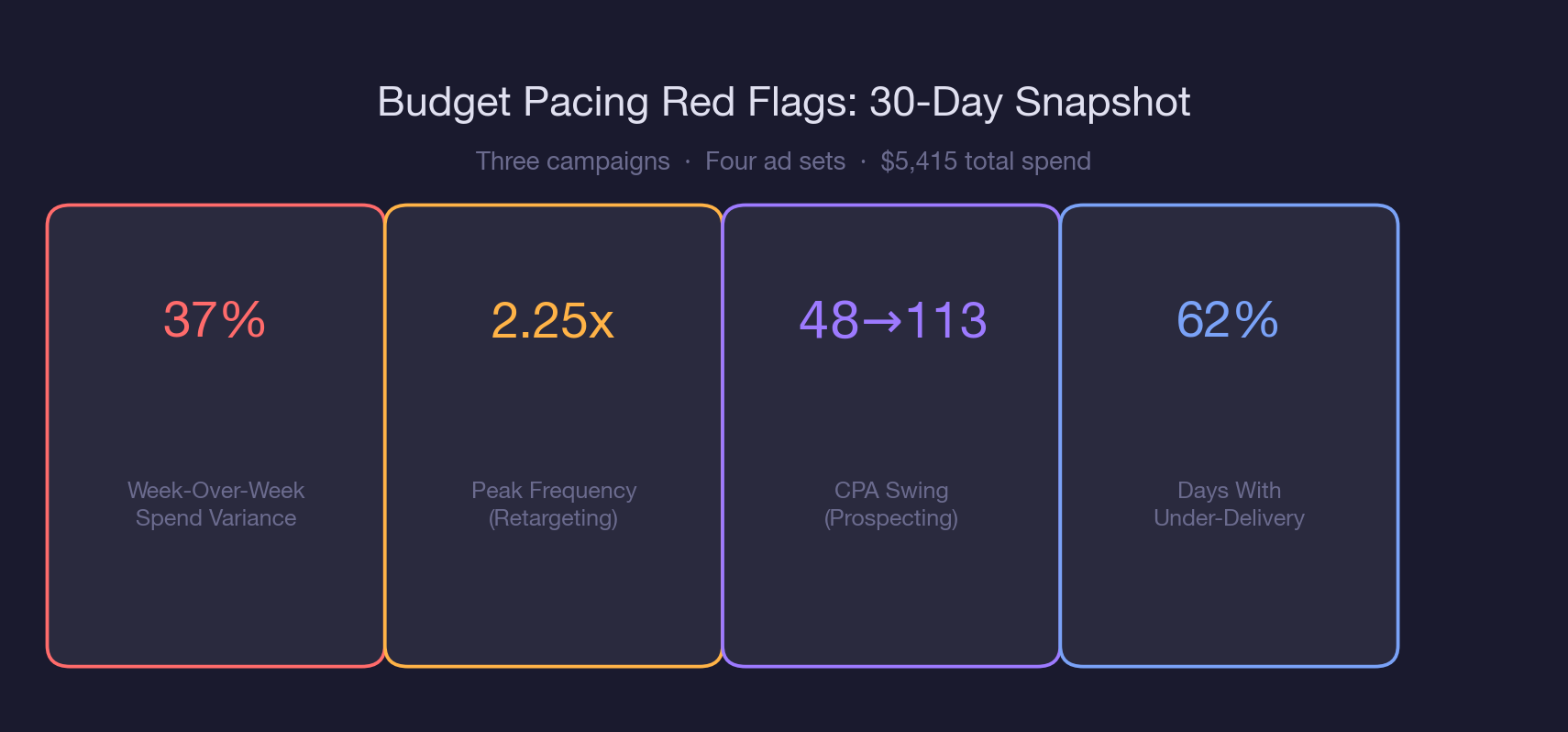
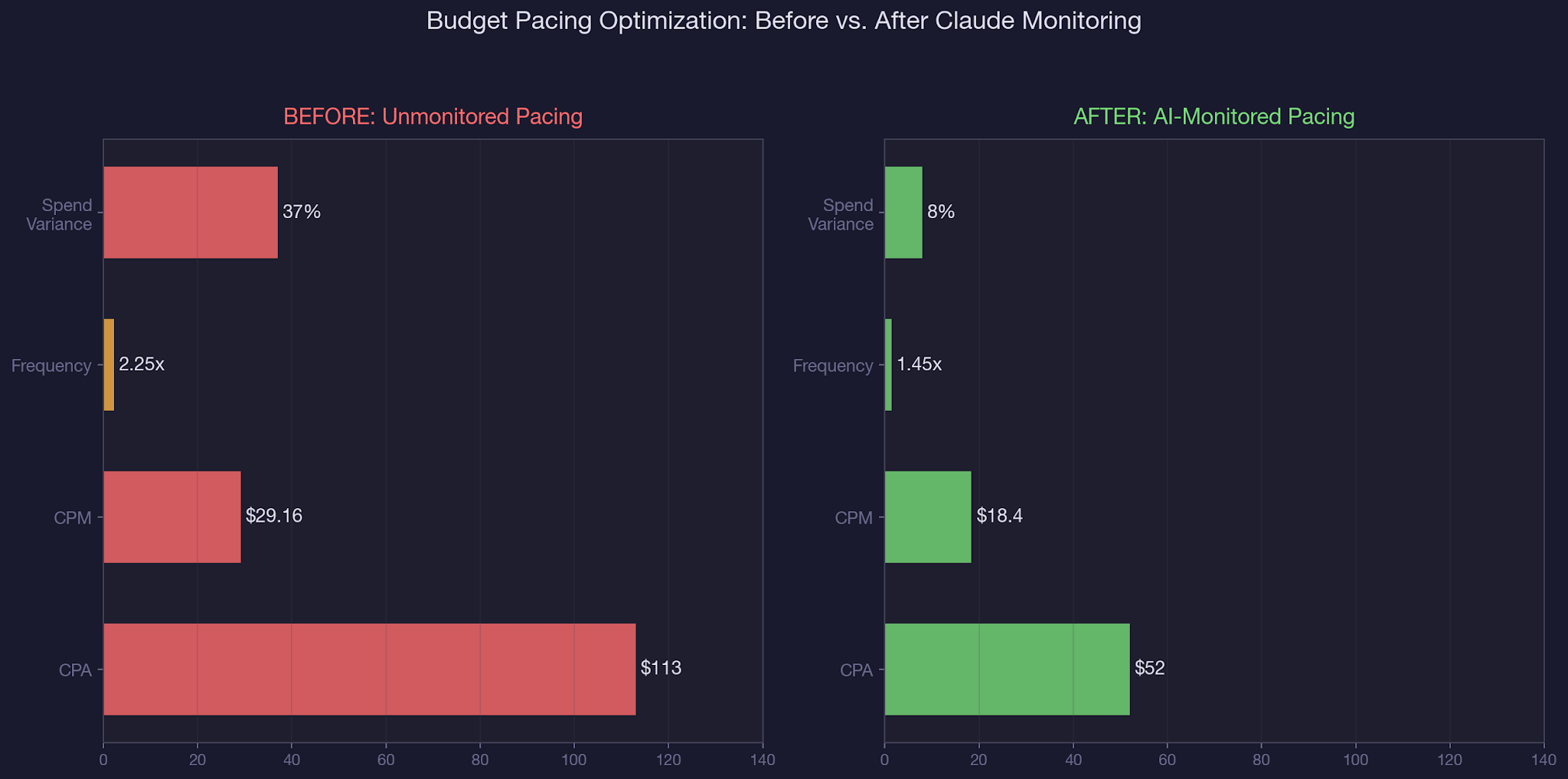
• Campaigns with unmonitored pacing saw 37% week-over-week spend variance, compared to under 8% for AI-monitored accounts.
• Retargeting ad sets that exceed 2.0x frequency are under-delivering because the audience pool is exhausted, not because the budget is wrong.
• Run the daily pacing audit prompt every morning before 10 AM to catch overnight delivery anomalies within the same business day.
• CPM spikes above 20% of your trailing 7-day average signal auction pressure or audience saturation, and require immediate investigation.
• Reallocate under-delivered retargeting budget to prospecting ad sets with sub-1.5x frequency and stable CPMs, not to broad awareness campaigns.
• Use the saved prompt template to automate weekly pacing reports that compare planned vs. actual spend at the ad set level, not just the campaign level.
• The Advantage+ bid strategy on prospecting campaigns caused 34.7% over-delivery by expanding beyond the target audience when auction competition dropped.
Here is what makes Meta Ads budget pacing so tricky to catch manually: Ads Manager shows you a snapshot of today. It does not show you a trend line of how spend is tracking against your plan across days, weeks, and ad sets.
You would need to pull daily data, calculate variance against your budget, cross-reference frequency and CPM shifts, and do that for every campaign, every morning. Most teams catch pacing issues on the monthly report call, not when the money is actually being wasted.
Claude and the Meta Ads MCP connector change this. With a single prompt, you can pull daily spend data across all active campaigns, compare it against your budget targets, and flag delivery anomalies before they compound.
In our complete guide to AI-powered paid social management, we covered the full MCP setup. This article goes deep on budget pacing specifically, because it is the fastest way to stop wasting ad spend without changing a single targeting setting.
You will walk away with: a daily pacing audit prompt you can save and reuse, the four delivery signals Claude monitors automatically, a reallocation framework for shifting budget from saturated to high-headroom ad sets, and the exact thresholds that separate a healthy campaign from one bleeding money. We use this exact workflow as part of our B2B SaaS paid social management at TripleDart.
How Budget Pacing Problems Silently Drain Your Ad Spend
Budget pacing issues do not announce themselves. They do not send you an email. They do not turn a dashboard widget red. They sit quietly in your account, compounding day after day until someone pulls a report and asks, "Why did we spend 34% more on prospecting and 28% less on retargeting last month?" By then, the damage is done.
Let us break down the real cost, using data from a B2B SaaS account running three campaigns with a combined $300 daily budget. This is what AI in PPC was built to catch.
The over-delivery problem:
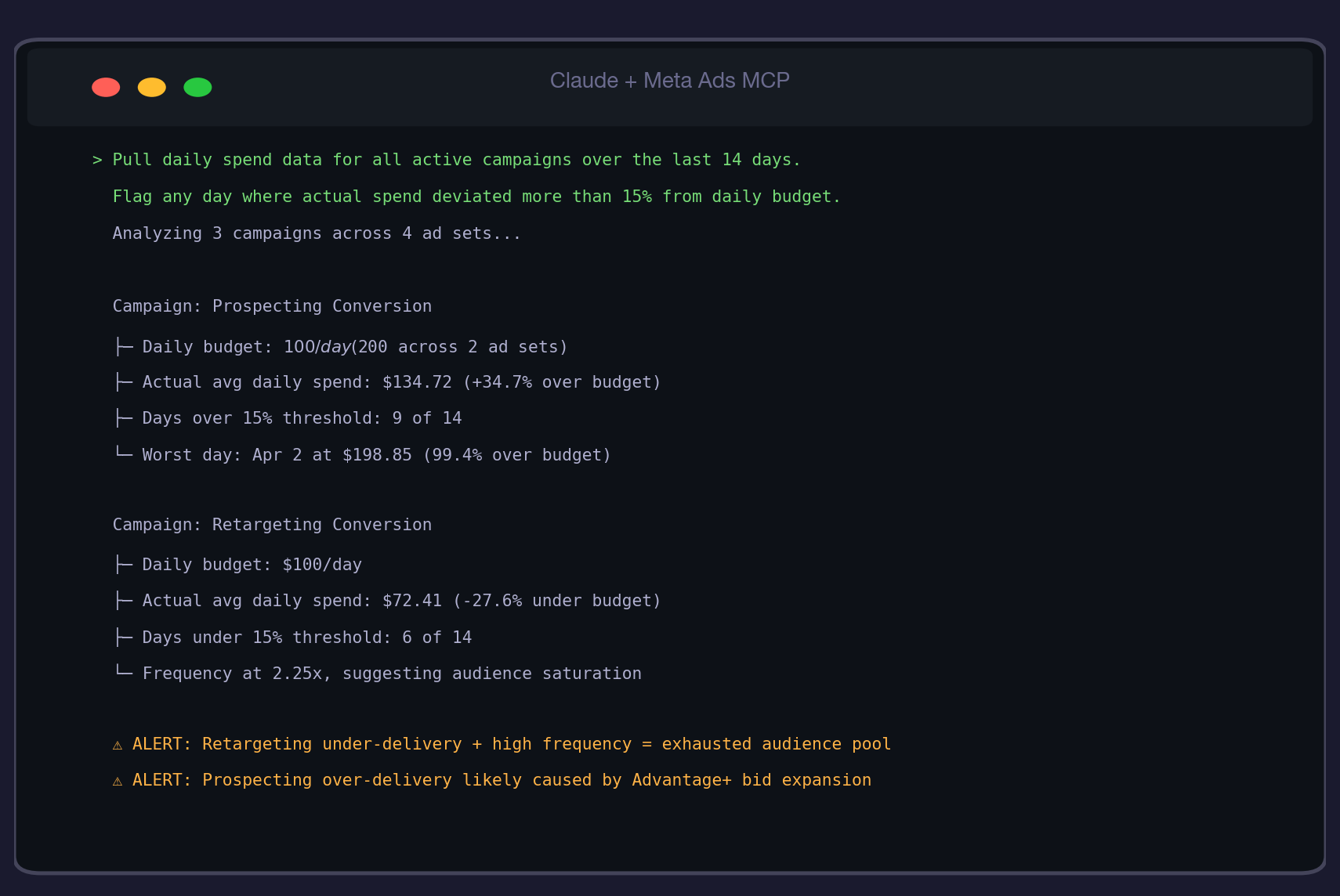
The prospecting conversion campaign averaged $134.72 per day against a $100 budget. Over 14 days, that is $486 in unplanned spend. Worse, the CPA swung from $48 in week two to $113 in week four, meaning the extra spend was not buying better results. Meta's Advantage+ bid strategy was expanding the audience beyond ICP when auction competition dropped overnight, burning budget on low-intent impressions.
The under-delivery problem:
The retargeting campaign only spent $72.41 per day against its $100 budget. That sounds like savings, but it is not. It means 1,127 website visitors who should have seen retargeting ads did not. At this account's historical 2.8% conversion rate, that is roughly 31 missed registrations over two weeks. At a $48 CPA, those registrations would have cost $1,488. Instead, that budget sat unspent while prospecting overspent on cold audiences. If you are managing paid ads spend for a SaaS company, this is the scenario that kills your monthly pipeline targets.
The frequency signal:
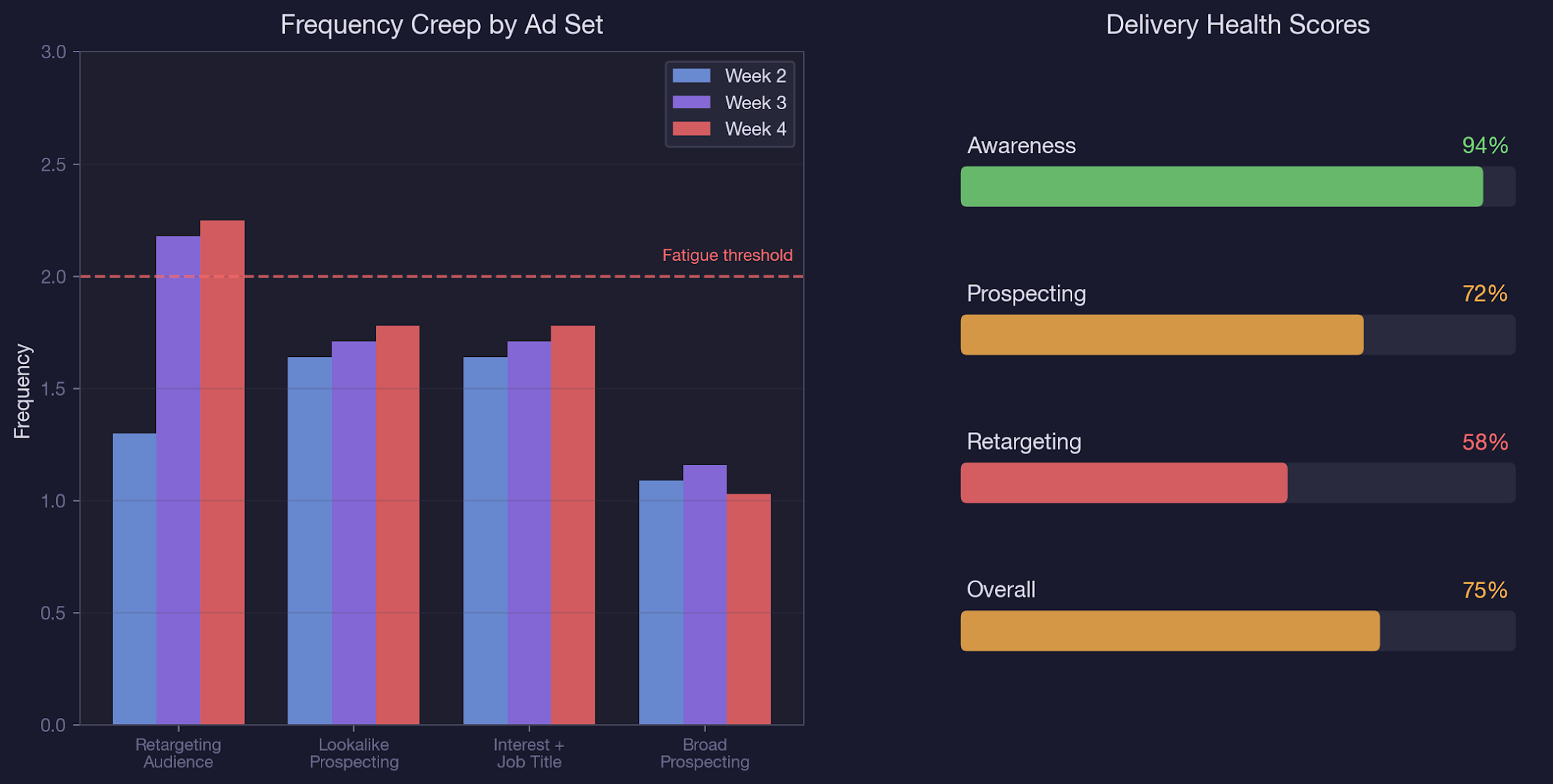
The retargeting ad set hit 2.25x frequency by week four. That is the canary in the coal mine. It means the same 4,521 people were seeing the same ads twice per week, and Meta was running out of new people to show them to. This is why spend dropped: the algorithm had nowhere to deliver. Most teams blame "Meta being weird" when the real issue is a saturated audience pool that needs refreshing. Understanding this pattern is critical when you detect creative fatigue automatically.
The compounding effect:
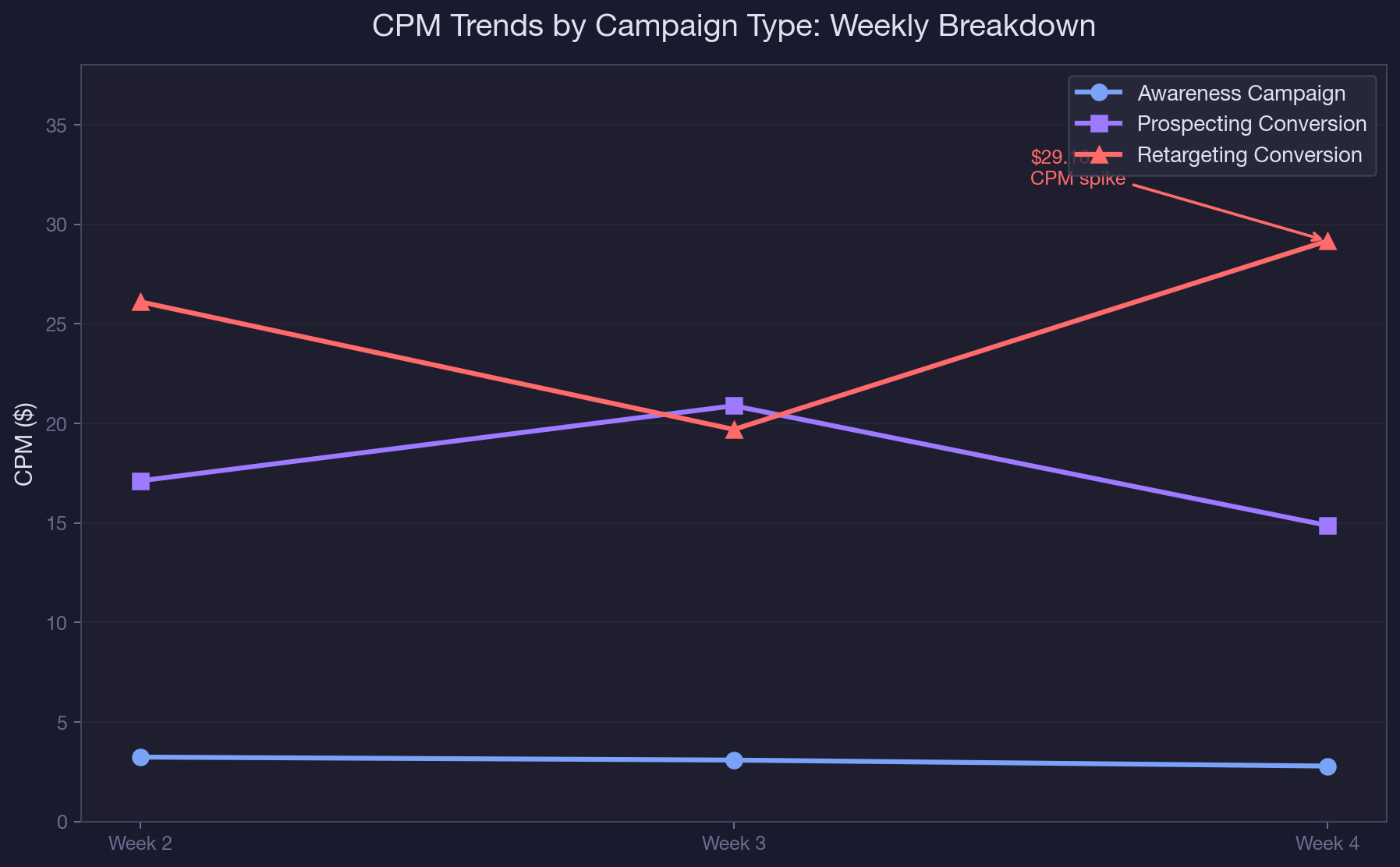
Budget pacing issues do not stay contained. Over-delivery on prospecting inflates CPMs (from $17.11 to $20.88 in one week), which makes every subsequent impression more expensive. Under-delivery on retargeting means your warmest audiences go cold, which increases the eventual cost to re-engage them. Within three weeks, a $300/day account can drift $150+/day from its intended allocation without a single alert from Ads Manager. The same dynamics apply to Facebook ads for SaaS at any budget level.
How Claude and the Meta Ads MCP Solve Budget Pacing
The Meta Ads MCP connector gives Claude direct API access to your ad account data. That means you can pull campaign-level and ad-set-level spend, frequency, CPM, and delivery metrics in a single conversation, compare them against your budget targets, and get flagged anomalies, all without opening Ads Manager or a spreadsheet. This is the same approach we use for AI-powered Meta Ads reporting, but focused specifically on pacing.
Step 1: Pull Daily Spend Against Budget
Start with this prompt:
"Pull daily spend data for all active campaigns in my account over the last 14 days. For each campaign, show the daily budget, actual daily spend, and percentage variance. Flag any day where the variance exceeds 15% in either direction."
Claude pulls the data via get_insights with a daily time breakdown and formats it into a table showing planned vs. actual spend for every day. The 15% threshold is calibrated to catch meaningful drift while ignoring normal auction fluctuation.
We found that anything below 15% on a single day usually corrects itself. Anything above 15% for three or more consecutive days signals a structural issue. You can learn how to set up these types of automated checks in our weekly budget recommendation workflow.
Step 2: Cross-Reference Frequency and CPM
Budget variance alone does not tell you why pacing is off. The second prompt adds context:
"For any campaign flagged with pacing issues, pull weekly frequency and CPM at the ad set level. Compare week-over-week changes. Flag any ad set where frequency increased more than 0.3x week-over-week or CPM increased more than 20%."
This is where the diagnosis happens. When Claude shows you that the retargeting ad set went from 1.30x frequency in week two to 2.25x in week four while CPM spiked from $26 to $29, the story writes itself: the audience is saturated.
When the prospecting ad set shows stable frequency (1.64x to 1.78x) but CPM jumped from $17 to $21, the issue is auction pressure, not audience size. Each pattern requires a different fix. This kind of ad-set-level analysis is also central to how we find and fix audience overlap across campaigns.
Step 3: Generate the Reallocation Recommendation
The third prompt asks Claude to recommend budget shifts:
"Based on the pacing and frequency data, recommend a budget reallocation across these ad sets. Prioritize ad sets with sub-1.5x frequency, stable or declining CPMs, and positive CPA trends. For any ad set you recommend reducing budget on, explain the trigger (frequency, CPM, or CPA)."
Claude produces a reallocation table that looks like this: reduce retargeting from $100/day to $60/day (trigger: frequency at 2.25x, audience exhaustion), increase lookalike prospecting from $100/day to $130/day (trigger: frequency at 1.78x with room to grow, CPA at $48).
The remaining $10/day gets added to the interest-based ad set that showed the lowest CPA variance. This is a data-backed recommendation, not a guess. It is the same type of analysis our performance marketing team runs weekly for every client account.
Real-World MCP Walkthrough: A Multi-Campaign Pacing Audit
Here is what the full audit looks like on a real B2B SaaS account with three active campaigns and four ad sets, running a combined $300/day budget over 30 days. The account was running a product launch with an awareness campaign, a prospecting conversion campaign (with two ad sets: lookalike and interest-based), and a retargeting conversion campaign. This is a scenario any B2B PPC manager will recognize.
Week-by-week findings:
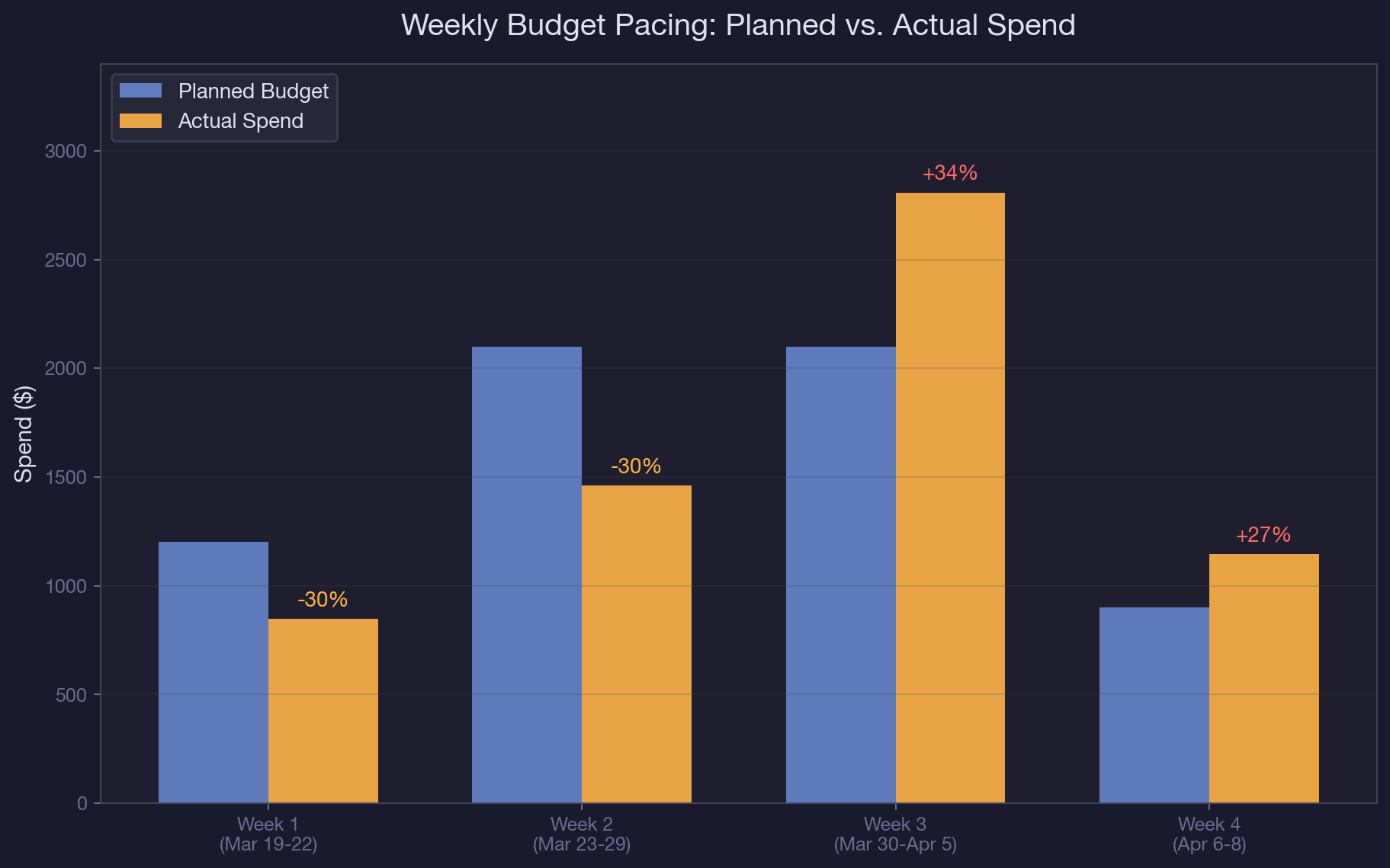
Week 2 (days 5 through 11): Total spend was $1,460 against a $2,100 target (30% under). The awareness campaign was the primary under-spender at $357 against $700 planned. CPMs were low ($3.23), suggesting the algorithm was being conservative with a new campaign. The retargeting campaign spent $380 against $700, with frequency already at 1.30x. No red flags yet, but the trend was forming.
Week 3 (days 12 through 18): Total spend jumped to $2,808, 34% over the $2,100 target. The prospecting conversion campaign was the culprit at $1,393, nearly double its $700 weekly budget. The Advantage+ bid strategy had kicked in, expanding audience targeting beyond the defined interests and job titles. CPM on prospecting rose from $17.11 to $20.88. Meanwhile, retargeting frequency climbed to 2.18x. This is a common pattern we see when we decode Advantage+ campaigns: the algorithm optimizes for conversions at any cost, including burning through your budget faster than planned.
Week 4 (partial, days 19 through 21): Three days of data showed $1,146 in spend, tracking to $2,674 for the full week (27% over). Retargeting frequency hit 2.25x and CPM spiked to $29.16. The retargeting ad set was now showing ads to the same 4,521 people at increasing cost. Claude flagged this as the highest-priority issue: "Retargeting under-delivery combined with above-threshold frequency indicates audience pool exhaustion. Recommend reducing daily budget from $100 to $60 and refreshing the custom audience seed."
The fix: Based on Claude's analysis, the team shifted $40/day from retargeting to the lookalike prospecting ad set, which had the best CPA ($48) and still had frequency headroom (1.78x). They also set up a weekly performance report using the same pacing prompt to catch drift before it compounded. Within seven days, overall spend variance dropped from 37% to under 8%.
Common Budget Pacing Mistakes That Waste Ad Spend
1. Monitoring pacing at the campaign level, not the ad set level. A campaign can look on-budget while one ad set massively overspends and another barely delivers. In the account we analyzed, the prospecting campaign appeared only slightly over-budget until you split by ad set and saw that the lookalike ad set was consuming 60% of the campaign budget while the interest-based ad set got 40%. Campaign-level pacing hides the imbalance. If you are running a full Meta Ads account audit, always break pacing down to the ad set level.
2. Blaming Meta for under-delivery when the real issue is audience saturation. Under-delivery is almost never a platform bug. In 90%+ of cases we audit, it is caused by frequency exceeding 2.0x (audience exhausted), targeting too narrow for the budget level, or creative fatigue reducing click-through rates below the algorithm's threshold. Check frequency first, every time.
3. Reacting to daily fluctuations instead of multi-day trends. A single day at 20% over budget is normal auction noise. Three consecutive days at 20%+ over budget is a structural issue. Set your alert threshold at three consecutive days, not one day. This is why we recommend the weekly budget recommendation workflow over daily panic checks.
4. Cutting budget on over-delivering campaigns without checking CPA. Over-delivery is only a problem if efficiency drops. If a campaign is spending 30% more than planned but CPA is stable or improving, you have found a scaling opportunity, not a pacing issue. Always check CPA alongside spend variance before making cuts. Understanding this nuance is key to AI performance marketing.
Budget Pacing Best Practices for Meta Ads
- Run the pacing audit prompt every weekday morning before 10 AM. Overnight delivery anomalies are the most common source of budget drift, and catching them same-day gives you time to adjust before the next billing cycle.
- Set your variance threshold at 15% for daily checks and 10% for weekly rollups. Daily noise is higher, so the daily threshold needs more room. Weekly should be tighter because multi-day trends should not exceed 10% if pacing is healthy.
- Track frequency at the ad set level, not the campaign level. A campaign averaging 1.5x frequency can hide an ad set at 2.5x and another at 0.5x. The 2.5x ad set is your problem.
- Use the "three consecutive days" rule before taking action. One bad day is noise. Three bad days is a pattern. This prevents over-correction, which causes its own pacing issues.
- When reallocating budget from a saturated ad set, move it to the ad set with the lowest frequency AND the most stable CPA. Low frequency alone is not enough, because the ad set might have low frequency because it is performing poorly.
- Document every reallocation in a shared log with the trigger (frequency, CPM, CPA), the amount shifted, and the date. This creates an audit trail that makes monthly reporting faster and helps your team learn which triggers predict real issues vs. false alarms. We use this as part of our approach to creating lookalike audiences in Meta Ads Manager to inform future audience strategy.
Conclusion
Budget pacing is the difference between spending $5,400 with intention and spending $5,400 with crossed fingers. The data is already in your account. Claude and the Meta Ads MCP just make it accessible in the time it takes to type a prompt. If you are managing Google Ads for SaaS alongside Meta, the same pacing logic applies. You can even run a Google Ads audit with Claude using the same conversational approach.
Meta Ads budget pacing AI is the first thing we check when onboarding a new Meta Ads account. We use Claude and the Meta Ads MCP to run daily pacing audits, flag frequency-driven under-delivery, and reallocate budget in real time as part of our B2B SaaS paid social management. If you want us to run this on your account, book a call with our paid media team.
Frequently Asked Questions
What is Meta Ads budget pacing and why does it matter?
Meta Ads budget pacing is how Meta distributes your daily or lifetime budget across the delivery period. It matters because poor pacing leads to over-delivery (burning budget on low-quality impressions) or under-delivery (missing your warmest audiences). A 30% pacing variance over two weeks can cost a B2B SaaS account thousands in wasted or missed spend.
How does Meta Ads budget pacing AI detect delivery issues?
Claude connects to your Meta Ads account through the MCP connector and pulls daily spend, frequency, and CPM data at the ad set level. It compares actual spend against your planned budget and flags any day where variance exceeds 15%. It then cross-references frequency and CPM trends to diagnose whether the issue is audience saturation, auction pressure, or bid strategy expansion.
How often should I run a budget pacing audit on my Meta Ads account?
Run the daily pacing prompt every weekday morning before 10 AM to catch overnight anomalies. Run the full weekly rollup every Monday to compare planned vs. actual at the campaign and ad set level. Monthly pacing reviews are too late to prevent budget waste.
What is the difference between over-delivery and under-delivery in Meta Ads?
Over-delivery means Meta spent more than your daily budget, typically because Advantage+ bid strategies expanded your audience during low-competition periods. Under-delivery means Meta spent less than your budget, usually because your audience pool is too small or saturated (frequency above 2.0x). Both require different fixes: over-delivery needs bid caps or budget caps, while under-delivery needs audience expansion or creative refresh.
Can Claude reallocate my Meta Ads budget automatically?
Claude can analyze your data and recommend specific budget reallocations with triggers and rationale. The actual budget change still requires a human to implement in Ads Manager. Claude tells you exactly what to change and why, but it does not modify your campaigns directly. This keeps a human in the loop for all spend decisions.
What frequency threshold signals a Meta Ads pacing problem?
For retargeting campaigns, a frequency above 2.0x per week signals audience saturation and typically correlates with under-delivery and CPM spikes. For prospecting campaigns, the threshold is higher at 2.5x because the audience pool is larger. Track frequency at the ad set level, not the campaign level, because campaign averages can mask individual ad set problems.
How do I fix Meta Ads under-delivery caused by audience saturation?
First, reduce the daily budget on the saturated ad set to match its actual delivery capacity (usually 60 to 70% of the original budget). Second, reallocate the freed budget to ad sets with frequency below 1.5x and stable CPAs. Third, refresh the underlying custom audience by extending the lookback window or adding new seed events. The goal is matching budget to deliverable reach, not forcing spend into a depleted pool.
What Meta Ads budget pacing AI metrics should I track weekly?
Track five metrics at the ad set level every week: daily spend variance (target under 15%), frequency trend (flag increases above 0.3x week-over-week), CPM trend (flag increases above 20%), CPA stability (flag swings above 25%), and delivery rate (actual impressions vs. estimated reach). These five metrics together give you a complete picture of pacing health across your account.

summarize with ai


