.png)
Key Takeaways
- Bulk schema generation is a template problem, not a per-page problem. The pipeline writes JSON-LD for one page template and deploys to every page using it.
- We generate 100+ pages of valid schema per hour with Claude Opus on the file-level MCP setup. Validation runs through Google's Rich Results Test automatically before deployment.
- Six schema types cover about 90% of the ranking-lift opportunity on B2B SaaS sites: Product, Article, FAQPage, HowTo, Organization, and BreadcrumbList.
- Claude produces syntactically correct JSON-LD reliably. It occasionally produces semantically incorrect JSON-LD. The Rich Results Test catches syntax; a technical SEO lead catches semantics.
- The typical deployment sees rich-result impressions within 7 to 14 days of re-crawl. Full ranking lift on schema-eligible queries arrives over 60 to 90 days.
- Schema debt is a silent liability. A 1,000-page B2B SaaS site missing Product and Article schema on flagship templates is leaving rich snippets on the table that a competitor with the same content will capture.
Bulk Schema Is a Template Problem, Not a Page Problem
A 1,000-page B2B SaaS archive does not need 1,000 JSON-LD files. It needs 10 JSON-LD files, one per page template, deployed through the CMS so every page inherits the schema dynamically.
That single distinction is what makes Claude economically useful for schema work. Per-page generation is a six-week project that no dev team wants to own. Template-level generation is one engineering release after an afternoon of Claude work and a validation cycle.
We run this pipeline across B2B SaaS engagements at TripleDart. The typical deployment ships 100+ pages of valid JSON-LD in under two hours, picks up rich-result impressions in GSC inside the first re-crawl cycle, and adds 40 to 90 percent CTR on the queries that gain rich snippets.
The rest of this guide walks the schema types that carry the rank lift, the four-stage generation and validation pipeline, the two classes of errors Claude produces that we catch on every run, and the deployment window you should expect after the schema ships.
The broader workflow this sits inside is covered in our Claude SEO guide. This piece is the schema layer in depth.
What a Template-Level Deployment Looks Like
One-off schema generators are everywhere. They handle the 5-page small-business site fine. They are useless on a 1,000-page B2B SaaS archive because the schema does not belong on individual pages. It belongs on templates.
A B2B SaaS site has maybe 8 to 15 unique page templates: homepage, pricing, product, feature, integrations, comparison, solution, customers, blog post, blog category, resource hub, tool page, case study, about, contact.
Every URL on the site uses one of those templates. Every template should carry the schema types that map to its content.
Generating schema per page is the inefficient path. Generating schema per template and deploying through the CMS is the architectural one.
The Templates That Carry the Most Schema Weight
On a typical B2B SaaS site, four templates drive 80% of the rich-result opportunity.
Product pages carry Product + Offer + AggregateRating schema. Comparison pages carry Product + Review schema. Guide pages carry Article + HowTo + FAQPage schema. Blog posts carry Article + FAQPage schema.
Nail those four template-level deployments and the rich-result eligibility across the whole archive moves. Everything else is maintenance.
The broader framing sits in our technical SEO for SaaS guide.
For the AEO side of the work, our AEO agency page covers how schema feeds AI citation visibility alongside traditional rich results.
Why Per-Page Generators Fail
A per-page tool produces 1,000 JSON-LD files for a 1,000-page archive. Dev teams cannot deploy 1,000 files. They can deploy a template change once, which then applies to the 1,000 pages dynamically.
The pipeline described below outputs template-level JSON-LD. The dev team deploys once. Every page using that template picks up the schema through dynamic rendering. Schema drift across pages is impossible because the template is the source of truth.
The Six Schema Types That Move Rankings
There are hundreds of schema.org types. Six of them handle most of the work on B2B SaaS.
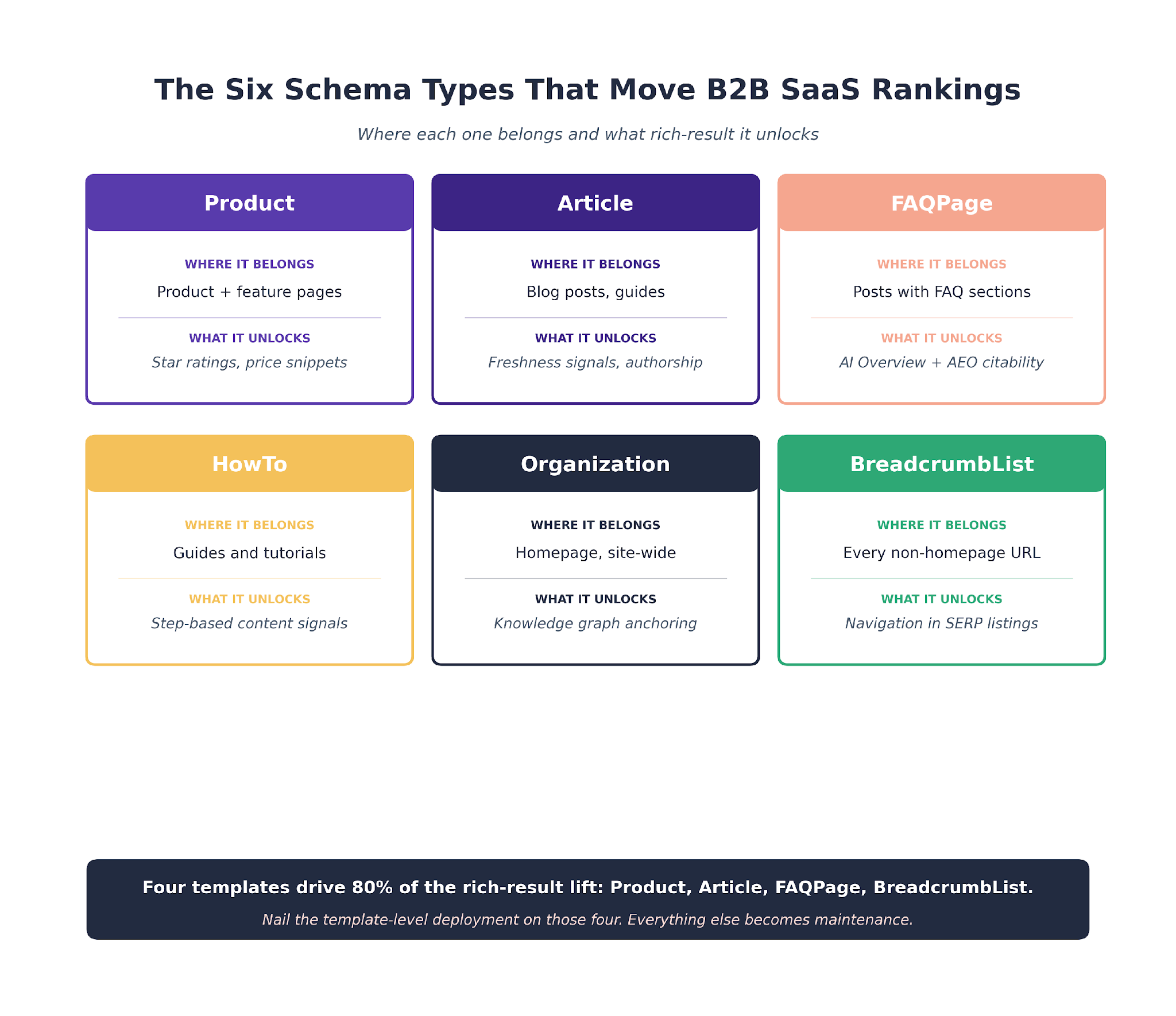
The pattern is simple. Match the type to the template; deploy at template level; validate before shipping. The keyword research side of the work that feeds these templates is covered in our keyword research pipeline.
Product
Most B2B SaaS brands underdeploy Product schema. It belongs on product pages, comparison pages, and any URL that represents a specific feature or tier.
Paired with Offer (for pricing) and AggregateRating (for customer ratings), Product schema drives the rich snippets that show star ratings and price ranges directly in the SERP.
Here is the template-level JSON-LD we generate for a typical B2B SaaS feature page. The dynamic fields ({{name}}, {{url}}, etc.) get populated by the CMS at render time:
{
"@context": "https://schema.org",
"@type": "Product",
"name": "{{product_name}}",
"description": "{{product_description}}",
"url": "{{page_url}}",
"image": "{{hero_image_url}}",
"brand": {
"@type": "Brand",
"name": "{{brand_name}}"
},
"offers": {
"@type": "Offer",
"priceCurrency": "USD",
"price": "{{starting_price}}",
"priceValidUntil": "{{price_valid_date}}",
"availability": "https://schema.org/InStock",
"url": "{{pricing_page_url}}"
},
"aggregateRating": {
"@type": "AggregateRating",
"ratingValue": "{{review_avg}}",
"reviewCount": "{{review_count}}",
"bestRating": "5",
"worstRating": "1"
}
}
Article
Every blog post should carry Article schema with author, datePublished, dateModified, and publisher fields. The impact is not just rich results; Article schema is one of the signals Google uses to understand content freshness and authorship.
Here is the standard template we ship for blog archives:
{
"@context": "https://schema.org",
"@type": "Article",
"headline": "{{post_title}}",
"image": ["{{featured_image_url}}"],
"datePublished": "{{iso_publish_date}}",
"dateModified": "{{iso_modified_date}}",
"author": {
"@type": "Person",
"name": "{{author_name}}",
"url": "{{author_profile_url}}"
},
"publisher": {
"@type": "Organization",
"name": "{{brand_name}}",
"logo": {
"@type": "ImageObject",
"url": "{{brand_logo_url}}"
}
},
"mainEntityOfPage": {
"@type": "WebPage",
"@id": "{{post_url}}"
}
}
FAQPage
The most underused type on B2B SaaS blogs. Every article with a FAQ section should carry FAQPage schema. Google FAQ rich results have become less visible since 2023, but the schema still signals answer-ready content to AI engines and feeds the AI Overview system.
Minimal FAQPage structure:
{
"@context": "https://schema.org",
"@type": "FAQPage",
"mainEntity": [
{
"@type": "Question",
"name": "{{faq_question_1}}",
"acceptedAnswer": {
"@type": "Answer",
"text": "{{faq_answer_1}}"
}
},
{
"@type": "Question",
"name": "{{faq_question_2}}",
"acceptedAnswer": {
"@type": "Answer",
"text": "{{faq_answer_2}}"
}
}
]
}
HowTo
Applies to guide and tutorial content. HowTo schema with step-by-step markup was once the source of major rich result real estate. Google has pulled back on HowTo rich results, but the schema still helps with content understanding and AEO performance.
{
"@context": "https://schema.org",
"@type": "HowTo",
"name": "{{guide_title}}",
"description": "{{guide_summary}}",
"totalTime": "{{iso_duration}}",
"step": [
{
"@type": "HowToStep",
"position": 1,
"name": "{{step_1_title}}",
"text": "{{step_1_body}}",
"url": "{{page_url}}#step1"
},
{
"@type": "HowToStep",
"position": 2,
"name": "{{step_2_title}}",
"text": "{{step_2_body}}",
"url": "{{page_url}}#step2"
}
]
}
Organization
Site-wide schema that belongs on the homepage at minimum. Organization schema with logo, sameAs (social profiles), contactPoint, and address fields anchors the brand entity in Google's knowledge graph.
{
"@context": "https://schema.org",
"@type": "Organization",
"name": "{{brand_name}}",
"url": "{{homepage_url}}",
"logo": "{{brand_logo_url}}",
"sameAs": [
"{{linkedin_url}}",
"{{twitter_url}}",
"{{github_url}}"
],
"contactPoint": {
"@type": "ContactPoint",
"contactType": "sales",
"email": "{{sales_email}}"
}
}
BreadcrumbList
Applies to every non-homepage URL. BreadcrumbList schema adds the navigation path to the SERP and improves the way search engines understand site structure. Trivial to generate, always worth deploying.
What Our Schema Audits Keep Surfacing
Across the B2B SaaS sites we rebuild, Organization schema is usually the only type deployed at launch. FAQPage is missing on 80% of archives we audit. Product schema is missing on 60% of comparison and feature pages that should carry it. HowTo is missing on 90% of guide content. The gap is consistent enough that it stopped surprising us.
The Bulk Generation Pipeline
The pipeline runs four stages. Each one has a narrow job.
Stage 1. Template Identification
Claude reads the sitemap and a sample of URLs per template. It classifies each URL by template type (homepage, product, comparison, blog post, etc.) and maps the count per template.
Output: a table of templates and URL counts. This is what tells the dev team where to deploy.
Stage 2. Schema Type Mapping
For each template, Claude recommends the schema types that apply and the fields each type requires.
The recommendation is grounded in schema.org spec and Google's current rich result documentation. The Google developers schema docs are the canonical reference.
Output: a coverage matrix. Template rows, schema type columns, recommended deployment state per cell.
Stage 3. JSON-LD Generation
Claude writes the JSON-LD for one URL per template, using that URL's actual content (scraped or passed in from the CMS) as input. The output includes all required and recommended fields for each schema type, with proper nesting for types like Product with AggregateRating.
Output: one JSON-LD file per template. The dev team drops each into the template's head section through the CMS.
Stage 4. Validation Loop
Every generated JSON-LD runs through Google's Rich Results Test before deployment. Errors get sent back to Claude with the specific Rich Results message, and Claude rewrites the problematic section. The loop runs until zero errors on every file.
Output: validated JSON-LD files ready for template deployment.

What Runs in an Hour
On a 10-template B2B SaaS site, the full four-stage pipeline runs in about 90 minutes of Claude time plus 20 to 30 minutes of validation cycling. The dev team then ships the template changes in a single release.
Compared to per-page generation (6+ weeks for 1,000 pages), the template-level pipeline is on a different time scale entirely. The Ahrefs AI SEO statistics compilation tracks the same pattern across other technical SEO workflows.
The pipeline also feeds cleanly into our broader workflow. The technical audit surfaces which templates are missing schema.
The generation pipeline fills the gap, and the reporting layer tracks the rich-result impression lift. The audit side of the loop sits in our technical audit guide.
The Validation Loop That Catches the Errors
Claude is good at writing syntactically valid JSON-LD. It is less good at spotting semantic errors that Rich Results Test catches but schema.org does not.
Syntax Errors Google Catches
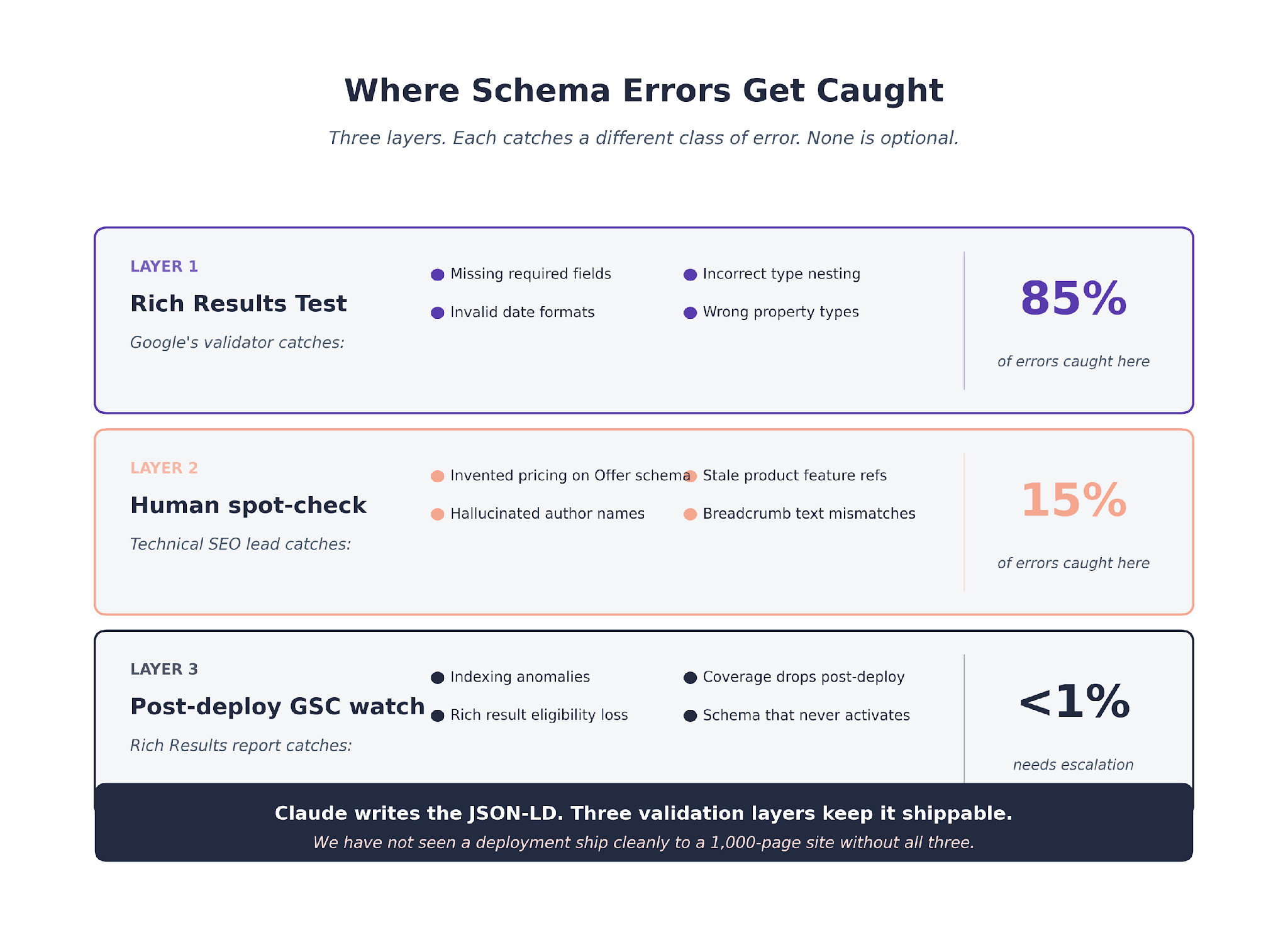
Missing required fields (Product without name or image). Invalid date formats. Incorrectly nested types. Wrong property types (string where an integer is expected).
The Rich Results Test surfaces these with specific error messages. The validation loop feeds the error back to Claude, Claude rewrites, the loop re-validates.
About 60 to 70% of first-pass JSON-LD files need at least one validation revision. 10 to 15% need two revisions. Very few need more than that.
Semantic Errors Humans Have to Catch
Claude can generate a syntactically valid Offer with a price that does not exist on the client's actual pricing page. The Rich Results Test does not catch that. A human does.
Claude can generate a BreadcrumbList with names that do not match the actual navigation. Valid schema. Wrong content.
The technical SEO lead spot-checks one URL per template against the live page after validation. Any discrepancy between the JSON-LD and the rendered content gets flagged and fixed before deployment.
The Validation Pattern We See Most Often
Across the schema engagements we run, the validation loop catches roughly 85% of errors automatically. The remaining 15% surface in the human spot-check. We have not seen a schema deployment ship cleanly to a 1,000-page site without both steps. Skipping either produces incorrect schema in production.
The Schema.org documentation is the canonical reference for what each type should contain. We cross-reference generated output against it before every deployment.
The Errors Claude Makes and How We Catch Them
Three error patterns show up regularly enough to name.
Pattern One. Invented Pricing
On Product + Offer schema, Claude occasionally invents a price that matches typical B2B SaaS pricing but does not match the client's actual rates. The spot-check catches it.
The CLAUDE.md for schema engagements explicitly prohibits inventing numeric fields. Every price, rating, review count, or offer validity field must come from the source URL. The guardrail reduces the failure rate but does not eliminate it.
Pattern Two. Hallucinated Authors
Article schema requires an author field. Claude pulls from the URL where possible. When the URL lacks clear authorship markup, Claude has been known to invent one.
We handle this by passing in a client-specific author list as part of the generation prompt. Claude is instructed to only use authors from that list.
Pattern Three. Stale Product Features
When a client's product has evolved faster than its pages, Claude's schema can reference features that no longer exist. The product page itself might not have been updated; Claude reads it and generates schema matching the stale content.
The fix is upstream. The product page needs to be refreshed, then the schema follows. We do not try to patch this at the schema layer.
Schema Debt Is a Silent Ranking Liability
Most of the B2B SaaS sites we audit have schema debt they did not know about.
A flagship template carries Organization schema only. The comparison pages that drive evaluation queries have no Product or Review markup. The guide pages that rank for educational queries have no Article or HowTo schema.
The competitors who deploy the missing schema capture the rich snippets on the same queries. The client sees their traffic plateau and cannot explain why.
The Search Engine Land coverage of Claude Code as an SEO command center touches on the same silent-liability pattern across several technical domains.
Schema debt grows quietly. Every new template the dev team launches without schema adds to it. Every existing template that carries outdated schema (HowTo without updated step formatting, Product without AggregateRating after reviews were added to the page) adds to it.
The pipeline above is the way to pay the debt off at scale. Once template-level schema is in place, maintenance becomes a quarterly check rather than a retrofit project.
The Schema Debt Pattern Across Our Audits
About two-thirds of the B2B SaaS sites we audit are leaving rich-result impressions on the table at a scale that would embarrass the team if they saw the number. The typical under-deployed site is missing rich-result eligibility on 40 to 60% of its eligible pages. Closing that gap tends to add 150,000 to 400,000 monthly impressions within two re-crawl cycles.
The Re-Crawl Window and What to Watch
Schema deployment does not produce instant rich results. Google has to re-crawl the template, recognize the new structured data, and decide when to show rich results for eligible queries.
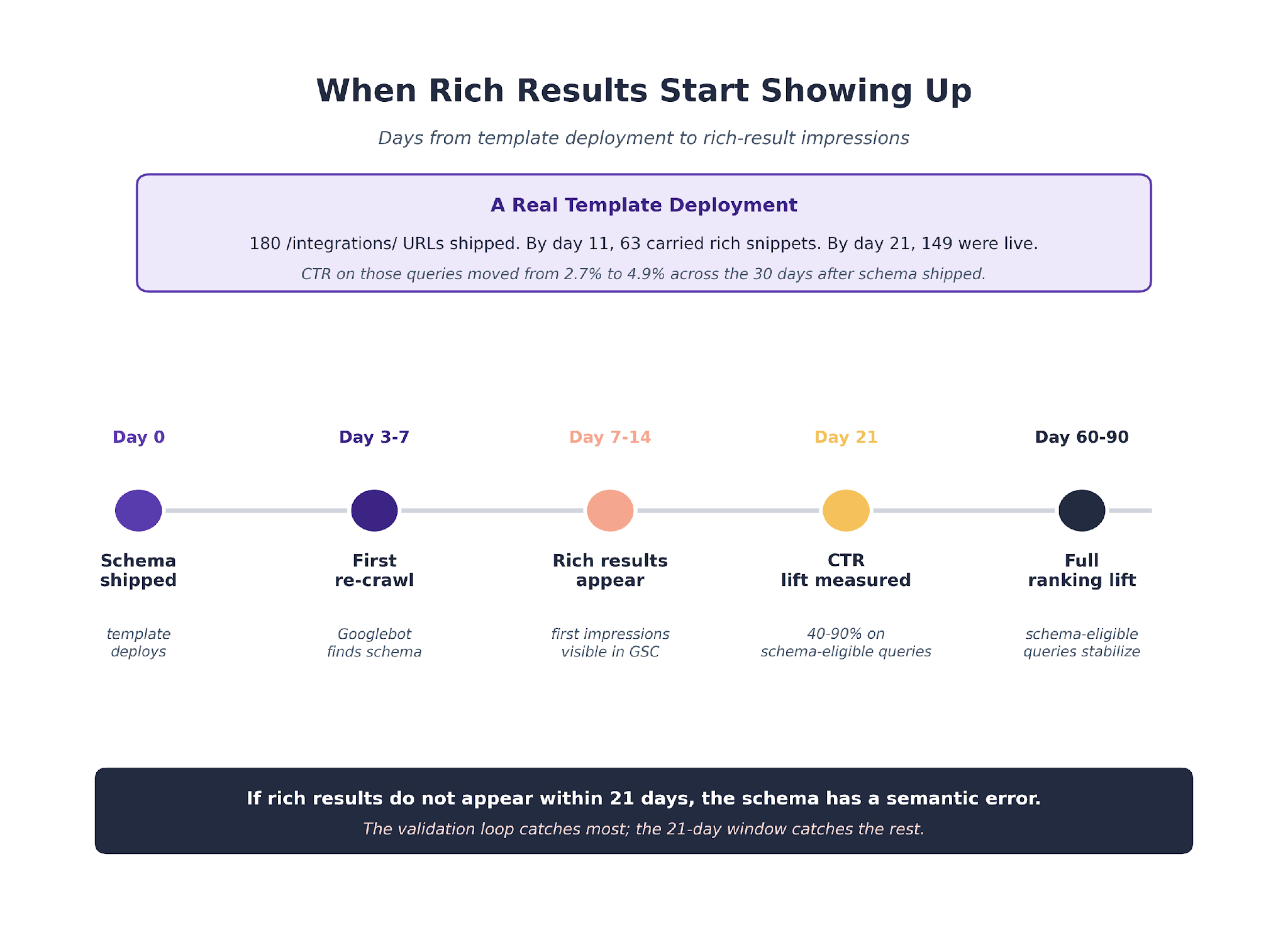
The re-crawl window sits between 3 and 14 days for most templates. Product schema on high-traffic pages tends to re-crawl fastest. Article schema on blog archives is slower because Google crawls those pages less frequently.
The first thing to watch in GSC after deployment is the "Rich results" report under Performance.
New rich-result impressions start appearing within the first two weeks on successful deployments. If rich results do not appear within 21 days, the schema probably has a semantic error that the validation loop missed.
The second thing to watch is the CTR delta on queries where rich snippets appeared. The delta is usually 40 to 90% CTR lift on queries that gained star ratings, price snippets, or FAQ rich results.
The absolute impression numbers also tend to tick up because Google expands which queries show rich results as the schema ages into the index.
The full monthly reporting cycle that tracks this is covered in our client reporting workflow. Rich-result impressions and CTR deltas sit alongside ranking and traffic data in every schema-phase client report we ship.
Putting the Schema Pipeline Into Practice
Schema at scale is the stage where the cost-to-value ratio tilts most in Claude's favor.
The time savings are extreme (100 pages in an hour versus weeks). The quality gain is comparable to a senior technical SEO doing the same work manually, which is unusual for a Claude-accelerated workflow.
The right entry point is a schema audit against the four templates that carry the most weight.
Product, Article, FAQPage, and BreadcrumbList are the four we prioritize. Generate for one template, validate it, deploy it, and measure the rich-result impression lift across the first two re-crawl cycles.
The gap map from the technical audit linked above feeds directly into this generation pipeline. Every template missing its primary schema type becomes a generation target for the next sprint.
We run this schema pipeline across 250+ B2B SaaS engagements at TripleDart. The pattern carries across WeWork, Atlas, Payoneer, and SignEasy, and across vertical specifics where the page-type mix varies but the six core schema types stay constant.
The service layer this work sits inside is our technical SEO agency.
For the GEO-adjacent framing, our GEO services page covers how schema pairs with content strategy for AI visibility.
To see how we would run it on your archive, talk to our team.
Frequently Asked Questions
Can Claude generate schema correctly without validation? No. Claude writes JSON-LD that is syntactically valid in most cases but not always semantically correct against Google's current rich result requirements. Every generation run needs to pass through the Rich Results Test before deployment.
Which Claude model handles schema best? Claude Opus. The instruction-following precision carries more weight on nested JSON structures than speed. We have tested Sonnet for simpler schema types (Article, BreadcrumbList) and it performs fine. For Product with nested Offer and AggregateRating, Opus is the reliable choice.
How much does one template deployment improve rich-result impressions? Depends on the template. Product schema on a 150-page feature template we ran once delivered a CTR lift from 2.7% to 4.9% within 30 days. Article schema on blog archives usually produces smaller but more consistent gains. Individual results vary by vertical and query mix.
Do we still need to update schema when product pricing or features change? Yes. Schema follows content. A pricing change on the product page means the Offer schema needs to update. Most CMS deployments handle this automatically if the template reads pricing from a dynamic field. Manual schema entries drift quickly.
What about AI citation impact from schema? AI engines weight structured data when deciding what to cite. FAQPage, HowTo, and Article schema all help with AI citability in ways that are hard to separate from their traditional SERP impact. The reporting workflow linked below tracks both streams.
Does schema work on hydrated React or Next.js SaaS sites? Yes, provided the schema renders in the HTML Googlebot sees. JavaScript-only schema can work with Google but is riskier across other crawlers and AI engines. We default to server-rendered or statically generated schema whenever possible.
How do we stop Claude from inventing data in schema fields? The CLAUDE.md for schema engagements explicitly prohibits numeric invention. The validation loop catches format errors. The human spot-check catches content errors. Three layers. All three are needed.
How often should schema get re-audited? Quarterly for actively updated sites. Semi-annually for sites with stable page templates. The audit is cheap; the cost of leaving stale schema in place is slow impression decay that nobody attributes correctly when it happens.
What about competitor schema monitoring? We track the schema competitor sites deploy on the same queries our clients target. When a competitor deploys FAQPage or HowTo schema that we do not have, we prioritize generation against the same template. This prevents silent erosion of rich-result share over time. The pattern fits into our SaaS SEO agency engagements as a standing quarterly check.
Does schema really help with AI Overview visibility? Indirectly, yes. Google's AI systems use structured data as one of several inputs when deciding what content to cite. Sites with rich schema coverage tend to appear more frequently in AI Overview citations for the same query set. The causation is hard to isolate perfectly, but the correlation is consistent enough that we treat schema deployment as part of our AI visibility work.



.webp)
.webp)

.png)


.png)





.webp)





.webp)


.webp)





%20(1).png)


.webp)
.webp)
.webp)





%20Ads%20for%20SaaS%202026_%20Types%2C%20Strategies%20%26%20Best%20Practices%20(1).webp)









.png)


.png)





.webp)


![Creating an Enterprise SaaS Marketing Strategy [Based on Industry Insights and Trends in 2026]](https://cdn.prod.website-files.com/632b673b055f4310bdb8637d/6965f37b67d3956f981e65fe_66a22273de11b68303bdd3c7_Creating%2520an%2520Enterprise%2520SaaS%2520Marketing%2520Strategy%2520%255BBased%2520on%2520Industry%2520Insights%2520and%2520Trends%2520in%25202023%255D.png)




.png)
















.webp)











%20Agencies%20for%20B2B%20SaaS%20Compared%20(2026).webp)

.webp)
%20with%20Hubspot.webp)








.png)


.png)

.png)
.png)
.png)
.png)


















.webp)

.webp)
.png)
.png)



.webp)


.png)




















.webp)


![How to Measure AEO Success: 12 Metrics Beyond Clicks [2026 Framework]](https://cdn.prod.website-files.com/632b673b055f4310bdb8637d/6a0d664b326187e99b3d5960_6%20-%20The%20Ultimate%20Guide%20to%20Measuring%20AEO%20Success%20in%202026.png)
![7-Step Workflow for AEO-Ready Content [2026 Framework]](https://cdn.prod.website-files.com/632b673b055f4310bdb8637d/6a0d55ea88913ede1d3a7123_5%20-%20Workflows%20for%20Optimized%20AEO-Ready%20Content%20Creation.png)
.png)

![How to Structure Content for AEO and GEO [With Templates]](https://cdn.prod.website-files.com/632b673b055f4310bdb8637d/6a0c6a56eb700472e635ff33_1%20-%20How%20to%20Structure%20%20Content%20for%20AEO%20and%20GEO%20%20Summaries%20(2026).png)







.png)
.png)









.png)


.png)





%2520Agencies%2520(2025).png)

![Top 9 AI SEO Content Generators for 2026 [Ranked & Reviewed]](https://cdn.prod.website-files.com/632b673b055f4310bdb8637d/6858e2c2d1f91a0c0a48811a_ai%20seo%20content%20generator.webp)




.webp)
.webp)














.webp)