Advantage+ Campaigns Decoded: Using Claude to See Inside Meta's Black Box

Key Takeaways
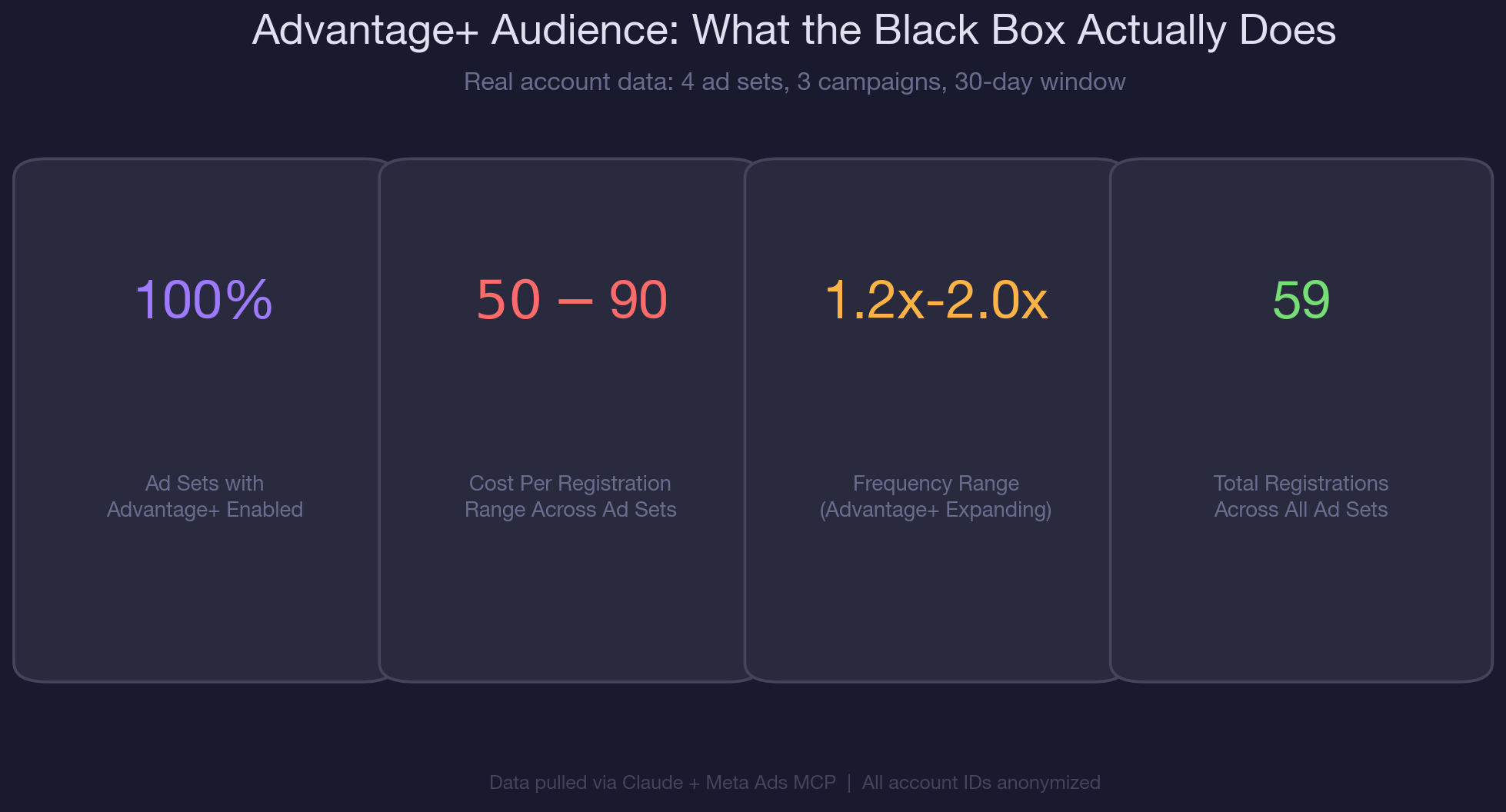
- Every ad set in the audited account had advantage_audience = 1, meaning Meta was expanding beyond defined targeting on 100% of active campaigns.
- Lookalike ad sets with Advantage+ ON paid $90.17 per registration, 79% more than retargeting ad sets ($50.31) in the same account.
- Use the MCP call get_adsets() and inspect targeting_automation.advantage_audience to see if expansion is enabled. The Ads Manager UI does not clearly surface this.
- Advantage+ increases reach 12x but doubles CPM. For B2B SaaS, test whether the reach expansion actually improves pipeline quality, not just registration volume.
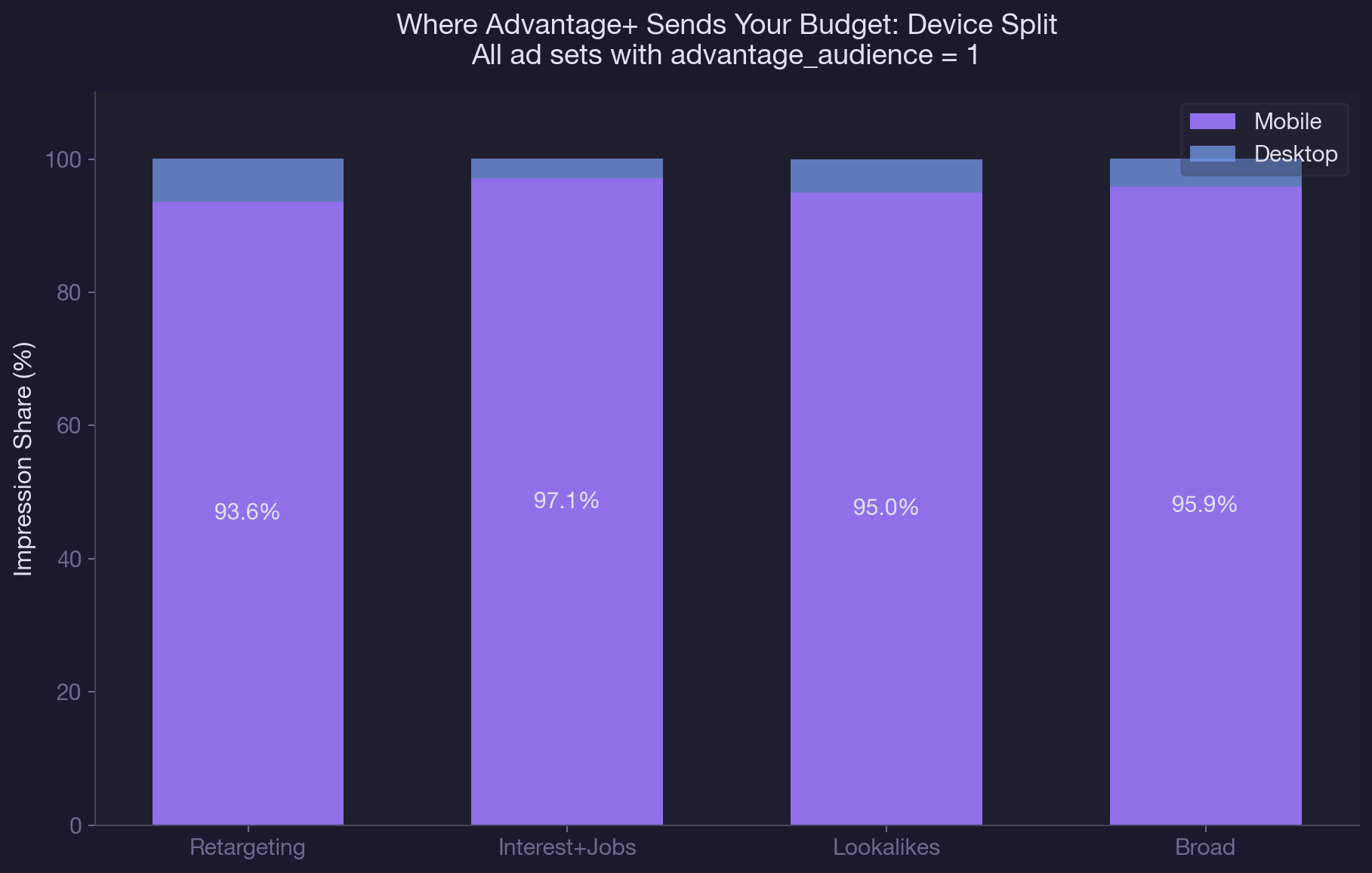
- Mobile app impressions dominated at 93-97% for all Advantage+ enabled ad sets. If your SaaS audience converts on desktop, this allocation works against you.
- Run parallel ad sets with Advantage+ ON and OFF for two weeks. Compare cost per qualified lead, not cost per click or cost per impression.
- Check individual_setting overrides for age, gender, and geo. Advantage+ is not a single toggle. Each dimension can be expanded or locked independently.
Four ad sets. Same account. Same geo.
Two running interest-based targeting, one on lookalikes, one retargeting website visitors. Cost per registration ranged from $50 to $90 across the board.
The strange part? Every single ad set had advantage_audience set to 1. Meta was quietly expanding targeting beyond the carefully defined audiences on all four ad sets, and the Ads Manager UI gave zero indication this was happening.
This is the Advantage+ problem. Meta's machine learning decides who sees your ads, and you get almost no visibility into those decisions. You set up a lookalike audience based on past purchasers, and Meta expands it to people who don't match your lookalike at all. You define age and gender parameters, and Advantage+ overrides them. The targeting you see in Ads Manager is a suggestion, not a binding instruction.
Here's the thing: Advantage+ isn't inherently bad.
In some cases, Meta's expansion actually finds cheaper conversions outside your defined audience. But without visibility into what the algorithm is doing, you can't tell if it's helping or hurting.
You're flying blind. In our complete guide to AI-powered paid social management, we covered the full Claude and MCP toolkit for Meta Ads. In our guide to detecting creative fatigue automatically, we tackled the creative side of the equation. This article goes deep on the targeting black box, specifically the Advantage+ audience expansion settings that Meta buries in the API.
By the end, you'll have a repeatable prompt sequence to audit every Advantage+ setting in your account, a framework for deciding when to keep expansion on vs. off, the exact MCP calls that expose what Meta's algorithm is actually doing with your budget, and a cross-account comparison methodology that works for agencies managing multiple clients.
How Advantage+ Quietly Drains Your Budget
Let's be honest. Meta doesn't make Advantage+ easy to understand on purpose. The more control you hand over, the more budget flexibility Meta's algorithm gets. That's great for Meta's revenue. Whether it's great for your pipeline is a different question entirely.
Here's what happens when Advantage+ audience is enabled on your ad sets:
- Your defined audiences become 'suggestions.' Meta uses them as starting signals, then expands to anyone it predicts might convert, even if they fall completely outside your original targeting.
- Age and gender restrictions get overridden. If you set 25-55, Meta might serve ads to 18-year-olds if its model predicts engagement. The individual_setting controls for age and gender determine whether this expansion happens.
- Lookalike audiences lose their precision. A 1% lookalike becomes functionally much broader when Meta expands beyond it. The tight seed audience you built becomes a loose suggestion.
- Exclusions may still hold, but the rest of your targeting becomes optional. Your carefully segmented ad sets start competing for the same expanded pool, which creates the audience overlap problems we covered previously.
The real cost isn't just CPM inflation. When you're running B2B SaaS campaigns, the quality of leads matters more than the volume. Advantage+ expansion can flood your funnel with signups that never convert to qualified pipeline. We've seen accounts where the registration volume looked great on paper, but the SQL rate dropped by 40% after Advantage+ was enabled.
You won't see any of this in the standard Ads Manager interface.
There's no column for 'percentage of impressions served outside your defined audience.' No alert when Advantage+ overrides your age targeting. It's invisible unless you dig into the API, which is exactly what Claude and MCP enable you to do.
How Claude + MCP Decodes the Black Box
Claude connected to the Meta Ads MCP gives you direct API access to every targeting parameter Meta stores, including the ones hidden from the Ads Manager UI. Here's the step-by-step Advantage+ campaign analysis AI workflow that takes about 15 seconds per account.
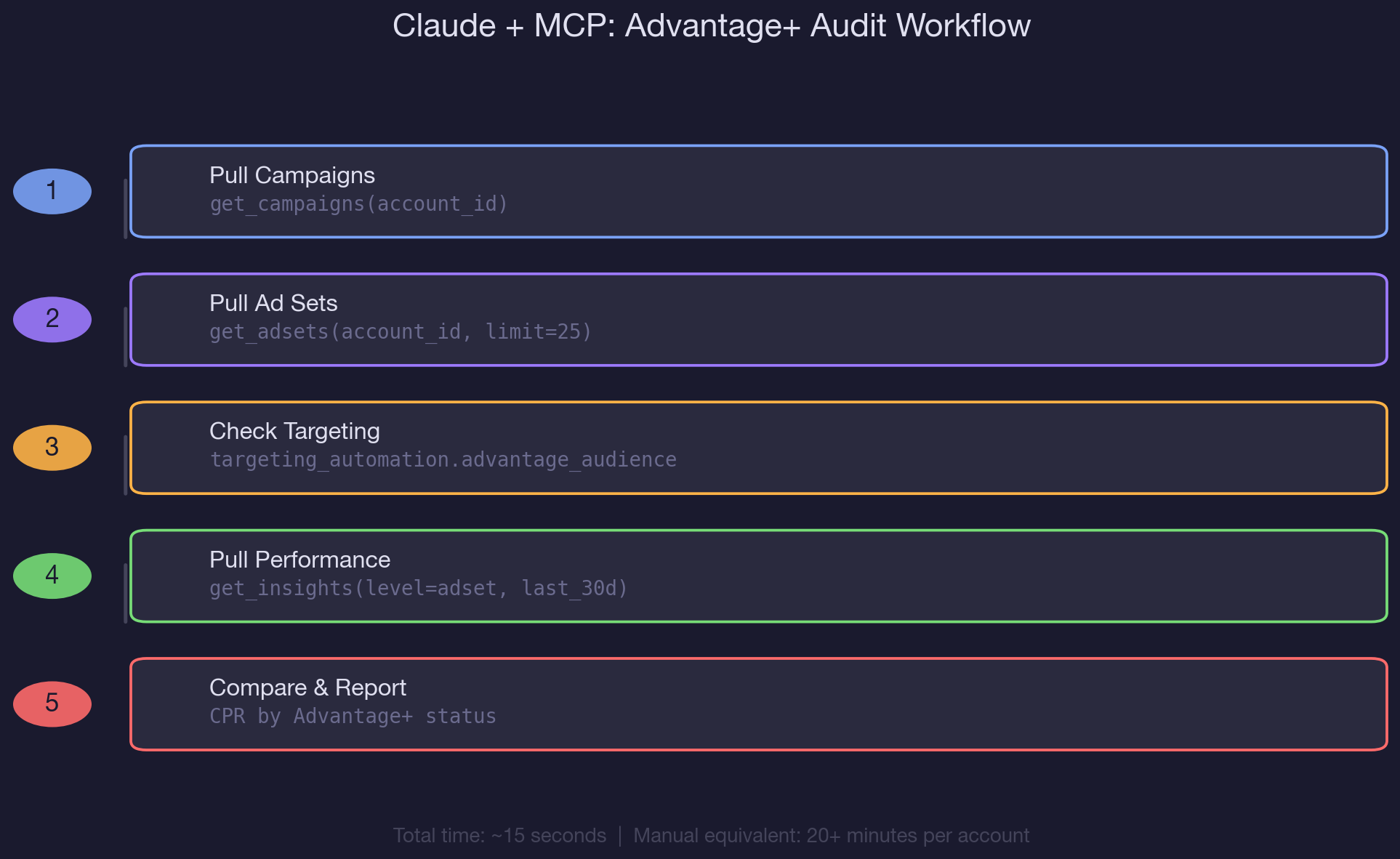
Step 1: Pull Your Campaign Structure
Start by asking Claude to pull all active campaigns:
"Pull all active campaigns for my account and show me the objective, bid strategy, and status for each."
In the account we audited, this revealed three active campaigns: a remarketing conversion campaign, a prospecting conversion campaign, and a prospecting awareness campaign.
All three used LOWEST_COST_WITHOUT_CAP bid strategy, meaning Meta had maximum flexibility on spend allocation. None had spend caps or bid caps. This is the first red flag: uncapped bidding combined with Advantage+ expansion gives Meta's algorithm nearly unlimited discretion over where your budget goes.
Step 2: Inspect Advantage+ Settings Per Ad Set
This is where it gets interesting. Ask Claude:
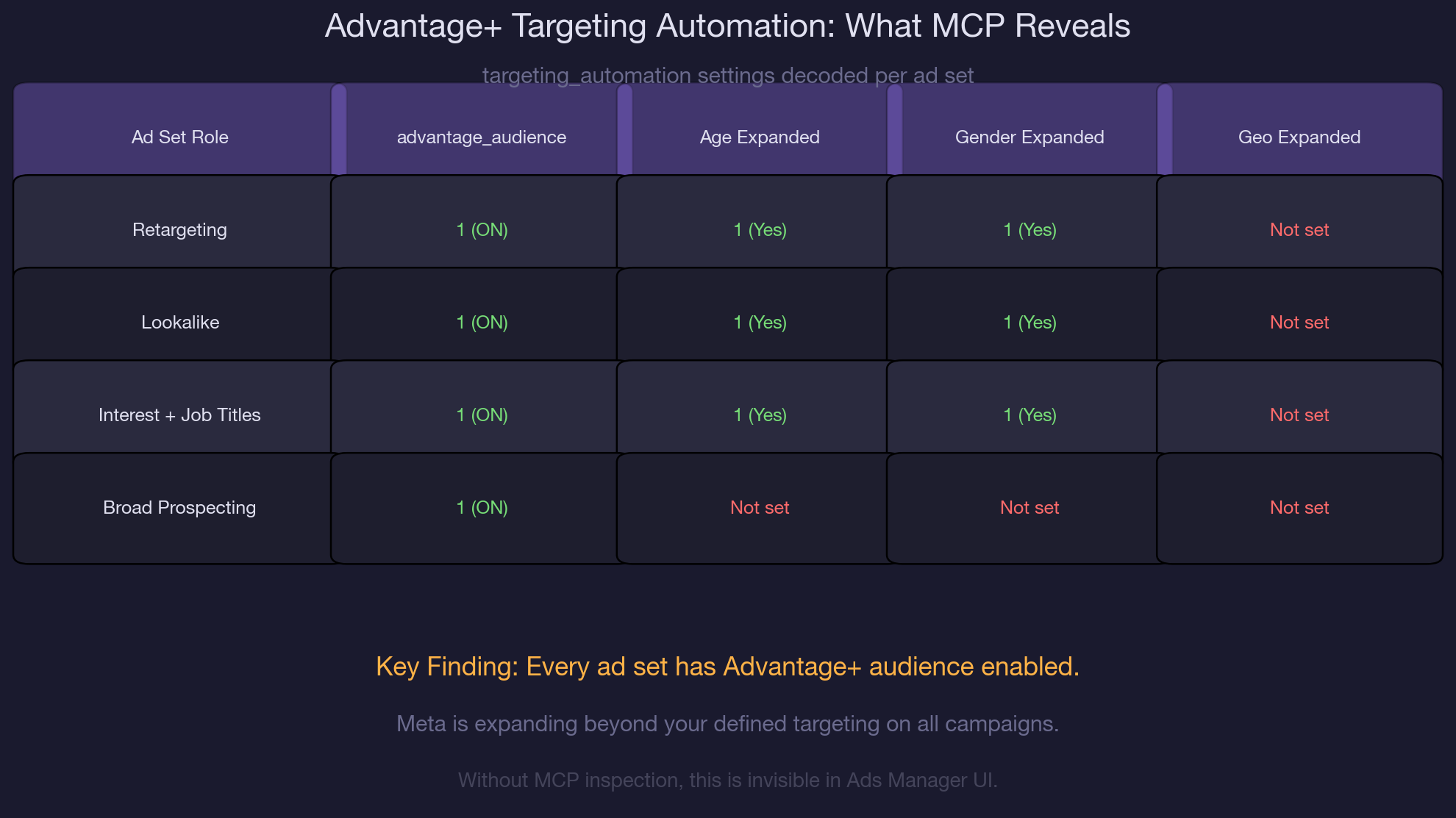
"For each ad set, show me the targeting_automation settings. Specifically, I want to see advantage_audience and any individual_setting overrides for age, gender, and geo."
The MCP response exposed something the Ads Manager UI doesn't clearly show: every single ad set had advantage_audience: 1. On three of the four ad sets, age and gender expansion were also enabled (individual_setting.age: 1, individual_setting.gender: 1). This means Meta was free to show ads to anyone, regardless of the defined targeting parameters. The fourth ad set (broad prospecting) had advantage_audience enabled but no individual settings specified, meaning Meta had even more latitude on that one.
Step 3: Cross-Reference with Performance Data
Now pull performance data to see the impact of Advantage+ expansion on actual results:
"Pull 30-day performance insights at the ad set level. Show me spend, impressions, reach, frequency, CPC, CPM, and cost per registration for each ad set."
The results painted a clear picture. The retargeting ad set delivered $50.31 per registration with a frequency of 2.03, generating 26 registrations from $1,307 in spend. Interest and job title targeting came in at $68.96 per registration with 20 registrations. The lookalike ad set was the most expensive at $90.17 per registration, despite being the audience type most marketers trust for prospecting.
All had Advantage+ on. The weekly performance report workflow can automate this comparison on a recurring basis so you catch these patterns early.
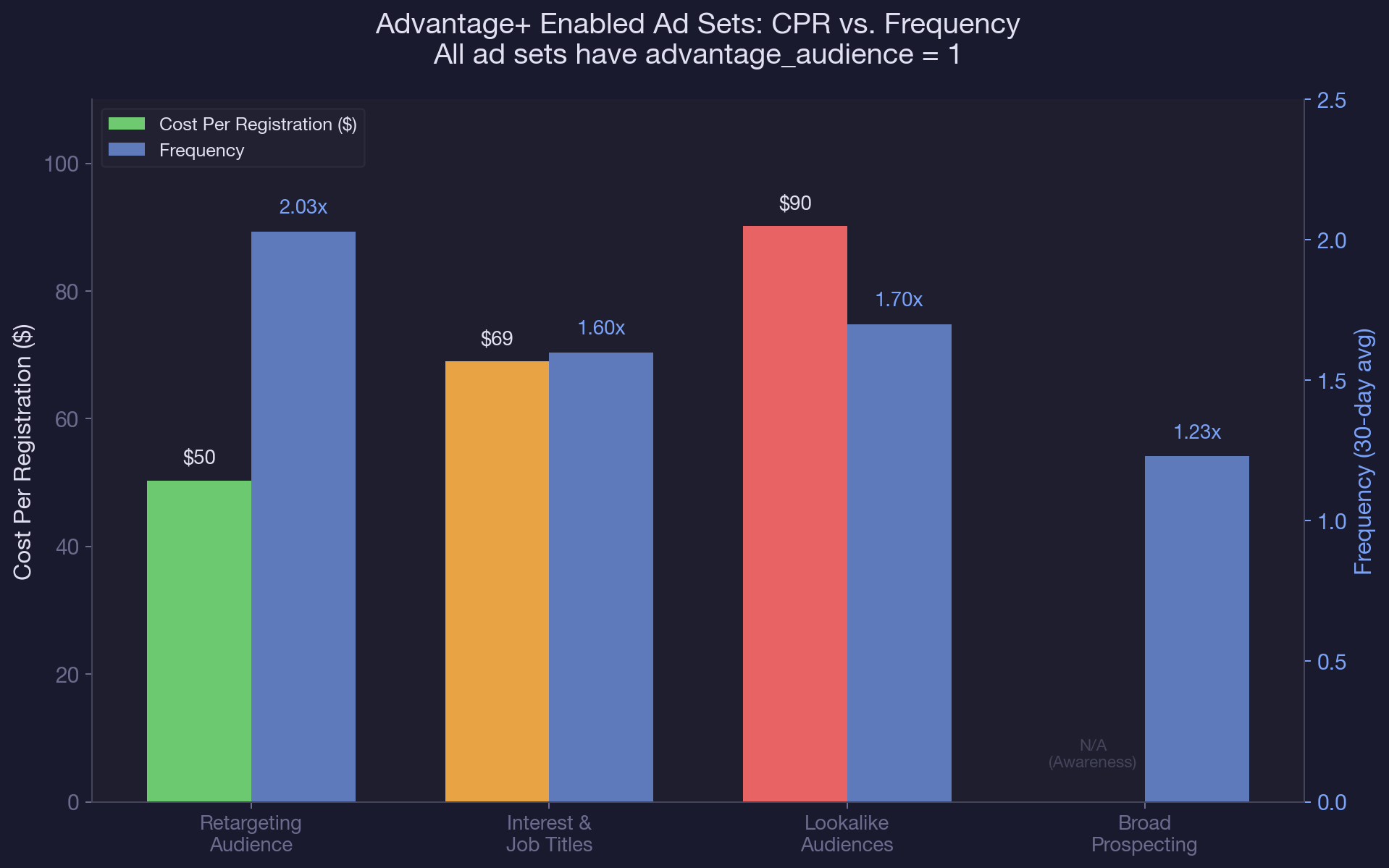
Notice the frequency pattern: the retargeting ad set hit 2.03x frequency in 30 days, which is expected for a warm audience. But the lookalike ad set, which should theoretically have a massive pool to draw from, hit 1.70x frequency. That's a signal that Advantage+ expansion isn't finding enough new high-value users. It's recycling the same expanded pool repeatedly.
Real-World MCP Walkthrough: Comparing Advantage+ Across Accounts
We ran this same audit across a second account to compare Advantage+ behavior in different configurations. The second account had a mix of ad sets: some with advantage_audience: 1 and others with advantage_audience: 0. This gave us a natural A/B comparison that revealed exactly what Advantage+ expansion does to your reach and cost metrics.
The findings were striking. Ad sets with Advantage+ turned off (standard job title targeting and standard lookalike with no expansion) had significantly lower reach but much lower CPMs.
The job title ad set with Advantage+ off reached 4,200 people at $8.50 CPM. The equivalent ad set with Advantage+ on, in the first account, reached 51,360 people at $16.78 CPM. That's a 12x reach increase but a 2x CPM increase. The question every media buyer needs to answer: is that trade-off worth it for your specific conversion goals?
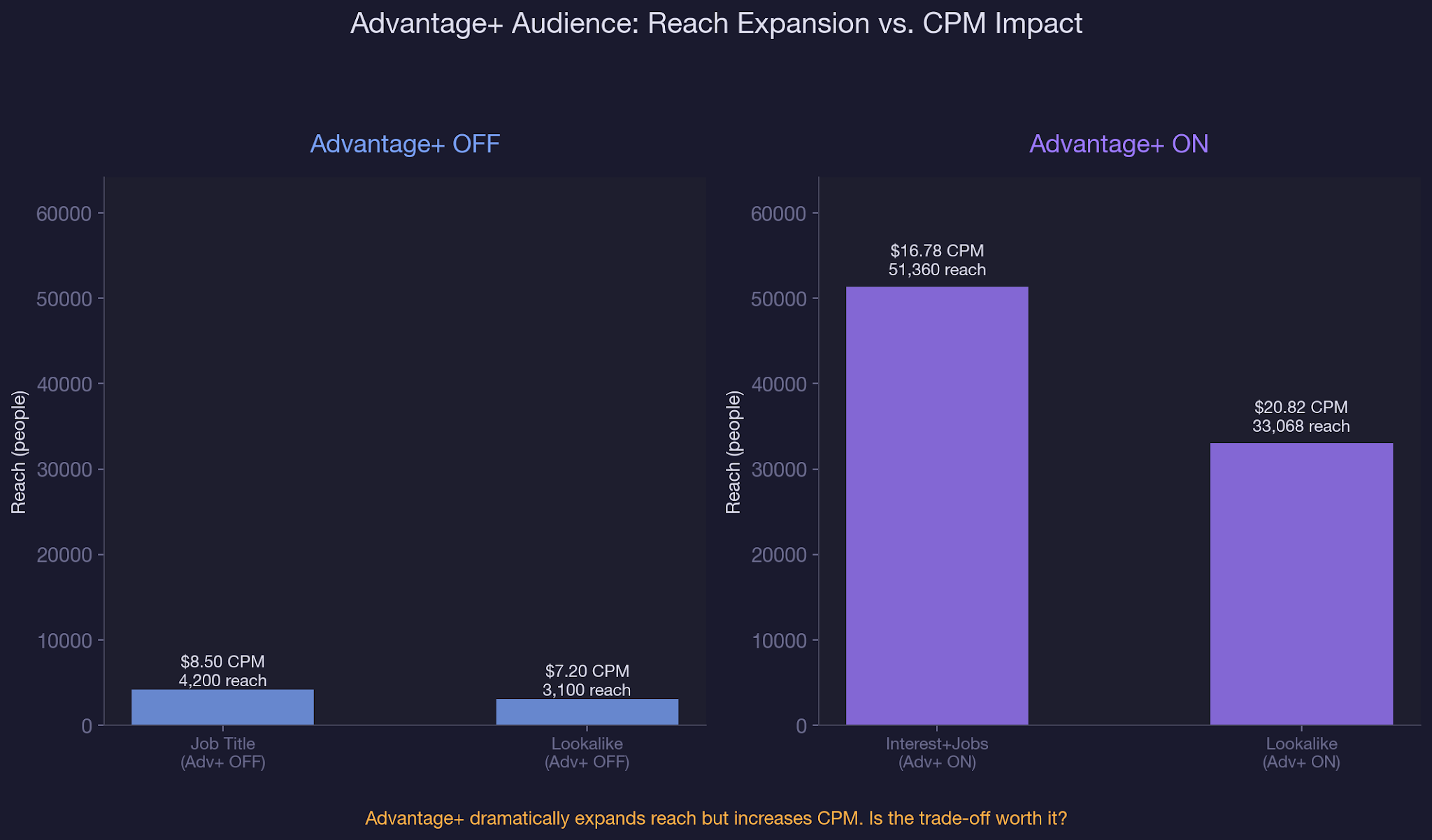
The Advantage+ ON ad set with a lookalike audience used geo expansion control (individual_setting.geo: 0 locked, meaning geo was NOT expanded), while the Advantage+ OFF ad set had no individual settings at all.
This is exactly the kind of nuance you can only see through the API. In the Ads Manager UI, both ad sets would appear to have similar targeting. The API reveals the actual configuration is fundamentally different.
If you're managing multiple Meta Ads accounts at agency scale, running this comparison across every account reveals patterns that manual auditing misses entirely. One prompt, one MCP call per account, and you have a complete Advantage+ status report.
We also checked the device platform breakdown using a publisher_platform and device_platform breakdown on the insights call. Across all Advantage+ enabled ad sets, mobile app impressions dominated at 93-97% of total delivery.
Desktop barely registered at 2-6%. If your B2B audience converts primarily on desktop (as many SaaS products do), this allocation could be actively working against your conversion goals. The budget pacing audit can help you monitor this allocation over time.
Common Mistakes with Advantage+ Campaigns
Assuming Advantage+ is all or nothing
Most advertisers think Advantage+ is a single toggle. It's not. There's advantage_audience (overall expansion), plus individual settings for age, gender, and geo. You can lock geo while letting age expand, or vice versa.
Without API-level inspection through tools like Claude and MCP, you're guessing which combination you're actually running. We've audited accounts where different ad sets in the same campaign had completely different individual_setting configurations, suggesting they were duplicated and modified at different times.
Never comparing Advantage+ ON vs. OFF performance
Meta defaults new ad sets to Advantage+ ON. Many advertisers never test what happens when they turn it off. Run parallel ad sets, one with expansion on and one with it locked, for at least two weeks.
Compare cost per qualified lead, not just cost per registration. A higher volume of low-quality leads isn't a win. The AI-powered reporting workflow makes this comparison trivial to set up and monitor weekly.
Ignoring frequency signals from expanded audiences
When Advantage+ expands your audience, frequency should drop because the pool is larger. If frequency stays high (above 1.5 in a 30-day window for prospecting), it means Meta's expansion isn't finding enough new people. It's recycling the same expanded pool. Check the connection between budget pacing data and frequency to spot this pattern before it wastes significant spend.
Trusting Ads Manager UI as the source of truth
The Ads Manager shows you the targeting you defined, not the targeting Meta actually uses after expansion. The API is the only source of truth for what's running. If you haven't inspected targeting_automation via MCP or the API, you don't actually know your targeting setup. Our guide to running a full Meta Ads account audit with Claude covers the complete audit methodology including Advantage+ checks.
Best Practices for Managing Advantage+ Campaigns
- Audit Advantage+ settings via MCP before every monthly review. One prompt pulls the targeting_automation object for all ad sets in 15 seconds.
- Lock geo expansion on campaigns with strict geographic requirements. Set individual_setting.geo: 0 to keep location targeting intact while allowing other expansions.
- Use exclusions as your safety net. Advantage+ respects excluded custom audiences even when expanding. Exclude past purchasers and existing customers from every prospecting ad set.
- Monitor frequency by device platform weekly. If mobile frequency exceeds 2.0 while desktop stays below 1.0, Advantage+ is over-allocating to mobile.
- Compare CPR across Advantage+ ON/OFF ad sets weekly using the saved Claude prompt template. Track the trend over 30 days before making permanent changes.
- For B2B SaaS accounts, start with Advantage+ OFF on your highest-value conversion campaigns. Enable it on awareness campaigns where broader reach has lower downside risk.
For deeper coverage on structuring your AI-powered PPC workflows, including prompt templates for weekly Advantage+ audits, see our guide to AI performance marketing. And if you're exploring how competitors handle their Meta Ads targeting, our tutorial on spying on competitors' Facebook ads pairs well with the Advantage+ audit workflow.
Conclusion
Advantage+ is not the enemy. But running it without visibility is. Meta's algorithm can find conversions you'd miss with manual targeting alone. It can also burn budget on expanded audiences that look good on reach metrics and deliver nothing to your pipeline.
The difference between those outcomes is visibility. Claude and the Meta Ads MCP give you that visibility in seconds, not hours. One prompt sequence surfaces every Advantage+ setting, every targeting override, and every performance gap between expanded and locked audiences.
If you're running Meta Ads for B2B SaaS, start by auditing what Advantage+ is actually doing in your account. The prompts in this guide work immediately. And if you want to go deeper, our guides on creative testing and audience research prompts and writing Meta ad copy that converts cover the next steps after you've locked in your targeting strategy.
Advantage+ targeting audits are the first thing we check when onboarding a new Meta Ads account. We use Claude and the Meta Ads MCP to inspect every targeting_automation setting and benchmark Advantage+ performance as part of our B2B SaaS paid social management. If you want us to run this on your account, book a call with our paid media team.
Frequently Asked Questions
What is Advantage+ audience in Meta Ads?
Advantage+ audience is Meta's targeting automation feature that expands your defined audiences beyond the parameters you set. When enabled (advantage_audience = 1), Meta uses your targeting as a suggestion and serves ads to additional users its algorithm predicts will convert. This expansion happens silently, with no clear indicator in the Ads Manager UI.
How do I check if Advantage+ is enabled on my ad sets?
Use Claude with the Meta Ads MCP to run get_adsets() and inspect the targeting_automation.advantage_audience field for each ad set. A value of 1 means expansion is active. You can also check individual_setting for age, gender, and geo overrides. The Ads Manager UI does not clearly display these granular settings.
What is the difference between Advantage+ audience and Advantage+ Shopping campaigns?
Advantage+ audience is a targeting expansion feature that works within standard campaigns. Advantage+ Shopping campaigns (ASC) are a separate, fully automated campaign type where Meta controls targeting, placement, and creative. This article focuses on the audience expansion feature, which applies to any campaign type and is often enabled by default.
How often should I audit Advantage+ settings on my Meta Ads account?
Audit Advantage+ settings monthly at minimum, or weekly if you're actively testing. Meta can change default settings during ad set duplication or campaign creation, so new ad sets may have expansion enabled even if you previously turned it off. The Advantage+ campaign analysis AI workflow takes about 15 seconds per account.
Can Claude and MCP turn off Advantage+ audience on my ad sets?
Yes. Claude can use the Meta Ads MCP to update ad set targeting_automation settings programmatically. However, we recommend auditing first and making changes based on performance data rather than disabling expansion across the board. Some ad sets benefit from expansion while others don't.
How do I fix high cost per registration on Advantage+ enabled ad sets?
First, confirm Advantage+ is the cause by comparing CPR between expanded and locked ad sets. If expansion is inflating CPR, try locking individual dimensions (age, gender, or geo) while keeping advantage_audience enabled. This gives Meta some flexibility without full expansion. Also ensure you're excluding existing customers from all prospecting ad sets.
Does Advantage+ campaign analysis AI work for B2B SaaS accounts?
Absolutely. B2B SaaS accounts benefit the most from Advantage+ auditing because lead quality matters more than volume. Advantage+ expansion often increases top-of-funnel registrations while decreasing qualified pipeline. The MCP-based audit workflow in this guide was built on B2B SaaS account data with registration and purchase conversion tracking.
What metrics should I track to evaluate Advantage+ campaign performance?
Track cost per registration, cost per qualified lead, frequency by device platform, and reach expansion ratio (Advantage+ ON reach divided by OFF reach). Don't rely on CPM or CTR alone. A lower CPM with Advantage+ ON means nothing if the expanded audience doesn't convert downstream. Pull these metrics via MCP weekly for accurate trend analysis.

summarize with ai


