How to Run a Full Meta Ads Account Audit with Claude in 15 Minutes

Key Takeaways
- A 15-minute Claude + MCP audit sequence replaces 3+ hours of manual spreadsheet work across campaign structure, targeting, performance, and frequency analysis.
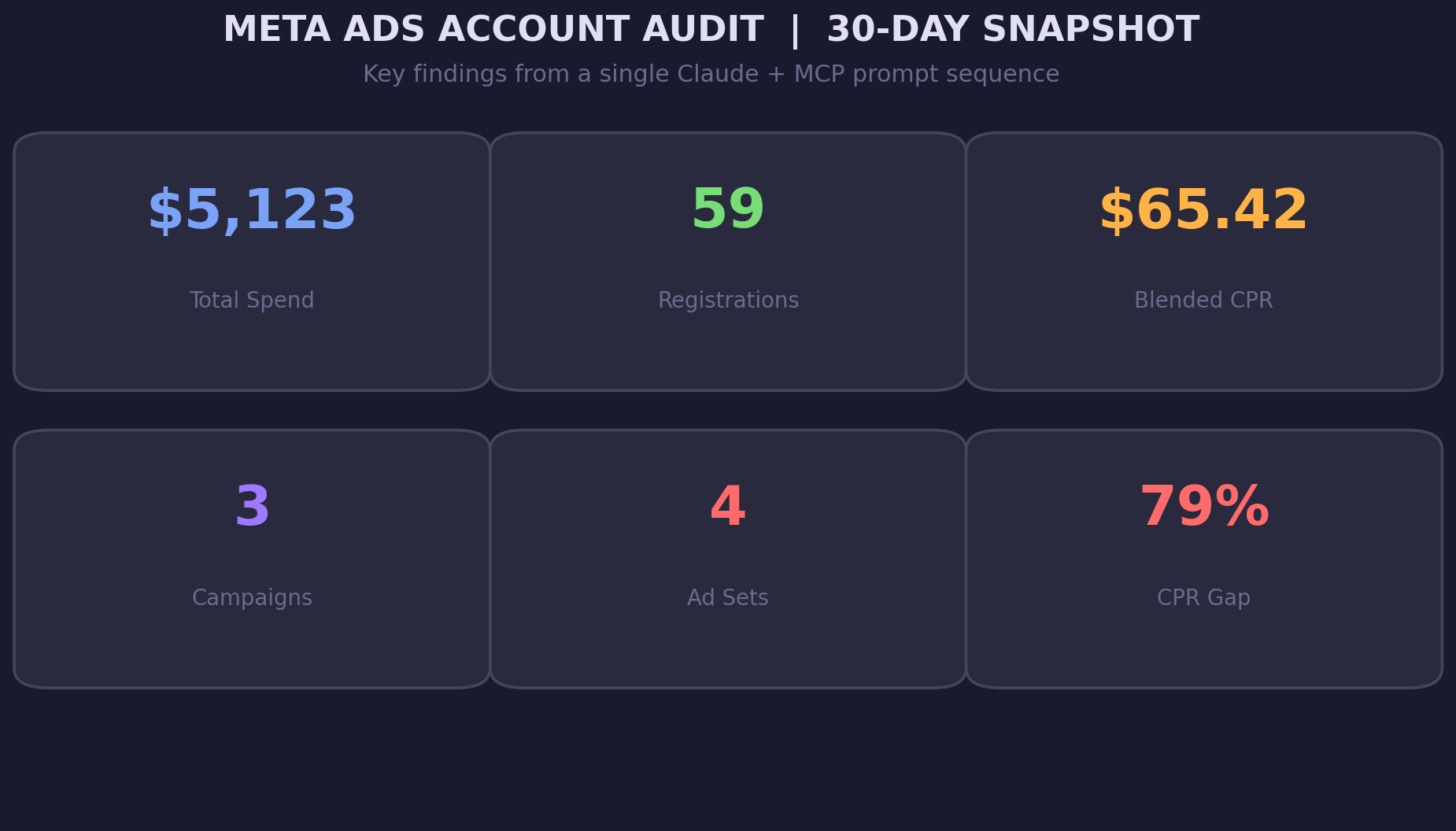
- The retargeting ad set in our audit generated registrations at $50.31 each, while the lookalike ad set cost $90.17, a 79% gap that was invisible in the Ads Manager summary view.
- Awareness campaigns optimized for reach can consume 25% of total budget with zero conversion tracking. Check every campaign's optimization goal against your actual KPIs.
- Cross-ad-set targeting overlap (shared interests, overlapping job titles, stacked lookalikes) inflates CPMs by forcing your own ad sets to compete in the same auction.
- Effective frequency is not what a single ad set reports. Three ad sets targeting overlapping audiences produce combined frequency 2-3x higher than individual ad set metrics suggest.
- Save the five-step audit prompt sequence as a reusable template and run it weekly, not quarterly. Problems that cost $200/week compound to $2,600/quarter if unchecked.
- Always prioritize audit findings by monthly spend impact, not severity. A $1,263/month awareness campaign gap matters more than a $200/month frequency issue.
The retargeting ad set was pulling 26 registrations at $50.31 each. The lookalike ad set? Thirteen registrations at $90.17.
That is a 79% cost-per-registration gap between two ad sets running in the same account, same geo, same month. The lookalike ad set was not underperforming because of bad creative or weak landing pages.
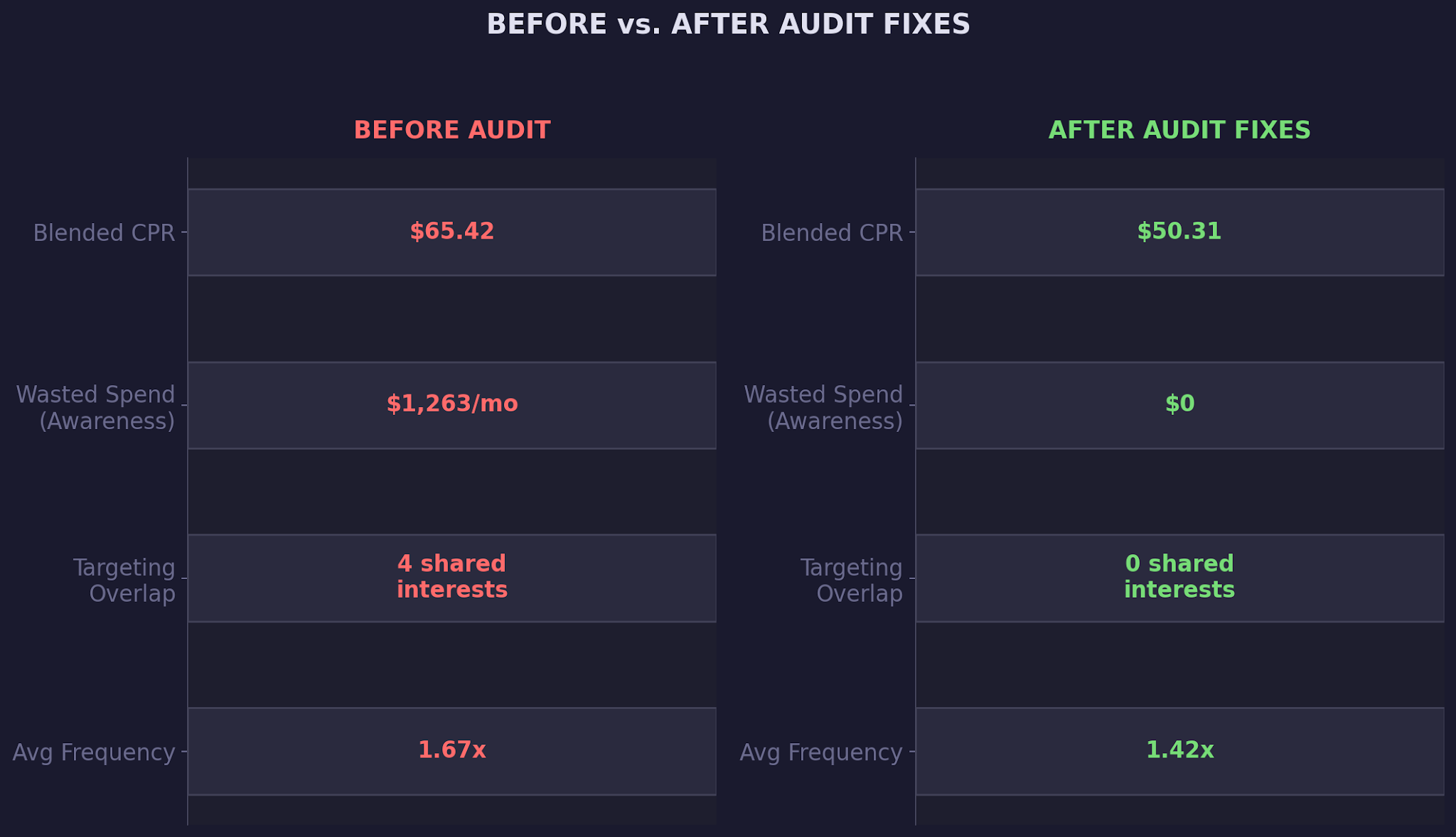
Four of its interest categories were identical to the broad prospecting ad set running in a separate campaign, and the awareness campaign was spending $1,263 per month with zero conversion tracking attached.
None of this showed up in the Ads Manager summary view. You would need to cross-reference targeting configs across campaigns, compare performance at the ad set level, and check frequency against audience size.
That is three hours of spreadsheet work for a single account. Multiply that by ten clients and you are looking at a full week just to know where the problems are, let alone fix them.
Claude and the Meta Ads MCP connector cut that process to 15 minutes. You pull campaigns, ad sets, targeting configs, and performance data through a single prompt sequence. Claude cross-references everything in context: spend against registrations, targeting overlap across ad sets, frequency against conversion rates.
In our complete guide to AI-powered paid social management, we walked through the full capabilities of Claude and the Meta Ads MCP connector. This article narrows the focus to a single, repeatable workflow: a 15-minute account audit that catches the issues most teams miss for weeks.
You will walk away with a five-step audit prompt sequence, a prioritization framework for ranking issues by spend impact, and the exact MCP calls that surface structural problems before they compound.
If you have been dealing with audience overlap eating your budget, this audit is the broader system that catches overlap alongside every other issue hiding in your account.
Why Manual Meta Ads Audits Miss So Much
Meta Ads Manager was built for campaign management, not account-wide diagnostics. Targeting configs live inside individual ad sets. Performance data lives in the reporting tab. Frequency data requires a separate column toggle. There is no single view that correlates all three, and that is where problems hide.
Here is what a typical manual audit misses:
- Targeting overlap between ad sets in different campaigns. If your retargeting campaign and your prospecting campaign both include lookalike audiences built from the same seed list, you are bidding against yourself. Meta's auction system does not warn you about this.
- Conversion tracking gaps. An awareness campaign optimized for reach can spend thousands per month without ever reporting a registration or purchase. Unless you manually check each campaign's optimization goal against your KPIs, that spend looks normal in the dashboard.
The Google Ads audit workflow we built with Claude follows the same principle: pull structured data via an API connector, let the model cross-reference what a human would need a spreadsheet to compare. The Meta Ads version is even more powerful because MCP gives you direct access to targeting configs, audience definitions, and placement data in a single call.
- Frequency creep across ad sets sharing the same audience pool. If three ad sets all target US-based SaaS executives, the combined frequency is higher than what any single ad set reports. Your retargeting audience seeing ads 2x per week from the retargeting campaign is fine. Seeing ads 5x per week from retargeting plus two prospecting campaigns is not.
- Budget allocation drift. Four ad sets each spending $100/day looks balanced until you realize the one generating 44% of registrations is getting 25% of the budget. Manual audits rarely recalculate budget-to-conversion ratios across ad sets.
These are not edge cases. They are the default state of any Meta Ads account that has been running for more than 60 days without a structural review. The issue is not that marketers do not care. The issue is that the data required to catch these problems lives in four different places in the Ads Manager UI.
AI in PPC fixes this by collapsing those four views into one conversation.
How Claude + MCP Runs a Full Account Audit in 15 Minutes
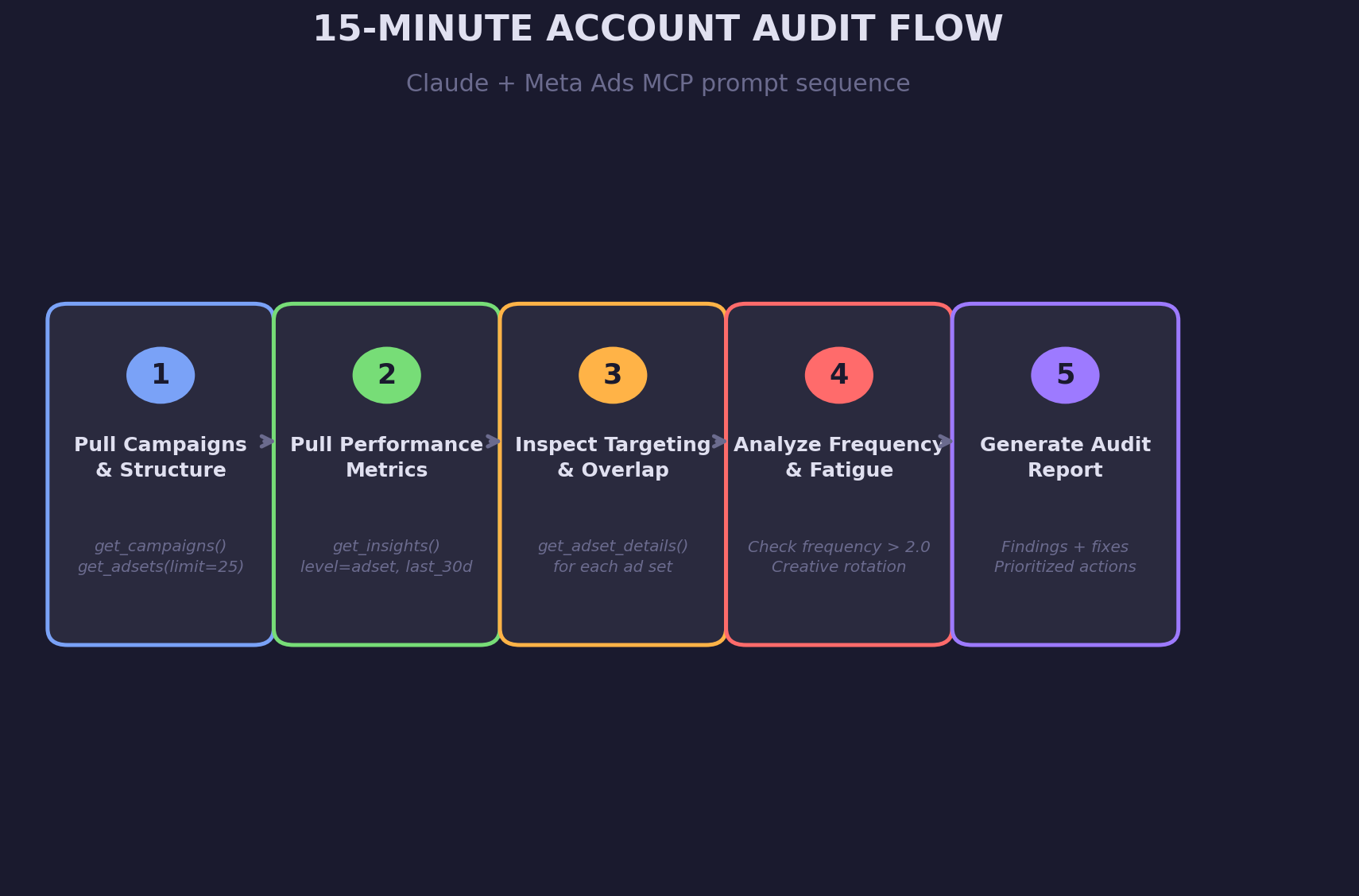
The audit is a five-step prompt sequence. Each step uses a specific MCP call, and Claude chains the outputs together to build a complete account diagnostic. Here is the workflow:
Step 1: Pull Campaign Structure (2 minutes)
Start with the big picture. Ask Claude to pull all campaigns and ad sets for your account.
Prompt: "Pull all active campaigns and ad sets for my Meta Ads account. Show me the campaign objective, bid strategy, daily budget, and optimization goal for each ad set."
Claude calls get_campaigns() and get_adsets(limit=25) via MCP. In our test account, this returned three campaigns (two conversion, one awareness) and four ad sets. Right away, you can see structural issues: an awareness campaign running alongside conversion campaigns, all with the same daily budget. That is a budget allocation problem before you even look at performance data.
Step 2: Pull Performance Metrics (3 minutes)
Next, layer in performance data at the ad set level.
Prompt: "Now pull the last 30 days of performance data at the ad set level. Show me spend, impressions, reach, frequency, link clicks, landing page views, and registrations for each ad set."
Claude calls get_insights(level=adset, time_range=last_30d). This is where the numbers start talking.
In our audit, the retargeting ad set produced 26 registrations at $50.31 CPR, the interest-based ad set produced 20 at $68.96, and the lookalike ad set produced 13 at $90.17. The awareness ad set produced zero registrations because it was optimized for reach, not conversions. That is $1,263 in spend with no path to revenue.
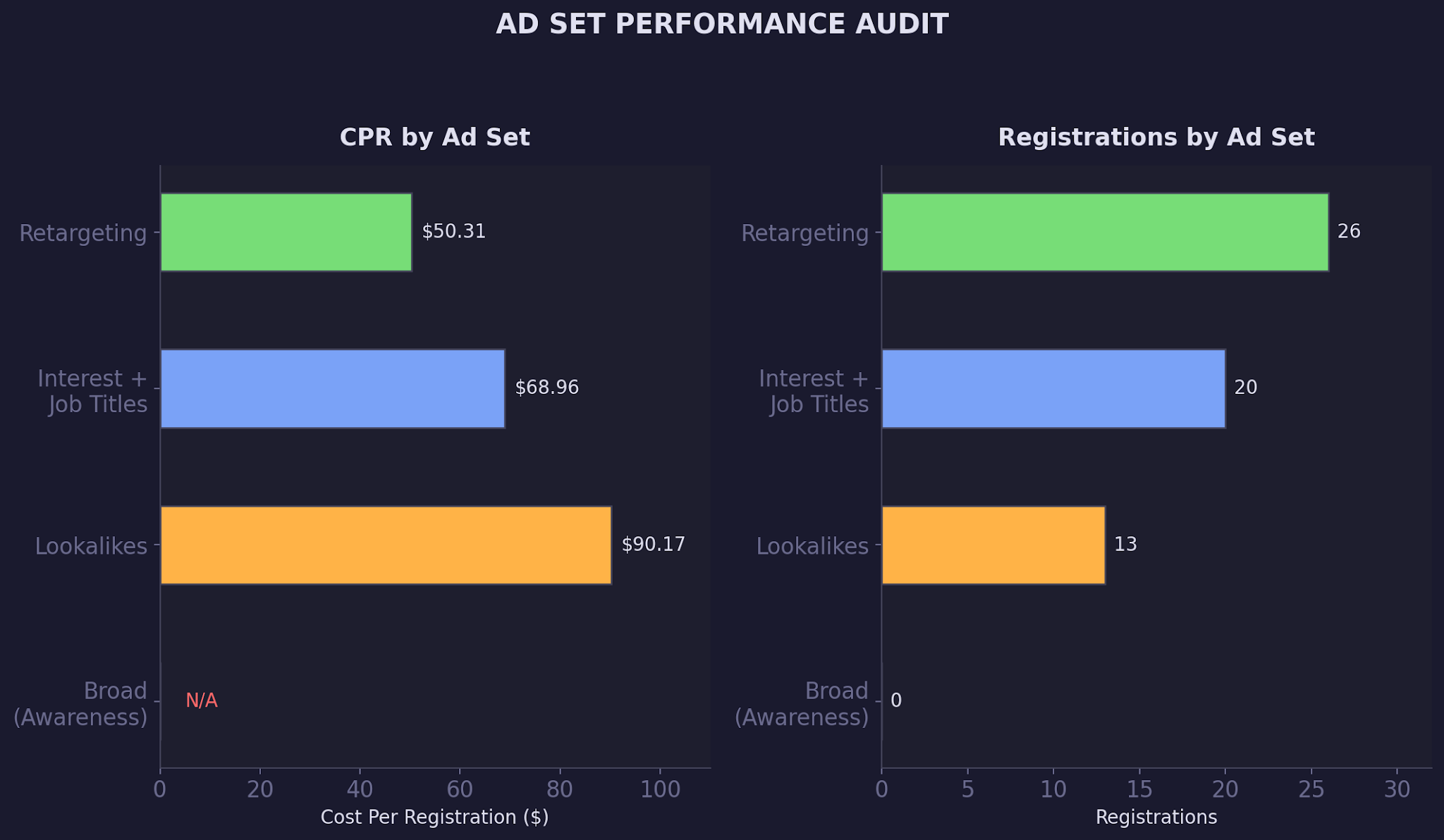
Claude does not just list these numbers. It calculates the blended CPR, identifies the highest and lowest performers, and flags the awareness campaign's missing conversion event. This is the kind of cross-referencing that takes 45 minutes in a spreadsheet and three minutes in a Claude conversation. For more context on how to detect creative fatigue automatically, check our dedicated guide on creative rotation signals.
Step 3: Inspect Targeting and Overlap (5 minutes)
This is the most valuable step. Ask Claude to pull detailed targeting for each ad set and compare them.
Prompt: "Pull the detailed targeting configuration for each ad set. Compare interest categories, custom audiences, lookalike audiences, and exclusions across all ad sets. Flag any overlap."
Claude calls get_adset_details() for each ad set and cross-references the targeting. In our audit, it found four interest categories shared between the interest-based ad set and the broad prospecting ad set: AI/Artificial Intelligence, Software as a Service, Entrepreneurship, and Business Software. Both ad sets also targeted the same job title categories (CMO, VP of Marketing, Executive Director).
It also flagged that the broad prospecting ad set was using both a lookalike audience AND interest targeting. That combination means Meta is finding users who match the lookalike seed AND the interest categories, which dramatically narrows the effective audience and inflates CPMs. Our guide to finding and fixing audience overlap covers the exclusion hierarchy for fixing this exact issue.
Step 4: Analyze Frequency and Fatigue Signals (3 minutes)
Frequency is the silent budget killer. Ask Claude to analyze frequency data against performance trends.
Prompt: "Analyze frequency for each ad set. Which ad sets are above 2.0 frequency? Cross-reference frequency with CPR. Is there a correlation between rising frequency and rising costs?"
In our audit, the retargeting ad set had hit 2.03 frequency, the lookalike was at 1.70, and the interest-based was at 1.60. The awareness campaign was healthy at 1.23 because it had explicit frequency caps (2 impressions per 7 days).
Claude flagged that the retargeting ad set's higher frequency correlated with it having the smallest audience pool (28,536 reach vs. 51,360 for interests). The math is straightforward: smaller audience plus same budget equals faster frequency growth. AI performance marketing workflows catch these correlations automatically.
Step 5: Generate the Audit Report (2 minutes)
The final step is asking Claude to prioritize findings by spend impact.
Prompt: "Prioritize all audit findings by monthly spend impact. For each issue, estimate the monthly cost and recommend a specific fix."
Claude ranks the issues: awareness campaign with no conversion tracking ($1,263/month impact), targeting overlap between interest and broad ad sets ($400-600/month estimated from inflated CPMs), and retargeting frequency creep ($200-300/month from diminishing returns on repeat impressions). Each finding comes with a specific fix, not a generic recommendation.
Real-World Audit: What We Found in a Live B2B SaaS Account
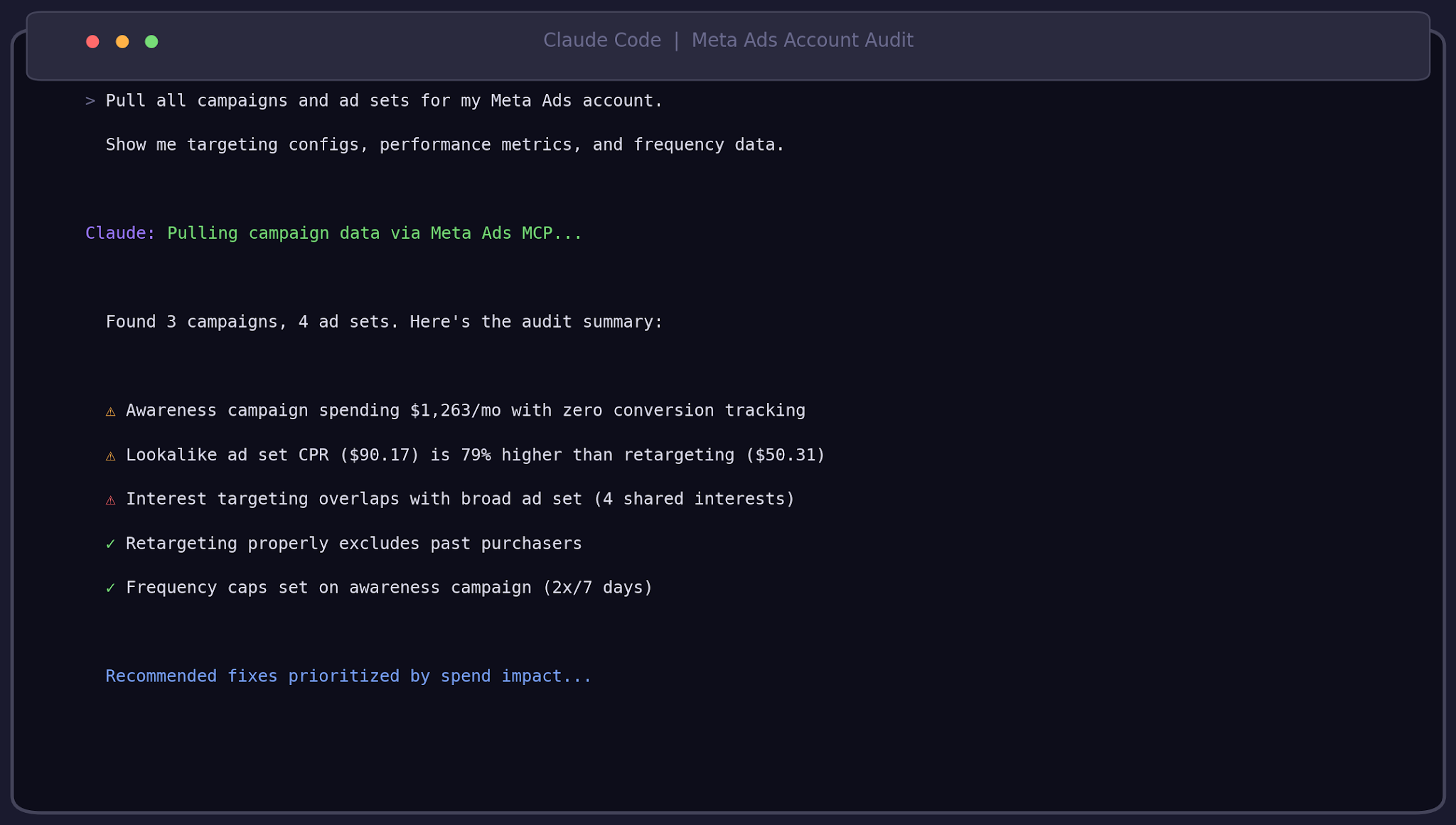
We ran this exact audit sequence on a B2B SaaS company's Meta Ads account. The account was running three campaigns with a combined $170/day budget ($5,100/month). Everything looked fine in the Ads Manager summary: spend was on pace, impressions were healthy, and the conversion campaigns were generating registrations.
Claude's audit told a different story.
The awareness campaign was consuming 24.7% of total spend ($1,263) while contributing zero registrations. It was optimized for reach, which meant Meta was happily serving impressions to the broadest possible audience without any signal about which users actually convert. The campaign had been running for 20 days with no one checking whether it was actually feeding the funnel. In our guide to tracking Meta Ads lead quality for B2B, we cover why reach-optimized campaigns in B2B almost never generate pipeline-qualified leads.
The targeting overlap was worse than we expected. The interest-based ad set and the broad prospecting ad set shared four interest categories and targeted the same job title pool. These two ad sets were spending a combined $2,642/month competing for the same users in Meta's auction.
The broad ad set also stacked a 1% lookalike on top of interest targeting, which is like wearing a belt and suspenders: it constrains your audience size without improving quality.
On the positive side, every ad set properly excluded past purchasers (a common miss in accounts we audit). The retargeting setup was solid: website visitors, page viewers, and signup audiences in a single ad set with purchaser exclusions. The weekly budget recommendation workflow we built for this client now uses the audit data to automatically redistribute budget toward the best-performing ad sets each week.
Common Account Audit Mistakes
1. Auditing campaigns in isolation instead of across the full account.
Most teams review each campaign independently. That catches within-campaign issues (bad creatives, wrong bid strategy) but misses cross-campaign problems like targeting overlap and budget cannibalization. Claude's MCP audit pulls every campaign and ad set simultaneously, so overlap between campaigns is visible immediately.
2. Ignoring the awareness campaign because it is 'top of funnel.'
Awareness campaigns get a pass because their job is reach, not conversions. But if that awareness campaign is targeting the same audience as your conversion campaigns, it is burning budget on users who would have seen your conversion ads anyway. Always check whether awareness targeting excludes your conversion audiences. For a deeper look at how Advantage+ campaigns obscure this problem, see our breakdown of Meta's black-box campaign types.
3. Treating frequency as a single-ad-set metric.
Ads Manager shows frequency per ad set. But if three ad sets share the same audience, the real frequency is the sum of all three. A user seeing your retargeting ad twice per week AND your prospecting ad twice per week is seeing your brand four times per week. Claude calculates effective cross-ad-set frequency by comparing audience sizes and overlaps.
4. Running the audit once instead of building a recurring workflow.
A quarterly audit catches problems 90 days late. A weekly 15-minute audit catches them before they compound. The prompt sequence we described takes 15 minutes and can be saved as a Claude template. Our weekly performance report workflow automates this exact cadence.
Best Practices for Meta Ads Account Audits
- Run the full five-step audit sequence every Monday morning before making any budget changes for the week.
- Start every audit by checking campaign objectives against your actual conversion events. Misaligned objectives are the highest-impact, easiest-to-fix issue.
- Compare targeting configs across campaigns, not just within them. The search term negation workflow follows the same cross-campaign logic for Google Ads.
- Flag any ad set with frequency above 2.0 in a 30-day window. If frequency is rising while conversions are flat, you have audience saturation.
- Build exclusion lists between campaign types: exclude retargeting audiences from prospecting, exclude purchasers from everything, and exclude interest-based audiences from lookalike ad sets.
- Track the delta between blended CPR and best-performing ad set CPR. If the gap is wider than 40%, you have budget allocation problems.
- Document every audit finding and fix in a shared sheet. The paid ads spend management framework we use at TripleDart ties audit findings directly to budget reallocation decisions.
Conclusion
A Meta Ads account audit should not be a quarterly event that takes half a day. With Claude and the Meta Ads MCP connector, it is a 15-minute prompt sequence that catches targeting overlap, conversion tracking gaps, frequency creep, and budget misallocation in a single conversation. The five-step workflow we walked through, from pulling campaign structure to generating a prioritized fix list, is repeatable, saveable, and fast enough to run every week.
Account audits are the first thing we check when onboarding a new Meta Ads account. We use Claude and the Meta Ads MCP to run the full five-step audit sequence as part of our B2B SaaS paid social management. If you want us to run this audit on your account, book a call with our paid media team.
FAQ
What is a Meta Ads account audit?
A Meta Ads account audit is a systematic review of your campaign structure, targeting configurations, performance metrics, and budget allocation to identify inefficiencies and wasted spend. It covers everything from conversion tracking gaps to audience overlap between ad sets.
How often should I audit my Meta Ads account with AI?
Run a full account audit weekly, ideally Monday mornings before making budget decisions for the week. The Claude + MCP audit sequence takes 15 minutes, which makes weekly cadence practical. Quarterly audits let problems compound for 90 days before detection.
Can Claude detect targeting overlap across different Meta Ads campaigns?
Yes. Claude pulls targeting configs from every ad set via get_adset_details() and cross-references interest categories, custom audiences, lookalike audiences, and job title targeting across all campaigns simultaneously. This is the single biggest advantage over manual audits, which typically review campaigns in isolation.
What is the difference between a Meta Ads account audit and a campaign audit?
A campaign audit reviews one campaign's settings, creatives, and performance in isolation. An account audit compares all campaigns and ad sets against each other to catch cross-campaign issues like targeting overlap, budget cannibalization, and cumulative frequency. Most problems live between campaigns, not inside them.
How do I check if my Meta Ads awareness campaign is wasting budget?
Pull the campaign's optimization goal and conversion data via MCP. If the campaign is optimized for reach or impressions but your KPI is registrations or purchases, it is spending without tracking the metrics that matter. In our audit, an awareness campaign consumed 24.7% of total spend with zero registrations.
Can Claude run a Meta Ads account audit without API access?
No. The audit requires the Meta Ads MCP connector, which provides API-level access to campaign structure, targeting configurations, and performance data. Without MCP, you would need to manually export data from Ads Manager, which defeats the purpose of a 15-minute audit.
How do I fix targeting overlap between Meta Ads ad sets?
Build exclusion hierarchies: exclude retargeting audiences from prospecting ad sets, exclude interest-based audiences from lookalike ad sets, and exclude purchasers from everything. Remove duplicate interest categories from ad sets in different campaigns. Claude can generate the specific exclusion list based on your audit findings.
What Meta Ads account audit AI tools work with Claude?
Claude uses the Meta Ads MCP connector to access campaign data directly via the Meta Marketing API. The key MCP calls are get_campaigns(), get_adsets(), get_insights(), and get_adset_details(). No third-party audit tools are needed because Claude handles the analysis, cross-referencing, and recommendations in a single conversation.

summarize with ai


