

.png)


Key Takeaways
- A SaaS PPC checklist only earns its place if every step maps back to pipeline and revenue, not clicks or leads.
- Foundation work (ICP, unit economics, conversion tracking, offline imports) fixes more budget leaks than any campaign-level optimization ever will.
- Google Ads for B2B SaaS runs on a three-campaign architecture: Brand, High-Intent Non-Brand, and Competitor, each with its own bidding and budget rule.
- LinkedIn paid spend only returns pipeline when the audience is built from first-party firmographic data and served a message that matches buying stage.
- Landing pages, forms, and offline conversion imports are where most SaaS teams break the feedback loop between spend and closed-won revenue.
- A weekly ops cadence tied to pipeline turns PPC from "what did we spend this week" into "what pipeline is this engine producing."
Why Most SaaS PPC Programs Bleed Budget
Across the 250+ B2B SaaS accounts we have audited and managed, the same pattern shows up on day one. Strong keyword lists, reasonable campaign structures, and a measurement stack that stops at the form-fill.
Spend looks efficient at the lead level. It falls apart the moment someone asks how much pipeline the program produced.
That gap is what this SaaS PPC checklist exists to close. The 52 steps below walk you from ICP and unit economics through Google Ads and LinkedIn structure.
They cover landing pages, forms, offline conversion imports, and the weekly cadence that keeps the engine accountable to pipeline.
The checklist is broken into five phases, mapped to the sequence we run inside every new SaaS PPC agency engagement. Each phase carries the agency patterns, failure modes, and benchmark numbers we see repeat across the portfolio.
Phase 1: ICP, Unit Economics, and Tracking (Steps 1 to 10)
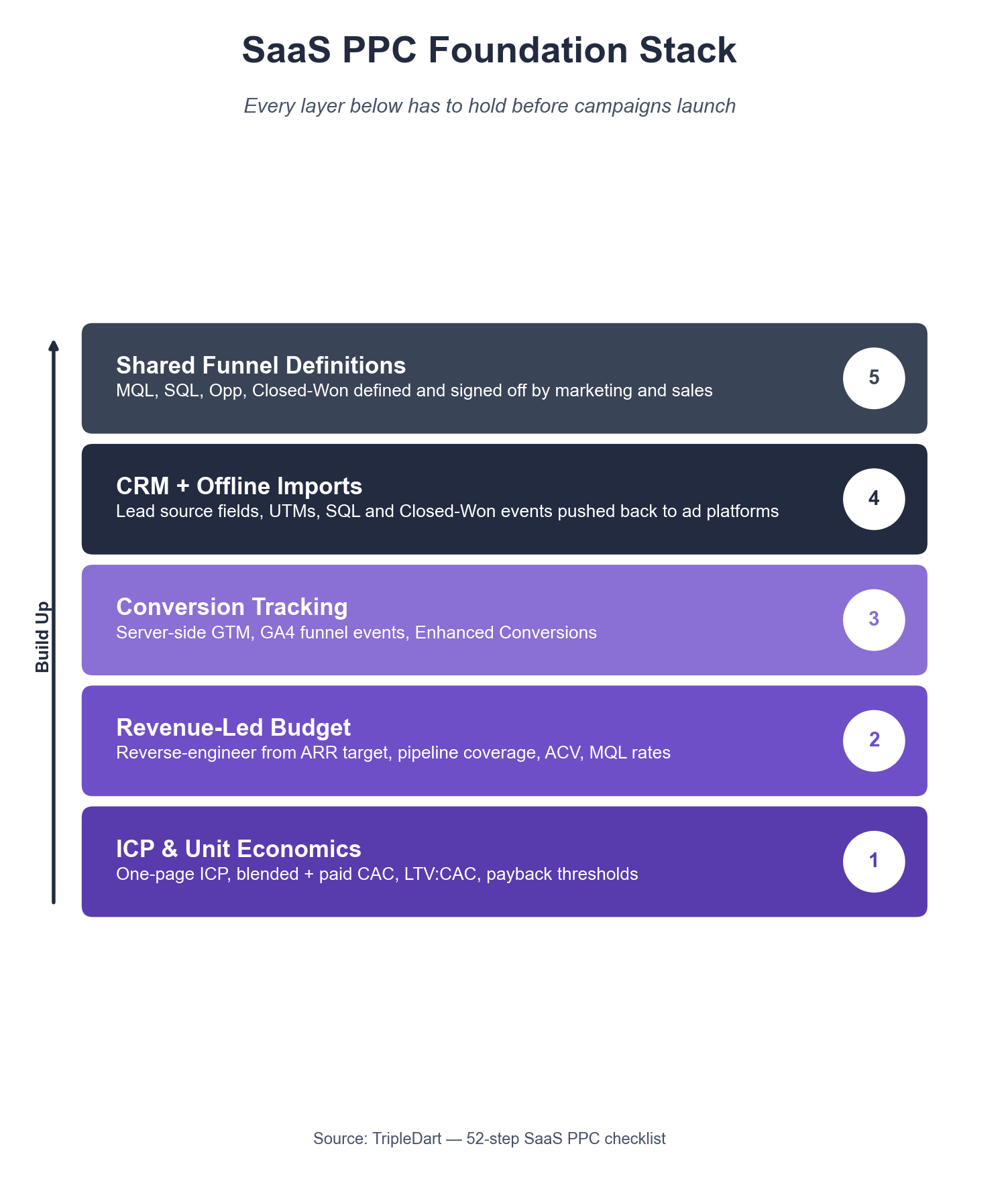
The foundation phase decides whether your SaaS PPC program will ever break even.
Before a single keyword enters Google Ads, you need three things in place. An ICP the paid team can target, unit economics that justify the spend, and conversion tracking that tells closed-won from closed-lost.
Step 1. Define the ICP in Firmographic and Behavioral Detail
Write the ICP as a one-page brief: industry, employee band, revenue band, tech stack signals, geography, commercial motion (PLG vs sales-led), and named titles. Vague ICPs produce vague targeting, and vague targeting is the first reason SaaS PPC spend leaks.
Step 2. Build the Closed-Won Reverse-Profile
Pull the last 12 months of closed-won accounts from your CRM. Compare their firmographics against the ICP brief. Where the two diverge, rewrite the ICP to reflect where revenue comes from.
Step 3. Calculate Blended and Paid-Attributable CAC
Run two CAC numbers. Blended CAC divides total sales and marketing spend by total new customers. Paid-attributable CAC isolates customers who first touched through a paid channel, and runs 1.4x to 1.8x blended in the B2B SaaS accounts we operate.
Step 4. Set the LTV:CAC and Payback Thresholds
For paid-driven new business, the board-defensible thresholds are LTV:CAC at or above 3:1 and CAC payback under 18 months. Anything below those is a signal to cut spend, not ask for more budget.
Step 5. Reverse-Engineer the Monthly PPC Budget From Revenue
Work the math once, then operate against it:
Pipeline target = Net new ARR target × 3x to 4x coverage
Opportunities = Pipeline target ÷ ACV
SQLs = Opportunities ÷ (SQL to Opp rate)
MQLs = SQLs ÷ (MQL to SQL rate)
Monthly PPC budget = (MQLs ÷ 12) × Blended CPL
Step 6. Install Google Tag Manager and a Server-Side Container
Client-side tracking alone misses 15% to 30% of conversions once iOS 17+ and ad-blockers come into play. A server-side GTM container closes most of that gap and future-proofs the stack against further browser-side privacy changes.
Step 7. Wire the GA4 Events That Map to Funnel Stages
At minimum: pageview, demo_request, trial_start, pricing_page_view, content_download, and any product-qualified event. Each event needs a documented definition so reporting does not drift quarter to quarter.
Step 8. Enable Enhanced Conversions in Google Ads
Enhanced conversions hash first-party email and phone data at the browser, then match it to Google-signed-in users. The Enhanced Conversions setup guide covers the wiring.
Step 9. Connect the CRM to the Ad Platforms for Offline Conversion Import
Without offline conversion imports, Google and LinkedIn only ever see form-fills. They never see which form-fills became SQLs, opportunities, or revenue. That missing signal is the single biggest reason SaaS PPC optimizes toward the wrong outcome.
Step 10. Agree the Source-of-Truth Definition for Every Funnel Stage
MQL, SAL, SQL, Opportunity, and Closed-Won each need a one-sentence definition, logged in the CRM, and signed off by marketing and sales. Without this, paid attribution conversations turn into arguments about definitions.
The Failure Pattern We See Most Often
Across the B2B SaaS audits we run, the foundation phase is where 60% of findings land. Most accounts have reasonable campaigns sitting on top of broken tracking: no server-side container, no offline conversion import, and no agreed funnel-stage definitions. The campaigns look fine on inspection. The feedback loop underneath them is the leak.
Phase 2: Google Ads Keyword Strategy and Campaign Architecture (Steps 11 to 22)
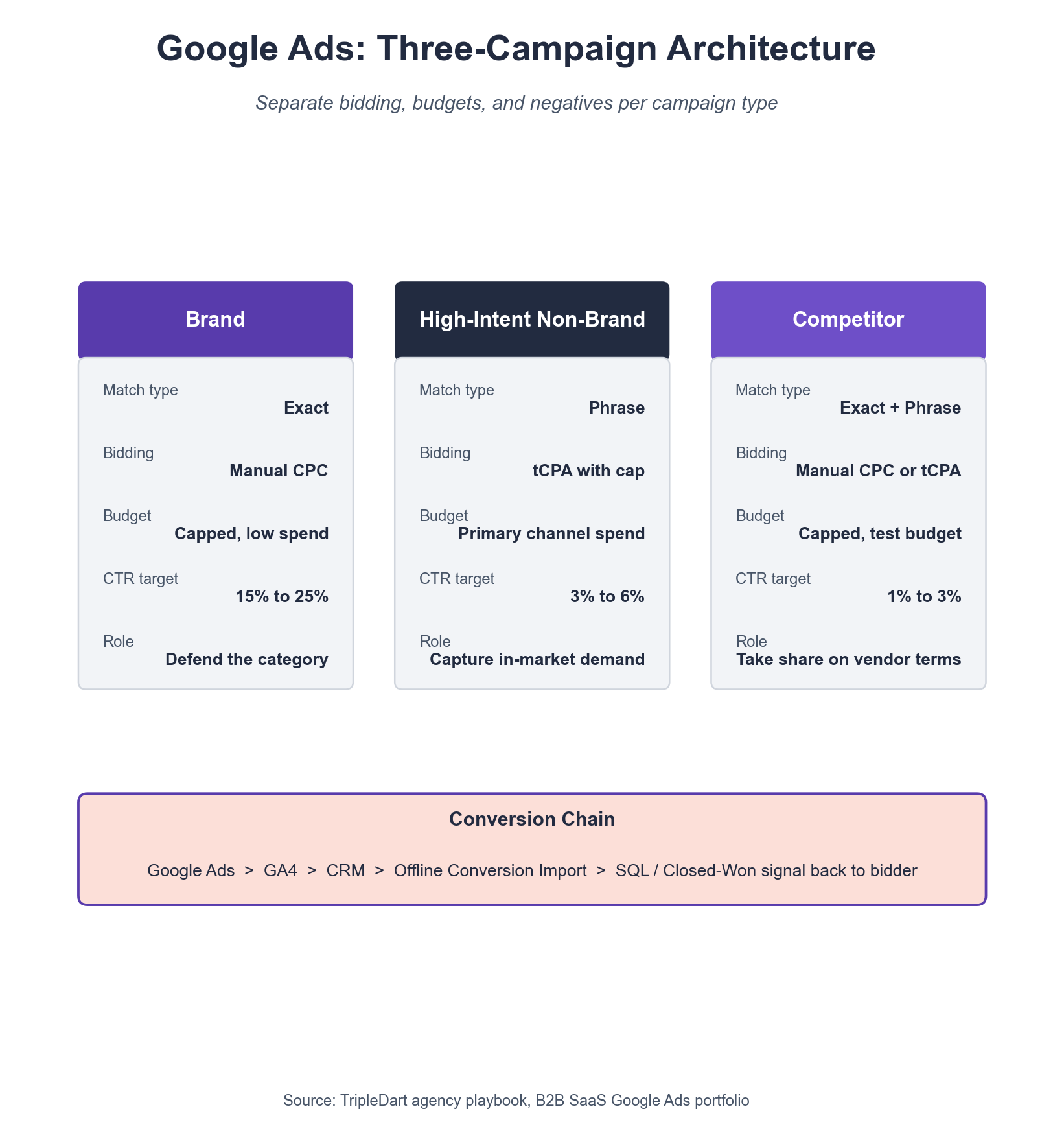
Google Ads for SaaS runs cleanly on a three-campaign architecture: Brand, High-Intent Non-Brand, and Competitor.
Every SaaS PPC checklist we run through a new account starts by collapsing the existing campaign sprawl into these three. Each campaign gets its own bidding strategy, budget rule, and exclusion list.
Step 11. Run a Full Keyword Research Pass Against the ICP
Build the keyword list by buying stage: problem-aware, solution-aware, and vendor-aware terms. Use Ahrefs Keywords Explorer for volume and difficulty. Use Google Ads Keyword Planner for forecasted CPC and conversion data.
Step 12. Separate Brand, Non-Brand, and Competitor Into Distinct Campaigns
Bidding strategies, CPCs, and conversion rates differ by an order of magnitude across these three. Running them in one campaign lets brand traffic subsidize non-brand inefficiency, which hides the problem instead of surfacing it.
Step 13. Set Match Types by Campaign Intent
- Brand: exact match, manual CPC.
- High-Intent Non-Brand: phrase match, tCPA or Maximize Conversions with a tCPA cap.
- Competitor: exact and phrase match with tight negative lists and a capped daily budget.
Step 14. Build the Master Negative Keyword List
A B2B SaaS master negative list is typically 300 to 800 terms on day one. Strip out jobs, training, free, tutorial, reddit, youtube, pdf, and any consumer-intent term. Review weekly for the first 90 days.
Step 15. Apply Audience Layers at the Campaign Level
Layer in-market and custom-intent audiences as "Observation" for the first 30 days to collect data. Then switch to "Targeting" on the segments that over-index on conversion rate.
Step 16. Exclude Irrelevant Locations and Device Types
Default settings allow "People in, or regularly in, or who show interest in" your targeted locations. Switch to "People in or regularly in" for B2B SaaS, or you will serve ads globally against a US-only offer.
Step 17. Write One Ad Group Per Tight Theme
Each ad group should have 15 to 30 keywords on a single theme and three responsive search ads with pinned H1 and H2 variations. Add at least four sitelinks, four callouts, and one structured snippet.
Step 18. Pin RSA Headlines for Category and Feature Language
Pin one headline to your named category term and one to your primary feature. Google's unpinned headline tests drift toward generic copy that loses CTR to better-positioned competitors.
Step 19. Launch Performance Max Only on Remarketing Audiences
Performance Max on cold prospecting burns SaaS budgets. Constrain PMax to a custom audience of high-intent visitors and offline-converted leads, with the "new customer acquisition only" flag off for pure ROAS and on for mixed intent.
Step 20. Configure Bidding to Portfolio Level With Shared Budgets
Shared budgets across a portfolio of ad groups let Google's algorithm reallocate spend toward the best-converting segment inside the campaign. This stops brand traffic from siphoning non-brand budget during high-volume periods.
Step 21. Set Up Weekly Search Term Report Reviews
A weekly 30-minute review of the Search Terms report catches wasted spend inside seven days instead of 30. Any term with more than $50 spend and zero conversions goes onto the negative list that afternoon.
Step 22. Install the Full Google Ads to GA4 to CRM Conversion Chain
The chain runs in this order:
- Google Ads conversion tag fires on form-fill.
- GA4 captures the GCLID against the session.
- CRM stores the GCLID against the lead record.
- Offline conversion import sends SQL and Closed-Won events back to Google Ads on a daily schedule.
Any break in that chain means Smart Bidding optimizes toward a lead signal, not a revenue signal.
What Our Audits Keep Surfacing
In the B2B SaaS Google Ads accounts we audit, the median wasted spend on search terms that never produce a pipeline lead is 22% of monthly budget. For a $75,000-per-month program, that is $16,500 recoverable inside the first two weekly search-term reviews.
Phase 3: LinkedIn Paid Social Structure (Steps 23 to 32)
LinkedIn only returns pipeline for SaaS when the audience is built from first-party firmographic data. The message needs to match buying stage, and retargeting has to run through a defined nurture window.
Most SaaS LinkedIn programs treat it like a consumer channel and wonder why CPL runs at $400 with no pipeline behind it.
Step 23. Upload Your ICP Account List as a Matched Audience
LinkedIn's native targeting reaches the right titles inside the wrong companies. A first-party account list (ICP companies, target accounts, or top-of-CRM stage accounts) narrows the match to the firms you want to sell into.
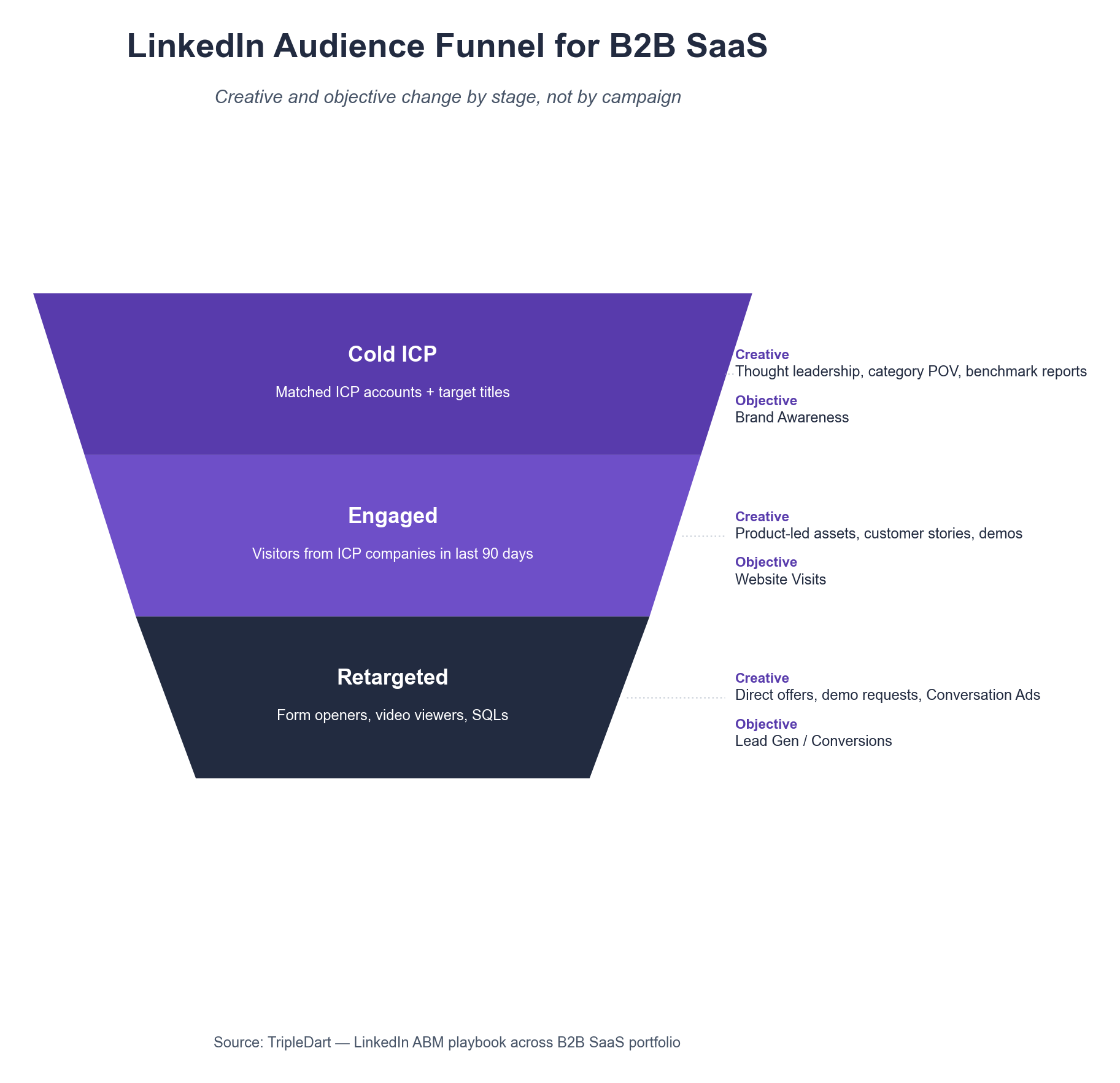
Step 24. Build Three Audience Layers: Cold, Engaged, and Retargeted
- Cold: matched ICP accounts plus target titles.
- Engaged: website visitors in the last 90 days from ICP companies.
- Retargeted: lead form openers, video viewers at 50%+, and sales-qualified contacts.
Step 25. Assign Stage-Appropriate Creative to Each Layer
Cold audiences see thought-leadership content (category POV, benchmark reports). Engaged audiences see product-led assets (demos, customer stories). Retargeted audiences see direct offers (demo requests, free trials, pricing page visits).
Step 26. Use Conversation Ads for Sales-Qualified Retargeting
LinkedIn Conversation Ads outperform single-image ads by 2x to 3x on sales-stage retargeting. They carry an SDR-tone message that single-image creative cannot deliver.
Step 27. Run Thought-Leader Ads Through Executive Profiles
Thought-leader format ads served through your CEO, CRO, or Head of Product profiles earn 4x to 6x the engagement of brand-handle ads. The personal handle is the unlock, more than the copy itself.
Step 28. Gate Only Mid and Bottom-Funnel Assets
Top-of-funnel assets (blog-level reports, POV pieces) stay ungated to build retargeting audiences. Mid-funnel assets (benchmarks with your data, category playbooks) gate to a short form.
Step 29. Keep Lead Gen Forms to Six Fields or Fewer
Conversion rate on LinkedIn Lead Gen Forms drops 30%+ above six fields. Drop "phone number" and "job function" to lift form-fill rate. Capture them on the thank-you page or inside the CRM after enrichment.
Step 30. Enable the LinkedIn Insight Tag and Conversion API
The Insight Tag captures pixel-based events. The Conversion API sends server-side events directly from your CRM. Running both recovers 10% to 20% of conversion signal that the pixel alone misses.
Step 31. Cap Frequency at 8 to 12 Impressions Per Week
LinkedIn impression caps are not a default. Without a cap, a cold audience will see the same creative 30+ times inside two weeks, torching CTR and brand perception in one campaign.
Step 32. Align Campaign Objectives to Buying Stage
Use Brand Awareness for cold ICP. Use Website Visits for engaged retargeting. Use Lead Generation or Website Conversions for sales-stage audiences.
Running Brand Awareness against sales-stage audiences wastes spend. Running Lead Gen against cold ICP produces form-fills that never close.
Phase 4: Landing Pages, Forms, and Conversion (Steps 33 to 42)
Landing pages are where the top 20% of SaaS PPC budget either converts or fails to. An ad that drives traffic to a generic homepage burns 30% to 50% of its potential conversion rate before the visitor has read a single word.
Step 33. Build a Dedicated Landing Page for Every Ad Group
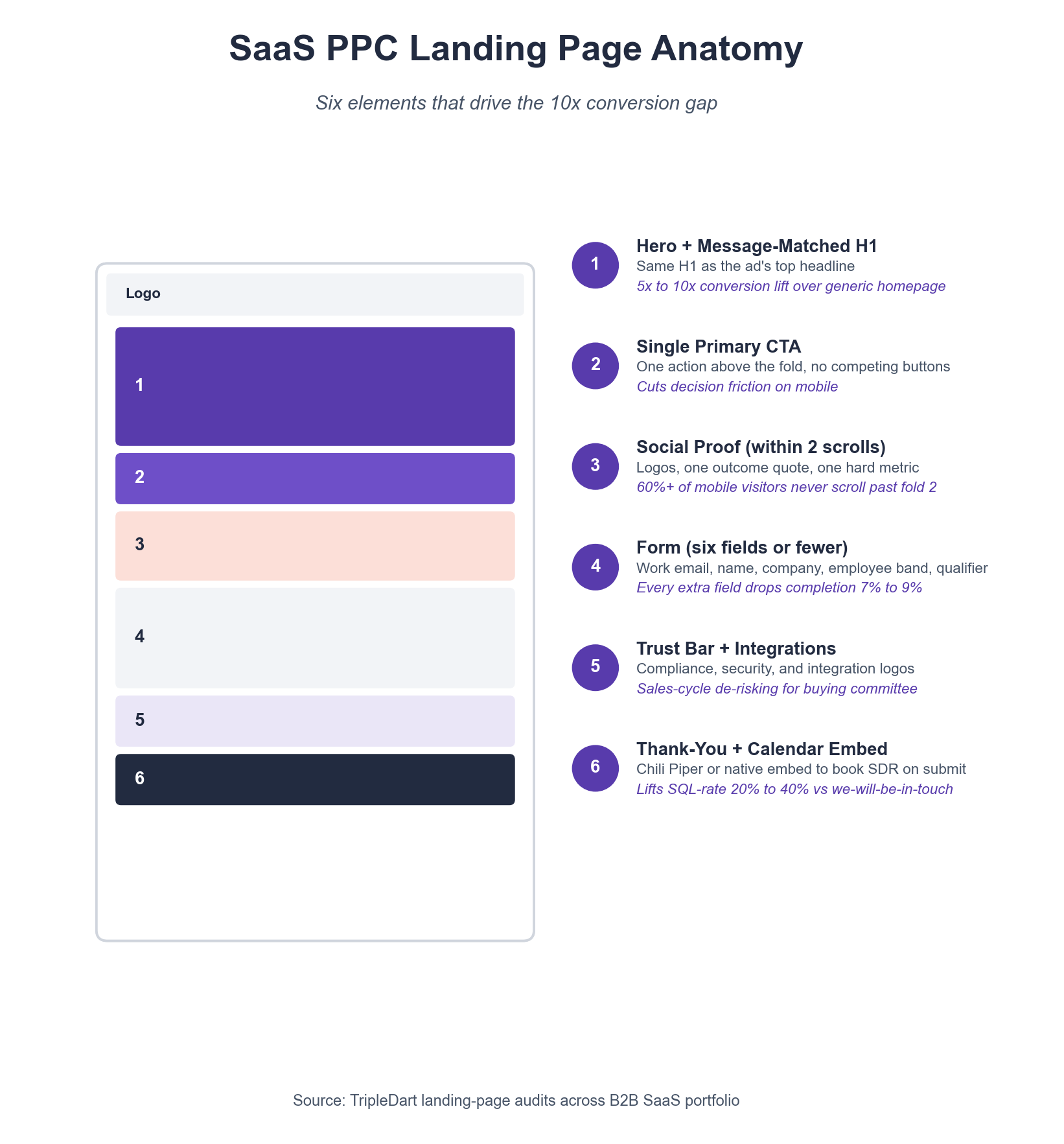
One landing page per ad group, at minimum. Same H1 as the ad's top headline, same feature language, same social proof. Message-match between ad and LP is the single biggest driver of landing-page conversion rate.
Step 34. Use a Single Above-the-Fold Call to Action
Pricing, "talk to sales," and "book a demo" competing for the same fold confuses every visitor. Pick one primary action per landing page. Demote the others to a text link in the nav.
Step 35. Add Social Proof Within Two Scrolls
Customer logos, a one-line outcome quote, and a specific metric (30% faster onboarding, 6x pipeline growth) inside the first two scrolls. Social proof below the fold does not exist for 60% of mobile visitors.
Step 36. Keep the Form Above Six Fields
Work email, first name, last name, company, employee band, and one qualifying question. Every additional field drops form completion by 7% to 9%, per HubSpot form research.
Step 37. Route Form Submissions Through a Validation Step
Block free-mail domains (gmail, yahoo) at the form level if you sell B2B. Add a honeypot field to catch bot submissions. Free-mail traffic and bot-fills distort paid attribution more than most teams see.
Step 38. Install a Calendar Booking Tool on the Thank-You Page
A Chili Piper or native Calendly embed on the thank-you page lifts SQL-rate by 20% to 40% over a generic confirmation message. Every hour of lag between form-fill and SDR contact drops show rate.
Step 39. Run the Page Against a 90+ PageSpeed Score
Google's Core Web Vitals directly affect Quality Score. A page scoring below 70 on mobile will pay 15% to 25% more per click than the same page scoring 90+.
Step 40. A/B Test the Hero and the CTA, in That Order
The two highest-impact tests on a SaaS landing page are the H1 and the primary CTA copy. Everything else (images, section order, form layout) is downstream of those two.
Step 41. Add Live Chat Only If Staffed Under Five Minutes
Unstaffed chat widgets that take 30 minutes to reply do more harm than no widget at all. If the SDR team cannot cover business-hours chat, remove the widget until staffing catches up.
Step 42. Fire the Conversion Event After a Qualified Field Check
The conversion event should fire after a qualified field check (corporate email, employee band above threshold), not on form submit. That one change cuts junk-lead conversion inflation by 10% to 25% in most of the accounts we run.
The 10x Gap Between Message-Match and Generic Pages
Across the SaaS landing pages we have audited, message-matched, intent-specific pages convert at 8% to 14%. Generic homepage destinations for the same ad group convert at 1% to 2%. The 10x gap is operational, not creative.
Phase 5: CRM Integration, Attribution, and Weekly Ops (Steps 43 to 52)
The final phase is where PPC stops being a cost center and becomes a pipeline engine. CRM integration, multi-touch attribution, and a weekly ops cadence convert paid spend into a forecastable line on the board deck.
Step 43. Map Every Ad Platform Lead to a CRM Lead Source Field
First-touch lead source (Google Ads, LinkedIn, Meta), campaign, ad group, and keyword flow into the CRM on every form-fill. Without this, the closed-won report can only say "paid" and not which campaign drove it.
Step 44. Stamp UTM Parameters on Every Paid URL
UTM taxonomy: utm_source, utm_medium, utm_campaign, utm_content, utm_term. Use a shared Google Sheet or a UTM builder tool. Inconsistent UTMs are the most common reason paid attribution reports do not match platform data.
Step 45. Set Up Multi-Touch Attribution
Multi-touch tools pull GA4, ad platform data, and CRM data into one view. The Dreamdata 2025 benchmark on B2B Google Search is the most operator-focused source on B2B paid attribution.
Step 46. Build a Weekly Paid Dashboard Tied to Pipeline, Not Leads
Dashboard columns: Spend, CPL, Leads, MQLs, SQLs, Opportunities, Pipeline $, Closed-Won $, Paid ROAS. If the dashboard stops at MQL, the program will optimize toward MQL, and MQLs do not pay salaries.
Step 47. Configure Offline Conversion Imports to Google Ads and LinkedIn
Send Opportunity-Created and Closed-Won events back to Google Ads and LinkedIn on a daily schedule. This is the single highest-impact attribution integration for B2B SaaS paid media.
Step 48. Run a Weekly 30-Minute PPC Ops Meeting
Agenda: previous week's spend vs plan, CPL and CPA trend, search-term report findings, creative fatigue flags, landing page conversion rate changes, pipeline impact. Thirty minutes, hard stop.
Step 49. Run a Monthly Pipeline Attribution Review With Sales
A cross-functional review with sales leadership, where every opportunity over a revenue threshold is traced to its first-touch and last-touch channel. This is the conversation that wins next year's budget.
Step 50. Set Quarterly Board Metrics: Paid ROAS, Payback, and Pipeline Coverage
Board metrics are paid ROAS (closed-won revenue ÷ paid spend), CAC payback (months to recover paid CAC), and pipeline coverage (paid pipeline ÷ paid target). These three numbers decide whether you get more budget next quarter.
Step 51. Audit the Full Funnel Quarterly With a Fresh Set of Eyes
A quarterly audit by someone outside the day-to-day team catches drift. That includes stale creative, broken UTMs, tracking gaps, buried negative keywords, and landing pages that have not been touched in six months. Fresh eyes find 15% to 25% budget recovery every time.
Step 52. Document the Full Stack in a Single SaaS PPC Playbook
Every account, campaign, audience, creative, landing page, CRM mapping, UTM taxonomy, and reporting schedule lives in one Notion or Confluence doc. New team members ramp in two weeks instead of two months.
Inside Our Tracked Programs
The B2B SaaS accounts in our portfolio that run all five phases of this SaaS PPC checklist hit pipeline-coverage targets within two quarters 70%+ of the time. The accounts that skip Phase 1 or Phase 5 hit the same target 20% of the time, even with strong campaign execution in Phases 2 through 4.
Putting the Checklist Into Practice
The 52 steps above are the sequence we walk every new SaaS PPC engagement through. Most in-house teams have the right instincts but not the operating cadence to run end-to-end.
Foundation, architecture, audience, landing pages, and pipeline ops stack on each other. Skip one and the engine runs but leaks.
We run Google Ads and LinkedIn paid programs for 250+ B2B SaaS companies including Factors.AI, SpotDraft, Apty, and Signeasy.
The same 52-step playbook runs inside every engagement. Each step is accountable to pipeline instead of leads, backed by portfolio-level benchmark data.
Save your PPC budget with a strategy walkthrough.
Frequently Asked Questions
How much should a B2B SaaS company spend on PPC in 2026?
The defensible monthly PPC budget reverse-engineers from revenue. Take the net new ARR target and multiply by 3x to 4x pipeline coverage. Divide by ACV, walk up through SQL and MQL rates, and multiply by blended CPL. For a $10M ARR target, that typically lands between $40,000 and $120,000 per month in paid media.
What is the difference between blended CAC and paid-attributable CAC?
Blended CAC divides total sales and marketing spend by total new customers. Paid-attributable CAC isolates the customers who first touched through a paid channel and divides paid S&M spend by that subset. Paid-attributable CAC runs 1.4x to 1.8x blended in most B2B SaaS accounts, which is the number that should gate PPC budget decisions.
How long before a new SaaS PPC program starts producing pipeline?
With clean tracking, offline conversion imports, and an ICP-aligned keyword list, most B2B SaaS programs produce MQLs inside two weeks. SQLs follow in four to six weeks, and Opportunities in six to ten weeks. Closed-won revenue follows the sales cycle, typically 90 to 180 days after launch.
Is LinkedIn or Google Ads better for B2B SaaS?
Both, in different roles. Google Ads captures in-market demand (problem-aware, solution-aware, vendor-aware queries) and is the higher-converting channel on intent. LinkedIn creates demand against named ICP accounts and is the higher-intent channel for ABM motions. The HubSpot State of Marketing research confirms both channels are top-three for B2B SaaS pipeline.
What is the biggest source of wasted spend in SaaS Google Ads accounts?
Search terms that never produce a pipeline lead. Across the B2B SaaS accounts we audit, the median wasted spend on these terms is 22% of monthly budget. A weekly 30-minute search-term report review recovers most of it inside the first month.
How many landing pages does a SaaS PPC program need?
One landing page per ad group, at minimum. A mid-sized program with 20 ad groups runs 20 landing pages plus one pricing page and one demo-request page. Generic homepage destinations cut conversion rate by 5x to 10x compared to ad-group-specific pages.
Do I need a multi-touch attribution platform to run SaaS PPC properly?
For programs under $30,000 per month, GA4 plus CRM lead source fields plus offline conversion imports are enough. Above $30,000 per month, a multi-touch tool like Dreamdata, HockeyStack, or the Demandbase platform earns back its cost inside a quarter. These tools isolate which campaigns drive closed-won, not just leads.
What belongs on a weekly SaaS PPC ops dashboard?
Spend, CPL, Leads, MQLs, SQLs, Opportunities, Pipeline dollars, Closed-Won dollars, and Paid ROAS, split by campaign. If the dashboard stops at MQL, the program optimizes toward MQL. The Ahrefs SaaS SEO guide covers the same attribution gap on the organic side.
.webp)


.webp)
.webp)

.webp)





.webp)



.webp)

.webp)


%20(1).png)


.webp)
.webp)
.webp)



%20Ads%20for%20SaaS%202026_%20Types%2C%20Strategies%20%26%20Best%20Practices%20(1).webp)





.png)


.png)




.webp)


![Creating an Enterprise SaaS Marketing Strategy [Based on Industry Insights and Trends in 2026]](https://cdn.prod.website-files.com/632b673b055f4310bdb8637d/6965f37b67d3956f981e65fe_66a22273de11b68303bdd3c7_Creating%2520an%2520Enterprise%2520SaaS%2520Marketing%2520Strategy%2520%255BBased%2520on%2520Industry%2520Insights%2520and%2520Trends%2520in%25202023%255D.png)




.png)
























.png)

.png)
.png)
.png)
.png)
.png)









.webp)
.webp)
.png)
.png)





.png)


















.webp)
.png)

.png)








.png)

.png)



%2520Agencies%2520(2025).png)

![Top 9 AI SEO Content Generators for 2026 [Ranked & Reviewed]](https://cdn.prod.website-files.com/632b673b055f4310bdb8637d/6858e2c2d1f91a0c0a48811a_ai%20seo%20content%20generator.webp)

.webp)
.webp)







.webp)













.avif)