

.png)

Key Takeaways
- Negative keywords stop your ads from showing on irrelevant queries. On a $50K per month B2B SaaS account, disciplined management recovers $5K to $12.5K in monthly budget.
- Four wrong-fit audiences quietly drain most SaaS PPC budgets: job seekers, free-tier hunters, students and researchers, and consumers who land on B2B queries by accident.
- A healthy B2B SaaS account carries 200 to 500 negative keywords across the account, campaign, and ad group levels. The list grows by 20 to 50 terms every month.
- Vertical patterns split the work. DevOps, fintech, HR tech, security, and CX each ship their own waste signatures, and a universal list alone will not catch them.
- Google raised the Performance Max negative keyword cap from 100 to 10,000 in 2025, a 100x change that reshaped how we structure shared lists for every SaaS account we run.
- AI-assisted workflows compress what used to be a two-hour weekly search term review into twenty minutes, with the reviewer staying in the loop for every approval.
Why Most SaaS Accounts Treat Negative Keywords Like an Afterthought
Most B2B SaaS accounts we audit have fewer than 50 negative keywords for SaaS PPC campaigns.
A lot of Series B+ paid programs still burn 30% to 40% of their budget on clicks that will never buy.
The fix is cheap.
A negative keyword is a search term you tell Google or Microsoft Ads to never show your ad for.
Three match types cover every case.
- Broad negatives block any search containing every word.
- Phrase negatives block any search containing the exact phrase.
- Exact negatives block only that specific query.
Apply them at the account, campaign, or ad group level depending on how targeted the exclusion needs to be.
The reason negatives get ignored is that they do not produce a dashboard metric. A line that reads "we saved $11,200 this month by blocking job-seeker queries" simply does not exist in Google Ads.
What you see instead is a slightly lower cost per lead and a slightly higher conversion rate, which most teams attribute to the wrong variable. The absence of the metric is why the discipline fades.
Then comes the audit where 35% of last quarter's spend went to people who(Copy-Paste Ready) were never going to convert.
How Much a Missing List Costs You
Small and mid-market businesses waste roughly 40% of their Google Ads budget on irrelevant clicks.
A comprehensive negative keyword list typically recovers 15% to 30% of wasted spend inside the first 60 days. ROAS lifts 20% to 40% on the surviving budget.
The mechanics are straightforward. Wasted clicks drag your Quality Score down. A lower Quality Score pushes your CPCs up.
Higher CPCs eat into the budget you had earmarked for high-intent queries. Google's automated bidding, which most SaaS teams now run, learns from whatever conversion signal it sees.
If your ads are converting at 0.2% because half your traffic is researchers and job seekers, Smart Bidding will optimize to that 0.2%. Not the 4% your ICP would hit.
What We See Across 250+ SaaS Accounts
Across the B2B SaaS search accounts we run, the negative-keyword gap is the single biggest controllable waste line we find in first-30-day audits. In one recent Series C sales-tech account we onboarded, competitor-brand queries with zero purchase intent (searches from users researching incumbents) had consumed roughly $11,800 over the prior month against zero conversions. Three shared lists and a search term report workflow closed the leak inside two weeks.
The 2025 update to the Google Ads documentation changed the implementation math. Performance Max campaigns now accept up to 10,000 negative keywords each, up from the original 100.
The 100x jump sounds academic until you run PMax as a serious channel for B2B SaaS. The old negative list, capped at 100 terms, was quietly letting everything through.
The Four Wrong-Fit Audiences Hiding in Your Search Term Report
Every B2B SaaS account we audit produces the same four waste clusters in the search term report. Once you know what to look for, you can diagnose an account in twenty minutes.
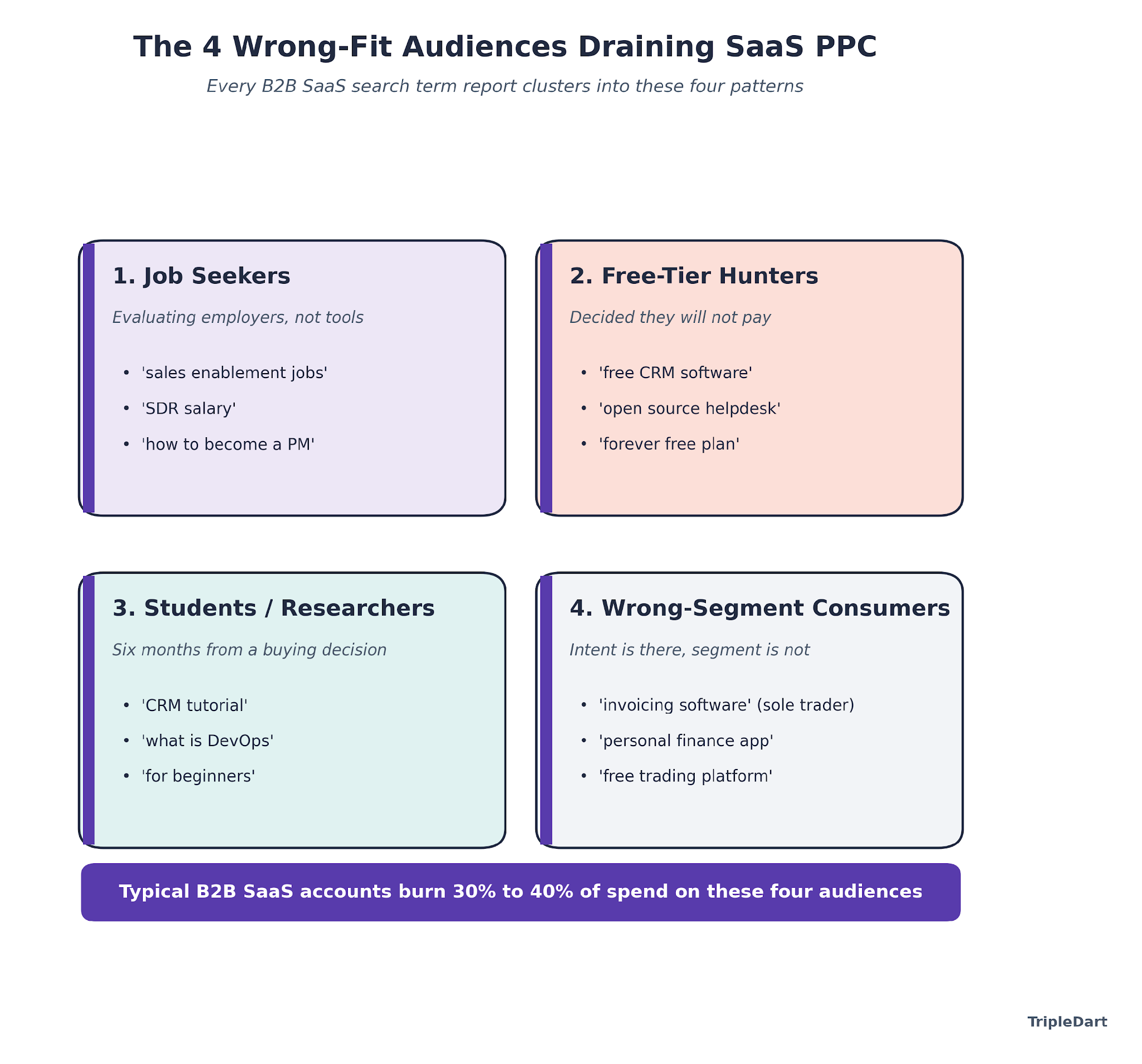
1. Job Seekers
People searching for employment at companies that use your software, or for jobs as your buyer persona. A sales enablement tool bidding on "sales enablement software" catches queries like "sales enablement jobs" and "revenue operations entry level." These users click to evaluate employers, never to buy.
2. Free-Tier Hunters
Searchers who have already decided they will not pay. Queries like "free CRM software," "open source helpdesk," and "project management tool forever free" rule themselves out of your funnel the moment they type them. A freemium plan changes the logic. A paid-only plan does not.
3. Students and Researchers
"How to use project management software," "CRM tutorial for beginners," "what is DevOps," "best invoicing tool course." High click volume, high bounce rate, zero pipeline. These users are six months from a decision at best, usually in the wrong role, and almost always in the wrong company size.
4. Wrong-Segment Consumers
A mid-market B2B invoicing platform bidding on "invoicing software" catches sole traders looking for a $10 monthly personal tool. It also pulls in small-business owners who want something simple and consumers looking for personal finance apps. The intent is there. The segment is not.
The reason we cluster this way is operational. Each cluster maps to a specific list structure, a specific match type rule, and a specific exclusion level. Lumping everything into one negatives dump is what makes most accounts un-maintainable by month three.
500+ Copy-Paste Negative Keywords, Organized by Category
These lists come from the pattern library we have built across 250+ B2B SaaS engagements. Treat them as a starting point. Run them against your own search term report for two weeks and prune anything that is blocking valid traffic in your specific vertical.
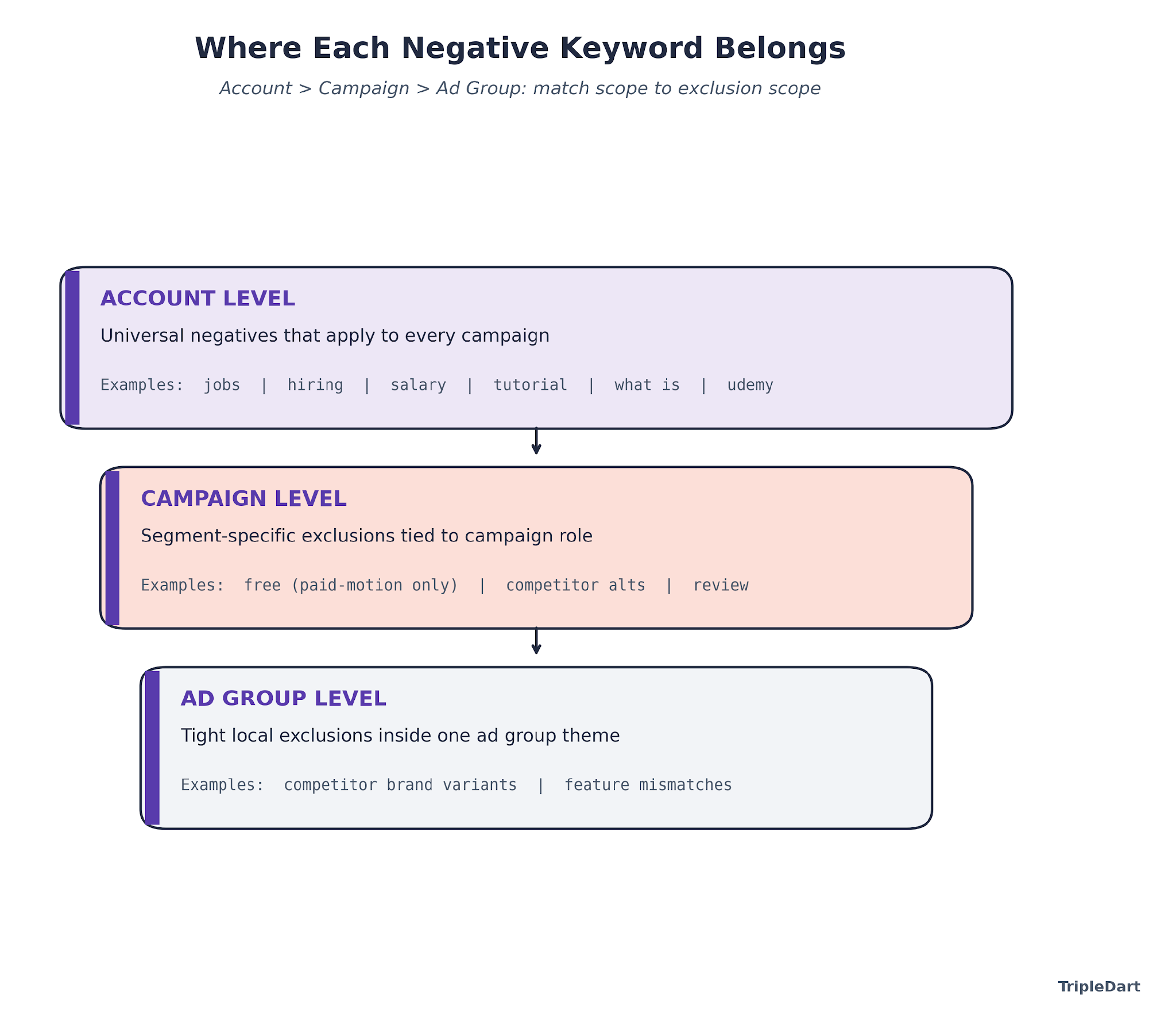
Universal B2B SaaS Negatives (Apply at Account Level)
Add these as a shared account list. Apply to all search and Performance Max campaigns.
Job-seeker terms (phrase match): jobs, hiring, careers, salary, job description, job posting, resume, CV, cover letter, interview questions, interview prep, how to become, certifications, training course, bootcamp, entry level, junior, senior, intern, internship, apprenticeship, staffing, recruiter, recruiting, recruitment, glassdoor, indeed, linkedin jobs, work from home jobs, remote jobs, freelance jobs, part time, contract role, contractor, permanent role, hiring manager, headcount.
Education and research terms (phrase match): tutorial, course, courses, certification, training, training course, online course, udemy, coursera, how to, what is, definition, meaning, explained, for beginners, beginner guide, learn, learning, study, student, syllabus, textbook, class, masterclass, university, college, PhD, thesis, research paper, academic.
Research and comparison traps (phrase match): wikipedia, quora, reddit, youtube, download, torrent, crack, cracked, nulled, patch, hack, hacked, illegal, free download, pdf download, ebook free, slideshare, template free, sample free, example, examples.
Price-gating terms (phrase match): free, freeware, free trial no credit card, open source, self hosted no license, github free, community edition only, forever free, zero cost, no cost, 100 percent free, completely free, totally free.
*Implementation note:* the free-related terms belong at account level only if your SaaS runs a paid-only motion. If you run a freemium plan, keep "free" out of the account-level list and push it down to the campaign level for bottom-funnel campaigns only.
Vertical-Specific Negatives
Each vertical ships its own waste pattern. These lists extend the universals, they do not replace them.
DevOps and developer tools: github copilot free, chatgpt free code, stackoverflow, docs, documentation, changelog, release notes, api docs, github repo, npm install tutorial, docker tutorial, kubernetes tutorial, homelab, raspberry pi, self hosted docker, docker compose home, home server, proxmox home, truenas, unraid.
Cybersecurity: kali linux tutorial, metasploit tutorial, ethical hacking course, pentest tutorial, CISSP bootcamp, CEH certification, security+ certification, hacking games, CTF, capture the flag, hackthebox, tryhackme, hacker news, cyber jobs, cybersecurity jobs entry level, SOC analyst jobs, SOC analyst salary, security engineer salary.
Fintech: personal finance app, budgeting app for individuals, venmo, cash app, zelle, paypal personal, crypto wallet personal, bitcoin price, ethereum price, nft, investment calculator, retirement calculator, stock screener, free trading platform, robinhood, coinbase personal.
HR tech: hr jobs, hr manager salary, chro salary, payroll tutorial, payroll course, hr certification, SHRM certification, i-9 form download, w-2 form download, w-4 download, 1099 template free, hr policy templates free, employee handbook template free, performance review template free.
CX and support: customer support jobs, customer service representative salary, contact center agent hiring, call center jobs, live chat agent jobs, support agent salary, zendesk tutorial, salesforce service cloud course, intercom tutorial, freshdesk tutorial.
Sales tech: SDR jobs, BDR jobs, sales development representative hiring, account executive salary, sdr salary, revops salary, sales jobs remote, sales enablement manager jobs, CRM tutorial, salesforce admin course, salesforce admin certification, hubspot certification free.
Competitor and Comparison Control
Competitor research queries rarely convert for the challenger brand. If you are the incumbent bidding on your own brand, the logic flips. For challengers, cut the noise.
Review and comparison terms (phrase match): vs, versus, alternative, alternatives, comparison, compared to, review, reviews, rating, ratings, g2 reviews, capterra reviews, trustpilot, best, top 10, top ten, top 5, top five, roundup, comparison chart.
Exceptions to add back: if your brand is running "[competitor] alternatives" as a conquest strategy, run those as a dedicated campaign with exact-match targeting. Pull "alternatives" out of your universal negative list for that campaign only. We go deep on this trade-off in our Google Ads broad match piece.
Brand-Name Negatives for Specific Verticals
If you sell developer tools, exclude consumer software brand queries. If you sell security, exclude consumer antivirus. If you sell HR tech, exclude consumer productivity.
The brand-exclusion list depends on the vertical and the search term report. We build these account by account because a universal list breaks as soon as a new adjacent brand enters the SERP.
How We Use AI to Build and Maintain Negative Keyword Lists
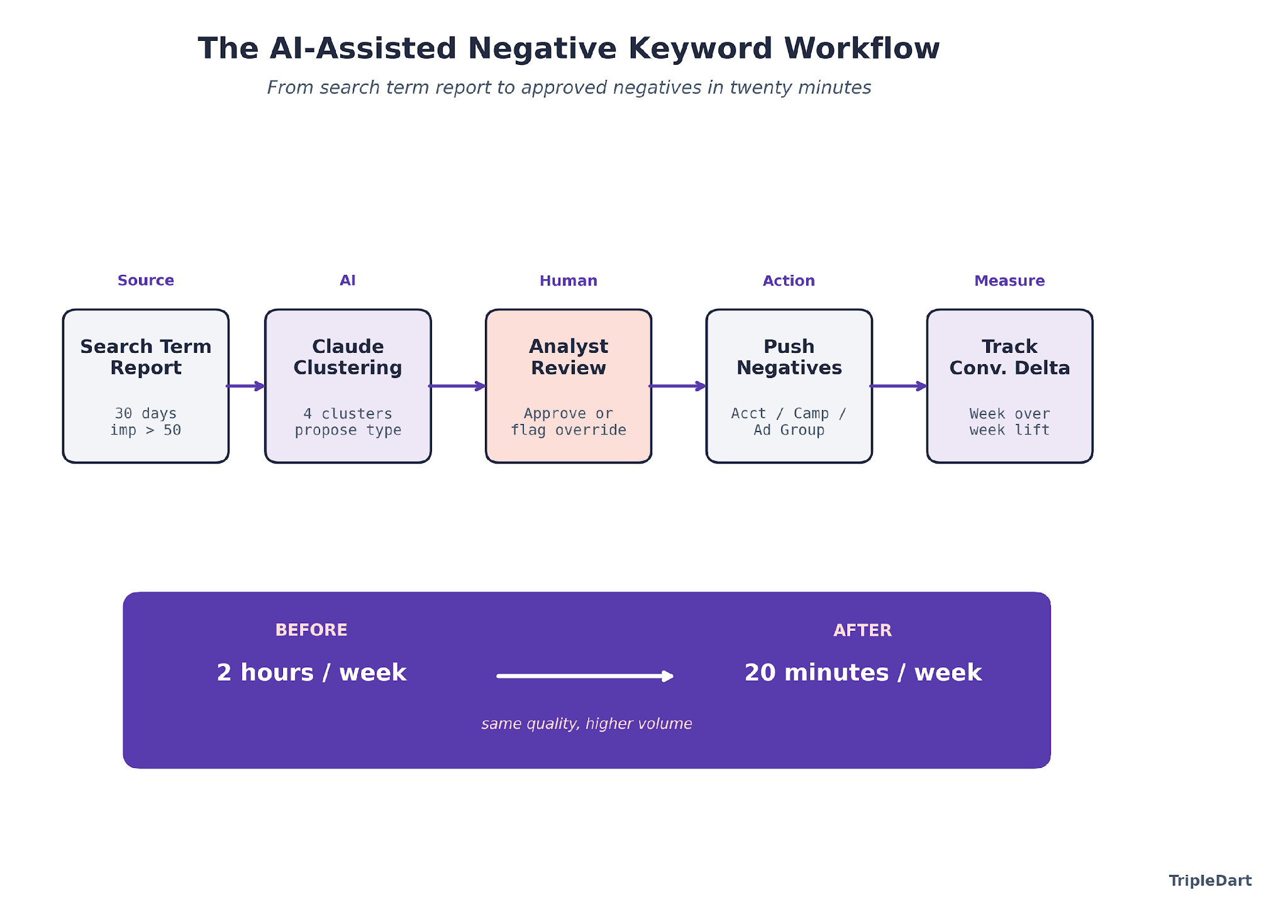
A two-hour weekly search term report review used to be the cost of keeping negative keyword lists current. Now it is twenty minutes, and the quality is better. The new model has AI doing the clustering while a human approves every decision.
What Changed in Our Playbook
Across the 250+ B2B tech engagements we have run, the weekly negative-keyword cadence was historically one of the harder disciplines to keep alive past month three. A paid strategist would export the search term report, scan for wrong-fit clusters, and add 20 to 50 phrase-match negatives. The exercise was valuable and boring, which is the worst combination for a repeatable workflow. With Claude wired into the search term report, the analyst now gets a clustered draft in under ninety seconds and approves or rejects each cluster one by one.
The workflow we run is simple on purpose, because the leverage is in the clustering, not the automation. We documented the end-to-end pattern in our Claude Google Ads workflow.
The negative-keyword-specific version runs like this.
Step 1. Pull the Search Term Report
Thirty days, impression threshold at 50, include costs and conversion counts. Anything below 50 impressions is not yet a pattern. Anything above is a candidate for the clustering pass.
Step 2. Feed the Report to Claude With a Clustering Prompt
The prompt asks for four clusters: job seekers, free-tier hunters, educational intent, wrong-segment consumers. For each cluster, Claude returns the candidate terms, a proposed match type, and a recommended level (account, campaign, ad group). The analyst sees a structured draft in under two minutes.
Step 3. Review One Cluster at a Time
The analyst scans each cluster, approves by default, and flags anything that looks like a valid buyer query miscategorised. The single most common override is "CRM tutorial for sales team" in an outbound-sales-tech account, which Claude clusters as education but is a bottom-funnel buyer signal for implementation.
Step 4. Push the Approved Negatives
Shared lists at the account level for universals, campaign lists for segment-specific exclusions, ad group lists for the tight ones. Document what went where, so the next review knows the inventory.
Step 5. Track the Conversion Rate Delta Week Over Week
The metric we watch is conversion rate on retained traffic. If it is climbing by 10 to 20 basis points a week after a cleanup, the negatives are working. If it is flat, the list was already healthy.
AI Marketing Agent: Search Term Negation
The reason we run it this way is philosophical. AI is an enabler for a discipline we already run, never a substitute for it.
Wiring Claude to the stack without a cadence produces a faster version of nothing. The workflow has to exist first.
The leverage is in that existing workflow applied to the volume of search terms we could never process by hand.
The Weekly Operating Cadence That Holds
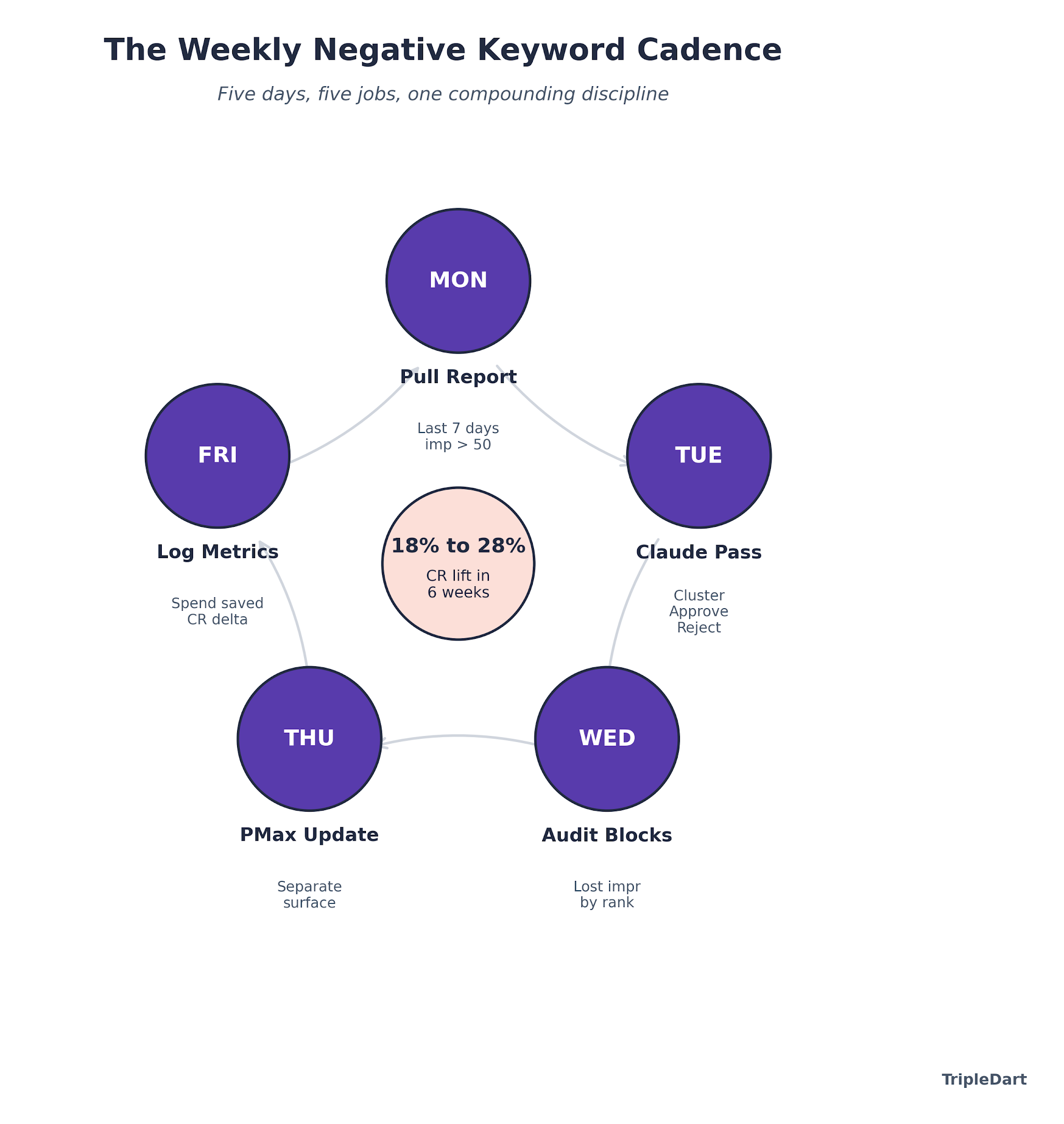
Negative keyword management is a weekly job, not a monthly one. A monthly cadence means Smart Bidding has been learning from four weeks of polluted conversion data before anyone checks.
Monday
Pull the search term report for the last seven days across every active campaign. Tag anything above 50 impressions for review.
Tuesday
Run the Claude clustering pass. Approve or reject each cluster. Update the shared account-level list for universals, the campaign-level lists for segment-specific blocks.
Wednesday
Audit the existing negative lists for over-blocking. Conversion rate lift is the win, but a silently-broken campaign where valid queries are being blocked is a bigger risk. Pull the lost impression share by rank and cross-reference against the negatives to surface anything blocked by mistake.
Thursday
Push any Performance Max updates separately. PMax negative keyword management is a different surface after the 2025 limit expansion. You can now keep 10,000 terms per campaign, which makes the campaign-level list carry more weight than before.
Friday
Log the metrics. Search terms added this week, conversion rate delta, spend saved estimate. The estimate earns its weight at the quarterly review, where "how much did we save by managing negatives" becomes a concrete pipeline defense.
The Number Most Teams Miss
In the search accounts we manage across the B2B SaaS portfolio, the conversion-rate lift from a clean weekly negative-keyword cadence averages 18% to 28% over the first six weeks of an engagement. The second-order effect is larger. Smart Bidding sees a cleaner conversion signal, optimizes toward higher-intent queries, and CPL drops another 10% to 15% without any bid adjustments.
The discipline is boring. That is why we systemize it. Every SaaS PPC account we run has a negative-keyword SOP with a named owner, a named cadence, and a shared dashboard showing the spend-saved metric.
The moment the SOP goes unowned, the discipline decays. The account starts leaking again inside 60 days. We walk the full operating model in our Google Ads for SaaS guide.
Putting the Negative Keyword System Into Practice
Negative keyword management ranks low on the glamour scale in B2B SaaS PPC, which is exactly why the highest-leverage wins live there.
A $50K per month account that runs clean lists, a weekly AI-assisted cadence, and a tight SOP recovers 20% to 30% of spend inside 90 days. No creative changes. No bid changes.
The recovered spend reads as a spreadsheet line. It behaves as pipeline, specifically the pipeline that was never going to close because the budget had already been spent on the wrong traffic.
We run Google Ads and paid social for 250+ B2B SaaS companies, from Airbase and SpotDraft to Helpshift and Signeasy. On every account, the B2B SaaS PPC agency engine installs the same negative-keyword system: named owner, weekly cadence, AI-assisted clustering, and a spend-saved metric the CFO can read.
It is also the workflow that pays for the engagement inside the first quarter.
Save your PPC budget with TripleDart.
Frequently Asked Questions
How many negative keywords should a B2B SaaS PPC account have? A healthy B2B SaaS account carries 200 to 500 negative keywords across account, campaign, and ad group levels. The list grows by 20 to 50 new terms every month from weekly search term report reviews. Accounts with fewer than 50 negatives are almost always leaking budget to job-seeker and research queries. Under 200 is a diagnostic signal that the cadence is not being run.
What match types should I use for negative keywords in Google Ads? Phrase match is the default for most negative keywords. It catches any query containing the exact phrase while still allowing broader variants. Use exact match for competitor brand terms you want to block precisely. Broad match negatives work sparingly, only when you are confident the term never appears in a valid query. The HubSpot Google Ads guide covers the exact behavior of each match type.
How often should I update my negative keyword list? Weekly for active accounts, monthly for low-volume campaigns. Smart Bidding learns from every conversion signal it sees, and a month of wrong-fit traffic produces a month of wrong-direction optimization. The weekly cadence does not have to be long. Twenty minutes with an AI-assisted clustering pass covers most accounts.
Does Performance Max support negative keywords? Yes. As of the March 2025 expansion, Performance Max campaigns accept up to 10,000 negative keywords per campaign, a 100x increase from the original limit of 100. The change makes PMax negative keyword management a meaningful lever for B2B SaaS. The wrong-fit query volume on PMax was previously too high to control with the old cap.
Should I add competitor brand names to my negative keyword list? It depends on strategy. For defensive motions where you do not want to pay to appear on competitor brand queries, add them as exact-match negatives. For conquest motions where "competitor alternatives" is a campaign theme, keep competitor terms out of the negative list for those campaigns and run them with exact-match targeting.
How do I know if my negative keyword list is too aggressive? Pull the lost impression share due to rank and budget. Cross-reference against the "blocked by negative keyword" reporting in Google Ads. If you are seeing high-intent queries blocked, the list has over-reached. We audit for this on Wednesdays in our weekly cadence, because a silently-broken campaign is a bigger risk than a leaky one.
Can AI replace the human reviewer for negative keyword work? No, and we do not run it that way. AI compresses the clustering, not the decision. The analyst approves or rejects each cluster, and the single most common override is a cluster that looks like research but is a bottom-funnel buyer signal. The leverage is in freeing the analyst's time for decisions, not removing the analyst.
What tools work best for building negative keyword lists? Google Ads search term reports are the primary source. Research tools like Semrush PPC research help surface waste candidates before launch. For clustering and review, Claude or another capable LLM plus a structured prompt beats a dedicated negative-keyword tool for most SaaS accounts.

.png)







.png)



.png)


.webp)


.webp)

.webp)
.png)
.png)
.webp)


.webp)
.png)


.webp)
.webp)
.webp)





%20Ads%20for%20SaaS%202026_%20Types%2C%20Strategies%20%26%20Best%20Practices%20(1).webp)






.png)







.webp)


![Creating an Enterprise SaaS Marketing Strategy [Based on Industry Insights and Trends in 2026]](https://cdn.prod.website-files.com/632b673b055f4310bdb8637d/6965f37b67d3956f981e65fe_66a22273de11b68303bdd3c7_Creating%2520an%2520Enterprise%2520SaaS%2520Marketing%2520Strategy%2520%255BBased%2520on%2520Industry%2520Insights%2520and%2520Trends%2520in%25202023%255D.png)































.png)

.png)
.png)
.png)
.png)
.png)













.webp)
.webp)
.png)
.png)





.png)



















.webp)
.png)

.png)










.png)




%2520Agencies%2520(2025).png)

![Top 9 AI SEO Content Generators for 2026 [Ranked & Reviewed]](https://cdn.prod.website-files.com/632b673b055f4310bdb8637d/6858e2c2d1f91a0c0a48811a_ai%20seo%20content%20generator.webp)




.webp)
.webp)












.webp)














.avif)