
Google Ads to finally let you keep AI Max off your brand
A new Branded Searches control decides whether Google's automation can bid on your brand terms. For careful paid teams, the most useful setting is the one that blocks it.
Contributor

Abishek Balaji
Content Marketing Manager
In this article
Last week a new setting showed up inside Google Ads.
It lives in the AI Max panel, and it answers one question: can Google's automation bid on searches that include your brand name?
If you have ever watched an automated campaign start bidding on your own brand terms, you know exactly why this matters, and this setting finally gives you a way to stop it.
The Story
AI Max is Google's automation layer for Search campaigns. It lets Google show your ads on searches you never added as keywords.
It launched in May 2025 and rolled out to every account over the following months. The paid teams we run have worked around how it behaves ever since.
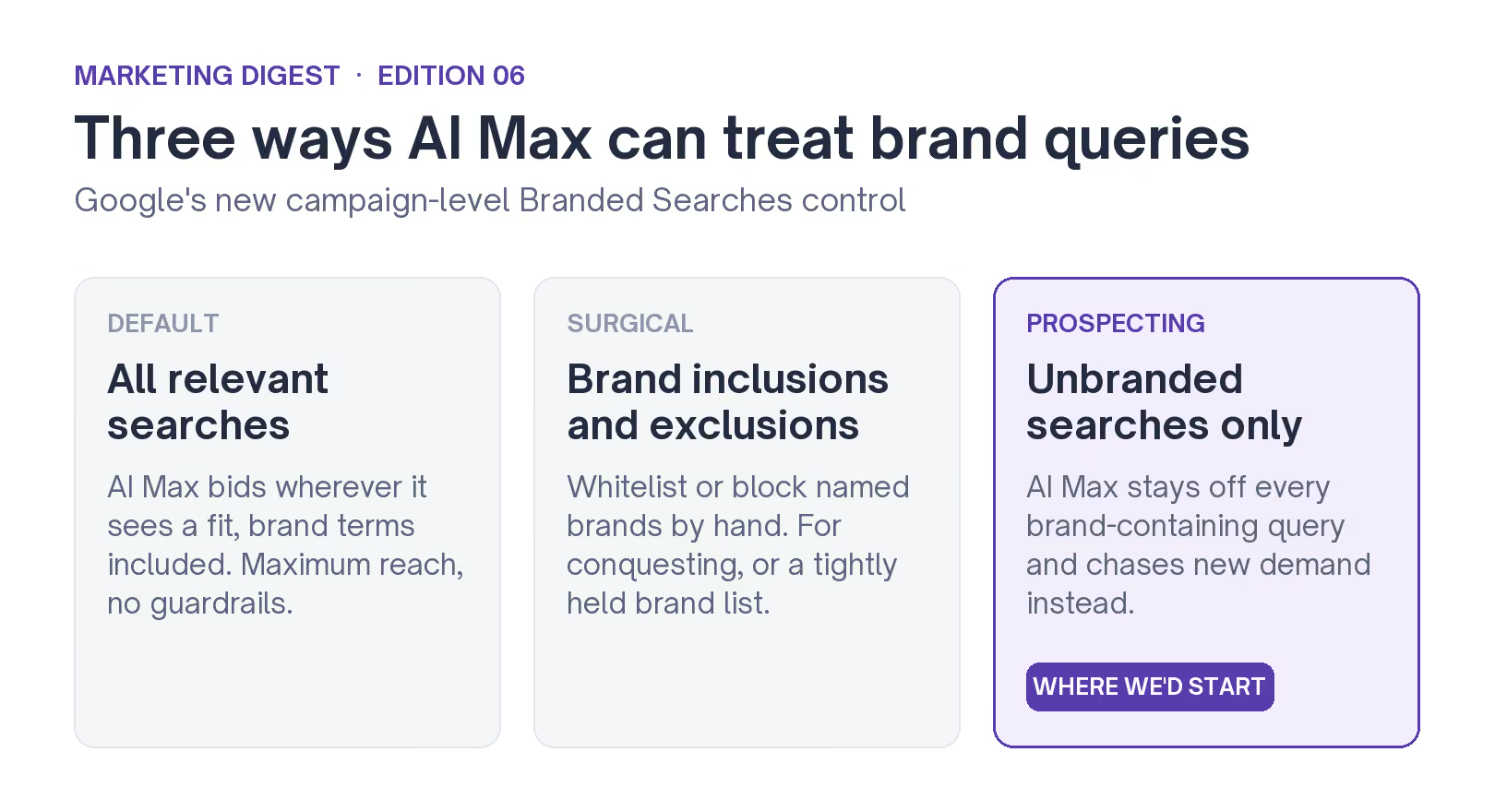
The new Branded Searches control sits at the campaign level and decides how AI Max handles brand searches. It has three settings:
- The default lets AI Max bid on every relevant search, including ones with your brand name
- The unbranded-only setting does the opposite and keeps AI Max away from any search that contains a brand name
- The third setting lets you pick which brands to allow or block by hand
Search Engine Land reported the sighting and called it an early test, not a confirmed launch.
And the people who spotted it first did not all agree on what it meant.
Where the click goes on default
If you leave the setting on its default, AI Max bids on your brand searches at the same time as your own brand campaign, and usually at a higher cost per click (CPC).
That person was going to click your brand campaign anyway. So the extra AI Max bid just makes you pay more for a click you were already getting cheaply.
In a well-run account, the brand campaign is the cheapest source of clicks, because people already know your name. When AI Max bids on those same searches, it pushes the price up for traffic you were already winning.
It also hurts your reporting. When two campaigns bid on the same search, Google splits the conversions between them, so you can no longer tell which campaign drove the sale.
The unbranded-only setting removes that overlap completely.
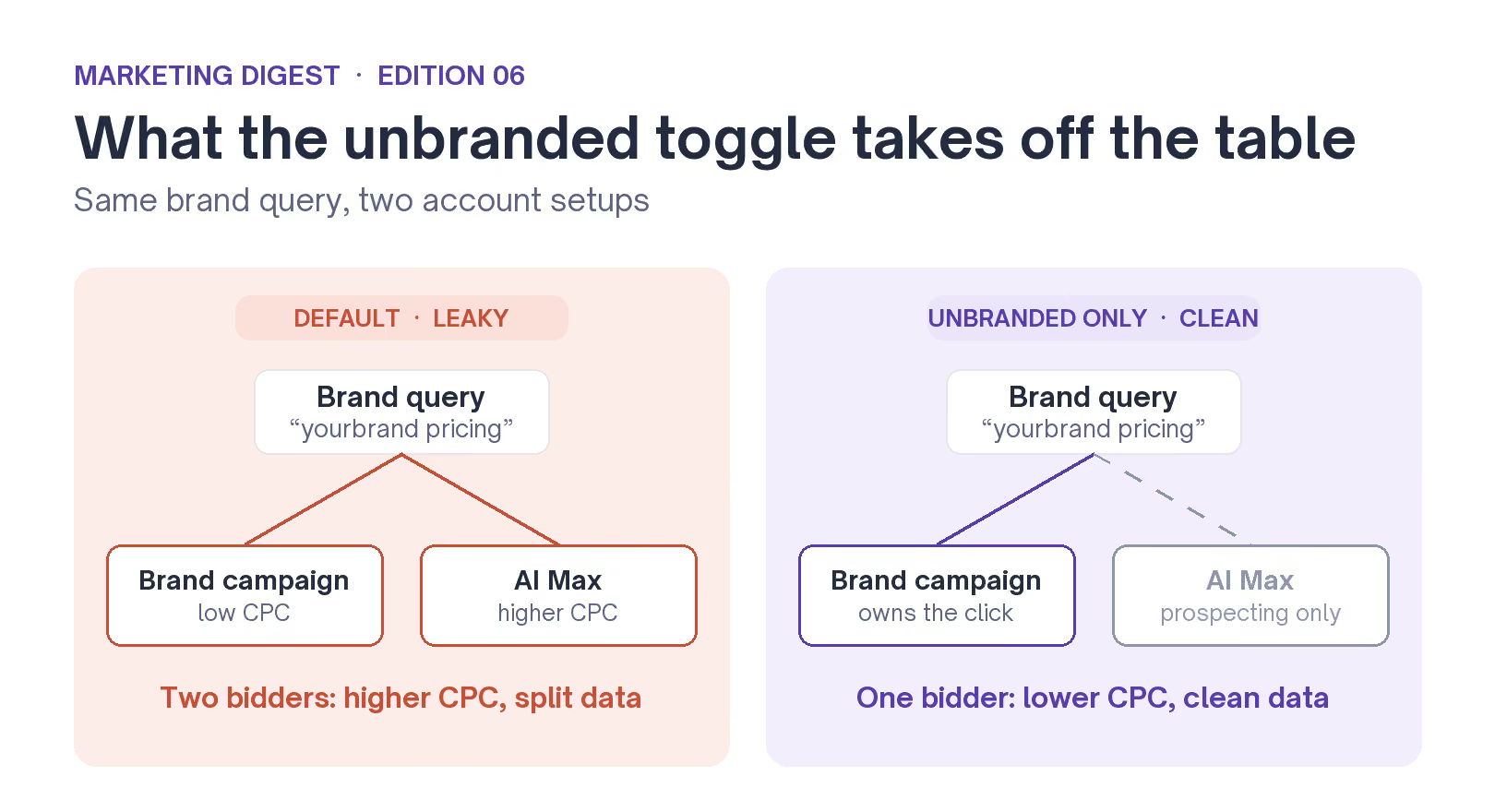
Same brand search, two account setups. The unbranded-only setting keeps the demand you already own apart from the demand you are trying to win.
Why this matters more than a normal feature
Your brand campaign does an important job. It runs to its own target return on ad spend (ROAS) and holds the impression share you want. It also keeps your conversion data clean.
When AI Max bids into the same campaign at a higher CPC, it works against all of that. That is why the unbranded-only setting is more useful than it first looks.
There is a second reason it helps.
If you leave the default on, AI Max can also start showing your ads on searches for competitor brands, on its own. Most advertisers would rather decide that themselves than have it happen automatically.
Until now, the only way to stop this was a brand exclusion list that you built and updated by hand. A setting that blocks it by default means far less manual work, especially if you manage a lot of Google Ads accounts.
The edge case to test before you trust it
The unbranded-only setting is blunt, so there is one thing to test before you rely on it.
What happens to a search like 'volkswagen vento', where a brand name sits inside a real product search? If Google reads 'volkswagen' as a brand and blocks the whole search, you have just stopped AI Max from chasing demand you wanted.
Google already treats brands and their sub-brands as separate things. Its own brand list documentation tells advertisers to add parent and child names, like Google and YouTube, as separate entries. So a search that mixes a brand with a product can behave in ways the simple on-off setting hides.
Before you rely on unbranded-only for those searches, check how Google is sorting them in your search terms report.
Google will not run this check for you. And if you skip it, the cost is easy to miss, because it will not show up clearly in your reports.
How we'd set it, account by account
None of this means you should turn AI Max off.
Google's own numbers for AI Max for Search show a 14% lift in conversions at a similar cost, rising to 27% for advertisers who kept their exact and phrase keywords running. AI Max is worth running for prospecting.
The thing that matters most is picking the right setting for each account. That depends on the account, not on one rule you apply everywhere:
- Strong, separate brand campaign: use unbranded-only, so AI Max stays in prospecting and your brand campaign keeps its own numbers.
- Going after competitor brand terms on purpose: use the inclusions and exclusions setting, so you choose exactly which brands to allow.
- Thin account with little brand demand: leave the default on for now, let AI Max gather data, then tighten it once you have more volume.
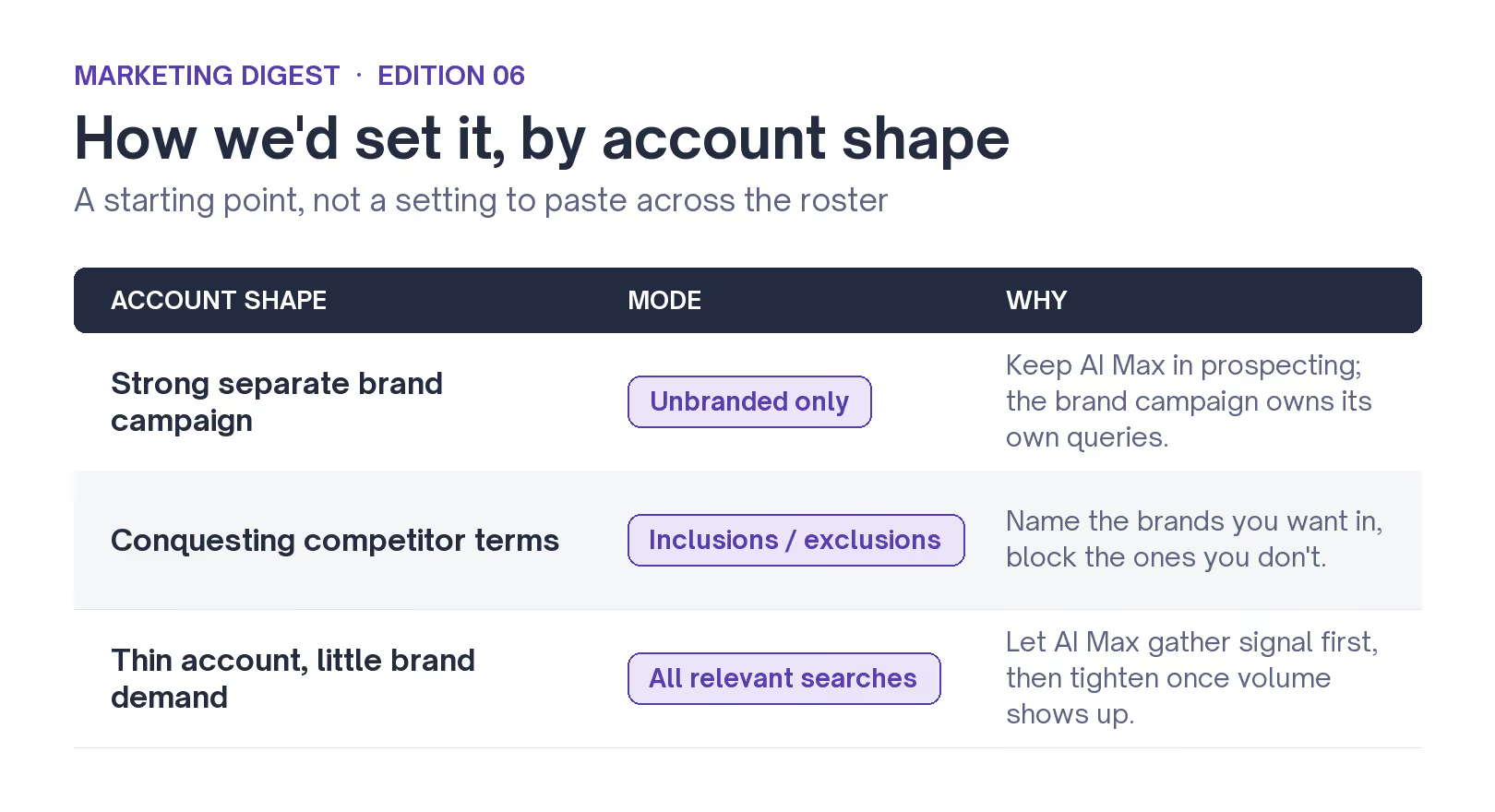
Getting that call right for each account is the ongoing job. It is most of what good paid management is.
Put simply, this update gives advertisers a control they have wanted for a year: a setting that decides where AI Max can go and where it cannot. The value is in knowing which way to set it for each account.
If this setting is live on your accounts and you want to compare notes, we are happy to talk.
We'll be watching to see whether it becomes a permanent, default part of Google Ads.