.avif)
Opening Keynotes: The State of SaaS PPC in 2026
Sabarinathan R, Co-founder, TripleDart
I've led TripleDart’s PPC operations for almost five years now, and it’s safe to say that the landscape has never changed as much as it has in the past 18 months. What is surprising isn't just the growth in technology, but also how rapidly our clients have had to adapt to stay competitive.
2024: Seismic Shifts in PPC
In 2024, three big changes forced us to rethink our approach.
- Buyer journeys became more complex. B2B SaaS deals required 266 touchpoints in 2024 (~20% jump from 2023) according to HockeyStack. Two factors drove this:
- Rising CPCs (especially in competitive niches like MarTech and FinTech)
- Evolving search behavior — thanks to GenAI tools like ChatGPT and Perplexity, users now bypass Google for complex queries.
- Traditional search volume dipped. With AI tools becoming go-to sources, some keywords we once relied on started to underperform.
- By mid-2024, things like Performance Max, AI bidding, and real-time optimization were just... expected. The brands that stood out? They experimented with new channels — and didn’t put all their PPC eggs in one basket.
What's Working in PPC in 2026
Today, our PPC strategies cover three key principles:
1. Bottom-of-funnel focus
With rising CPCs, we’re doubling down on high-intent keywords.
The math is simple: A $25 CPC for an active buyer is far more effective than five $5 clicks from early-stage researchers.
2. Signal-based marketing
This is the most exciting development I've seen. We’ve helped top clients shift from waiting on form completions to proactively identifying buying signals across multiple platforms and starting outreach immediately.
3. AI agents
From dynamic budget reallocations to flagging CPC spikes and tracking competitors, AI is now powering the backend of high-performing PPC campaigns.
What was once enterprise-only is now accessible to everyone — if you have the right partner.
Where We're Headed in SaaS PPC
Looking ahead, I see three trends SaaS companies should get ready for:
First, we’ll continue to move in the direction of manual work + AI agents. As a side effect, we’ll see roles in marketing teams that are partly or fully focused on AI-based execution and tracking related KPIs.
Secondly, video advertising will be essential, driven by shorter attention spans and the need for unique content. Top SaaS companies are already creating platform-specific content, not just repurposing assets.
Third, I expect significant innovation in the hyper-targeting space. The ability to bucket audiences based on specific criteria will allow for more precision in B2B SaaS advertising.
Building on Foundations
None of these developments invalidates the fundamentals. Account structure, landing page optimization, and compelling ad copy remain essential. But in 2026, your PPC strategy must build on top of these to include the emerging trends.
This Saas PPC Guide, written out of our insights and examples working with clients, has been tailored according to the marketing ecosystem of 2026. We’ll walk through curated segments starting with an introduction to PPC and its importance in SaaS, and move on to strategies, challenges, trends, AI PPC agents, and much more.
Let’s get started.
SaaS PPC Guide for 2026 - Introduction
According to Gartner, the SaaS industry grew from $31 billion to $161 billion between 2015 and 2022, a 420% increase in seven years. This sector is expected to reach $195 billion by the end of 2025.
On one end, such growth is good news and shows the rapid adoption of cloud-based SaaS software programs by firms. However, it also indicates an increased influx of newer SaaS businesses, a peaking of existing ones, and a higher level of competition to get your target audience’s attention.
This means there’s a chance you’ll hit the hard wall when it comes to:
- Acquiring new customers
- Scaling your business beyond borders
- Generating satisfactory revenue despite increased customer acquisition costs
And remember, no lead means no sales. If there are no sales, there’s no way to keep your business running.
We’ve worked with hundreds of SaaS businesses and understand how unpleasant any of these scenarios can be, especially for those solely relying on SEO for lead generation.
That’s where SaaS PPC advertising comes in.
What is SaaS PPC?
SaaS PPC, or Software-as-a-Service Pay-Per-Click, is a digital marketing strategy in which you advertise your SaaS product or services on platforms like Google and pay a certain amount whenever someone clicks those ads.
Let’s break it down:
- Imagine you own a Customer Relationship Management (CRM) tool
- You register on the Google Ads platform and create campaigns to promote your product
- When Google displays your CRM product to a fitting audience, they are likely to view & pass or click the ad
- If they click the ad, Google charges you a certain amount
- If they don’t click the ad and merely view it, Google doesn’t charge you
In this way SaaS PPC fundamentally differs from pay-per-view advertising, where you are charged for every 1000 people who view your ads, even if they take no action.
Before going further, understand that Google Ads is not the only platform for PPC ads. Other channels include Microsoft’s Bing Ads, Facebook, Instagram, LinkedIn, Twitter, etc.
Most importantly, each advertising platform charges a different cost-per-click, some as little as $0.40 and others as high as $10, depending on various factors. You can read more about different PPC channels and their respective costs in our B2B PPC article.
Why is PPC Important for SaaS Companies?
Proactive and Quality Lead Generation
If you ask any SaaS owner about their challenges, generating leads will top the list. That’s not surprising given that SaaS leads are often company leaders, high-ranking executives, and well-informed decision-makers who are at the top of their craft in their respective niche.
So, it takes a lot to get their attention, especially in a busy market where your competitors have kick-ass products in their arsenal, and everyone claims to be an expert.
Lead generation is also a big challenge owing to the primary use of SEO. While that’s a great approach, the internet is oversaturated and search engine algorithms keep changing frequently. That makes it more difficult to scale up your website, generate enough visibility, and attract leads.
SaaS PPC cuts through these barriers and delivers your product right in front of your target audience instead of waiting for them to find you. Moreover, PPC generally generates twice as many leads on average as compared to SEO.
Higher Lifetime Value
Customer lifetime value (CLV) is the total amount of revenue you can expect to generate from a customer over the duration of their relationship with your business.
Let’s say customer A pays $200 per monthly subscription to your SaaS product. If the customer uses your product for one year without any change in subscription cost, then the CLV is $2400.
The higher your average CLV, the less money you need to spend to acquire new leads.
So, how does SaaS PPC affect your CLV?
First off, SaaS PPC leads convert 50% more than organic leads. That gives you a better head start compared to SEO.
Secondly, PPC encourages careful and granular-level messaging right from the start, ensuring your leads are aware of your offerings inside and out.
That means you need not worry about your customer ditching you for competitors midway because of miscommunication in your value proposition and brand messaging.
All these combined lead to longer customer retention, which results in higher CLV.
Steady Flow of Revenue
The SaaS market, just like any other market, is influenced by seasonal changes and recessional trends. This is especially true if your main channel for lead generation is SEO coupled with the ever-changing search engine algorithms.
Anything that affects your lead generation flow will also directly affect your conversions, sales, and revenue. If your revenue dips, you will have less capital to budget for marketing. Reduced marketing effort leads to less revenue in the next season. And the cycle continues.
However, that’s not the case with SaaS PPC. Regardless of algorithm changes, seasonal trends, and market disruptions, you can always reach your target audience and communicate your value propositions.
With proper messaging, maintaining a robust lead pipeline becomes easier, potentially leading to a sustained flow of revenue.
Why SaaS PPC Campaigns Fail And How To Fix Them
“I invested 10% of my company's revenue in PPC but failed to get results.”
That’s a common complaint from clients who have previously tried pay-per-click advertising. While SaaS PPC is not rocket science, this doesn’t mean you can just scramble in and expect results. You must follow some steps religiously (which we will discuss in the next section).
After analyzing hundreds of brands, we discovered that most SaaS PPC campaigns fail because of poor outreach strategies and ineffective campaign management. Beyond these two, there are other reasons, such as:
Extremely Narrow Targeting
The general belief is that the narrower your target is, the more likely you are to connect with your ideal customer.
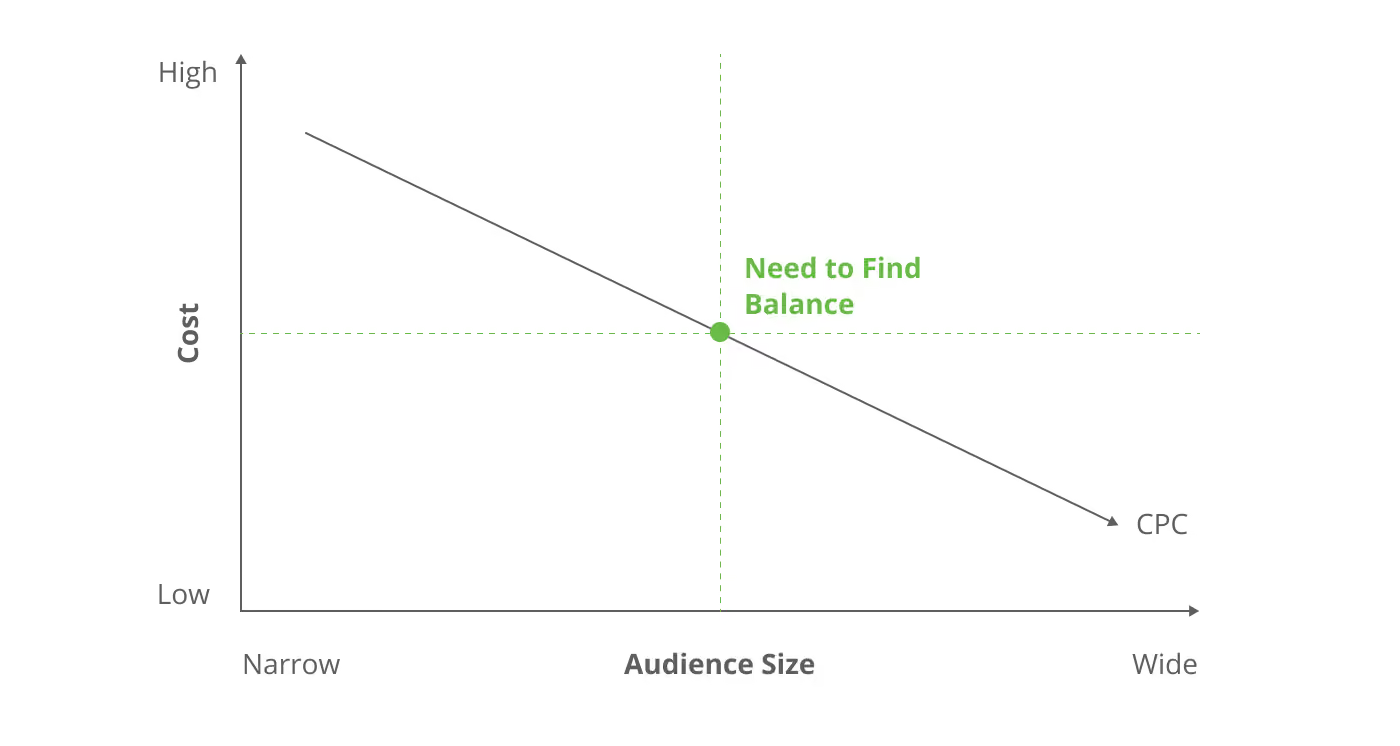
However, this comes with a disadvantage. A narrower target means a low supply of leads. It could also be considered as a high-value target by multiple bidders, and hence face heavy competition.
Source: Powered By Search
This inadvertently leads to a higher cost-per-click. Another way to understand the concept of narrow targeting is auction bidding.
Assume there’s a sapphire vase, one of its kind, wooed by almost 100 bidders.
The auctioneer, therefore, has to throw an open bid, where each bidder calls a price higher than the last until there’s no more bidding. At this point, the final cost is already monumental and would normally be sufficient for many similar vases on a normal day.
In the end, you either spend more to get less, or simply opt out if the expenses supersede the return. To solve this, you have to strike a balance in choosing the audience you want to target based on your campaign goals.
Targeting the Wrong Audience
While this point is often reiterated, most SaaS brands still miss it, especially if they leave their PPC campaigns to a new in-house PPC team that lacks the required experience.
Sometimes, brands end up targeting an audience that is too broad. An excessively broad audience puts you at risk of generating a large percentage of leads that do not align with your product.
Both mistakes—too narrow or excessively broad targeting—lead to inappropriate ad spending, reduced lead generation, low-quality leads, poor conversion rates, and low returns on investment.
Besides choosing the wrong audience, brands also end up focusing on keywords that do not matter or are too difficult. If it’s the latter, they are likely to spend more per click.
Lack of Baseline CPC
One of the most common frustrations we hear from SaaS founders and PPC marketers: Our cost-per-click is just too high.
The typical reaction? They pause the ads, cut the budget, or switch platforms — often too early.
That’s like grounding your plane just as it’s about to take off.
Here’s the problem: Many teams jump into campaigns without setting a baseline CPC — a clear range of what they’re willing (and expecting) to pay per click. This could be a lower and upper limit, or an average figure with some tolerance for fluctuation.
Why it matters? Ad platforms need time to learn. You’ve got to give your campaigns at least 1–2 weeks of run time to gather data, optimize delivery, and start showing results. In this learning phase, costs may seem high — but pulling the plug too early means you never give the algorithm a chance to optimize.
In most cases, CPCs drop and ROAS improves after that initial window. But only the patient campaigns get there.
Generic Ad Copies and Blunt Creatives
We get it! There are tons of sophisticated AI writers out there that supersede even the ChatGPTs and Claudes. However, AI still can’t match the nuance, strategy, or persuasion of a great human copywriter.
Your ad copy carries the main message. So, it’s a big mistake to invest less in it just because you want to save costs or join the AI trend.
The same applies to your creatives—videos, flyers, animations, and landing pages. They all create a lasting impression on your target audience. Blunt creatives won’t move the needle or evoke your high-level leads to take action, even if your targeting hits the bullseye.
Low Quality Score
Quality score is a rating used by Google to determine the relevance of your keywords and ads in PPC campaigns. The more relevant your keywords and ads are to the audience you’re targeting, the higher your quality score. A higher quality score translates to lower cost-per-click and higher ad rank.
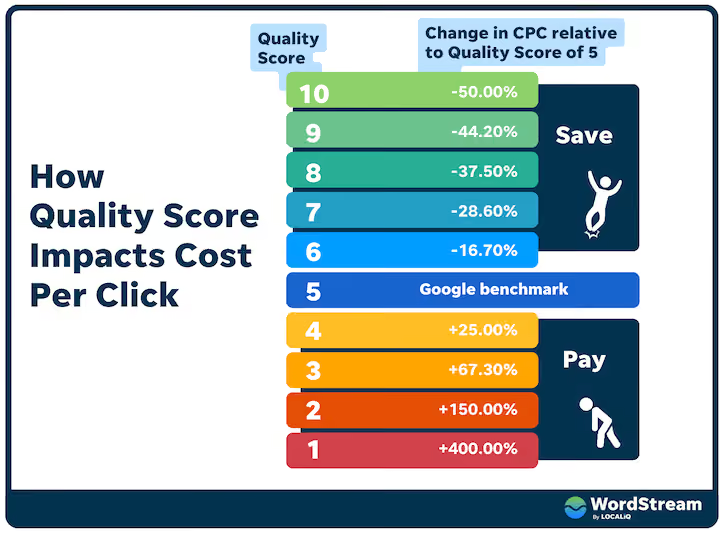
Google calculates this score based on four major factors:
- Your click-through rate (CTR)
- The relevance of each keyword and ad text
- The quality of your landing page
- Your past Google Ads account performance
Now, here’s the problem. Most PPC campaigns perform poorly in all the factors mentioned above, resulting in a low-quality score. So you end up spending more money to achieve minuscule results.
This results in cost-ineffectiveness, which may force you to pause your campaigns till you have enough budget.
How to Create a Winning SaaS PPC Campaign
SaaS PPC marketing yields an average ROI of $2 for every $1 invested and an $8 ROI if you use the Google Ads network. Of course, it’s also possible to get zero results if you don’t set up your campaigns properly.
Remember what I said at the start of this article? While SaaS PPC is no rocket science, it’s not something you can garbage in and garbage out or scramble your way into. You need to do it well.
To ensure your campaigns bring in good results, we will share some of the steps we employ at TripleDart.
Define Your Goals and Objectives With Appropriate KPIs
You’ve probably heard this a million times. Setting a goal is vital, and it’s worth reiterating if you ever want a successful SaaS PPC campaign.
A vague goal like “get more leads” won’t cut it. You need specific, measurable, and realistic targets — think SMART goals.
Here’s an example for a CRM SaaS brand:
- Specific: Increase CRM free trial sign-ups
- Measurable: Achieve 20% increase in sign-ups, maintaining CPA below $50
- Achievable: se targeted keywords + optimized copy
- Relevant: Tied to broader business growth
- Time-bound: Within three months
Summary Goal: Grow CRM trial sign-ups by 20% in 3 months through targeted PPC, keeping CPA under $50
To effectively create a goal and set objectives, you must attach certain key performance indicators to track your input and output. In the above example, cost-per-acquisition (CPA) was used to quantify capital investment. Other metrics like cost-per-click (CPC), return on ad spend (ROAS), and customer lifetime value (CLV) are also important. Check out more KPIs here.
Know Your Target Audience and Create a Persona
In SaaS, you're not selling to companies — you’re selling to the people inside those companies: decision-makers, buying committees, and champions.
- First, you should research all the companies that could use your solution. For instance, a CRM solution will benefit sales and marketing firms, e-commerce companies, real estate agencies, financial services, healthcare providers, and IT and software companies.
- The next step is to narrow the list and choose a micro-audience—not necessarily too narrow, but not too broad either. This could be just e-commerce companies or real estate agencies. Even if your product is built to handle different spectrums of businesses, you still have to target each spectrum separately to make the most out of personalization.
- Once you have a list of your target companies, find out their decision makers, such as CEOs, executives, shareholders, and managers. Look for where they spend time online, what they do, personal quirks, etc.
- Gather details of their demographics, behavioral, and psychographic (interest and preferences). Then use it to formulate a buyer persona.
Primarily, it’s best to divide your audience into three categories based on your buyer persona:
- Ideal customers — hot leads, ready to buy
- Warm prospects — might convert with proper nurturing
- Long shots — not ideal, but connected to your core buyers
Your messaging strategy depends on who you're speaking to.
- Warm leads need awareness-stage (TOFU) content that nurtures interest
- Hot leads need BOFU offers to convert
- Long shots might need educational content to build relevance
A blanket approach won’t cut it. Tailor your content to the audience's stage in the funnel — and you’ll see far better results.
Case Study: SingleStore's Targeting Transformation
SingleStore was running LinkedIn Ads. They were getting clicks, but the engagement wasn't turning into leads and eventually into real conversations. The problem was that their targeting was too narrow in some cases and too broad in others which prevented them fromreaching the right people.
Step 1: Digging Into LinkedIn Ads & Refining the ICP
The first thing we did was audit their LinkedIn Ads. Who was engaging? Who was converting? And more importantly, who wasn't? Their campaigns targeted engineering leaders, but some were too senior to care, while others weren't the right fit.
We mapped out an Ideal Customer Profile (ICP) and narrowed it down to Hi-Tech Companies using functional databases critical to their business. These were people who actively needed better product storytelling. From there, we adjusted our targeting to focus on native LinkedIn functions and job titles that matched this persona.
Step 2: Creating Personas and Forecasting Audience Size
With a refined ICP, we built detailed personas:
Role:
- VP/Directors/Head of Engineering and IT
- Managers, Senior Engineers, and IT functions
Company Size:
- Mid-Market: 250-1000 Employees
- Enterprise: 1000-10000 Employees
Pain Points:
- Using traditional SQL tools slows down query time and affects database performance. This impacts customer experience as well as business operations
- SingleStore replaces this with high-performance query speeds
Buying Triggers:
- Traditional Query Tools slow down the performance at scale, hence, adopt SingleStore
We then forecasted the audience size to ensure it was large enough to scale and specific enough to drive quality leads. This helped us chalk out a demo account list.
Step 3: Structuring the Funnel
We set up a structured ad funnel:
- TOFU (Awareness): Broad ads to introduce the brand
- MOFU (Consideration): Retargeting engaged users with product messaging
- BOFU (Decision): Push campaigns driving demos for high-intent leads
We adjusted the budget dynamically, pushing harder where we saw traction and pulling back on underperforming segments.
Results
Over three months, we fine-tuned audience mapping, ad creatives, and budget allocation. This led to a 20-30% decrease in cost per MQL.
Conduct Analytic Keyword Research
Knowing your target audience makes it easy to find which keywords they use when looking for solutions to their problems.
At this stage, choose a B2B SEO tool like Ahrefs or SEMrush and do a general search on your company’s primary keyword. For a CRM brand like Salesforce, the primary keyword would be ‘CRM.’
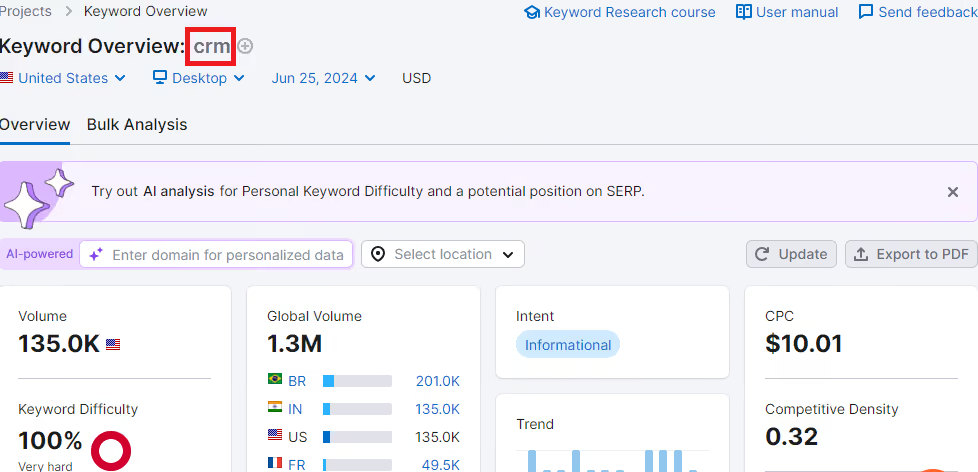
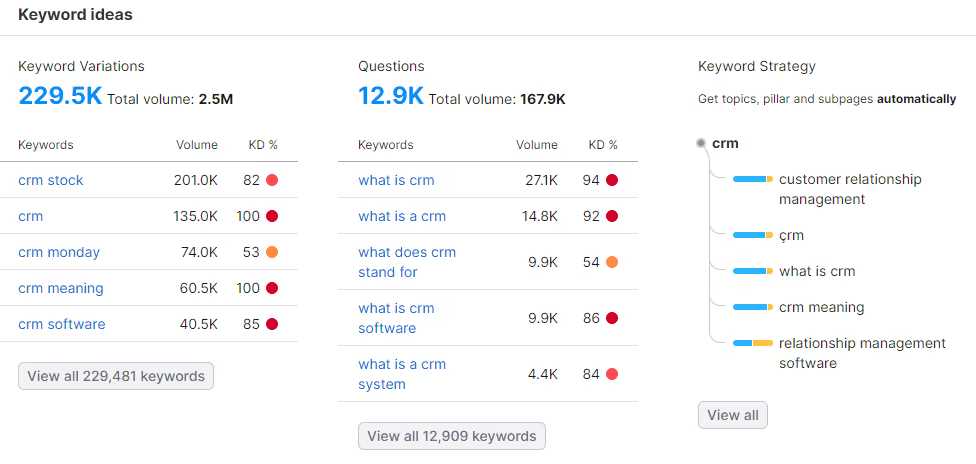
Once you put that in, you should get many related search terms that your prospects use online. Dig each term for search volume, difficulty, and other relevant branch-offs. Then export them into a spreadsheet for use in your campaigns.
To choose the right keywords:
- Focus on relevant terms related to your SaaS product and target audience
- Prioritize keywords with high search volume and low competition
- Find comparison and alternative keywords such as “X vs Y” or “Best X”
- Consider long-tail keywords for specificity and lower CPC. According to our compilation of B2B SEO statistics, these keywords perform 2.5 times better
- Analyze competitors' keywords for insights and opportunities
You can also explore sites like Quora, Google’s PeopleAlsoAsked, and Reddit for search queries by your ideal customers.
Choose an Appropriate Channel
The most popular ad platform is Google Ads, which generates over 39% of ad revenue. Social media ad platforms like Instagram, LinkedIn, Twitter, and Pinterest follow suit, with Facebook ad groups generating the most revenue.
There are over 120 other advertising platforms besides Google, such as Outbrain, Citreo, and Microsoft’s Bing Ads. Each platform has its perks. For instance, Microsoft has an audience of older people over 50 years, Facebook has over 3 billion active users, and Google has the largest internet coverage.
Each of these platforms also has a different CPC. You have to consider this in your decision-making process.
Note that there’s no hard-and-fast rule against omnichannel marketing (using more than one channel). In fact, most leading SaaS businesses use at least three channels, mostly social media, Google, and Bing. This increases your audience coverage and boosts lead generation.
But it’s advisable to scale up from a single channel and build a robust strategy before moving to another.
Determine Your Most Relevant Bidding Strategy and Baseline CPC
Choosing the right bidding strategy is critical to running an efficient PPC campaign. To identify the most relevant one, you’ll need to consider factors like your budget, campaign goals, and the competitiveness of your industry.
If your goal is immediate visibility in a highly competitive market, a Cost-Per-Click (CPC) strategy might be your best bet. It gives you control over spend while helping secure top ad placements.
On the other hand, if you're focused on driving conversions within a set budget, strategies like Cost-Per-Acquisition (CPA) or Return-on-Ad-Spend (ROAS) can be more effective. These approaches use performance data to optimize bidding for profitability.
To decide between clicks and conversions, it’s important to understand your audience’s behavior and where they are in the sales funnel:
- Behavior: Different audience segments will interact with your ads differently. Some may click on ads out of curiosity or to gather information, while others may click with a stronger intent to purchase.
- Sales Funnel Journey: The sales funnel represents the stages a potential customer goes through before making a purchase, from awareness to consideration and finally to decision-making. At each stage, the intent of the customer varies:
- Top of Funnel (TOFU): Customers at this stage are usually in the awareness phase. They might click on ads to learn more about your product or service. Prioritize clicks to drive traffic and educate
- Middle of Funnel (MOFU): Customers here are considering their options. They may click on ads for comparisons or detailed product information. Blend both clicks and conversions depending on the offer
- Bottom of Funnel (BOFU): Customers at this stage are ready to purchase. They are more likely to convert from a click into a sale. Prioritize conversions by bidding aggressively for high-intent keywords
You should also set an expected or acceptable CPC. Let’s assume the average CPC in the finance industry is $0.50, and you offer a finance SaaS program. You should create an upper limit below which any fluctuation is permissible—for instance, a maximum of $0.70 for a normal industry average of $0.50 per click.
Design Ad Copies and Other Creatives
Your ad copy and creatives are the first impression of your brand—and often, the deciding factor for whether someone clicks or scrolls past. They communicate your value proposition and brand identity at a glance.
Take a brand like Salesforce, for example. Every line in their messaging evokes trust, familiarity, and leadership. Anything less would dilute their reputation and fail to meet audience expectations.
The same principle applies to visual creatives—flyers, videos, animations, and landing pages. Poorly designed assets can undermine even the best targeting or bidding strategies.
Here's what matters:
- Consistency with your brand’s promise – Your tone, visuals, and messaging must reflect the value you offer and the reputation you’ve built.
- Invest in great copy – AI tools can help, but don’t rely solely on them. Human copywriters still craft the nuance, emotion, and clarity that move high-intent leads to action.
- Work with skilled designers – Partner with professionals who understand how to visually translate your message and product value in every pixel and frame.
Above all, ensure every creative asset aligns with your brand’s identity, across every platform. Consistency builds credibility—and credibility converts.
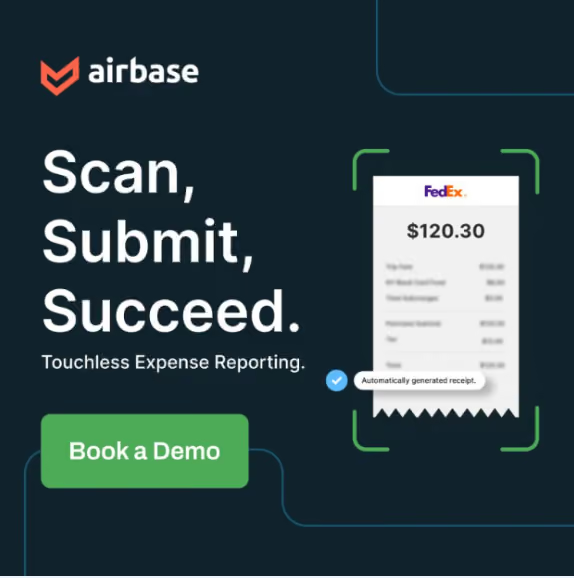
What Does a Scroll-Stopping PPC Creative Look Like?
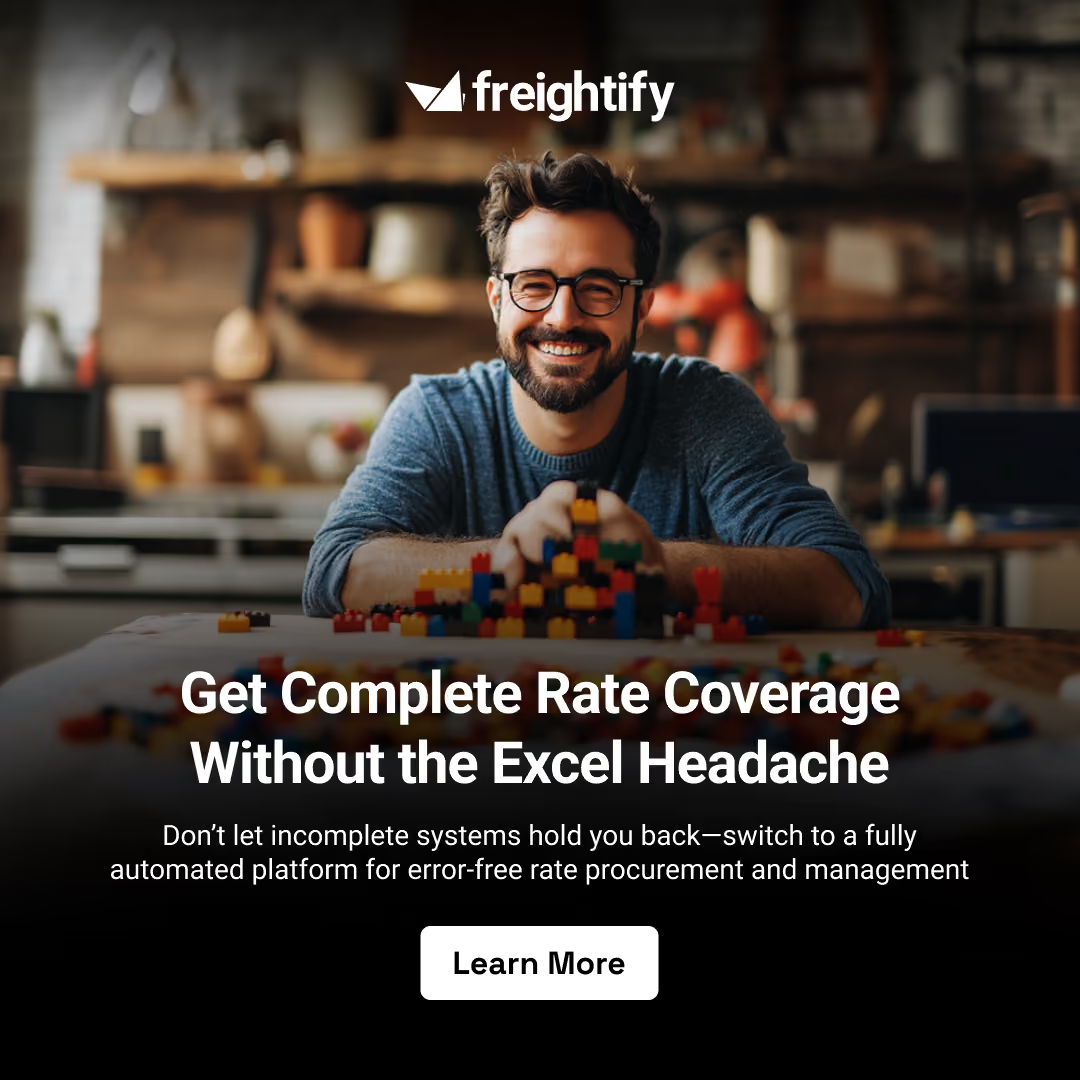
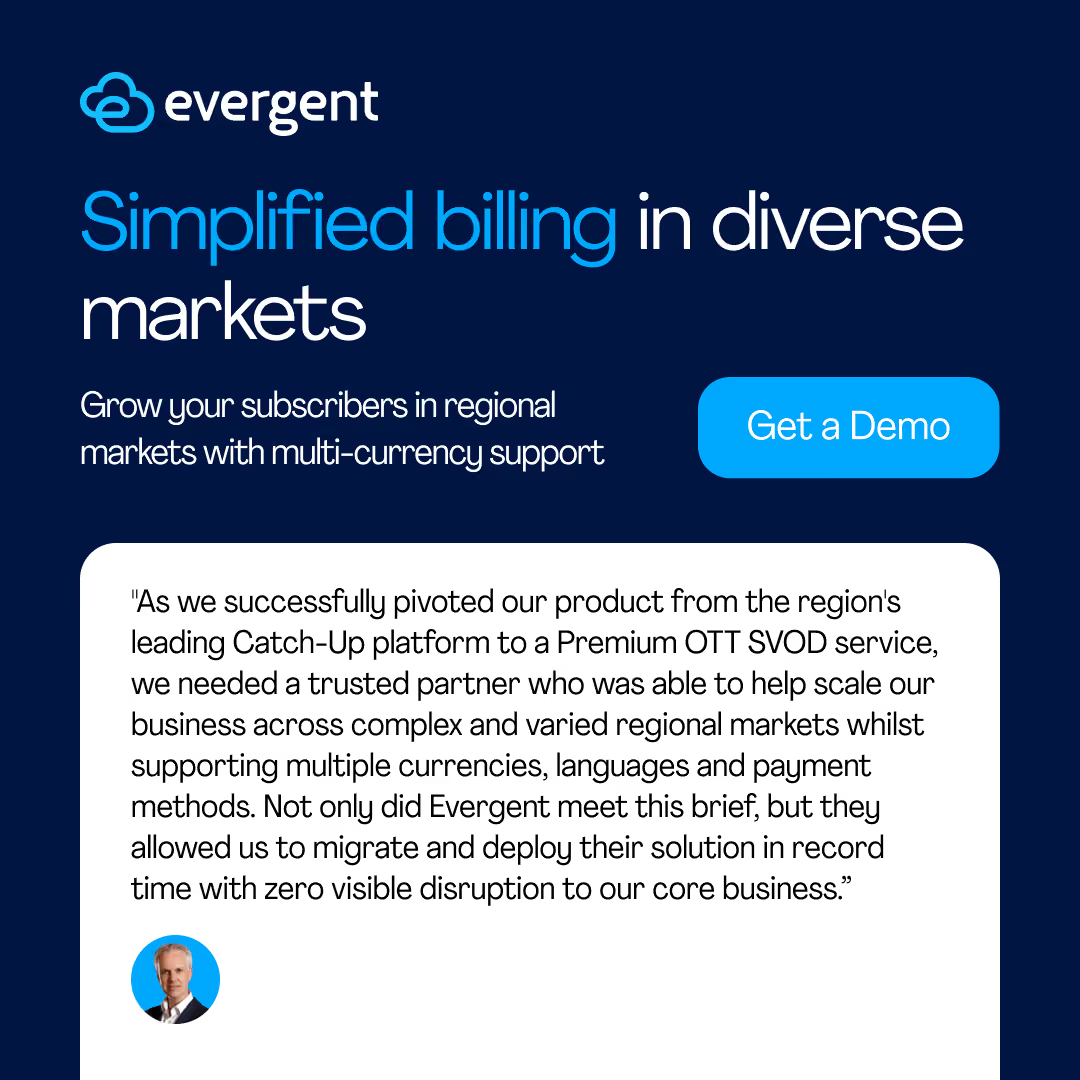
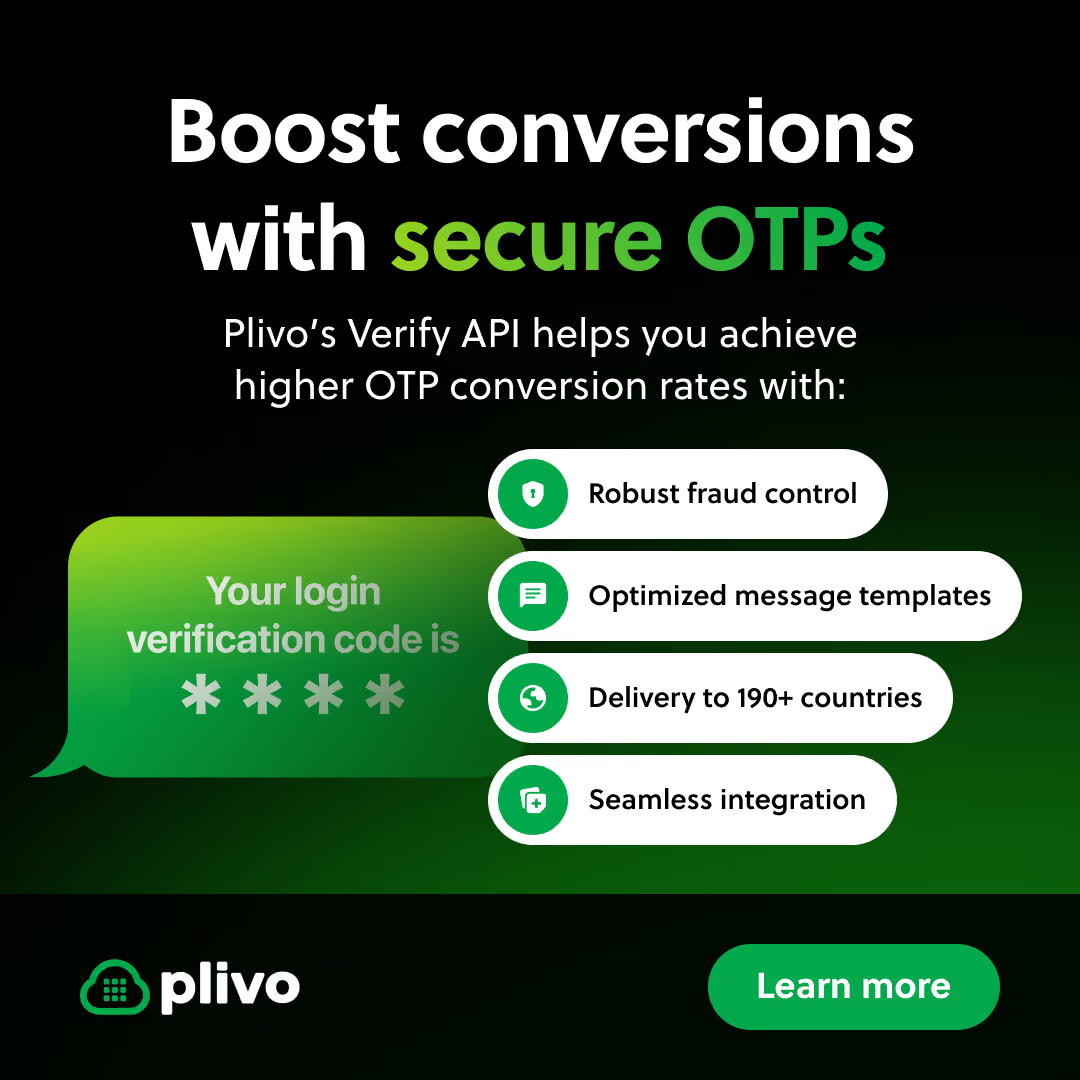
Here are a few examples from our client campaigns that demonstrate what makes a creative effective:
- It reflects the brand’s core identity
- It aligns with the campaign’s goals, based on where the audience is in the customer journey
- It conveys a clear narrative or message
Once we’ve locked in these elements, our copywriters draft the messaging, and our designers bring it to life—factoring in visual personality, complexity, color schemes, and tonality.
Design a Responsive Landing Page
Once someone clicks your ad, the landing page becomes the most important touchpoint. It’s where users learn more about your offering—and it could be your homepage, product page, or a custom campaign-specific page.
Regardless of what you choose, the experience must be seamless. Poor mobile responsiveness, slow load times, cluttered design, and complex navigation will cause visitors to bounce instantly.
A high-converting SaaS landing page should include:
- A clear headline and concise sub-headings
- Fast load speed and mobile-friendly design
- Benefit-oriented copy written with the customer in mind
- A prominent call-to-action (CTA)
- Compelling visuals that reflect your product and brand
- User-friendly layout and intuitive navigation
- Social proof (testimonials, reviews, client logos)
- Trust signals, like security badges or guarantees
- Transparent pricing or a prompt to request a quote
Templates for Winning SaaS Landing Pages
Here are some landing page structures that you can take inspiration from. These templates have been designed to ensure maximum engagement and conversion, and have led to successful results for several of our clients.
- Hiver Homepage
The page offers a user-friendly layout with impactful visuals, clear messaging, and persuasive testimonials, highlighting key benefits of using Hiver for customer service. The pricing options are simple and clearly presented, appealing to various user needs.
- Feature Page by Leen
This page makes it easy for visitors to understand how Leen’s API integration solves real-world problems. The CTAs are strategically placed, ensuring that users can quickly engage with the product.
- Competitor Page by Limelight
This competitor page effectively showcases Limelight's advantages with a clear comparison table, strong testimonials, and a neat design that emphasizes its modern, user-friendly features and seamless integration.
Introduce Negative Keywords and Launch Campaign With Split Testing
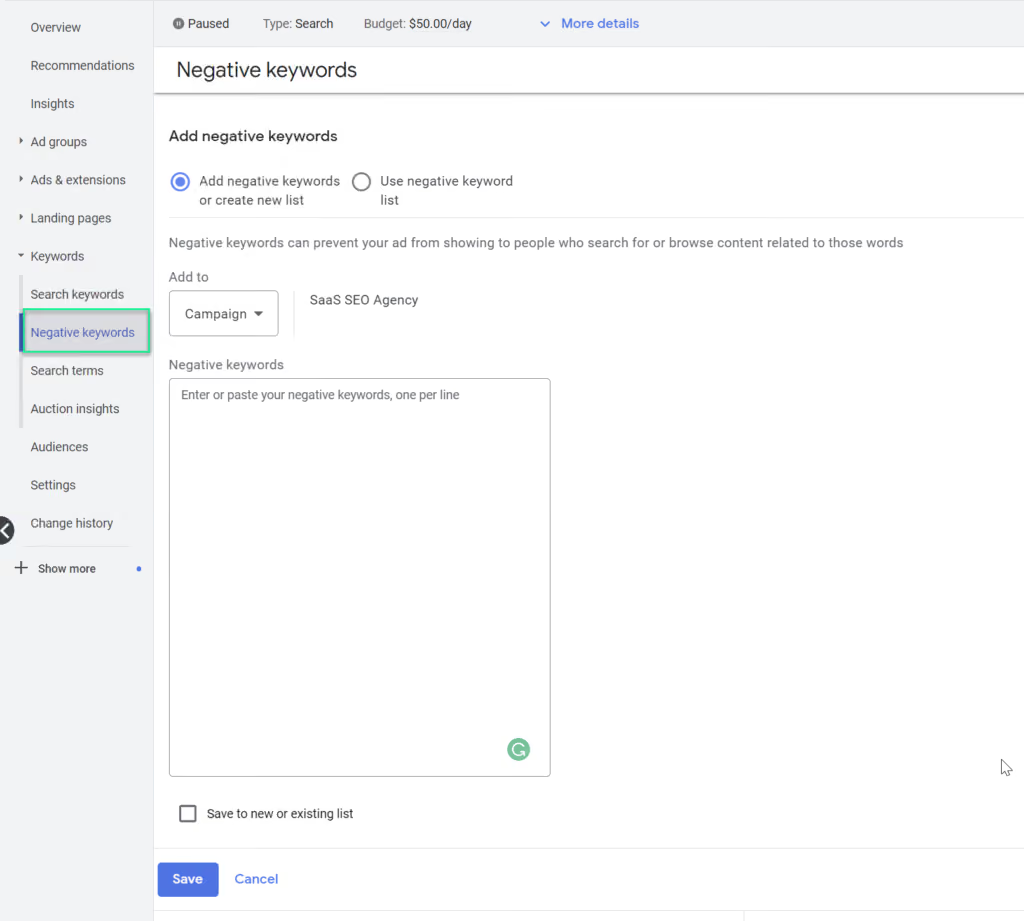
Before launching your campaign, add negative keywords to filter out irrelevant traffic and avoid wasted spend.
Once setup is complete, double-check your campaign settings for errors and launch. Then wait. Most analytics tools take a few days to generate reliable insights. On platforms like Google Ads, CPC data may begin appearing within hours, but deeper performance metrics take longer to stabilize.
Track Performance Metrics and Optimize Campaigns Accordingly
If your campaign performs well, continue monitoring and fine-tuning. If performance is underwhelming (e.g., high CPC, low conversions), don’t rush to pause or slash budgets.
Instead, investigate potential issues like:
- Overly narrow audience targeting
- Too many negative keywords
- Too few positive keywords
- Not allowing enough time for algorithms to learn
Once identified, adjust strategically—but always give your campaigns time to settle before making changes. Remember, ad platforms need time to optimize delivery.
Challenges in SaaS PPC and How to Overcome Them
Running SaaS PPC isn’t exactly a walk in the park—but it’s not a war zone either. Here are common hurdles and how to get past them:
1. Lack of an Experienced In-House PPC Team
Many SaaS founders end up hiring one generalist to juggle everything—strategy, copy, design, analytics. This rarely works. SaaS PPC demands specialists: one for strategy, one for creatives, one for data, etc.
2. Overcrowded SaaS Market
Thanks to AI and low barriers to entry, the SaaS space is more competitive than ever. Multiple startups now target the same buyers—which means your ads need to stand out and connect faster than the competition.
3. Budget Constraints
Not every startup can afford a full in-house PPC team. Consider this:
- Mid-level PPC specialist: ~$64,000/year
- Copywriter: ~$71,000/year
- Designer, strategist, analyst? Even more
The Solution:
Partner with a reputable SaaS PPC agency. It’s more cost-effective and gives you access to battle-tested pros, specialized tools, and proven strategies—without the overhead of a full team.
SaaS PPC Trends in 2026
There’s no permanent blueprint for SaaS PPC. he landscape keeps evolving, and SaaS marketers are constantly discovering smarter ways to reduce ad spend and boost returns. If you want to stay on top your game in the industry, you need to proactively track and adopt these trends shaping the future.
Programmatic Advertising
Programmatic advertising uses digital automation to buy and sell ad space. It allows for hyper-targeted campaigns and more efficient budget allocation, thanks to advanced data use.
The global market value for programmatic ads topped $200 billion in 2023, and is projected to hit $300 billion by 2026, according to Statista.
As AI and automation become more accessible, this approach is quickly moving from optional to essential. Now is the time to get on board.
Ad Retargeting
Not every prospect will click your ad the first time—but that doesn’t mean they’re not interested. SaaS sales cycles tend to be longer than B2C, so repetition matters.
Retargeting helps you stay top of mind, gently nudging potential customers closer to conversion. It’s not new, but it’s becoming increasingly important for SaaS brands looking to build familiarity and trust over time.
Non-branded Creatives
You’ve probably used or seen user-generated content (UGC)—where real users share their experiences online. Non-branded creatives take this a step further.
These include screenshots, reviews, or video clips created by real users, but shared by you, not posted directly by customers on their social channels.
Because they feel authentic and user-driven, these creatives tend to grab attention and generate higher-quality clicks than polished, overtly branded ads.
AR and VR SaaS PPC Marketing Channels
Augmented Reality (AR) lets users visualize your product in real-world settings. Virtual Reality (VR) provides immersive demos or training environments that deepen product understanding.
These technologies don’t just wow audiences—they boost engagement and retention. In fact, VR advertising generated $166 million in revenue in 2023, with forecasts pointing to $174 million by the end of 2025.
As adoption of AR/VR tools continues to grow, expect them to become a core part of modern SaaS advertising—especially for companies aiming to stand out in saturated markets.
The Rise of AI Agents for PPC
In 2026, at TripleDart we’ve moved from manual marketing into a hybrid of manual and AI agents. This has changed how we manage PPC campaigns daily.
What are AI agents for PPC?
They're specialized tools that handle repetitive tasks, analyze patterns, and make adjustments faster than humans. Unlike basic automation, they learn from data and can improve over time.
How do AI agents help with SaaS PPC?
At TripleDart, we use AI agents on top of our PPC expertise and playbooks for:
- Dynamic keyword management: Automatically source new keywords, analyze performance, and classify them into high-performing or negative lists—no need to wait for weekly reviews.
- Budget optimization: Track performance throughout the day and shift budget between campaigns based on what's working.
- Ad copy generation and testing: Create multiple versions based on your framework and then choose the ones getting better responses. This eliminates a lot of guesswork from the creative process.
- Audience segmentation: Uncover new customer segments by identifying patterns in conversion data—often revealing opportunities manual analysis might miss.
- Competitor intelligence: Track competitor ads, detect new entrants, and flag major changes in their strategy to stay ahead in the auction.
- Omnichannel attribution: Understand the full customer journey across touchpoints and assign credit accurately. This helps resolve messy attribution issues in multi-touch journeys.
Why choose this approach? The biggest advantage? Speed. AI agents adapt to real-time market changes—far faster than human teams can.
They make thousands of micro-adjustments, 24/7, freeing our PPC experts to focus on high-level strategy, such as messaging, positioning, and expansion opportunities.
But it’s not about replacing humans—it’s about creating the right balance.
AI agents excel at data analysis and pattern recognition, but they lack the brand context, emotional nuance, and strategic intuition that only humans can bring. That’s why we see this as a partnership, not a handoff.
Case Study: AI Agent for Budget Optimization
At TripleDart, our budget optimization AI agent has transformed how we manage client spending across campaigns.
Why we implemented the agent: SaaS campaigns often run across multiple platforms, each with varying performance. Our goal was simple: Ensure every dollar flows to the campaigns driving the most value—without relying on delayed, manual adjustments.
The Process:
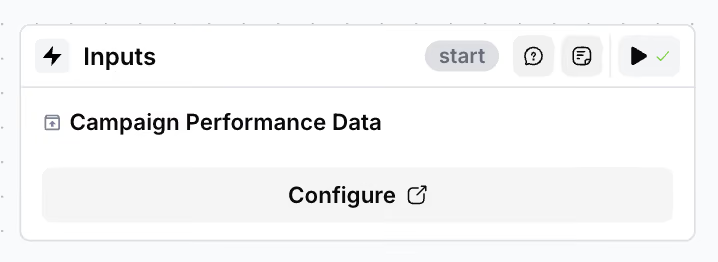
Step 1: Aggregate Campaign Data
Pull real-time performance data from all active campaigns across platforms.
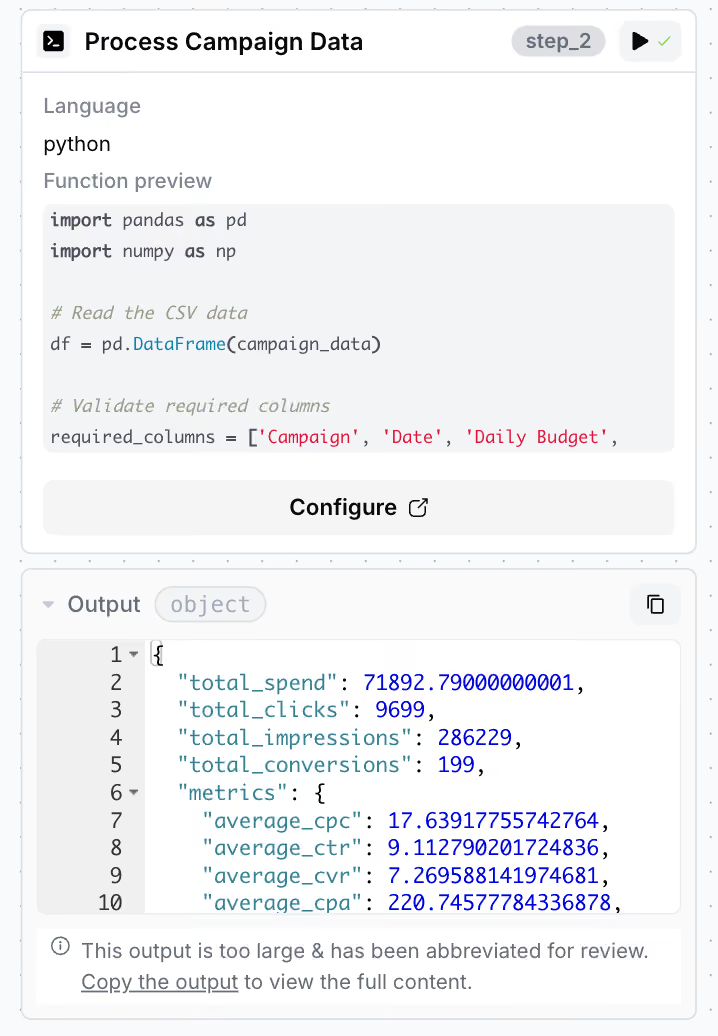
Step 2: Process & Normalize via Python
Run scripts to clean, standardize, and structure the data into a format ready for analysis.
Step 3: Analyze with LLM-Powered AI Agent
The AI agent uses advanced large language models to:
- Evaluate daily spend and ROI trends
- Pinpoint high-performing campaigns to scale
- Flag low-performing campaigns for budget cuts
- Recommend reallocation strategies backed by data
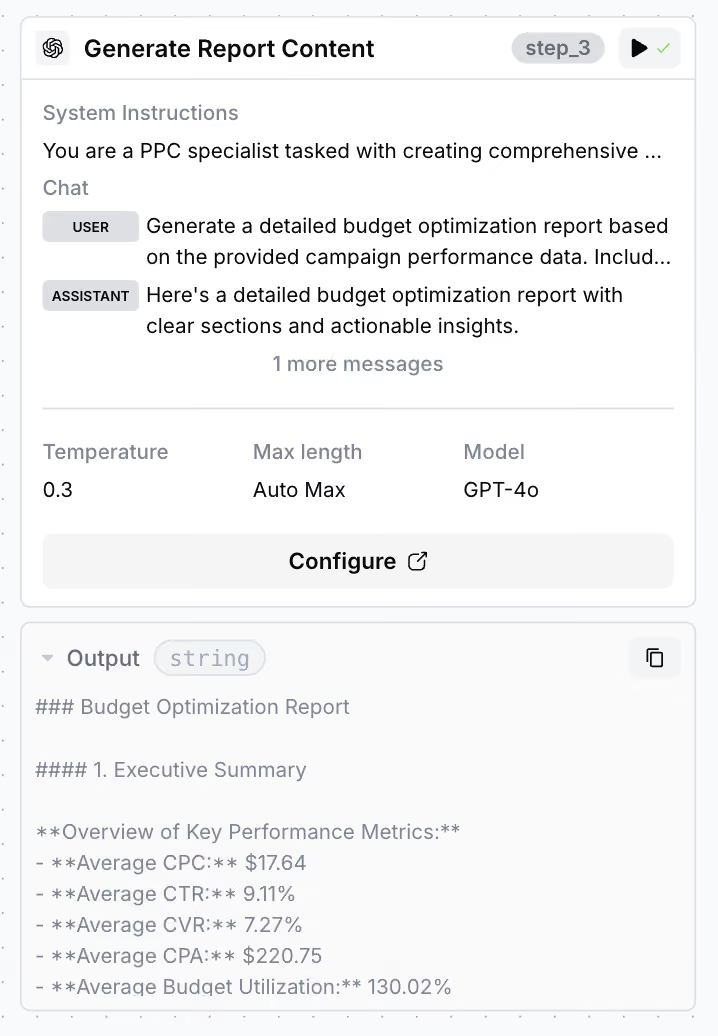
Step 4: Generate Executive Summary
The agent produces a digestible report outlining:
- Performance shifts
- Budget recommendations
- Actionable insights for both our internal team and clients
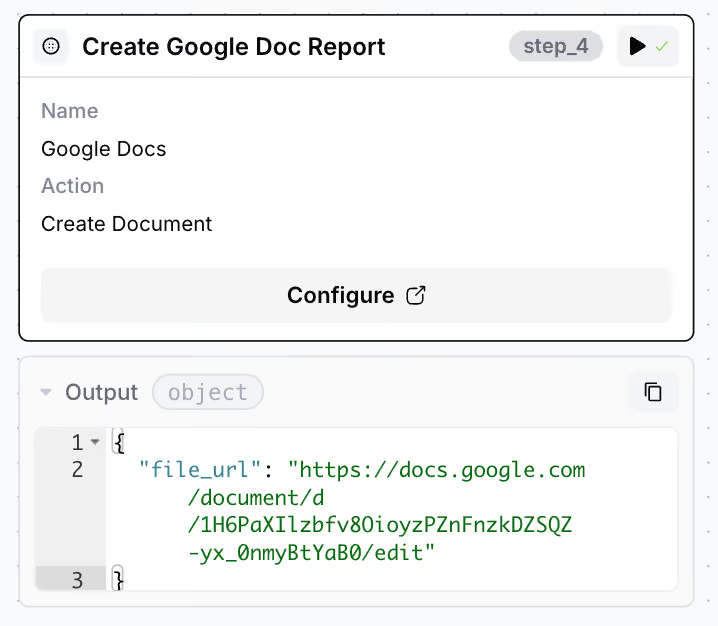
What makes this system powerful is its adaptive thinking. It doesn’t just pause underperformers—it actively reinvests that budget into better-performing campaigns.
The result?
- Faster budget decisions
- Higher return on ad spend
- Greater clarity for clients via simple, insightful reports
With this AI agent in place, our budget decisions are always guided by the latest performance data, not guesswork or lagging metrics.
Kickstart Your SaaS PPC Campaigns with TripleDart
SaaS PPC can be wildly profitable—but only if you know what you’re doing.
Too often, in-house teams burn through budget with scattered efforts, disconnected talent, and overconfident "experts" delivering underwhelming results.
If you want performance, not just activity, it’s time to work with a B2B PPC agency.
Why a B2B PPC Agency?
- Proven experience scaling campaigns across industries and funnel stages
- Deep insight into what works (and what doesn’t) through battle-tested strategies
- Access to high-end tools without additional overhead
- Hands-on specialists who know how to drive SaaS growth—not just clicks
And the best part?
You don’t need to go searching. You’ve already found us.
“TripleDart has been a dream partner. The team is intelligent and responsive and delivers what they promised. We have made huge progress in our growth marketing efforts with TripleDart.” – Drew Wallace, Head Performance Marketing at SpotDraft.
Ready to find out how we achieve jaw-dropping results for our partners? Schedule a call below.
FAQs
What is SaaS PPC?
SaaS PPC (Software-as-a-Service Pay-Per-Click) is a digital advertising model where SaaS companies bid on keywords and pay for each click their ads receive. These paid ads appear on search engines, social media, and other online platforms to attract potential customers to their software solutions.
Why is PPC important for SaaS companies?
PPC is crucial for SaaS companies because it drives targeted traffic to their websites, increases brand visibility, and generates high-quality leads. It allows SaaS businesses to reach potential customers actively searching for software solutions, leading to higher conversion rates.
What are the best PPC platforms for SaaS marketing?
The best PPC platforms for SaaS marketing include Google Ads, LinkedIn Ads, Facebook Ads, and Bing Ads. Google Ads are ideal for capturing search intent, LinkedIn Ads target professionals and decision-makers, Facebook Ads offer broad audience reach, and Bing Ads provide additional paid search engine exposure.
What are the key metrics to track in SaaS PPC campaigns?
Key metrics to track in SaaS PPC campaigns include click-through rate (CTR), cost per click (CPC), conversion rate, cost per acquisition (CPA), return on ad spend (ROAS), and customer lifetime value (CLV). These metrics help measure the effectiveness of your campaigns and optimize performance.
Why should I use a PPC agency for my SaaS company?
SaaS PPC requires specialized expertise, strategic planning, keyword research, ad creation, and performance analysis tailored to meet your business needs. But this experience-rich approach is not something you can get with an in-house team. At TripleDart, our team of PPC specialists has the necessary resources to manage your campaigns for better ROI and help you redirect your time to core business activities.