
How to Use Claude and Slate MCP to Scale Your Content Engineering

Contributor

Joe Kurian
Co-founder & CPO, Slate

Glenn
Organic Growth Manager @ TripleDart
In this article
Claude is everywhere in marketing right now. If you spend any time on LinkedIn, you've seen the posts - skills being shared, workflows being built, prompts going viral. But there's a gap between using Claude and understanding how it actually works under the hood.
Joe Kurian, Co-founder and CPO of Slate, puts it bluntly: everyone is using Claude, but only 1% of marketers truly know how to work with it. And out of that 1%, only a fraction understands what's happening behind the scenes - which means when something goes wrong, most people don't know how to fix it.
This guide walks through the fundamentals of working with Claude effectively and demonstrates how to pair it with Slate MCP to build automated, repeatable marketing workflows. It's based on insights from Joe during Episode 13 of Coach by TripleDart.
Before Slate, Joe worked at Freshworks across both product management and performance marketing, giving him a unique vantage point on how users discover, evaluate, and choose products. Today, he's focused on solving the problem that most marketing teams still face: running GTM and SEO workflows manually in a world that's quickly moving toward automation.
Claude for Marketing: Build Automated SEO Workflows with MCPs | Workshop
Understanding LLM Context: The Foundation
Before jumping into workflows and tools, Joe starts with something most marketers skip entirely - understanding how LLMs actually process your conversations.
Think of an LLM as an incredibly intelligent person with no memory. If you ask Claude to tell you about the Roman Empire, it will give you a detailed answer. But if you follow up with "What about its fall?" - the LLM on its own wouldn't know you're still asking about Rome. It has no memory of the previous exchange.
What Claude (and ChatGPT and similar tools) do in the background is send your entire conversation history back with every new message. This is the LLM context window - and every model has a fixed size for it.
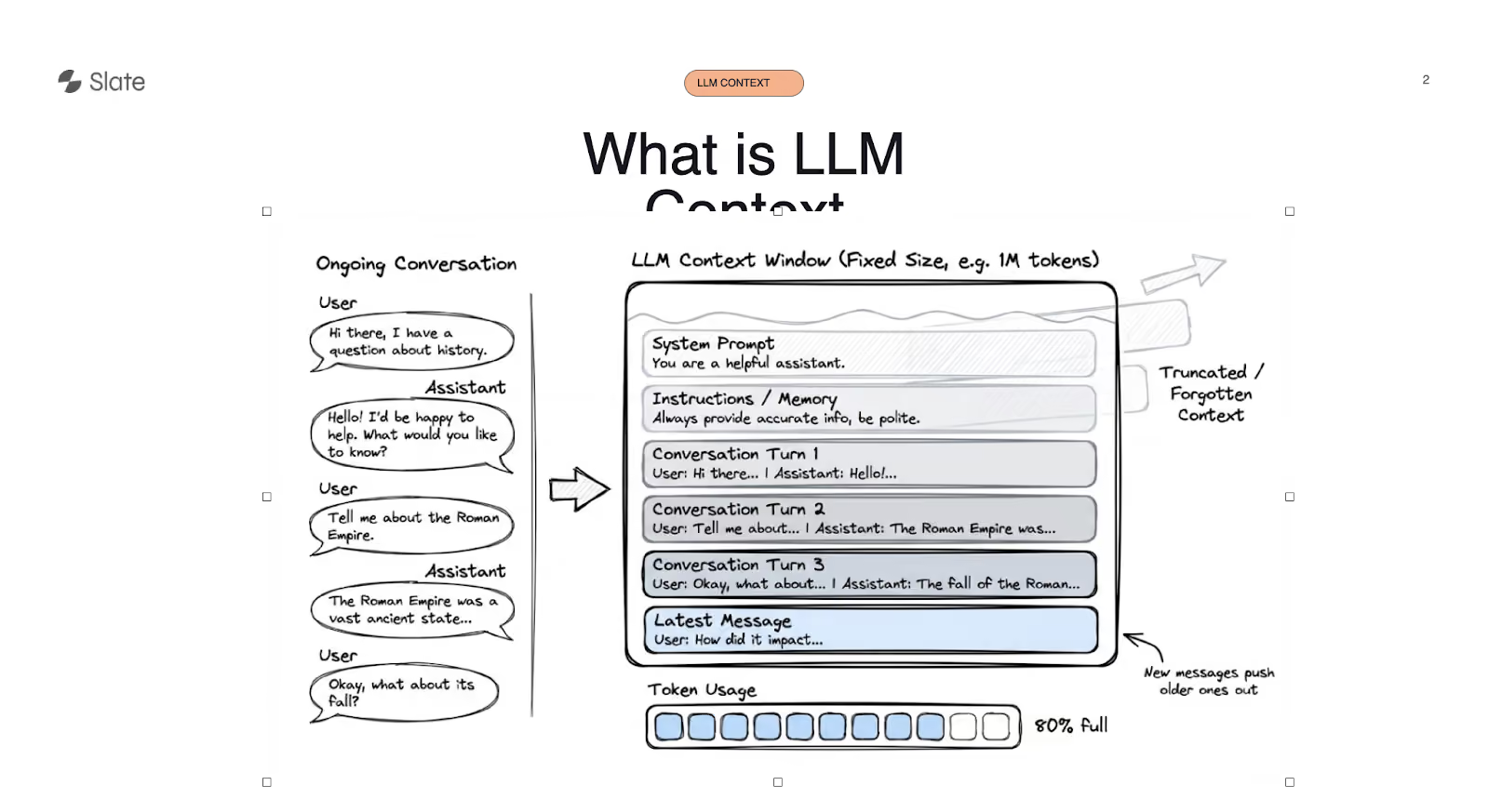
As your conversation gets longer, the context fills up. Some users have noticed Claude automatically "compacting" their conversations. That's because the context window is approaching its limit, and the model needs to drop older parts of the conversation to make room for new ones. New messages push older ones out.
This is the single most important concept for marketers to understand, because it directly explains why Claude hits usage limits, why output quality degrades during long sessions, and why you shouldn't use Claude for everything.
The Context Window Efficiency Problem
The latest Claude Opus model has a 1 million token context window. That sounds massive, but having a large context window doesn't mean you should use all of it.
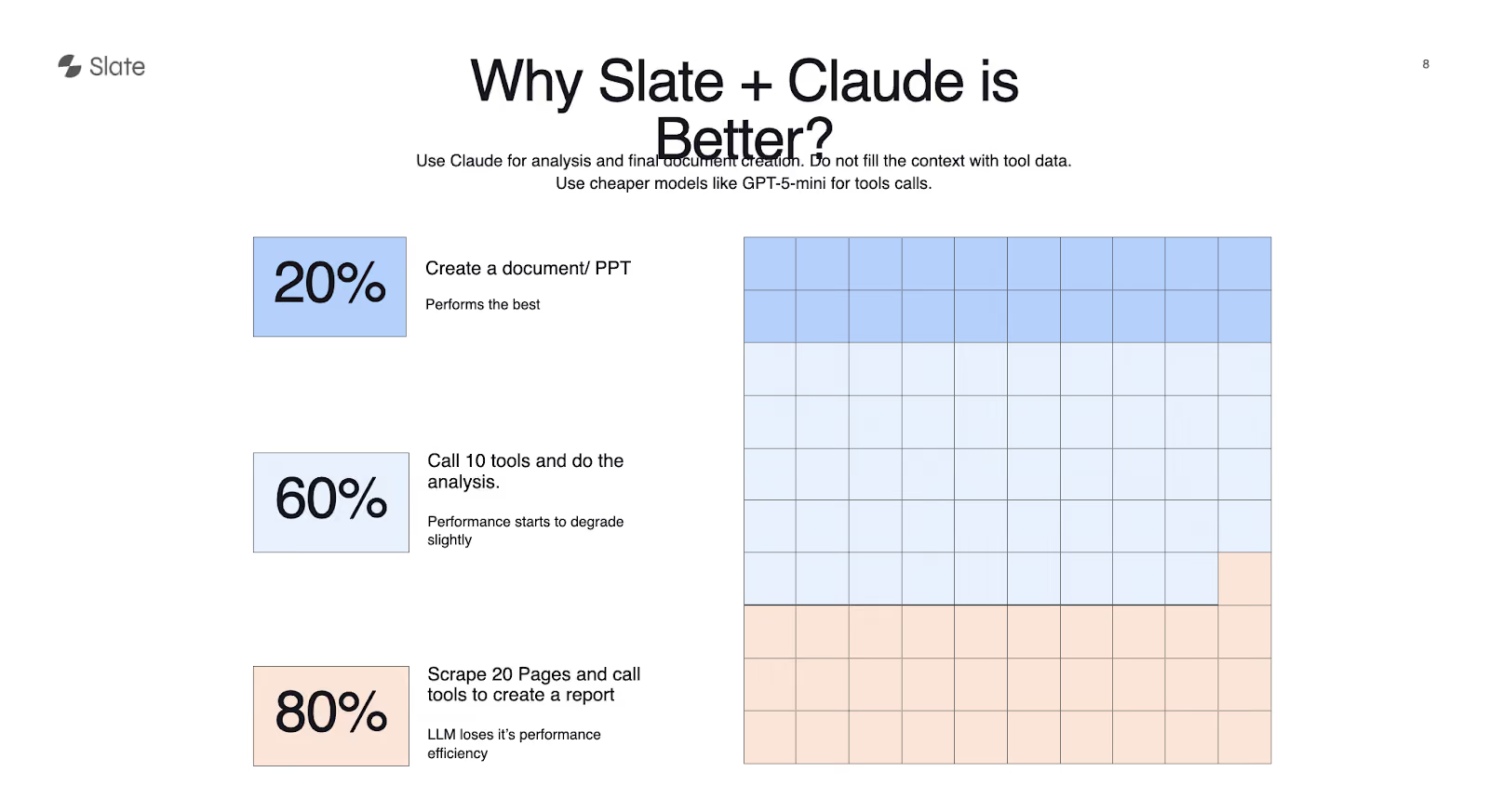
Joe breaks this down into three zones:
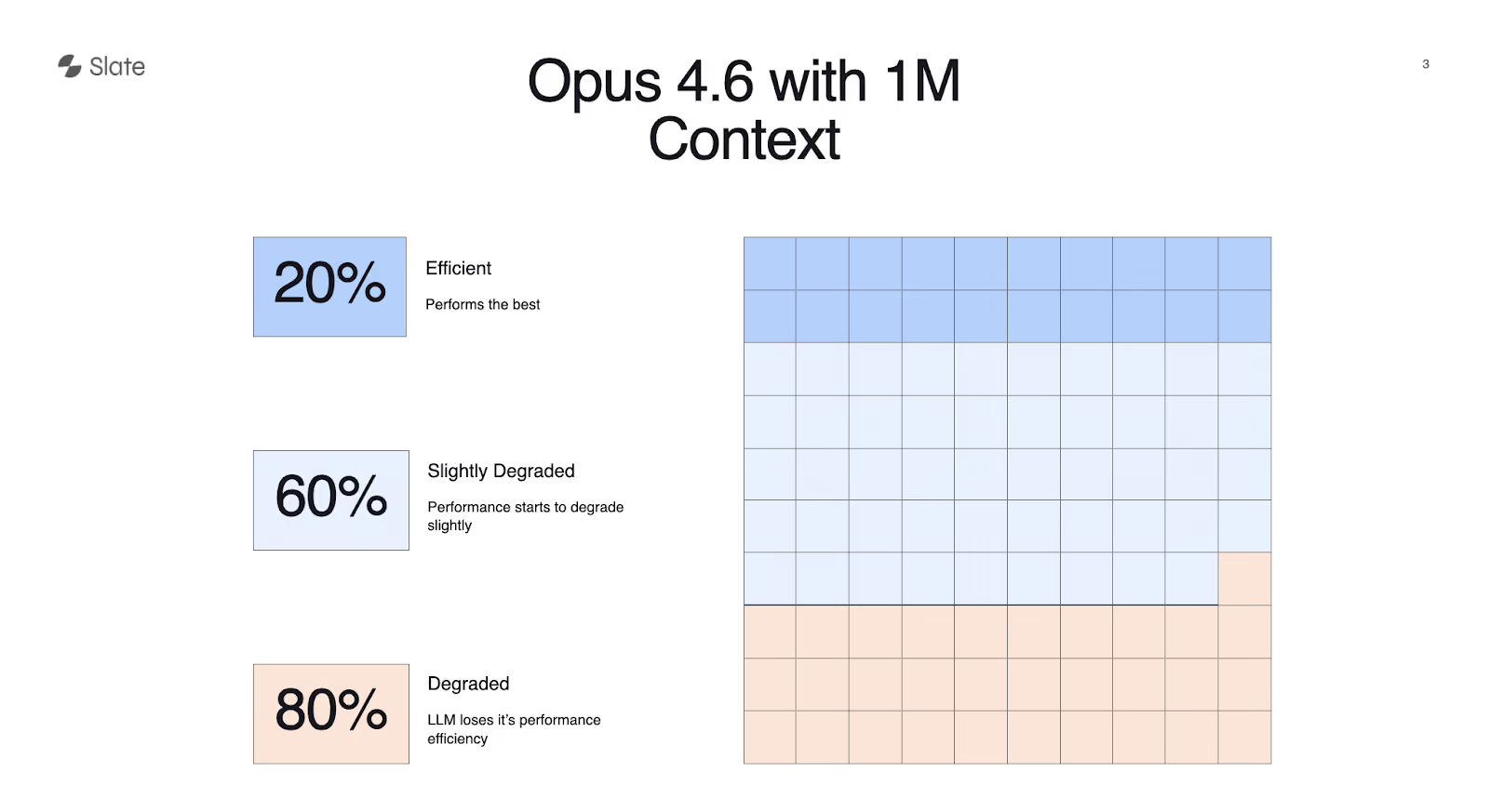
Up to 20% of context: This is where the model performs at its best. Tasks like document creation, report writing, and analysis work well here. The model has plenty of room and delivers high-quality output.
Around 60% of context: Performance starts to degrade slightly. You're feeding the model a lot of information - multiple tool calls, scraped data, analysis requests - and the quality begins to slip.
At 80% of context: The model loses its performance efficiency. You're asking it to juggle too much at once, and outputs suffer. This is also where your usage limits get eaten up fastest.
The practical implication is that Claude Opus is one of the most expensive models available. You don't want to waste it on tasks that don't require that level of intelligence. Scraping 10 web pages, for example, doesn't need Opus - it needs a cheaper model. But writing the final document from that research? That's where Opus earns its cost.
Claude Chat vs. Code vs. Cowork: Choosing the Right Tool
Claude isn't a single product. There are three distinct interfaces, and knowing when to use each one makes a meaningful difference in output quality and cost efficiency.
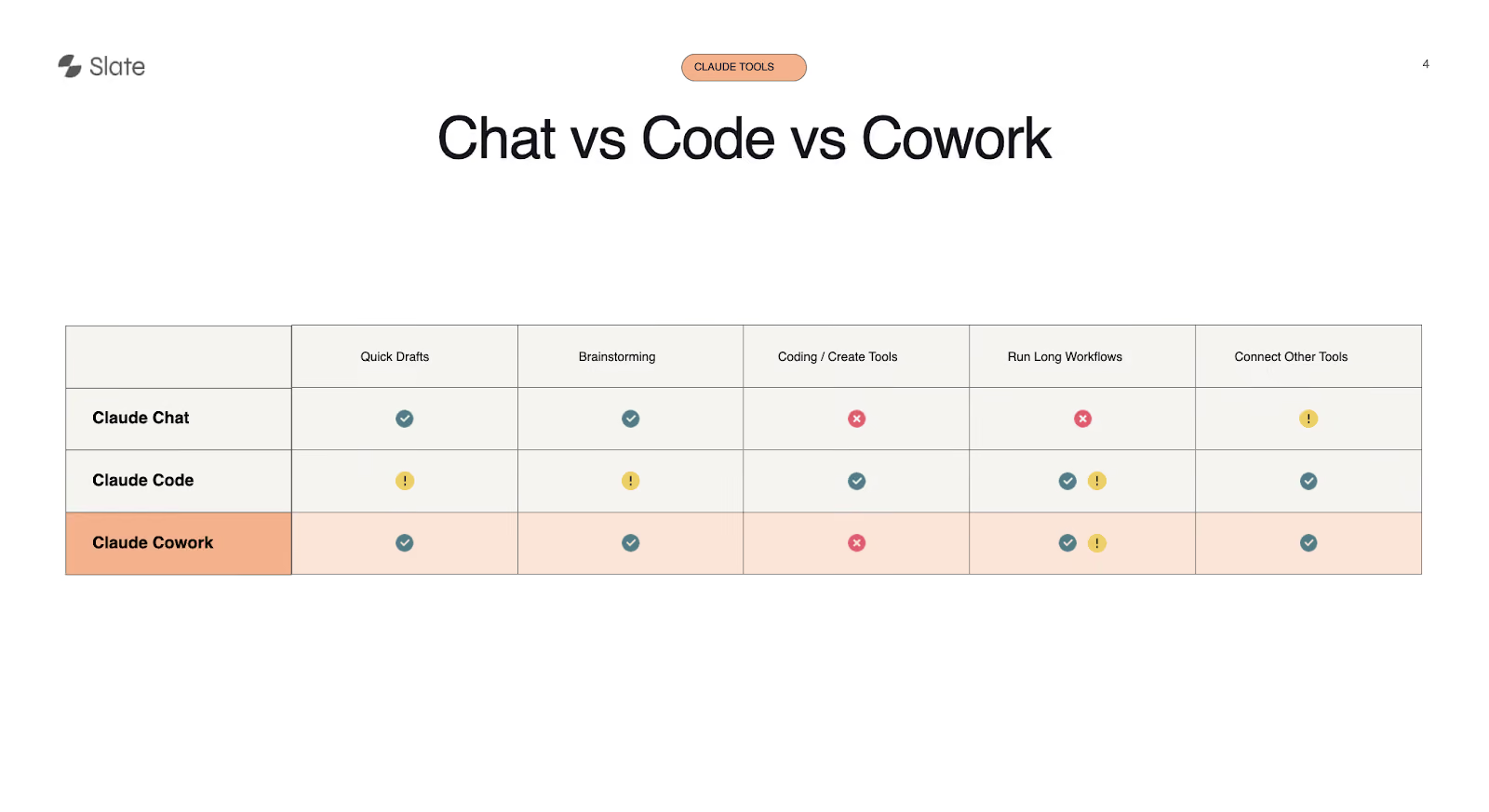
Claude Chat is the most familiar option - it works like ChatGPT. It's good for quick drafts, brainstorming, and general analysis. But it can't write and execute code, can't run long workflows autonomously, and has limited ability to connect with external tools.
Claude Code was originally built for developers working in the terminal, but it's now available in the desktop app as well. It's the right choice when you need to create a tool, build a landing page, or run tasks that require code execution. It can connect to external tools and run longer workflows, though it's more technical in nature.
Claude Cowork is the newest option and the one Joe highlights as most relevant for marketing teams. It's built on top of Code, but with a key difference: when you give it a task, it breaks it into subtasks, assigns them to different agents, and those agents work together to deliver the output. This makes it well-suited for long-running workflows, multi-tool orchestration, and complex marketing tasks that involve several steps.
Joe's recommendation: if you're doing marketing work that involves connecting different tools, running multi-step processes, or brainstorming complex strategies, Cowork is the most capable option available (on the paid plan).
Skills: What They Are, How They Work, and What to Watch For
Skills have been one of the most viral features on LinkedIn. Everyone is sharing and downloading them. But few people understand the mechanics of what's actually happening.
A skill is simply a set of instructions for Claude. What makes skills powerful is how they interact with the context window.
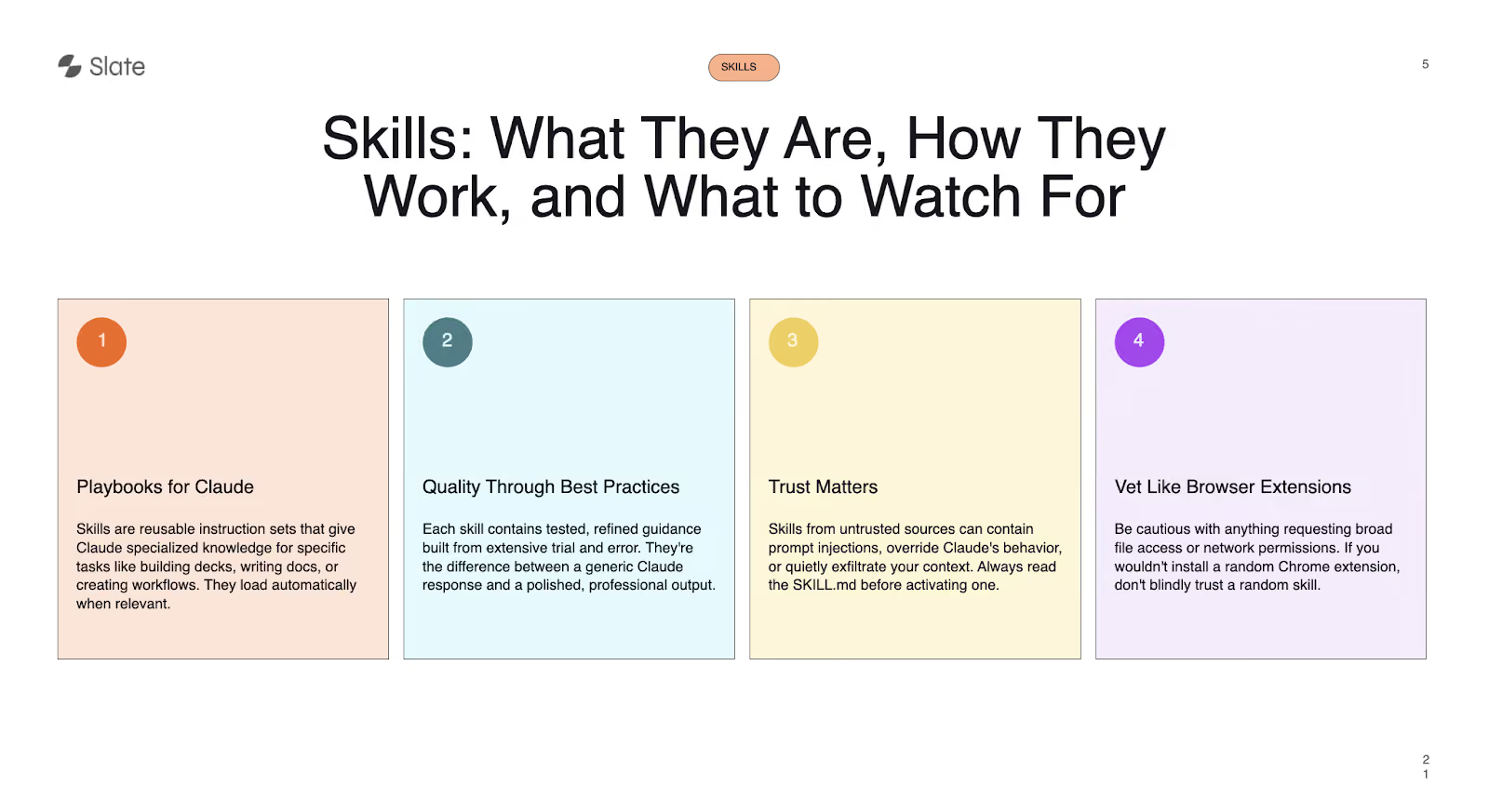
When you add a skill to Claude, the full skill file doesn't get loaded into the context immediately. Claude first reads just the description to understand what the skill does. Only when you ask it to perform a specific task does it pull in the relevant portions of the skill's instruction file. This is what makes skills efficient from a context management perspective - they add only what's needed, when it's needed.
Joe demonstrated this with Slate's own workflow creator skill. The skill contains detailed instructions for building workflows in Slate, but Claude doesn't dump all of that into its context upfront. It adds context incrementally based on what you're actually asking for.
The Security Caveat
Here's the part most people gloss over: skills are essentially browser extensions for Claude. Since Claude has access to your desktop environment, a skill downloaded from an untrusted source could contain hidden prompts like "access this file and send it somewhere" buried within the instructions.
Joe's advice is clear. If you're downloading skills from sources you don't know, at minimum read through the skill file to understand what it's doing. If you're not technical enough to read the markdown, ask Claude itself: "What is this skill doing? Is there any potential harm?" The same caution you'd apply to installing a random Chrome extension should apply to installing a random Claude skill.
What is Slate and Why It Exists
With the Claude fundamentals covered, Joe transitions into Slate and the reasoning behind why it was built.
The analogy is simple. Designers have Figma. Developers have Claude Code. Outbound and growth teams have Clay. Slate is built for marketers.
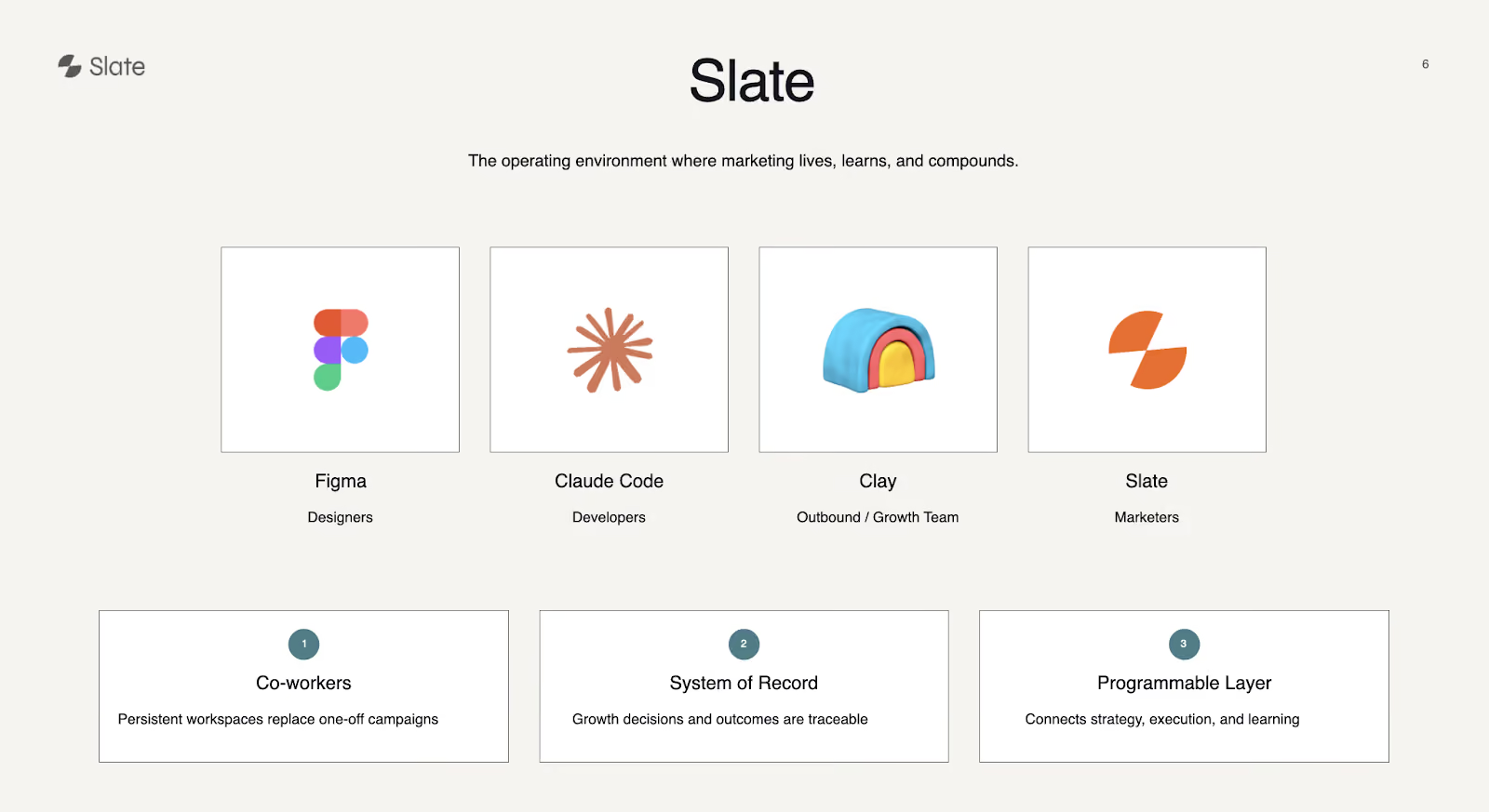
Slate operates across three layers:
Co-workers: Persistent workspaces that replace one-off campaigns. Instead of spinning up a new project every time, you have a continuous workspace where marketing work lives and evolves.
System of Record: Growth decisions and outcomes are traceable. Instead of marketing data living in disconnected spreadsheets and dashboards, it's centralized.
Programmable Layer: This connects strategy, execution, and learning into one system. You can build workflows that automate multi-step processes, and those workflows can run at scale.
The core idea behind Slate, as Joe explains it, is that marketing teams don't need another dashboard. They need a co-worker - something that doesn't just show you data but helps you actually execute on it.
Connecting Claude to Slate via MCP
The bridge between Claude and Slate is the MCP (Model Context Protocol) connector. Setting it up is straightforward.
You go to Claude's settings, navigate to connectors, add a custom connector, and paste in Slate's remote server URL along with the client ID and secret. Once saved, Slate appears as a connected tool within Claude.
From that point forward, you can talk to Claude naturally and it will pull data from Slate, create workflows in Slate, and execute tasks - all without leaving the Claude interface.
This is the critical distinction Joe keeps coming back to: you shouldn't have to log into a separate tool for every step of your workflow. Once Slate is connected, Claude becomes the single interface through which you interact with your entire marketing data layer.
Building Repeatable Workflows: The Live Demo
Joe walks through three concrete workflows that demonstrate how Claude and Slate work together in practice. Each one addresses a common marketing pain point.
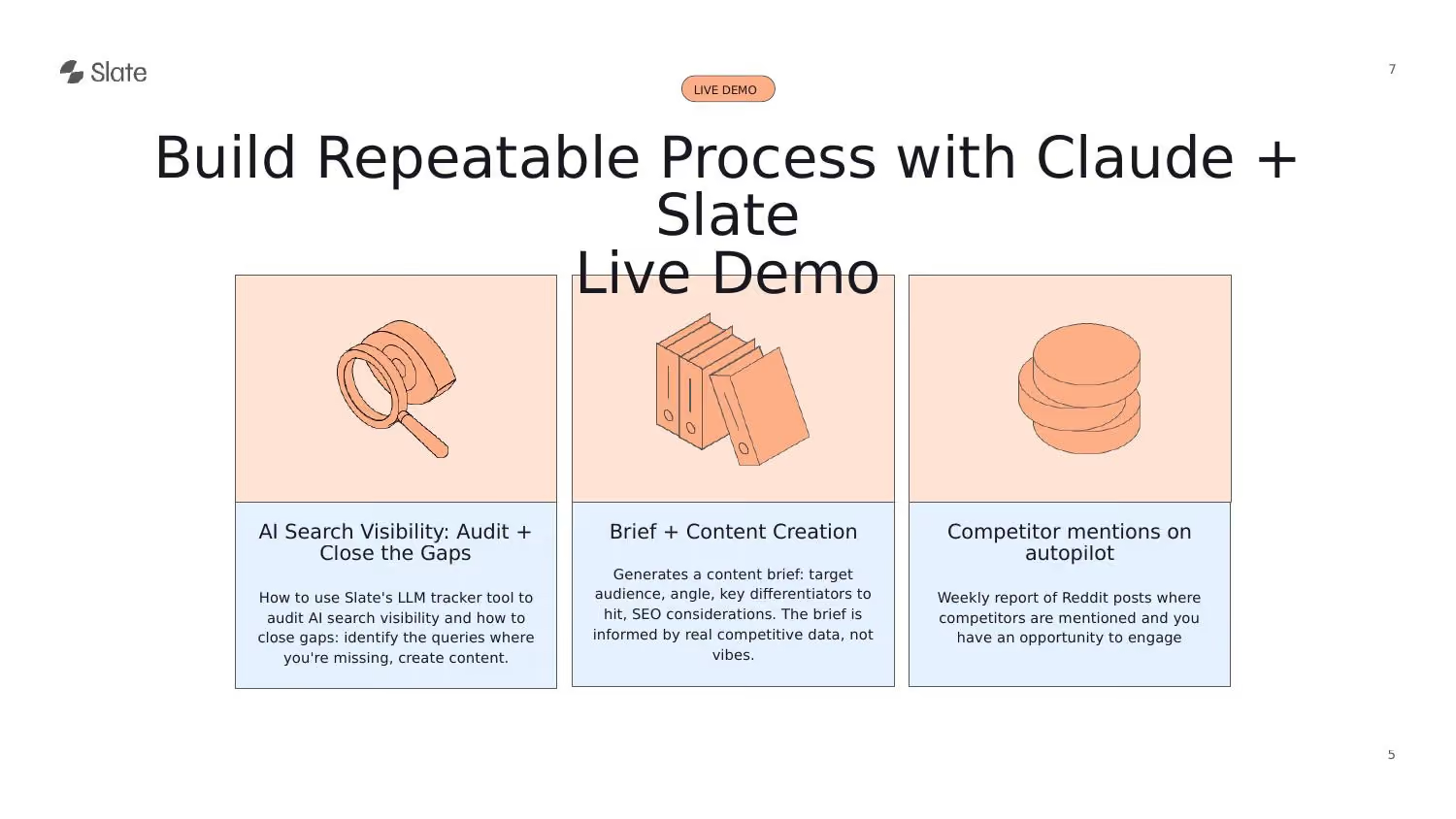
Workflow 1: AI Search Visibility Report
The first demo starts with a simple natural language prompt to Claude: "I want to know what the last 7 days of brand visibility looks like in the AI tracker in Slate, what competitors are showing up for each topic, what citations are coming through, and what content I should work on next - in markdown format."
Because Slate is already connected, Claude knows how to pull the data. It fetches the workspace, retrieves topic lists, citation information, sentiment data, brand mentions, and competitor visibility - all in the background.
Slate's AI tracker works by tracking prompts across multiple LLM platforms. You upload the prompts you want to monitor, set a recurrence (weekly, daily, monthly), and Slate tracks how your brand is being mentioned, your visibility score, share of voice, and citation sources.
One feature Joe highlights: you can filter Slate's citation data to show links where competitors are cited but your brand is not. This gives you a ready-made outreach list - you know exactly which sources are referencing your competitors and can reach out to get your brand included.
The sentiment analysis layer also shows how your brand and competitors are being talked about in AI-generated responses. If a competitor's sentiment is negative, that's an opportunity. If yours is negative, you know what to fix.
The final output is a structured markdown report with a visibility status, competitor breakdown, citation gaps, and recommended content actions - including specific topics to create next.
Workflow 2: Content Brief Creation
From the AI visibility report, Joe identifies a content opportunity: "Best AIO tools in 2026." Normally, creating a brief for this keyword would mean a manual process: Google the keyword, pull the top 10 results, scrape each one, analyze the angles and topics covered, check for FAQs, then run a Perplexity deep research pass to find gaps, and finally combine everything into a brief document.
The problem with running this entire process through Claude directly is context window consumption. If you tell Claude to scrape 10 URLs and analyze everything, the context fills up just from the scraped content. For a single brief, that might be fine. For 10 or 15 briefs, you'll burn through your limits.
This is the core argument for offloading work to Slate. Instead of Claude doing everything, you tell Claude to create a workflow in Slate that handles the repeatable parts.
Joe prompts Claude: "Create a workflow for brief creation. The input is a keyword. I want a Google search of the top 10 results, scrape each link, analyze the content for topics, angles, and target audience. Then run a Perplexity deep research on additional topics to cover. Finally, create a brief document for the content team."
Claude generates a workflow plan and then creates it directly in Slate. The resulting workflow is a drag-and-drop chain of blocks - input, Google search, link extraction (filtering out Reddit, YouTube, and social media), a loop that scrapes and analyzes each page, a cross-page comparison step, a Perplexity deep research block, and a final brief generation step.
What Joe calls the "magical part" is that Claude automatically selects the right model for each step. The scraping and analysis steps use a cheaper model like GPT-5 mini because they don't require the intelligence of Opus. The Perplexity research step uses Perplexity's own deep research capability. Only the final brief creation step uses Claude Opus, because that's where quality matters most.
The output is a detailed brief with search engine classification, target word count, target persona, content gaps, weaknesses in existing content, and a recommended heading structure. If you need a specific format, you can define that as well.
From Brief to Article
Joe extends the workflow concept further. Once you have a brief creation workflow, you can create a second workflow that takes a brief as input and produces a full article. This workflow similarly uses Perplexity for deep research, Google search for fresh data, web scraping for context, and Claude Opus for the final writing step.
The two workflows can be chained together using Slate's Sheets feature. Sheets works similarly to Google Sheets or Clay - you add a keyword column, map your brief creation workflow to it, and then map the article creation workflow to the brief output.
The result is a waterfall: you enter a keyword, the first workflow creates a brief, the brief feeds into the second workflow, and a full article comes out the other end. If you have 100 keywords, you add them all to the sheet, click "run all," and the system processes each one sequentially.
You can also enable auto-run on the sheet, so that any keyword added automatically triggers the full pipeline without manual intervention. And you don't need to log into Slate to do any of this - you can tell Claude to add keywords to a sheet and the auto-run takes care of the rest.
Joe shows an example article produced by this process. It's detailed, includes screenshots, and is ready for human review before publishing directly to a CMS.
Workflow 3: Competitor Mentions on Autopilot
The third workflow tackles a different problem: finding Reddit threads where competitors are being discussed so you can engage with the conversation.
Joe sets up a workflow that takes a competitor name as input (e.g., "Semrush"), finds all Reddit threads mentioning that competitor published in the last 7 days, and returns a list of threads you can jump into.
The scheduling dimension is what makes this particularly useful. You can schedule this workflow in two ways. The first is within Slate itself - set a weekly recurrence and it runs automatically. The second is through Claude's scheduled tasks feature. Joe creates a scheduled task: "Run the Reddit mentions workflow in Slate and send the output to me in Slack." He sets it to run every Monday at 9 AM.
Now imagine scaling this across your full competitive set. If you have 10 competitors, you set up 10 scheduled workflows. Every Monday, you get 10 sets of fresh Reddit threads - potentially 100 engagement opportunities - delivered straight to Slack without lifting a finger.
Claude for Marketing: Build Automated SEO Workflows with MCPs | Workshop
Why Claude Plus Slate Works Better Than Claude Alone
The throughline of Joe's presentation is not that Claude is insufficient - it's that Claude is being overloaded with work it shouldn't be doing.
When you use Claude alone for the entire pipeline - research, scraping, analysis, writing - you're using the most expensive model for tasks that don't need it. You're filling up the context window with scraped web data, which degrades model performance. And you're limited to doing things one conversation at a time.
When you pair Claude with Slate, the division of labor becomes clear. Claude handles what it's best at: analysis, document creation, strategic thinking, and final content generation. Slate handles the repeatable, scalable parts: scraping, data processing, tool calls, workflow execution across hundreds of items, and scheduling.
The key technical advantage is that Slate's workflows use the right model for each step. A web scraping step doesn't need Claude Opus. A keyword analysis step doesn't need the most advanced model available. By routing each task to the appropriate model, you save money, preserve context window capacity, and get better output from Claude when it actually matters.
Audience Q&A Highlights
Several questions from the audience surfaced important details about how Slate works in practice.
On skills and integration: You don't need to install a separate skill to use Slate with Claude. The MCP connector handles the integration automatically once connected. The skill Joe showed was for his own specific workflows, but the standard Slate connector gives Claude access to all of Slate's capabilities out of the box.
On how Slate differs from Semrush AI: Brand visibility tracking is just one part of what Slate does. Beyond AI visibility data, Slate pulls in Google Search Console data, AI citation data, and GA4 data into a unified pages view. An intelligence layer recommends which pages to refresh, which third-party sites to reach out to for brand mentions, and which prompts represent content gaps. It's more of a full marketing operating layer than a single visibility tracker.
On prompt generation: Slate uses its own internal workflows to generate tracking prompts from your target keywords. It also monitors Reddit threads and other sources to discover new prompts that reflect how real users are searching. The system continuously adds new prompts based on actual market activity.
On Slate vs. AirOps: Both platforms handle workflow automation, but Slate's vision extends beyond workflows into being a co-worker for marketers. The goal is for teams to set high-level objectives - like "increase traffic by 10% in 3 months" - and have Slate create a task plan, assign some tasks to itself automatically, and delegate the rest to humans. It's designed to function as a marketing team member, not just a tool.
Conclusion
The shift Joe describes isn't about moving faster within existing workflows. It's about operating on a fundamentally different level - building systems that run marketing for you, rather than doing every step manually.
Key actions to take immediately:
- Understand how the LLM context window works and why overloading it with scraping and tool calls degrades your output quality - this single insight will change how you use Claude
- Choose the right Claude interface for each task: Chat for quick drafts and brainstorming, Code for building tools, Cowork for complex multi-step marketing workflows
- Vet any Claude skills you download from external sources the same way you'd vet a browser extension - read the file or ask Claude to audit it for potential risks
- Connect Slate to Claude via the MCP connector and start pulling AI visibility data, content recommendations, and competitive intelligence directly from your conversations
- Build your first workflow in Slate through Claude - start with a content brief generator that scrapes top-ranking pages, analyzes content angles, runs deep research, and produces a structured brief
- Chain workflows together using Sheets to create end-to-end pipelines from keyword to published article, with the right model powering each step
- Set up scheduled competitive monitoring workflows that deliver fresh Reddit engagement opportunities to Slack every week without manual intervention
- Stop using Claude Opus for menial tasks like web scraping and data extraction - offload those to cheaper models through Slate and reserve Opus for analysis, strategy, and final content creation
Watch the full video here:
Claude for Marketing: Build Automated SEO Workflows with MCPs | Workshop