
Contact-Level Advertising: How Dag Holmen Runs B2B Ads to a Named List
Contributor

Dag Holmen
CMO & CRO at ContactLevel and Co-Founder, Buyerfeeds

Glenn
Growth Manager @ TripleDart
In this article
Introduction
Most B2B ad accounts are built on filters. You pick job titles, company sizes and industries. The platform then decides which people inside that filter see the ad. Forms come in, they get labeled MQLs, and sales works through the pile.
Dag Holmen thinks the trouble starts at step one. If filters and an algorithm choose your audience, you never find out who you paid to reach. His deck says it plainly: filter-targeted ads and MQLs only cover a fuzzy version of the early funnel, and they never reach the late one at all.
So he names everyone up front. Map the market, list the actual contacts, make them targetable, then run ads to that list and nobody else.
"We drop the MQL completely and we start marketing to SQLs from the beginning," he says.
This playbook covers the system he presented in Episode 18 of Coach by TripleDart. The three stages, the campaign structure underneath them, and what changes in the reporting.
Dag is CMO and co-founder at ContactLevel, where he built the identity layer that maps business contacts to the consumer profiles ad platforms recognize. He also co-founded Buyerfeeds, an intent data product. He runs ContactLevel's own paid program as a marketing team of one.
Two Ways to Decide Who Sees Your Ad
Dag opens with a side-by-side.
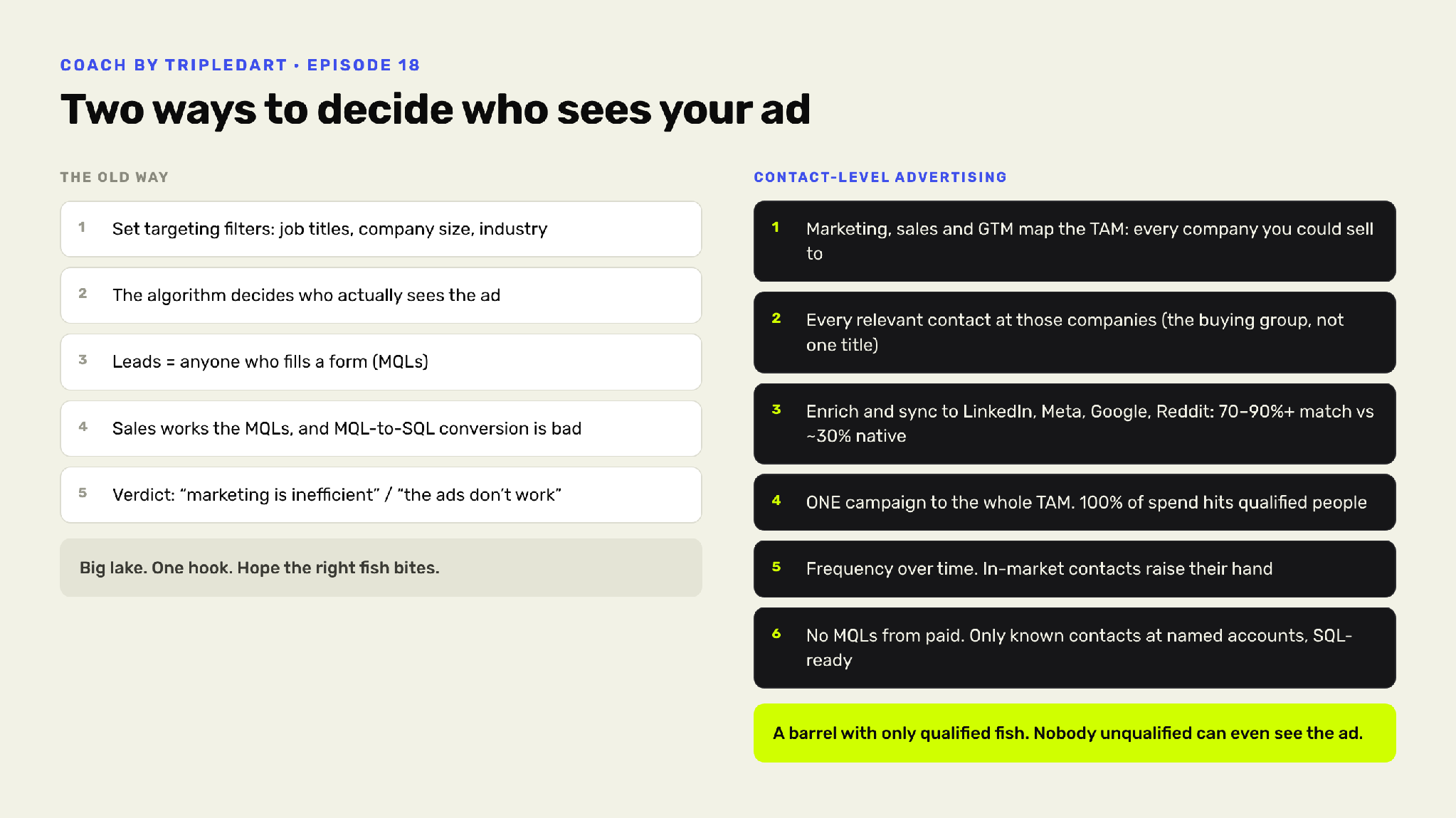
On the left is the way most accounts run. You set targeting filters. The algorithm picks which of those people sees the ad. Anyone who fills a form counts as a lead. Sales works those leads, the MQL to SQL conversion rate comes back poor, and the verdict is that marketing is inefficient or the ads don't work.
He calls that a big lake, one hook, and hope the right fish bites.
On the right is his version. Marketing, sales and GTM agree on the TAM, meaning every company you could sell to. Then every relevant contact inside those companies, which means the buying group rather than one job title. Those contacts get enriched and synced to LinkedIn, Meta, Google and Reddit, where they match at 70 to 90% rather than the roughly 30% a native upload returns. One campaign runs to the whole list, so every dollar lands on someone qualified. Frequency does the rest, and the people who are in-market raise their hand by engaging.
Paid stops producing MQLs. It produces known contacts at named accounts.
His phrase for it is a barrel with only qualified fish, where nobody unqualified can even see the ad.
Getting the List to Match
That 30% figure is the whole reason this needs a tool.
Upload work emails to LinkedIn or Meta and the platform looks for accounts registered to those addresses. Most people signed up with a personal address years ago, so most of the list doesn't match. The ads manager reports an audience size and tells you nothing about who is missing. It's a common reason LinkedIn ads for B2B underdeliver against a target account list.
ContactLevel closes the gap with its own identity graph, linking business identities to consumer ones. You hand over a LinkedIn URL, a work email, or a name with a job title and company. Back comes the personal email, phone, zip code, age and gender, plus the hashed emails, mobile ad IDs and platform user IDs the networks match against.
Accuracy comes from volume. A typical enrichment tool sends the platform one row per person. ContactLevel sends 50 to 70, so the match has far more chances to land.
On LinkedIn that reaches about 90% of the list. On Meta and Google it's closer to 80%. Reddit runs lower, because fewer B2B buyers have accounts there.
Enrichment takes a minute or two. The prospector behind it holds around a billion contacts, searchable by name, domain, company or LinkedIn URL, so an account-based list can be built from a domain alone.
The Three Contact-Level Stages
Dag splits the program into three stages. Each one is defined by four things: who sees the ads, what they see, what the stage is for, and the signal that moves someone out of it.
Stage 1 is contact-level demand generation. The audience is the whole TAM, cold, showing no intent yet. They see educational and authority content: thought-leader ads, podcast clips, use cases, point of view. No product pitch. The goal is to be known before they are in-market, which is why he says frequency beats reach at this stage. Repeat views, clicks, a site visit or an intent-topic match move someone to the next stage.
Stage 2 is contact-level demand capture. The audience is people showing intent, whether that's an ad click, a visit to a product or pricing page, an intent-data hit or a keyword match. Creative turns to product ads, offers, demos, case studies and comparisons. The goal is a meeting or a trial from someone you can name. A booked meeting moves the whole account forward, along with that person.
Stage 3 is contact-level ABM. The audience is every stakeholder at an open deal, the champion plus the rest of the buying committee, added account by account. Creative goes role-specific: ROI for finance, security and compliance for IT, proof and testimonials for the champion. The goal is to multi-thread the account and keep it warm between calls. Closed won moves them into a customer audience. Stalled or lost sends them back to Stage 1 content.
Stage 3 is the one Dag argues filter-based advertising never reaches. You can't run a security ad at a named IT stakeholder when the platform is choosing your audience for you. Most teams treat that work as a separate ABM strategy with its own tooling, or skip it and let a demand generation framework carry the whole funnel.

One Campaign, Four Ad Sets
This is the part of the deck you can copy straight into an ad account.
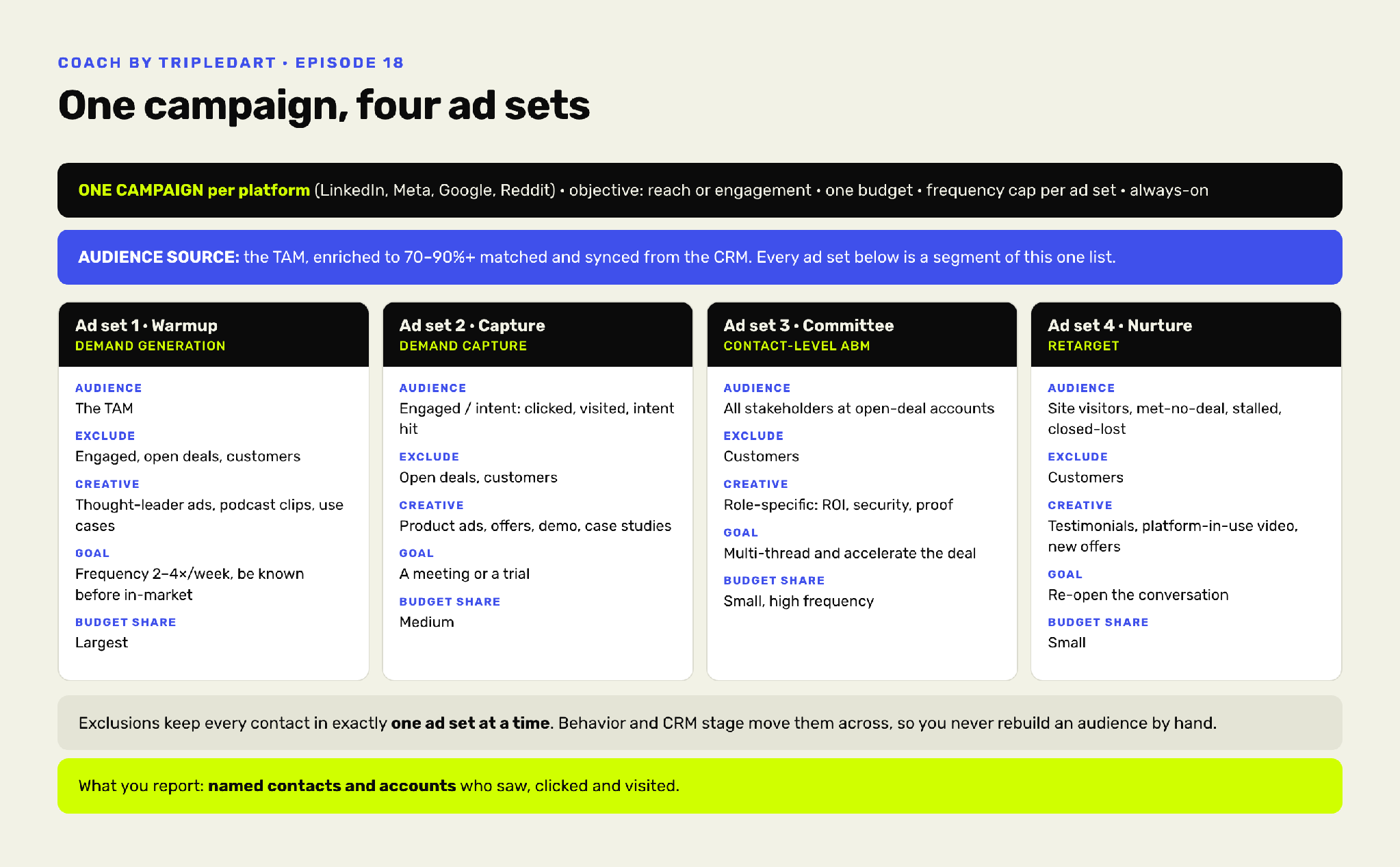
Per platform, Dag runs one campaign. One budget. A reach or engagement objective. A frequency cap per ad set. It stays always-on.
Underneath sits one audience source: the enriched TAM, synced from the CRM. Every ad set is a segment of that one list.
Ad set 1 is warmup, and it takes the largest share of budget. The audience is the TAM, excluding anyone already engaged, in an open deal, or a customer. Creative is the educational set, and the target is 2 to 4 impressions per person per week. His instruction for this ad set is to chase frequency rather than clicks.
Ad set 2 is capture, on a medium budget. The audience is the engaged and intent segment, excluding open deals and customers. Creative is product-led, and the goal is a meeting or a trial.
Ad set 3 is the committee, on a small budget at high frequency. The audience is all stakeholders at open-deal accounts, excluding customers. Creative is role-specific. This is where LinkedIn ABM gets done.
Ad set 4 is nurture and retargeting, also small. The audience is site visitors, people who took a meeting and didn't buy, stalled deals and closed-lost. Creative is proof: testimonials, platform-in-use video, new offers. It does the job most teams hand to multi-channel retargeting tools.
Why the Exclusions Do the Real Work
The exclusion rules matter more than they look like they should.
Because each ad set excludes the stages ahead of it, every contact sits in exactly one ad set at a time. Nobody in an open deal is still getting cold educational ads. Nobody who already booked a meeting is being asked to book a meeting.
And nobody maintains this by hand. Behavior and CRM stage move people across. A click or a site visit pushes a contact from warmup into capture. A booked meeting moves their whole account into the committee ad set. When a deal closes or dies, the CRM stage syncs back and the audiences update themselves.
That's the difference between this and a standard pilot ABM campaign, where someone rebuilds target lists every month and the five-step ABM framework lives in a spreadsheet.
What the Numbers Look Like
A $200 CPM and a $3 CPM can buy the same person.
That's the arithmetic behind Dag's budget split. Reaching a B2B buyer on LinkedIn runs between $100 and $200 per thousand impressions, which matches published LinkedIn ad costs, and a custom audience doesn't make it cheaper. Standard B2B PPC advice treats that as the price of reaching a business buyer. The same person costs $2 to $5 on Meta, where Facebook ads for B2B tend to get written off as a consumer channel.
So he puts roughly 80% of budget on LinkedIn and 20% on Meta, and the Meta slice buys enormous frequency for very little. On a $20,000 month that's about $15,000 to $17,000 on LinkedIn and $3,000 on Meta.
At one point ContactLevel's Meta frequency hit 98 over 30 days, roughly three impressions per person per day for a month. It cost between $600 and $800.
The objective gets cheaper too, and this follows directly from having a named list. Native targeting rewards a conversion objective because the algorithm needs a signal to hunt with. With a pre-qualified audience there's nothing left to hunt.
"I don't care what the algorithm is doing because I have such a small audience that's targeted, that I have pre-qualified," Dag says. So he runs engagement on LinkedIn and awareness on Meta, the cheapest objectives available. Awareness on Meta comes in near a $5 CPM where a conversion objective would run $50 to $70. Cost per outbound click lands under $2, and every one of those clicks is a qualified person.
None of this needs a long test. Duplicate an existing campaign, swap in the custom audience, and compare. Across accounts Dag sees CPA drop by at least half.
The number worth writing down is the timeline. From adding someone to a campaign to a booked call, ContactLevel averages 21 to 22 days.
One Hook Until It's Exhausted
One of Dag's ads has been running for six months.
That's deliberate, and it cuts against most creative testing advice. As a marketing team of one, the same constraint Adam Holmgren worked under in Episode 17, he runs an evergreen setup: the same ads pointed at the same list, with a couple of new thought leader ads or videos added each month.
His reasoning is about who the ads attract. When one ad converts five people from a list where everyone shares a title, a toolset and a problem, he expects it to convert the rest.
Rotating hooks does something he doesn't want. "If you keep showing too many different ads, then you change what kind of people it attracts." An ad about B2B targeting on Meta brings in people who care about B2B targeting on Meta. Change the angle weekly and the audience arriving at the bottom of the funnel stops being consistent, which makes every number downstream harder to read.
So he runs one hook until it stops working, then moves to the next angle.
The Measurement Loop
Every contact record carries a click history.
A pixel on the site identifies visitors who came from any of the audiences, by name. Each record shows total visits, last activity, every audience the person belongs to, and a log of what they did on the site, including whether they reached pricing. In the EU that pixel fires after consent, which Dag names as best practice everywhere.
That data syncs to the CRM, which is what makes the loop close. The rep reads the ad and website history on the contact before the call. Then the CRM stage change pushes the contact into the next ad set.
At the account level the platform aggregates impressions, engagements and clicks, which is the layer a marketing analytics function can hand to sales, and the point where this starts touching RevOps strategy more than media buying.
What you report, in his words, is named contacts and accounts who saw, clicked and visited.

AMA With Dag Holmen
The audience spent the back half of the session on operational detail. These were the answers worth keeping.
On minimum audience size
There isn't a standard one. Dag has seen people target a few hundred contacts and people target 100,000. Budget and the size of your market decide it. Watch frequency rather than list size.
On LinkedIn's 300-member floor
You can't launch below 300 matched members, but you can pad the list. Add a couple hundred contacts from a country you don't sell into, then exclude that country at the campaign level. You keep the 100 people you wanted.
On the LinkedIn and Meta split
About 80% of spend goes to LinkedIn and 20% to Meta, and the reason is CPM math rather than channel quality. Meta delivers the same named people far cheaper, so a small budget there buys frequency LinkedIn would charge many times more for.
On whether an awareness objective converts
It does both. Impressions are cheap enough to show the same people ads repeatedly until they click. Buyers who aren't in market don't book. The ones who are book after a few clicks.
On frequency caps
He leaves frequency uncapped and controls it with budget, running about $100 a day against a 20,000-person audience, which lands frequency in the twenties or thirties over a month.
On per-contact analytics
Clicks are tracked per person, and so is on-site behavior once someone lands on a page carrying the pixel. Impressions per contact aren't available. Impressions, engagements and clicks do aggregate at the company level.
On personalizing by intent
Build more audiences. There's no cap on how many you can create, so Dag segments by problem, using intent data or LinkedIn post engagement to find people discussing a specific issue, then writes ads for that issue.
On Meta's Andromeda and AI-driven matching
ContactLevel doesn't use Meta's native targeting for niche B2B products. It can work with exclusion audiences, for event promotion, or when the market runs to several hundred thousand people.
On ChatGPT ads
No native integration yet, though it's on the roadmap. For now you can export the enriched audience and upload it as a CSV.
On generating ads at scale with Claude and MCP
It works, and some users hit the ContactLevel API to spin up personalized ads per buying committee. Dag doesn't, because the 80/20 favors fewer ads and better targeting.
Conclusion
Deciding the audience before launch takes the algorithm out of the decision, and the rest of the account gets simpler because of it. The objective drops to the cheapest one available. Budget moves toward whichever platform sells impressions cheapest. Creative stops being a testing program. Exclusions and CRM stages move people between ad sets, so nobody rebuilds a list by hand. And the report at the end names people rather than counting them.
What sales gets is a list of who saw the ads, how often, and who read the pricing page. That's a different conversation from a CPL.
Key actions to take immediately:
- Map your full addressable market and find the most likely buyer at every account before you build any audience.
- Run a match test on your current contact list to see how many of those people your ad platforms can reach today.
- Enrich the list for consumer identifiers so the match rate climbs out of the 30% range a native upload delivers.
- Build one campaign per platform on a reach or engagement objective, with one budget and a frequency cap per ad set.
- Split that campaign into warmup, capture, committee and nurture ad sets, and give warmup the largest share.
- Write exclusions so every contact sits in exactly one ad set at a time, then let behavior and CRM stage move them.
- Add every stakeholder at your open-deal accounts to a committee audience and run role-specific creative at them.
- Duplicate an existing campaign with the custom audience swapped in and benchmark the two, checking the math against a PPC ROI calculator.
- Install a pixel that identifies audience members by name on site, firing after consent in the EU.
- Sync ad and website history to the CRM so the rep reads it before the call.
If you'd rather run this alongside a team that does it daily, our paid media and ABM practices work with B2B companies on exactly this.
Watch the full video here:
Episode 18: How to Generate More Revenue by Unifying Your PPC Audience