
Why Your Site Is Invisible to ChatGPT and Claude
A 17-source meta-analysis, four official crawler docs, and Vercel's crawl-log study on server-side vs client-side rendering: why a #1 Google ranking can still be blank to AI search, and a 30-minute audit for your own pages.
A few months back, we were auditing a client's site and hit something we couldn't explain. The page in front of us sat at the top of Google for its main term, the kind of page you'd be glad to own.
Then we asked ChatGPT for the best tools in that category, and the page wasn't in the answer at all. Not near the bottom either. It simply wasn't there.
Our first guess was a fluke, so we checked a handful of other sites. The same gap showed up on the ones built a certain way. That sent us down a rabbit hole, and what we found at the bottom now shapes how we audit every client for AI search.
It comes back to one file most people never open. If you want to follow along on your own site, right-click a page and choose "View Source." That wall of code is what your server sends first, before your browser does anything with it.
It's also, give or take, what an AI crawler gets. And that turned out to explain the whole thing.
The short version, before the details: the crawlers behind ChatGPT, Claude, and Perplexity read that raw code and stop. They don't run the JavaScript that builds the rest of the page in your browser. So anything that only shows up after the JavaScript runs, they never see.
Google is the exception, and that's what threw us for a while. Google reads JavaScript without trouble. The others don't, and their own docs are upfront about it. Getting from that surprise to something useful meant going through the evidence properly, so that's where we'll start.
How We Checked This
We didn't want to run on a hunch, so we gathered the evidence first.
- Sources: 17 articles on SSR/CSR and AI crawling, from web-dev primers to technical SEO agencies, plus a few primary docs.
- Official docs: OpenAI, Anthropic, and Perplexity crawler documentation, plus Google Search Central, for how each crawler behaves.
- The primary study: Vercel's crawl-log analysis with MERJ (December 2024), which watched live crawler traffic on production sites for several months.
- Source grading: we tagged every claim by how much we trusted the source, so shaky vendor stats stayed out of the conclusions.
A little shared vocabulary makes the rest easier to follow:
- CSR (client-side rendering): the server sends a near-empty HTML shell, and JavaScript in your browser fetches the data and builds the page.
- SSR / SSG (server-side rendering / static generation): the server sends the finished HTML, so the content is already there before any script runs.
- The Two Gates: two questions ended up organizing everything we found, and we started calling them the Two Gates. Gate 1, render: can a crawler see your content at all? Gate 2, return: once it can, does that crawling send anything back your way?
When we began, we were only thinking about the first gate. So that's where the story goes next.
Do ChatGPT, Claude, and Perplexity Read JavaScript?
The question we needed answered was almost embarrassingly basic: can these crawlers run JavaScript at all? The answer is no. They read the raw HTML your server sends and stop there. Whatever your JavaScript builds afterward, in the browser, they never reach.
That holds right across the board. It covers GPTBot and OAI-SearchBot from OpenAI, ClaudeBot and Claude-SearchBot from Anthropic, and PerplexityBot. The big training crawlers from Meta, ByteDance, and Common Crawl work the same way.
The one that behaves differently is Google's Gemini, which borrows Googlebot's rendering. But that's help you only get inside Google's own AI features, and it does nothing for the others.
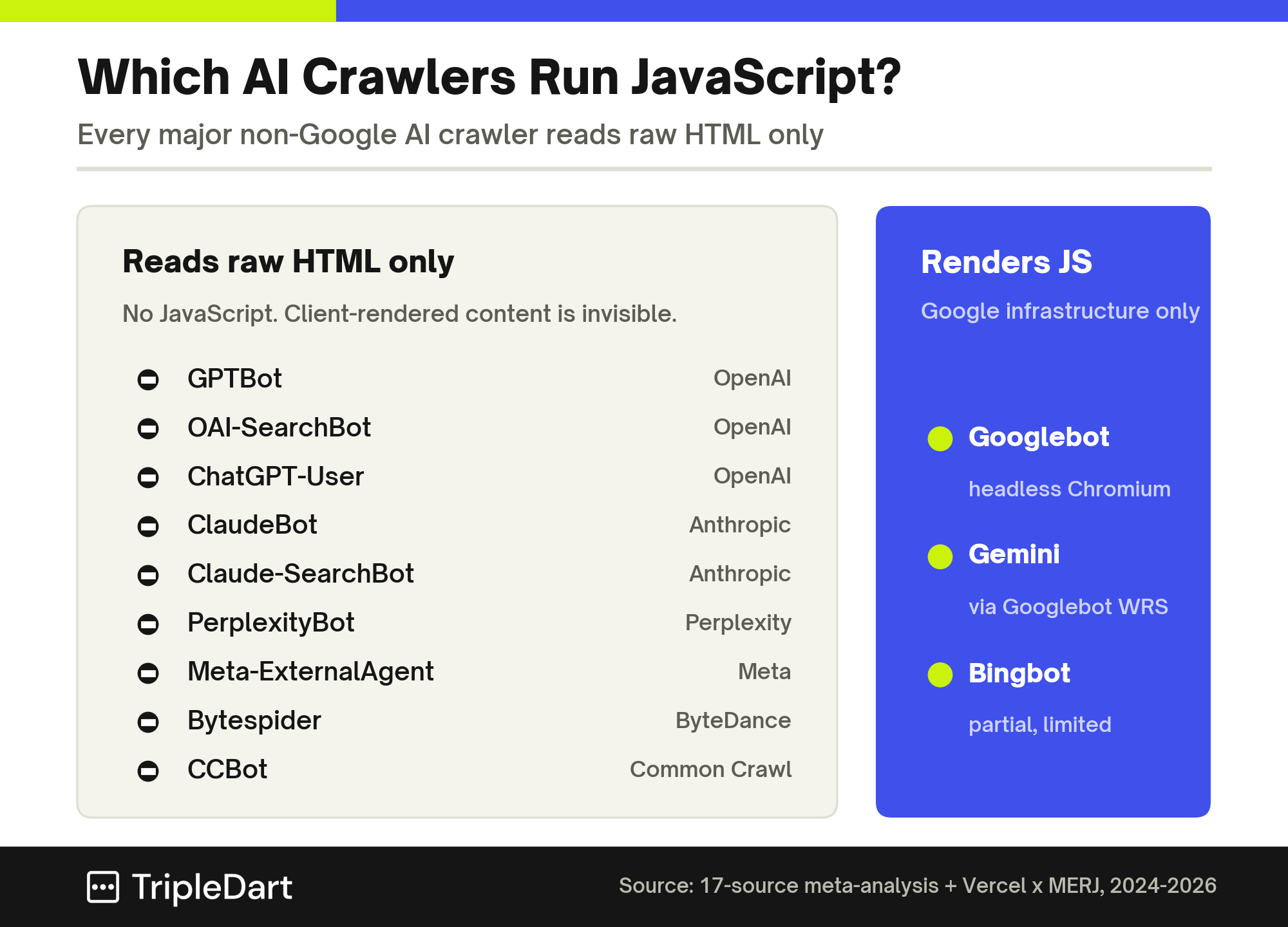
Here is the full picture across the crawlers we looked at:
| Crawler | Operator | Executes JavaScript? |
| Googlebot | Yes, headless Chromium | |
| Gemini | Yes, via Googlebot's renderer | |
| GPTBot | OpenAI | No |
| OAI-SearchBot | OpenAI | No |
| ChatGPT-User | OpenAI | No |
| ClaudeBot | Anthropic | No |
| Claude-SearchBot | Anthropic | No |
| PerplexityBot | Perplexity | No |
| Meta-ExternalAgent | Meta | No |
| Bytespider | ByteDance | No |
| CCBot | Common Crawl | No |
| Bingbot | Microsoft | Partial, limited |
You can read that table as one long version of the View Source test. A crawler that can't run JavaScript only ever gets the raw HTML, so if a page looks empty there, it's empty to AI.
If you want the next layer, how AI systems choose what to cite once they can read you, our generative engine optimization guide covers it. All of it waits on getting past this first gate.
What finally convinced us wasn't the docs. It was the size of the numbers sitting behind them.
The Proof: 569 Million Fetches, Zero JavaScript Executed
The clearest picture came from Vercel. Their team watched live crawler traffic on production sites for months, and the pattern was impossible to miss.
The scale alone is worth sitting with. In the month Vercel's crawl study measured, GPTBot made 569 million requests and ClaudeBot made 370 million. Together that comes to about a fifth of everything Googlebot crawls in a month, which runs to 4.5 billion requests.

Then came the detail that stopped us. GPTBot pulled JavaScript files in 11.50% of its requests and ClaudeBot in 23.84%, and neither ran a single line. It happened on React sites and non-React sites alike, which points at the crawler itself and takes your tech stack out of the picture.
One more thing stuck with us. These crawlers waste a lot of effort. ChatGPT's crawler spent 34.82% of its requests on 404 pages and Claude's spent 34.16%, next to Googlebot's 8.22%.
So even a site that renders everything on the server still loses close to a third of its AI crawl budget to dead links.
What this means for you: rendering gets your content seen, and it won't tidy up that waste on its own. A clean sitemap, current internal links, and stable URLs earn that budget back. Vercel's advice was to render your main content on the server and keep client-side rendering for extras like view counters and chat widgets.
By now we were fairly sure. But one objection kept nagging at us, the same one clients raise: what about Google?
Why a #1 Google Ranking Doesn't Save You
Google reads JavaScript without any trouble, and it even relaxed its guidance on the whole subject recently. For a while we honestly wondered whether this was a problem worth flagging.
The answer we landed on: Google's ability to render JavaScript lives entirely inside Google, and it never reaches the crawlers behind ChatGPT, Claude, or Perplexity.
On March 4, 2026, Google Search Central removed a long-running "Design for accessibility" note from its JavaScript SEO Basics page. Its reasoning was that it has rendered JavaScript for years, so loading content that way no longer makes its job harder.
That was the fifth time since December 2024 that Google eased this guidance.
It's tempting to read that as JavaScript being a solved problem everywhere. For Google, close to true. For the other crawlers, Google's own two-step process shows why the update changes nothing:

Wave 1: Crawl
On the first pass, Googlebot grabs the raw HTML, indexes what's there, and follows the links it finds.
Wave 2: Render
Later, if a page qualifies, it goes into a queue for a full render in a headless version of Chrome. That can take anywhere from seconds to weeks, and afterward Google indexes the page again with everything the render added.
The other crawlers have no second pass. They arrive once, read the HTML, and move on. Google built that two-step system over roughly a decade, and OpenAI, Anthropic, and Perplexity haven't built anything close to it.
Google still points to server-side rendering as best practice, even after softening the language. The gentler wording is about a renderer that has grown up, and it stops well short of waving anyone toward client-side only.
So the same page can win on Google and vanish from AI search at once, and the more your site leans on JavaScript, the wider that split runs. We dug into how the two systems weigh content differently in SEO vs GEO.
The relief, when it came, was that the render gate has a known answer, and it's gentler than a rebuild.
SSR, CSR, and How to Clear Gate 1
So how do you get a crawler past that first gate? You send your important content as HTML the server has already built, so it's in the page before any JavaScript runs. Server-side rendering, static generation, and prerendering all do that.
It helps to see the two starting points next to each other:
- CSR is quick to move around once it loads, and it works nicely for dashboards and logged-in tools. The downside is that first response: a near-empty HTML file that hides your content, meta tags, and schema from any crawler that skips JavaScript.
- SSR / SSG hands over the full page right away, so you get a fast first paint and content every crawler can see. The trade is more work for your server and a heavier setup than a bare client-side bundle.
Most frameworks already offer a middle path, and it's the one we point clients to. Next.js, Nuxt, and Angular Universal build the full HTML on the server, then "hydrate" it, handing control to JavaScript in the browser for the interactive parts.
So the first thing a crawler or a reader gets is a complete page, and the site still behaves like an app once it loads.
Two hydration slip-ups come up often enough that we check for them every time:
- The server's HTML and the browser's HTML don't match, which leaves the crawler unsure what's on the page.
- A component gets set to render only in the browser even though it holds something you'd want cited, like a pricing table or an FAQ.
What to do about it: on a purely client-side site, prerendering is the quick win and a full move to SSR is the durable one. One rule carries most of the weight: anything you want cited, JSON-LD schema included, has to sit in the raw HTML and never get dropped in by script.
You do it once at the template level, and it sits right beside your answer engine optimization work.
Clearing that gate makes your pages readable. Which brought us to the question we hadn't thought to ask: being readable and being cited turned out to be two different things.
Getting Crawled vs Getting Cited
We'd assumed that once a crawler could read a page, the work was done. Then we looked at what happens after that, and it reset our thinking.
Most AI crawling exists to train models. That kind sends nothing back to you, and it's separate from the crawling that might cite you. Cloudflare sorts the traffic by purpose, and the H1 2026 split, via Cloudflare Radar, looks like this:
| Purpose | Share of AI crawl traffic | What it means for you |
| Training | About 48% to 52%, up from ~29% a year earlier | One-way extraction: no visit, no citation, no referral |
| Mixed purpose | About 33% to 35%, falling | One crawler doing several jobs at once |
| Search / citable | About 9% to 11%, the fastest-growing slice | Can turn into a citation inside an AI answer |
| User action | About 2.3% to 2.6% | A person's live query triggered the fetch, the highest-value signal |
Look at that top row again. Somewhere around half of all AI crawling is training, with no visit and no citation attached. The search and user slices, under 15% between them, are the ones worth aiming at.
There's a blunter way to see the imbalance. Cloudflare tracks a crawl-to-refer ratio, which is how many pages a company crawls for every visitor it sends you:
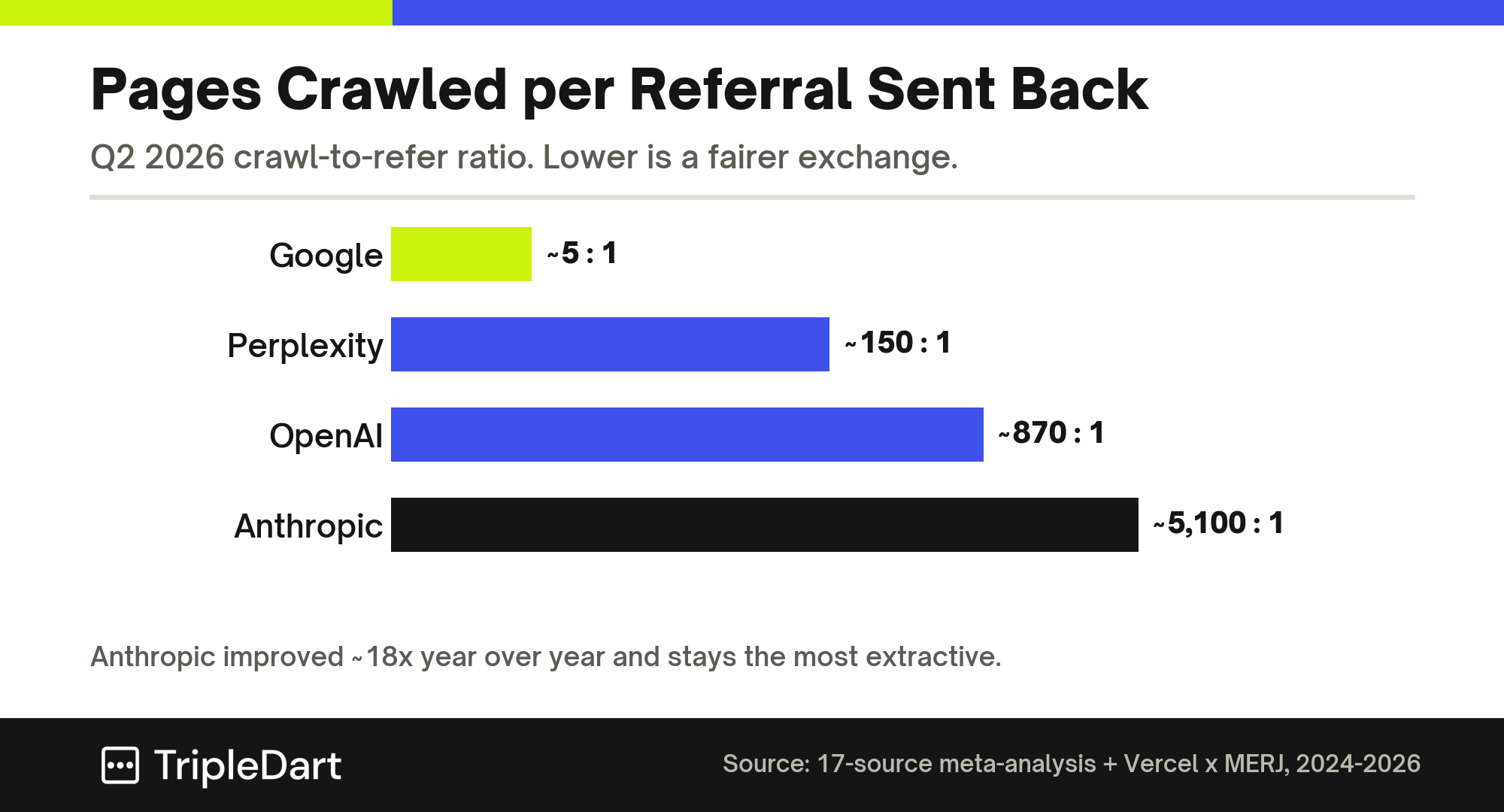
Google is close to a fair trade at around 5 pages per visitor. OpenAI sits near 870 to 1. Anthropic has improved roughly 18-fold in a year and still sits near 5,100 to 1.
So heavy crawling and traffic coming back are far from the same thing. With one client, our 5.5x AI traffic case began by sorting out access, then went after that citable slice.
This is the thinking behind a robots.txt setup we see more and more: block the training crawlers, let the citation ones through. You disallow GPTBot and ClaudeBot, then allow OAI-SearchBot, ChatGPT-User, Claude-SearchBot, and PerplexityBot.
Deliberate blocks aimed at AI crawlers roughly doubled over the year, from about 3.6% to 8.6% of AI-bot requests on Cloudflare's network.
One thing to flag for clients, though. robots.txt only works when a crawler chooses to honor it. Anthropic and OpenAI both say theirs do, though OpenAI notes ChatGPT-User no longer strictly follows it, since it's fetching for a live person.
So it's a useful lever, and it stops short of being a wall.
What to do about it: make crawler access a deliberate line in the strategy doc, weighing training exposure against AI-search visibility. It sits on top of the rendering work, as its own decision.
That covers both of the Two Gates. Everything we learned folds down into a short check you can run on any live site in about half an hour.
The 30-Minute AI Visibility Audit
We turned all of this into one check that walks the Two Gates in order, and the order is what makes it work. Rendering comes first, then access, then the writing.
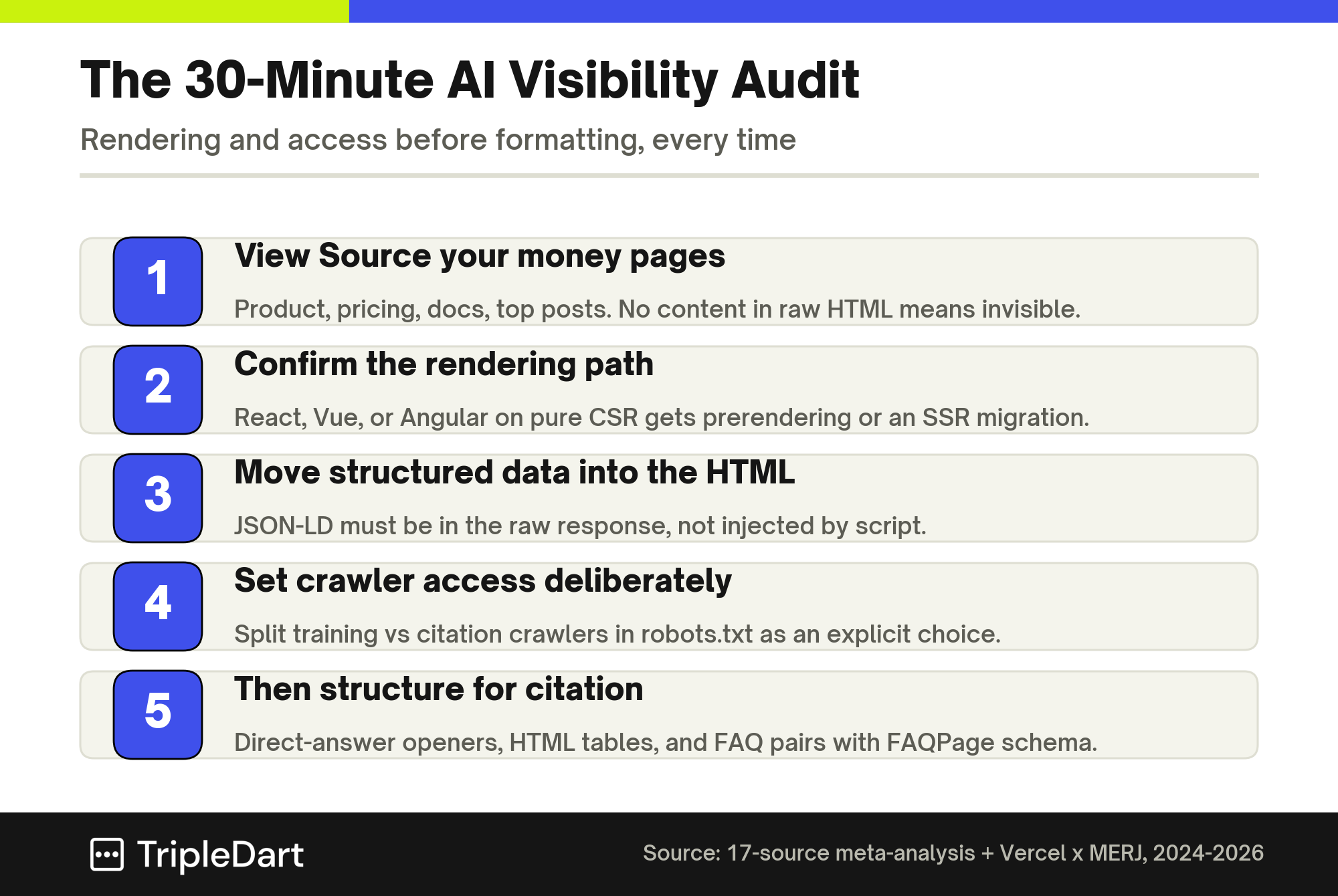
1. View Source Your Money Pages
Open your important pages, product, pricing, comparison, docs, and your best posts, then run View Source or a quick curl on each.
If the content, meta title and description, or schema is missing from that raw HTML, the page is invisible to GPTBot, ClaudeBot, and PerplexityBot. Its Google ranking won't change that.
2. Confirm the Rendering Path
If a SaaS front end runs on React, Vue, or Angular, find out whether it uses SSR, SSG, or pure client-side rendering. A client-side page gets prerendering for the quick win, or an SSR migration for the lasting one.
3. Move Structured Data Into the HTML
Check that your JSON-LD sits in the raw response instead of being added by script. A non-rendering crawler can only use the schema it sees on that first fetch.
4. Set Crawler Access Deliberately
Decide how you want to split training and citation crawlers, and write it into robots.txt. Let the search and user crawlers you want citing you through, and put that trade-off in front of the client instead of leaving it to a default.
5. Then Structure for Citation
Once the page can be seen, make it easy to quote. Open each page and section with a clear answer that stands on its own, and put comparison data in a proper HTML table. Keep your FAQs as visible question-and-answer pairs with FAQPage schema in the raw HTML.
The order is what makes it work: none of the formatting helps a page a crawler can't read, so clear the render gate, then the return gate, then polish. And if you'd rather not run it yourself, that's the day-to-day work of our AI SEO team.
Frequently Asked Questions
Can ChatGPT See My Website If It's Built in React?
Only the parts that end up in the raw HTML. If your React app uses SSR or static generation, through something like Next.js, it sends a full page and ChatGPT can read it. A purely client-side React app sends an almost-empty shell, so the crawler gets next to nothing.
How Do I Check If My Site Is Visible to AI Crawlers?
Right-click any page, choose "View Source," and read the raw HTML. If your main content, meta tags, and schema are there, AI crawlers can see them. If it's mostly empty containers and script tags, your content is client-rendered and invisible to every non-Google crawler.
Does Google's AI Render JavaScript?
It does. Gemini and Google's AI Overviews run on Googlebot's Web Rendering Service, so they render JavaScript in that second wave. It's a Google-only thing. The crawlers behind ChatGPT, Claude, and Perplexity don't render JavaScript at all.
Is Server-Side Rendering Required for AI Search?
For anything you want AI to cite, yes in practice. The content has to be in the HTML before JavaScript runs. SSR, static generation, and prerendering all manage that, while a purely client-side setup leaves the page empty on the first load.
If AI Crawlers Can Reach My Page, Will They Cite It?
Not on its own. Getting read clears the first gate, and whether you get cited depends on crawl purpose and how your content is structured.
Most AI crawling is for training and sends nothing back, so you want the search crawlers landing on pages that open with a clear, self-contained answer.
When you want to know which of your pages a crawler can't read, book a GEO audit with our team. We start in the raw HTML and walk both gates with you.