

.png)

Creating tasks in HubSpot is a powerful way to manage your to-do list, streamline your workflow, and ensure that nothing slips through the cracks. Whether you're tracking follow-up calls, emails, or other action items, HubSpot's task management feature can be tailored to suit your team's needs.
In this tutorial, you'll find a step-by-step guide that walks you through creating tasks in HubSpot. Whether you are using it for personal task management or to coordinate a team effort, mastering this feature will help streamline your workflow. By the end, you'll feel confident about managing your tasks effectively.
Step-by-Step Tutorial on How to Create a Task in HubSpot
1. Start by Navigating to the ‘Tasks’ Section

- Access your HubSpot account and locate the CRM section.
- Click on Tasks to open the tasks dashboard.
2. Next, Initiate a New Task by Clicking ‘Create Task’

- On the tasks dashboard, find and click on the Create task button on the top right corner.
3. Choose a Priority Level by Selecting ‘None’

- Use the dropdown menu to set the task priority to None, Low, Medium, or High based on urgency.
4. Set the Deadline by Clicking ‘In 3 Business Days (Tuesday)’

- Assign a due date for the task by selecting a predefined option or manually entering a date that fits your schedule.
5. Finally, Create the Task by Clicking ‘Create’
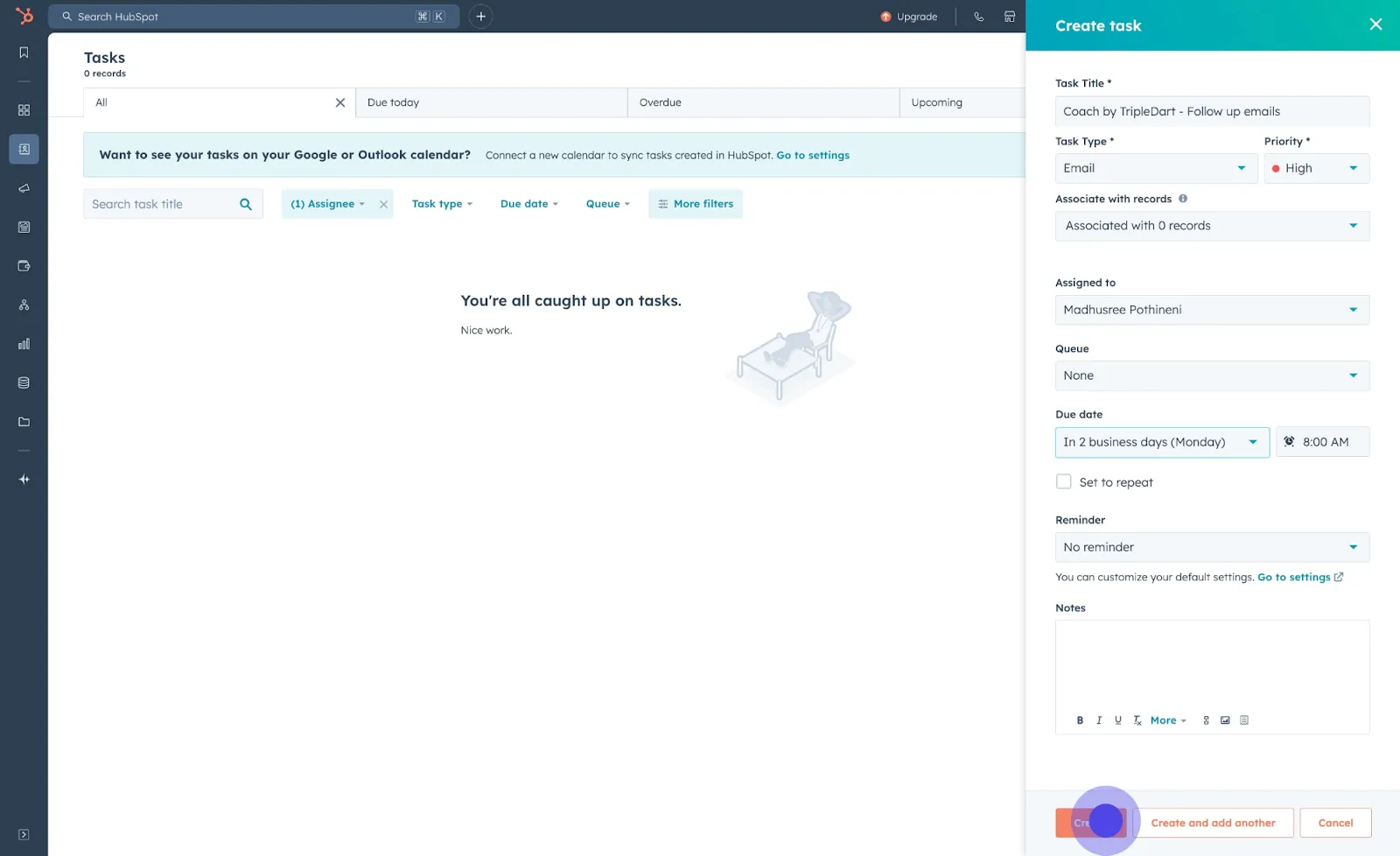
- Review the task details and click Create to finalize and save your task. This step ensures the task is now visible on your dashboard.
Conclusion
Creating tasks in HubSpot is intuitive and flexible, allowing you to customize tasks based on priority and deadlines. By following the steps outlined in this guide, you can efficiently manage your workload and enhance your team's productivity.
Additionally, consider using workflows to automate task creation. This feature can save time and ensure important tasks are generated automatically.
Frequently asked Questions
.svg)
Yes, you can create tasks in bulk for multiple records. Simply select the desired records on your CRM dashboard, and use the "Create tasks" option to assign a task to all selected contacts.
HubSpot's workflows tool allows you to automate task creation. Set triggers and conditions for when tasks should be automatically created, such as when a deal reaches a certain stage.
Yes, recurring tasks are available for users with Sales Hub or Service Hub Starter, Professional, and Enterprise plans. You can set tasks to repeat at specified intervals from the task creation panel.
When creating a task, you can assign it to another HubSpot user by selecting their name in the "Assigned to" dropdown menu, ensuring they're part of your HubSpot account.
Yes, you can set email reminders for tasks. During task creation, select the reminder option and specify when you'd like to be notified before the task is due.


