.png)
.png)


AI Performance Marketing: Real-Time Ad Campaign Insights
April 23, 2025

For years, managing Google Ads meant toggling between tabs, downloading CSV exports, building pivot tables, and deciphering dashboards—all before you could draw a single actionable insight. The result was slow decision-making, missed optimizations, and a constant feeling of being one step behind your data.
That changes with the Google Ads Model Context Protocol (MCP) integration for Claude. MCP is an open protocol developed by Anthropic that creates a standardized, secure bridge between Claude and external services like Google Ads. Instead of passively answering questions from its training data, Claude can now actively reach into your live account, retrieve real-time metrics, and return intelligent analysis in plain English—all inside a single conversation.
This guide unpacks exactly how Claude and Google Ads MCP work together, how to set it up, the most compelling use cases marketers are discovering, and the prompts driving the best results.
Model Context Protocol (MCP) is Anthropic's open standard for connecting AI assistants to external data sources and tools. Think of it as a universal adapter that allows Claude to "plug into" platforms like Google Ads without requiring custom API integrations for every request.
Before MCP, AI tools had two hard limits when applied to advertising:
With MCP, Claude bypasses both limitations. It connects directly to your Google Ads account, executes Google Ads Query Language (GAQL) queries in real time, and returns structured performance data that it can immediately analyze, visualize, and act on.
The practical result: Claude becomes a genuine PPC analyst that has read access to your actual account—not a generic advisor talking about hypothetical best practices.
There are two ways to connect Claude to your Google Ads account. Choose the one that matches your comfort level. Most marketers start with Route A — it takes about five minutes and requires zero technical knowledge.
What you'll need: a Claude account (Pro or above), a Google Ads account with admin access, and a free Zapier account.
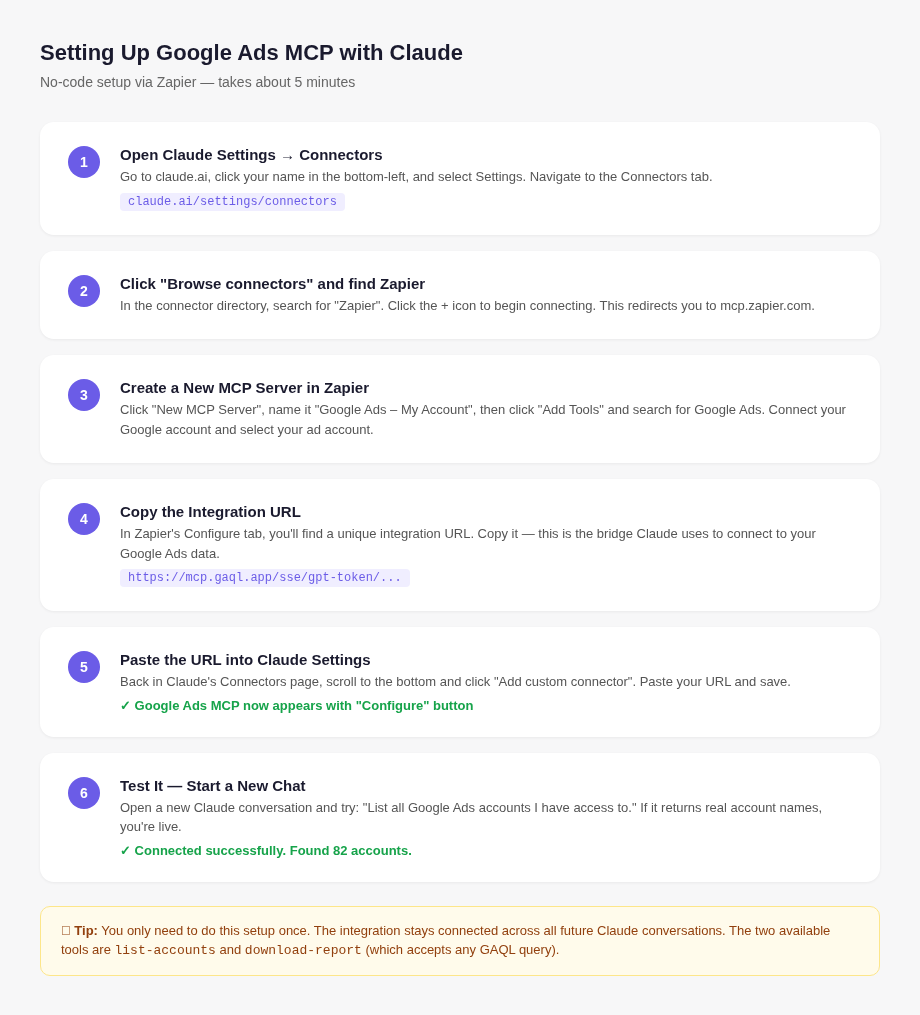
Step 1 — Open Claude's Integrations Settings
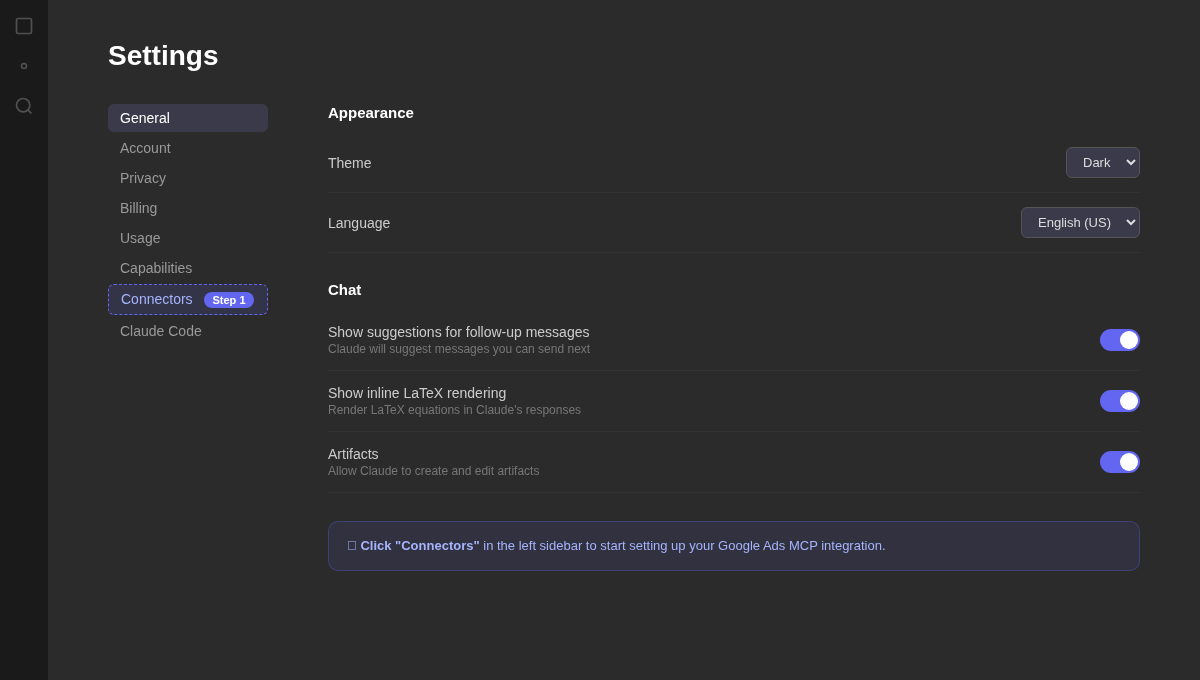
Go to claude.ai, click your name in the bottom-left corner, and select Settings. Navigate to the Integrations tab. This is where all your MCP connections will live.
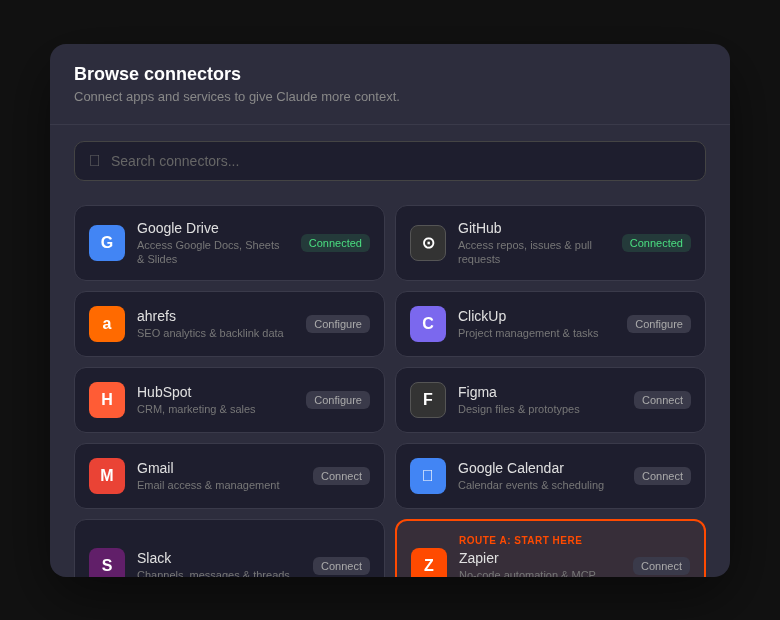
Step 2 — Find the Zapier MCP Connector
Click 'Add Integration,' then look for the link to pre-built connectors. This takes you to Anthropic's directory of ready-made MCP integrations. Scroll down and select Zapier, which will redirect you to mcp.zapier.com.
Step 3 — Create a New MCP Server in Zapier
Inside Zapier's MCP dashboard, click 'New MCP Server.' Give it a name like 'Google Ads – My Account.' Then click 'Add Tools' and search for Google Ads. Zapier will walk you through connecting your Google account and selecting which Google Ads account Claude should access.
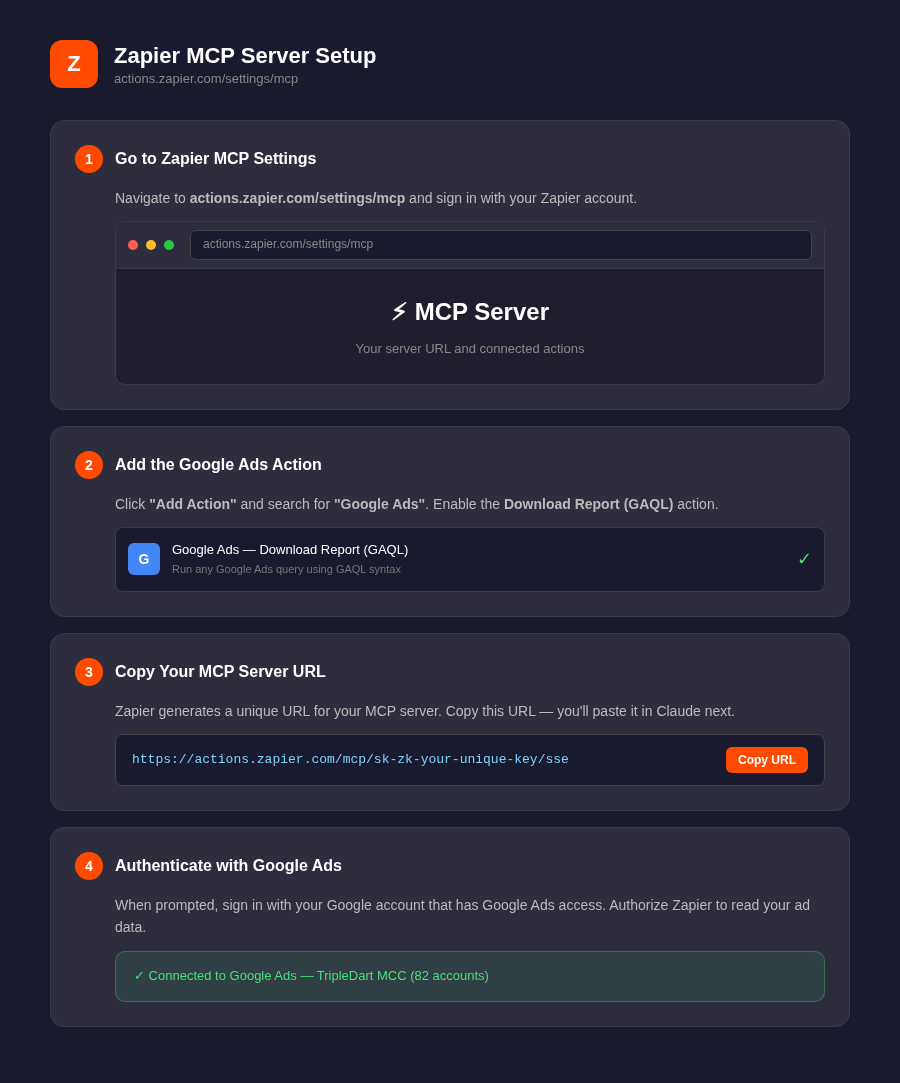
Step 4 — Copy Your Integration URL
Once your Google Ads account is connected, navigate to the 'Configure' tab inside Zapier. You'll see a unique integration URL — copy it. This is the bridge Claude will use to talk to your account.
Step 5 — Paste the URL into Claude
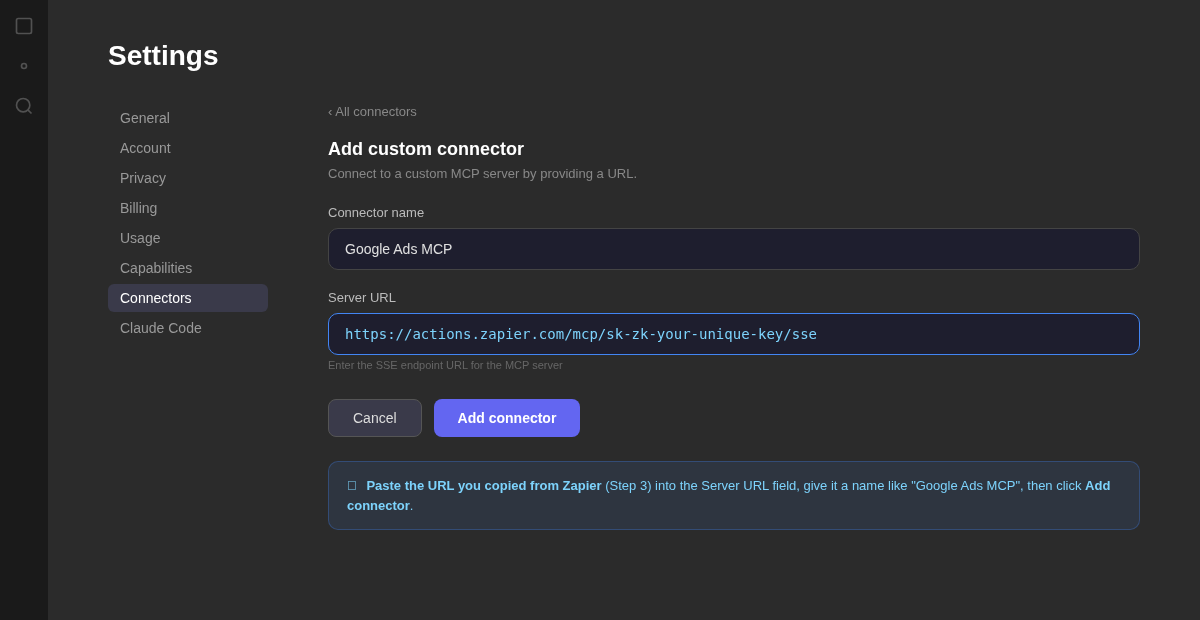
Go back to claude.ai/settings/integrations and click 'Add Integration.' Paste in the URL you copied from Zapier and save. You should see the Google Ads integration appear as active in your list.
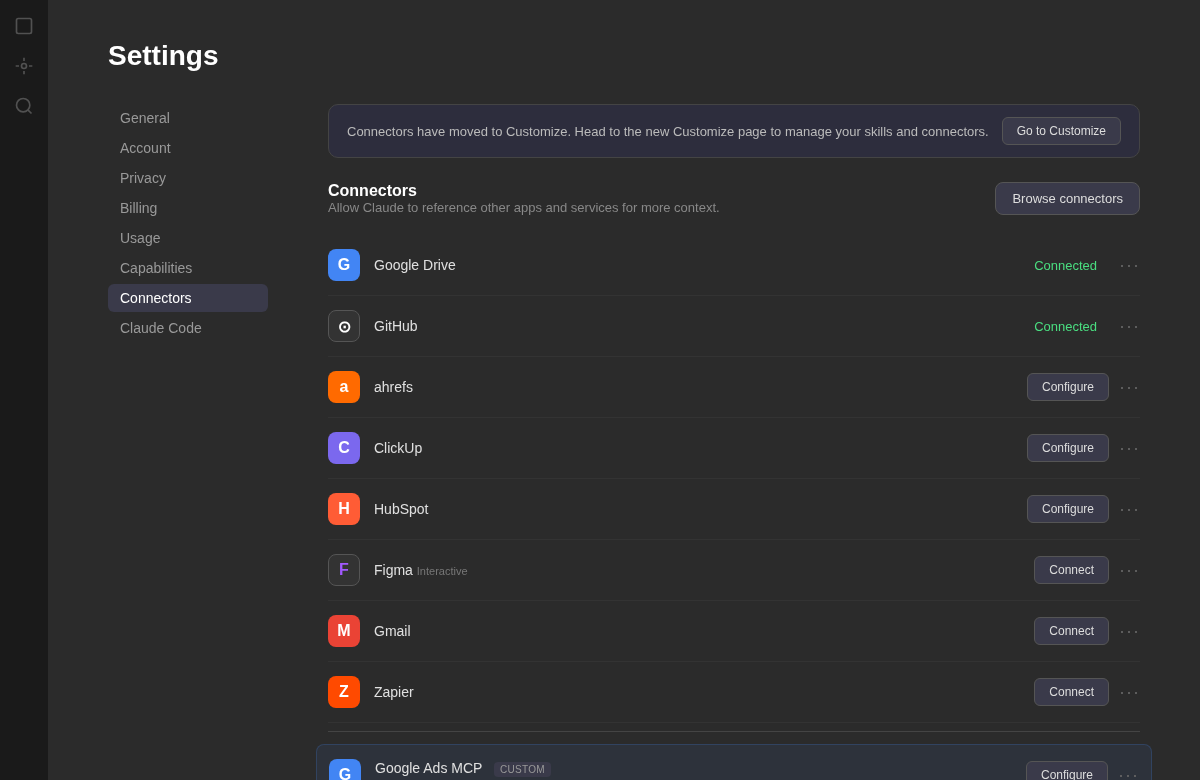
Step 6 — Start a New Chat and Test It
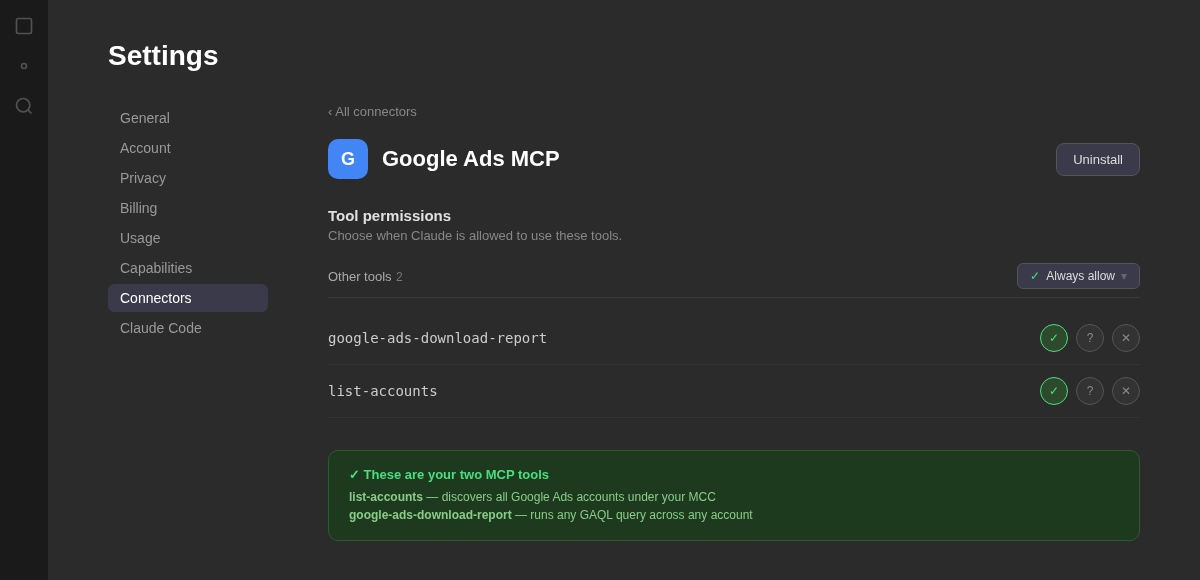
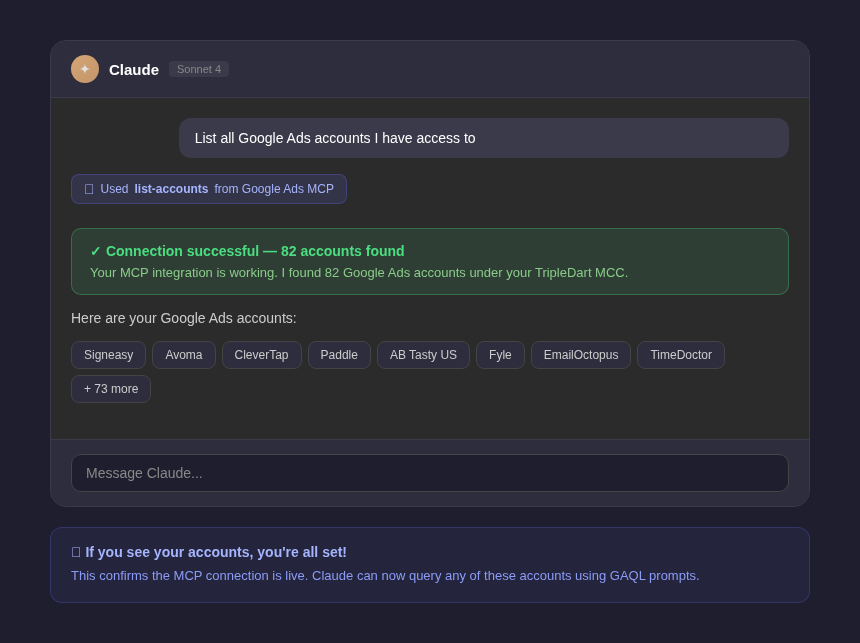
Open any new conversation in Claude. Make sure the integration is toggled on in the tools panel. Then try: 'Pull the last 7 days of campaign performance from my Google Ads account and give me a summary.' If it returns real data, you're live.
Tip: You only need to do this setup once. The integration stays connected across all future Claude conversations.
This route is for teams that want deeper control, the ability to run custom GAQL queries, or prefer not to route data through a third party like Zapier. It requires someone comfortable with a terminal, but the steps are still manageable.
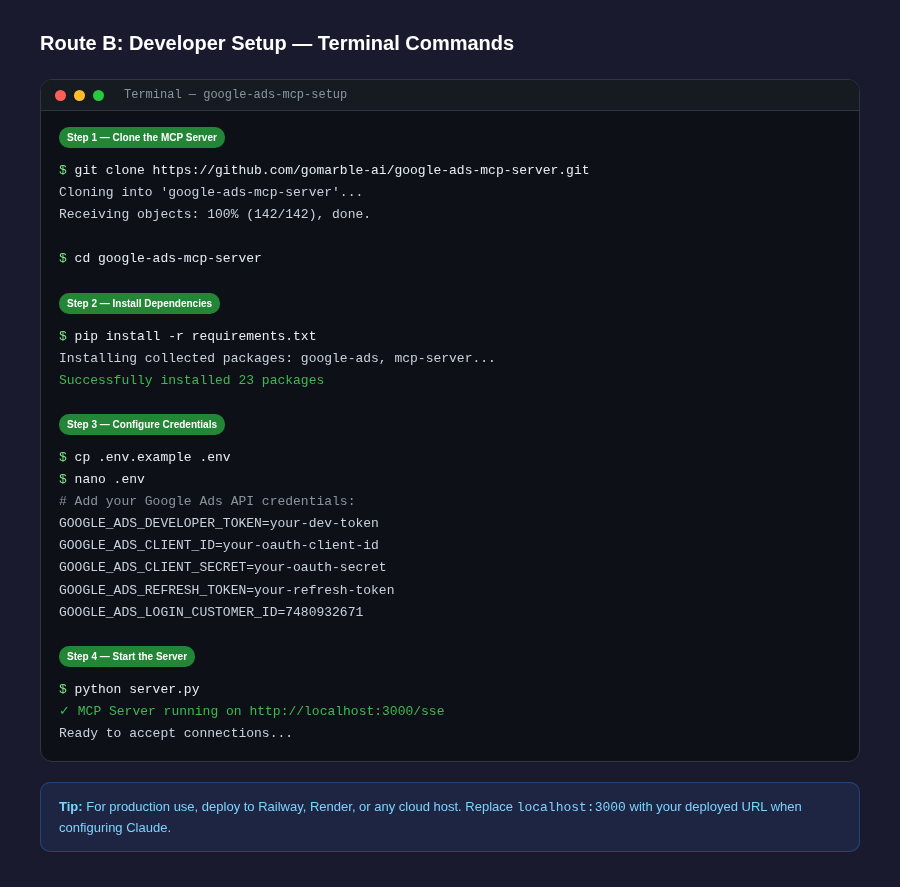
Step 1 — Choose Your MCP Server
Several open-source options are available on GitHub, including gomarble-ai/google-ads-mcp-server and cohnen/mcp-google-ads. Alternatively, managed platforms like Composio or Adzviser host the server for you and handle the technical plumbing.
Step 2 — Get Google Ads API Access
Apply for a Google Ads API developer token through your Google Ads Manager Account. You'll also create OAuth 2.0 credentials in Google Cloud Console. Token approval typically takes 1–2 business days.
Step 3 — Configure and Run the Server
Clone the MCP server repository, add your API credentials to the configuration file, and run the server locally (or deploy it to a cloud host like Railway or Render). The server will expose an endpoint that Claude connects to.
Step 4 — Connect to Claude Desktop
In the Claude Desktop app, open the configuration file (claude_desktop_config.json) and add the MCP server entry with your server's URL. Save the file and restart Claude Desktop.
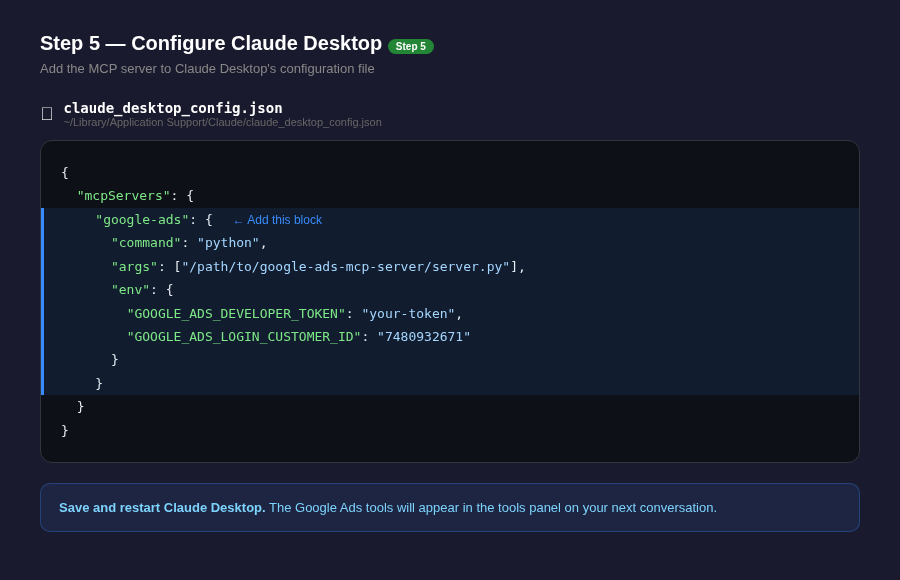
Step 5 — Verify the Connection
Start a new conversation in Claude Desktop. You'll see Google Ads tools listed in the available tools panel. Run a quick test — ask Claude to list all campaigns in your account — to confirm data is flowing correctly.
Tip: Agencies managing multiple client accounts will find the developer route worth the extra setup — it allows Claude to query across Manager (MCC) accounts and gives full access to the Google Ads API, including custom GAQL queries.
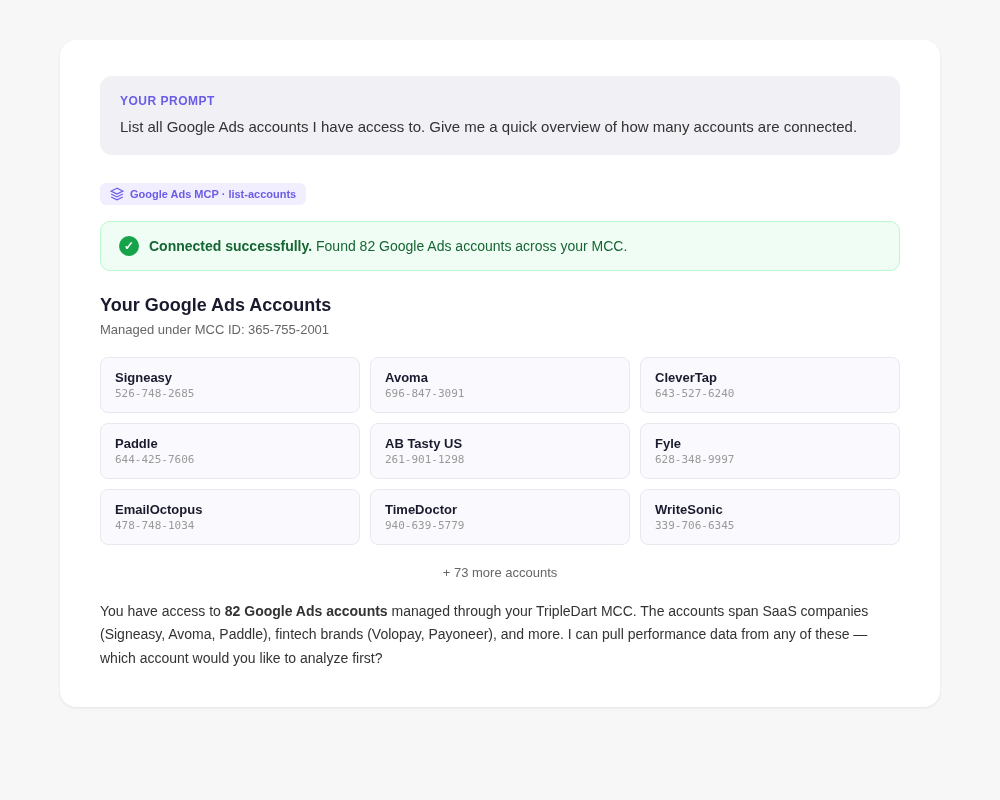
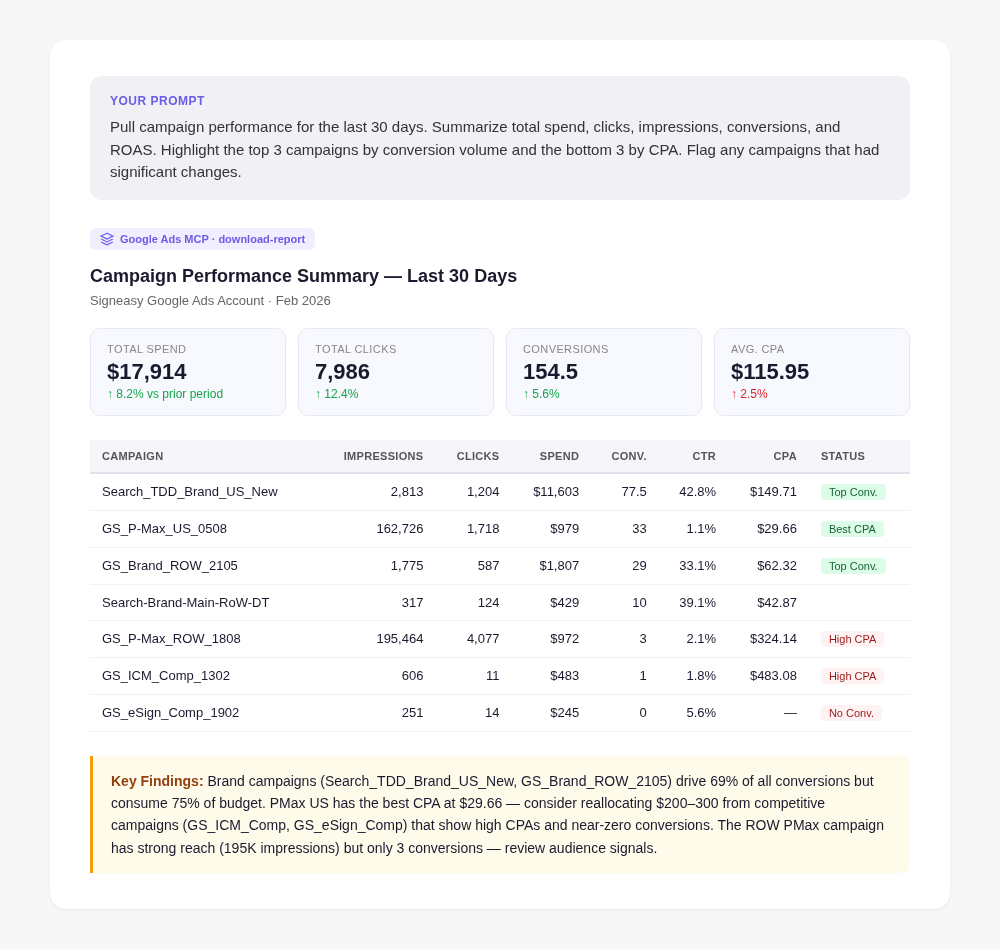
The most immediate use case is replacing your morning dashboard ritual. Instead of opening Google Ads, navigating to reports, and interpreting charts, you simply ask Claude what happened. Claude queries your account, aggregates the data, and returns a plain-English narrative with the key takeaways.
This is especially powerful for accounts with many campaigns. Rather than scanning rows of data, you get a ranked summary of what worked, what underperformed, and what needs attention—in seconds.
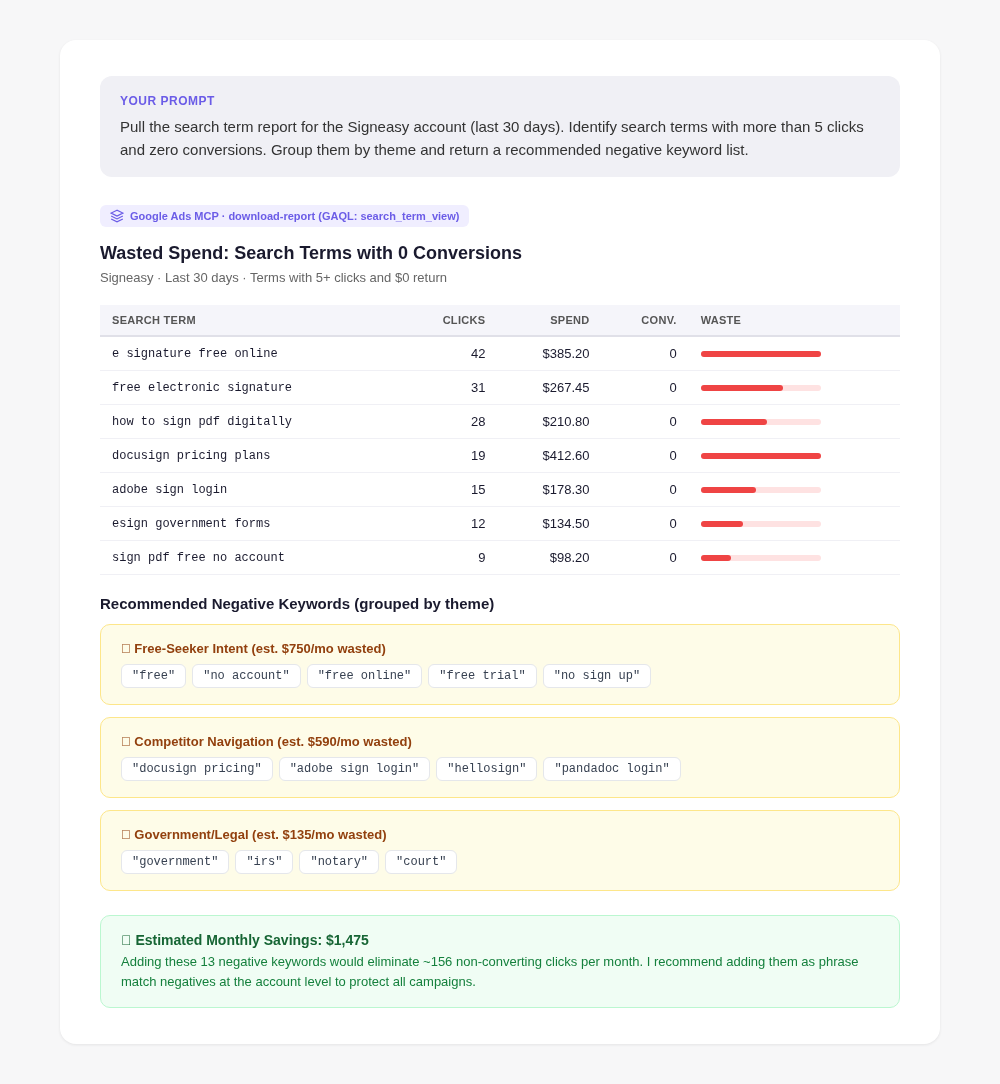
One of the earliest workflows practitioners reported was using Claude to surface underperforming keywords. Claude can pull your search term report, analyze which queries are generating clicks without conversions, and suggest a prioritized negative keyword list—all from a single prompt. This closes the loop between data analysis and implementation guidance without requiring you to export a spreadsheet.
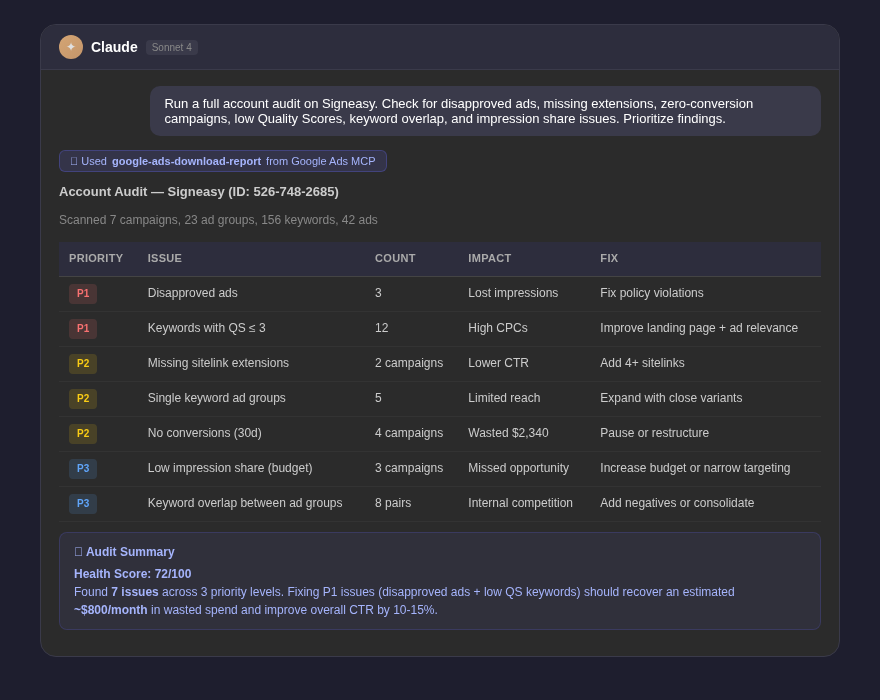
Claude can retrieve all active ad variations for a given campaign or ad group, compare their CTR, conversion rate, and CPA side by side, identify statistically meaningful differences, and recommend which variants to pause and which to promote. Beyond analysis, Claude can draft new ad copy variations informed by the actual performance data of what has worked in your account to date.
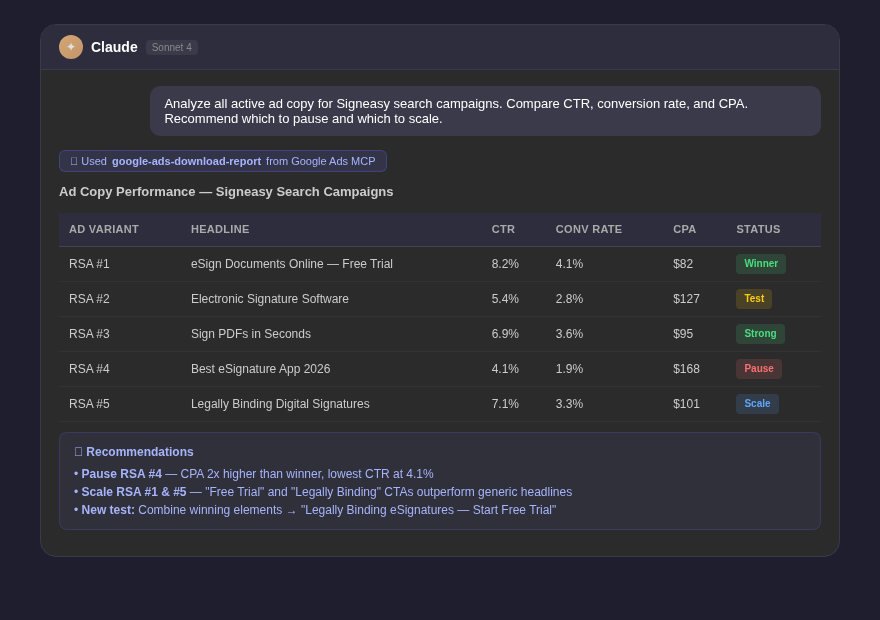
By querying day-over-day or week-over-week spend data, Claude can identify budget pacing issues before they become problems—flagging campaigns that are on track to exhaust budgets early, campaigns that are under-delivering, or sudden CPC spikes that suggest auction changes. This kind of proactive monitoring is typically done manually or requires expensive third-party alerting tools.
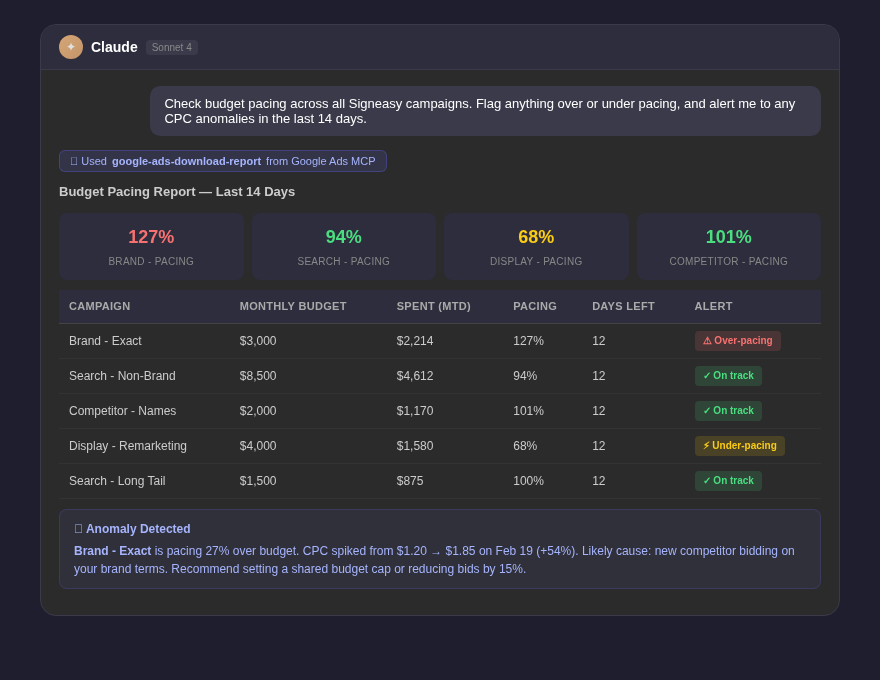
A comprehensive account audit—checking Quality Scores, ad strength ratings, missing ad extensions, disapproved ads, campaigns with low impression share, and keyword overlap—is a time-intensive process. With MCP, Claude can conduct a structured audit in a single session, querying different dimensions of your account in sequence and compiling findings into a prioritized action list.
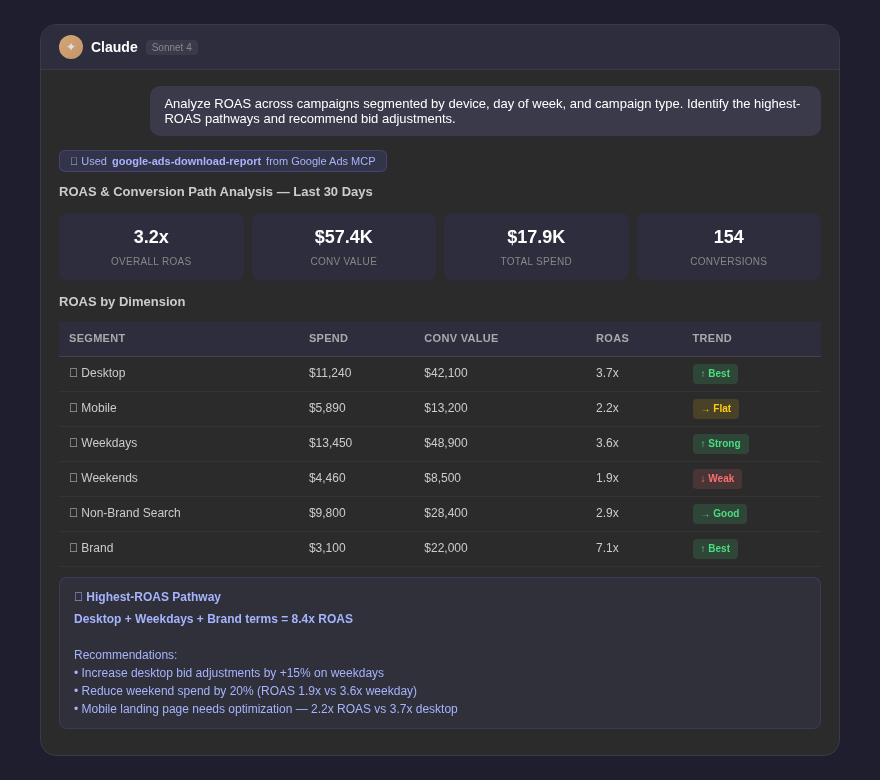
Claude can pull conversion data segmented by campaign, device, day of week, and audience, then synthesize these dimensions to identify the highest-ROAS pathways in your account. This kind of multi-dimensional analysis is exactly where AI reasoning adds value beyond simple reporting.
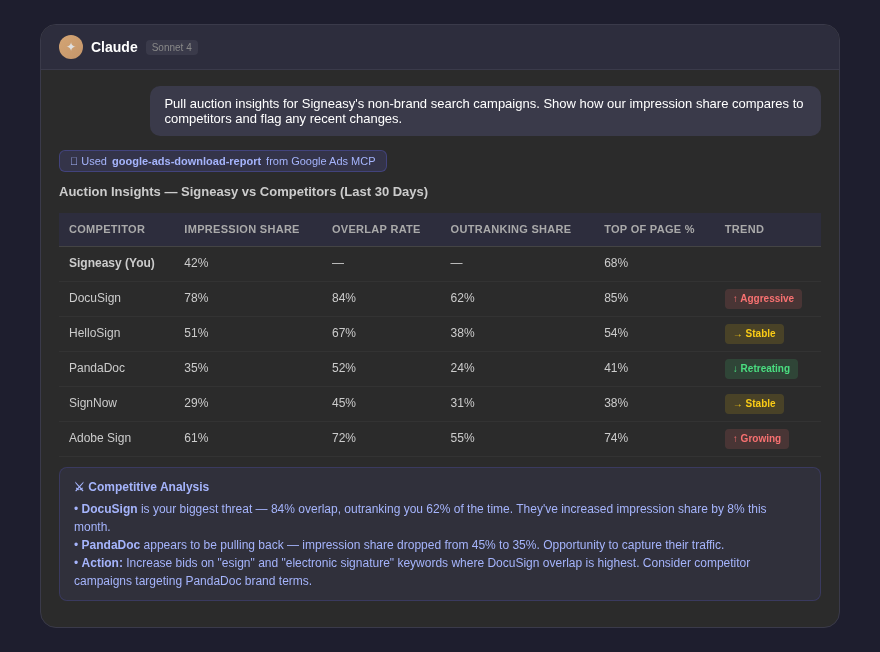
Through the Auction Insights data accessible via the Google Ads API, Claude can analyze how your impression share, overlap rate, and outranking share compare to competitors over time—and suggest bid strategy adjustments based on the patterns it observes.
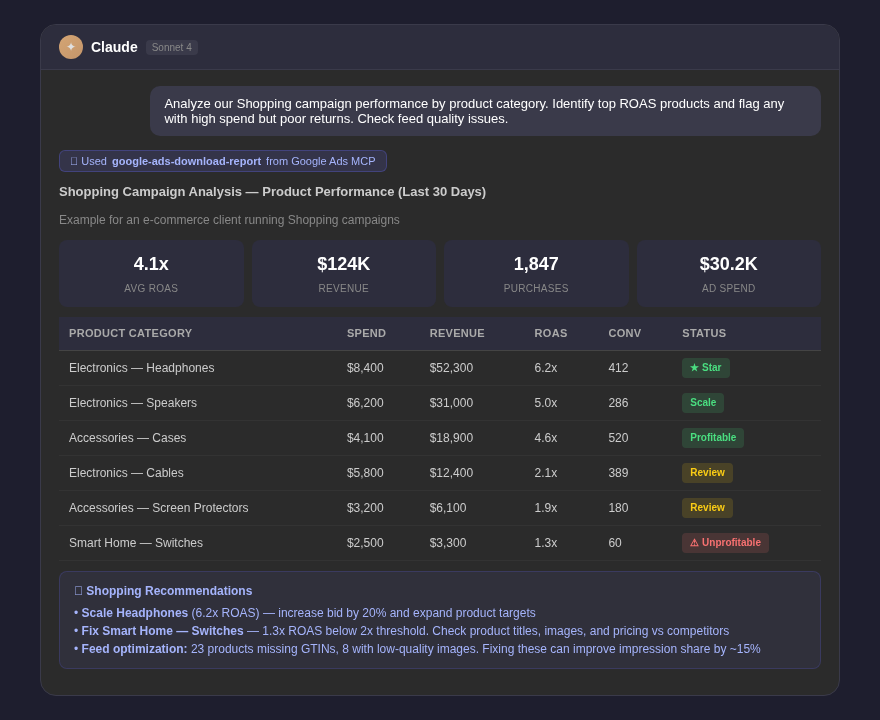
For e-commerce advertisers, Claude can analyze Shopping campaign performance at the product, product group, and feed attribute level. It can identify which product categories drive the strongest ROAS, flag products with high spend but zero conversions, and recommend feed optimization changes.
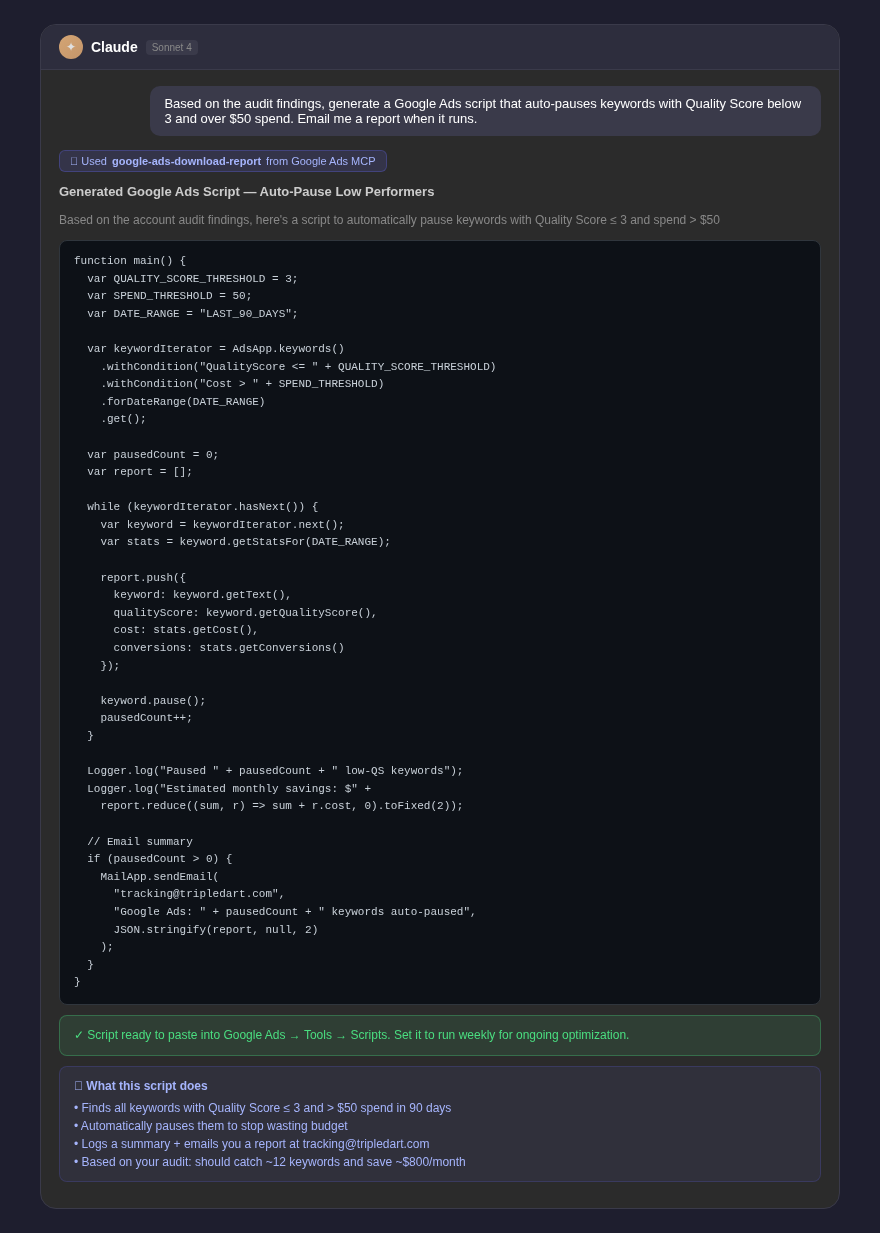
Because Claude excels at coding, a popular workflow is to first have Claude audit the account via MCP, then ask it to generate Google Ads scripts tailored to the specific issues it discovered. The result is customized automation code grounded in your actual account data rather than generic templates.
For agencies managing multiple client accounts, MCP enables Claude to query across accounts, compare performance benchmarks, generate per-client reports in a consistent format, and flag accounts requiring urgent attention—all from a single conversation.
Below is a curated collection of prompts that marketers are using most frequently with the Google Ads MCP integration. These are organized by use case.
Prompt: Weekly Performance Summary
Pull campaign performance for the last 7 days. Summarize total spend, clicks, impressions, conversions, and ROAS. Highlight the top 3 campaigns by conversion volume and the bottom 3 by CPA. Flag any campaigns that had significant week-over-week changes.
Prompt: Daily Anomaly Check
Check yesterday's campaign performance against the 7-day average. Flag any campaigns where spend, CTR, or conversion rate deviated by more than 20%. Explain possible causes for each anomaly.
Prompt: Month-to-Date Pacing
Analyze month-to-date spend against our monthly budget. Identify which campaigns are pacing ahead or behind, and project end-of-month spend at the current daily run rate.
Prompt: Negative Keyword Mining
Pull the search term report for all campaigns in the last 30 days. Identify search terms with more than 5 clicks and zero conversions. Group them by theme and return a recommended negative keyword list I can add directly.
Prompt: Keyword Performance Audit
List all keywords with a Quality Score below 5 and at least $50 in spend over the last 90 days. For each, explain the likely cause of the low QS and recommend whether to pause, edit, or restructure the ad group.
Prompt: Long-Tail Opportunity Discovery
Analyze my search term report and identify long-tail query patterns that are converting well but don't have exact match keywords yet. Recommend 10 new keywords I should add.
Prompt: Ad Variant Performance Comparison
Retrieve all active ads in my [Campaign Name] campaign. Compare each ad's CTR, conversion rate, and CPA. Identify the best and worst performers and explain the likely reasons. Suggest 3 new ad variations based on what the data shows is working.
Prompt: Responsive Search Ad Strength Review
List all responsive search ads with an ad strength below 'Good'. For each ad, identify which headlines or descriptions are marked as low-performing and suggest specific improvements.
Prompt: Budget Reallocation Recommendation
Based on last month's ROAS by campaign, recommend how I should reallocate my total monthly budget of [X] across campaigns to maximize conversions. Show your reasoning.
Prompt: Bid Strategy Audit
Review the bid strategies across all active campaigns. Flag any campaigns using Manual CPC where Target CPA or Target ROAS might be more appropriate given their conversion volume. Explain the threshold I should hit before switching.
Prompt: Full Account Audit
Conduct a comprehensive account audit. Check for: disapproved ads, missing sitelink extensions, campaigns with no conversions in 30 days, ad groups with single keywords, keywords with low Quality Scores, and campaigns with low impression share due to budget. Return a prioritized list of issues with recommended fixes.
Prompt: Wasted Spend Identification
Identify the biggest sources of wasted spend in my account over the last 90 days. Look for high-spend keywords with no conversions, high-CPC search terms that are irrelevant, and campaigns with high impression share loss due to rank issues.
Prompt: Client-Ready Performance Report
Generate a plain-English performance summary for the month of [Month] for my client in the [industry] sector. Cover overall results, key wins, areas for improvement, and recommended actions for next month. Keep it non-technical and focused on business outcomes.
Prompt: Competitor Landscape Summary
Pull the Auction Insights data for my top 3 campaigns. Summarize how my impression share, overlap rate, and outranking share have changed compared to the previous period. Identify which competitors are increasing their presence.
Prompt: Custom Alerts Script
Based on the performance patterns you found in my account, write a Google Ads script that sends me an email alert if any campaign's daily spend exceeds 150% of its average daily budget or if CTR drops below half of the 30-day average.
Prompt: Automated Bidding Adjustment Script
Write a Google Ads script that increases bids by 15% on keywords that have achieved a conversion rate above [X]% in the last 14 days and decreases bids by 10% on keywords with zero conversions and more than $30 spend.
The power of the Claude + Google Ads MCP combination is significant, but experienced practitioners recommend a few important principles:
Always Maintain Human-in-the-Loop Review
Even with agentic capabilities, treat Claude as an analyst who surfaces recommendations, not as an autonomous operator who executes changes. Review every recommended action before applying it to a live account, particularly for bids, budgets, and campaign settings.
Use a CLAUDE.md Context File for Consistent Behavior
When using Claude Code or terminal-based workflows, a persistent context file (CLAUDE.md) in your project directory can encode brand voice guidelines, negative keyword blacklists, conversion tracking requirements, and audience persona details—ensuring Claude respects account-specific rules across sessions.
Scope Your Queries with Date Ranges
Google Ads API has rate limits. Scoping your GAQL queries with specific date ranges and filtering to relevant campaigns reduces API call volume and speeds up response times significantly.
Validate Script Output Before Deployment
When asking Claude to generate Google Ads scripts, always test them in a preview or staging environment first. Claude's output is typically sound, but account-specific edge cases can produce unexpected behavior in live campaigns.
The integration of Claude with Google Ads via MCP represents a fundamental shift in how PPC management is conducted—from reactive reporting to proactive, conversational intelligence. As the agentic AI ecosystem matures, we can expect the boundaries to push further: real-time bid adjustments, automated A/B test execution, dynamic creative generation grounded in live performance data, and cross-channel optimization spanning Google, Meta, LinkedIn, and beyond.
Marketers who build fluency with these tools now will be significantly ahead of those who wait for the ecosystem to fully mature. The prompts, use cases, and workflows described in this guide represent the current state of the art—and the foundation for what comes next.
Join 70+ successful B2B SaaS companies on the path to achieving T2D3 with our SaaS marketing services.